Rayscaper New Releases
-
@Alattab The white square isn't the light itself, it's a reflection.
With Spread at 0, an area light works like a projector: it only shines straight ahead, in a narrow beam with hard edges. That beam makes one very bright patch on the wall opposite the window. Glass reflects a little of everything in front of it, and that patch is so bright that its reflection in the window comes out white. The roughness of the walls doesn't matter here, because the glass is what reflects.
For a light that stands in for a window, set Spread to 180° (or around 120° if you want it a bit more directed). The light then fills the room softly, and the square goes away. The render gets darker, so raise the light's intensity or the exposure a little.
Cheers,
Thomas -
Hey folks,
Rayscaper 1.0.3 for Mac is up. Same link as before: Rayscaper for Mac
Since 1.0.1: section planes cut the render, Glass presets, a photo behind your render (also in saved PNGs), a render that runs out of memory keeps its image, the Asset Manager works offline and on slow connections, and the Render threads setting now works for CPU renders. The full list is in the release notes.
Restart SketchUp after installing it over an earlier version.
Cheers,
Thomas -
@pixelcruncher walls has no specular and set roughness to 100% , you can try
-
@pixelcruncher Is it possible to add a drag feature and basic manipulation capabilities for the background, so that it can be adjusted to fit the scenes?
-
@pixelcruncher thank you for the section planes!
-
@sashapepperspray , matrial outliner radio button benath martials list , it is good option to outline objects contain matrials
-
Hello Thomas,
My French friend Samuel Talet made this plugin that I discovered and I immediately saw an application related to Rayscaper.
Because it allows me to choose Polyhaven materials in sketchup...
but in Rayscaper, you should be able to find them by their exact name. And I don't think that's possible at the moment.
Do you think you could add this function one day?
Many thanks
https://community.sketchucation.com/topic/160433/plugin-material-browser-v1.1.2-15-nov-2026/53?page=3 -
I’ve developed an addiction to checking for updates; every so often throughout the day, I visit the page to see if there’s anything new.
-
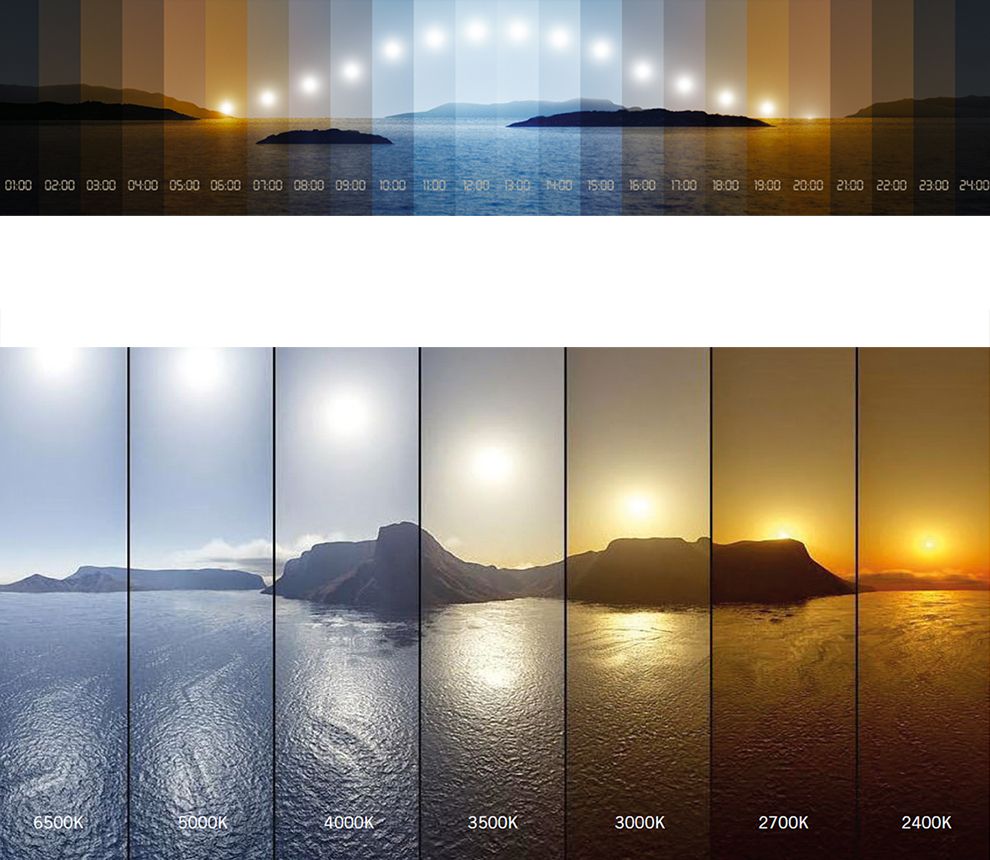
Is it possible to link the sun to the hours of the day within the Rayscaper viewport?
-
@pixelcruncher

Email received, I am glad to see my three pictures logged into the showcase. I hope Rayscaper continues to improve -
Nice renders
-
-
Hey, Rayscaper users!
Rayscaper 1.0.4 is available. You can get it via:
- The SketchUcation store.
- Direct download: Rayscaper_Win_1.0.4.rbz.
Rayscaper Has Its Own Licenses Now
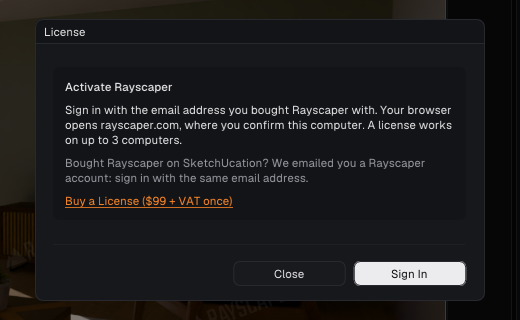
From 1.0.4 on, you activate Rayscaper with a Rayscaper account instead of a SketchUcation license. In the Rayscaper window, open License... and click Sign In: your browser opens rayscaper.com, you sign in with your email address (no password, we email you a link) and confirm the computer. A license works on up to 3 computers, which you manage on your account page, and Rayscaper keeps working offline.
Bought Rayscaper on SketchUcation? Your license has already moved: you have a Rayscaper account with the email address you bought it with, and we emailed you today. There's nothing to buy, and as a thank-you your license includes every Rayscaper 1.x update and support by email until November 21, 2027. Rayscaper 1.0.3 and older keep working with your SketchUcation license until you update.
Buying through SketchUcation? You get a license in the new system too: we add it to a Rayscaper account with the email address you bought it with, and email you how to sign in.
New licenses are also sold on rayscaper.com. See the Licensing FAQ.
Any issues with your license or signing in? Contact us at hello@rayscaper.com or reply here, and we'll sort it out.
What Changed?
- Move Rayscaper to its own licensing system: you activate it with a Rayscaper account through Sign In in the License dialog (Extensions > Rayscaper > License…), instead of with SketchUcation. Licenses bought on SketchUcation move to a Rayscaper account, and older versions keep working with them.
Full release notes: rayscaper.com/manual/release-notes
Help Me Build the Community

If you like Rayscaper, please share your renders (final or work-in-progress, it doesn't matter)! This is motivating
and helps me showcase its capabilities to new users.Follow me on X.
Happy Rendering!
Thomas -
Great news @pixelcruncher
Thanks for sharing the whole development of Rayscaper here. It’s been great to see it become a very solid engine.
For one person it’s also an amazing feat. Well done and I hope it continues to grow into the future.
Download the free D'oh Book for SketchUp 📖
-
A wild ride and great experience. Glad to have been along for some of it. Rich, we owe you too.
My thanks to both of you. -
Hi all,
Some of you who moved over from SketchUcation to the new Rayscaper accounts got mixed messages about whether Rayscaper is now a subscription. It isn't, and that's my fault for showing a date that looked like an expiry. To clear it up:
- You pay once, and the license is yours. Nothing renews, and you'll never be charged again.
- Every Rayscaper 1.x update is included, also the ones that come out later.
- Rayscaper 2.0 will be a paid upgrade whenever it arrives, and only if you want it. Your 1.x license keeps working either way.
- Email support: a license officially includes a year of it. In practice, I've always helped people well beyond that and will keep doing so. The limit is only there so I'm not answering 1.x questions for the rest of my days once newer versions are out.
The date I showed was only the end of that support year. I've removed it from the account page so it doesn't cause more confusion.
If anything about your license or account is unclear, reply here or email me.
-
Hey, Rayscaper users!
If you don't use AI agents (Claude Code, Codex, Claude Desktop, Cursor...), you can skip this one.
If you do: Rayscaper has an experimental feature that lets an agent work in Rayscaper. It can look at your scene and the render, and change the sky, lights, materials, scatters, camera and post processing. You ask in your own words, for example "light this room for the evening", and it works through it while checking the render.
It's early, and I'd like to hear how it works for you before I put more into it. What did you ask, what went well, what went wrong, and what would you want it to do?
Two recordings, so you can see what it does:
Trying it: you need the latest Rayscaper, 1.0.4. The AI Agents page has a prompt that sets up your agent, and the settings to do it by hand (also under Tools > Connect AI Agent... in the render window). Open the render window before you start the agent session. The connection stays on your computer, but the agent sees your renders, so they go to the AI service behind your agent app.
Thanks!
Thomas






Hello! It looks like you're interested in this conversation, but you don't have an account yet.
Getting fed up of having to scroll through the same posts each visit? When you register for an account, you'll always come back to exactly where you were before, and choose to be notified of new replies (either via email, or push notification). You'll also be able to save bookmarks and upvote posts to show your appreciation to other community members.
With your input, this post could be even better 💗
Register Login


Advertisement