sketchucation logo sketchucation
    • Login
    Oops, your profile's looking a bit empty! To help us tailor your experience, please fill in key details like your SketchUp version, skill level, operating system, and more. Update and save your info on your profile page today!
    Mac User? | Join the Rayscaper Beta for Mac Learn More

    Rayscaper New Releases

    Scheduled Pinned Locked Moved Extensions & Applications Discussions
    rayscaperrender
    566 Posts 13 Posters 257.3k Views 14 Watching
    Loading More Posts
    • Oldest to Newest
    • Newest to Oldest
    • Most Votes
    Reply
    • Reply as topic
    Log in to reply
    This topic has been deleted. Only users with topic management privileges can see it.
    • A
      Alattab
      last edited by

      I’ve left it as is, but the image has become more distracting due to the watermarks scattered throughout it; I think they should only be placed in the corner.

      pixelcruncherP 1 Reply Last reply
      Reply Quote -1
      • Mike AmosM
        Mike Amos
        last edited by

        Well, the idea would be that you try it and buy the full release, making it possible to do commercial work on a free product is counter intuitive.

        Absentia mortis praesentiam vitae probat, vita autem est argumentum constantiae.

        1 Reply Last reply ♥
        Reply Quote 1
        • pixelcruncherP
          pixelcruncher Extension Creator @Alattab
          last edited by

          @Alattab, thanks for the feedback. The watermark placement was deliberate, though.

          Many people use Rayscaper, but comparatively few have a commercial license. I suspect some are rendering at high resolution and cropping or editing out a corner watermark, which works against how I've set up the licensing. Spreading the watermarks across the image makes that harder.

          I know the free renders are more distracting, and I'm sorry about that. But it doesn't feel fair for people to make money from Rayscaper while the work behind it goes unsupported. A license is $99, or $74.99 for members here, and it removes the watermarks entirely. If Rayscaper is giving you value, even as a hobbyist, I hope that feels like a fair price. It's also what keeps development going.

          Cheers,
          Thomas

          I'm the developer of Rayscaper: https://rayscaper.com/ - Fast and easy rendering for SketchUp.

          A 1 Reply Last reply
          Reply Quote 0
          • Mike AmosM
            Mike Amos
            last edited by

            I believe the free version should be seen as a longer term trial, try before you buy. Free 'stuff' is nice when you get it but expecting everything free to be usable for commercial work is fraudulent. The developer works hard to produce a product which is bloody good value and I say this as a hobby user who gets a LOT from Rayscaper.
            Also, consider the perpetual license so support will be with you down the line rather than paying ever increasing monthly premiums.
            Buy the full version mate, you will not regret it and no, not a rich person but a person living on a pension.

            I rate this product as one of the best value for money products I have EVER purchased.

            Absentia mortis praesentiam vitae probat, vita autem est argumentum constantiae.

            1 Reply Last reply ♥
            Reply Quote 1
            • KrassK
              Krass
              last edited by

              I also noticed the changes to the free version, and you’re right to offer a full-featured trial version of your program—it has truly become a must-have.
              Over the years, I’ve worked with:

              V-Ray
              Indigo
              Thea Render
              Twilight Render
              Twinmotion
              D5 Render
              SimLab Composer

              I can now say that Rayscaper is a polished, high-quality program that includes all the necessary features.
              It’s rare to find an interface this well-thought-out in this type of software, and the quality of the help pages and the manual is simply unmatched. It’s also rare to be able to communicate directly with the developer, and I really appreciate how attentive he is to user requests.
              I’ve purchased a perpetual license for 88 euros!

              Krass

              1 Reply Last reply ♥
              Reply Quote 2
              • A
                Alattab
                last edited by

                I’ve left it as is, but the image has become more distracting due to the watermarks scattered throughout it; I think they should only be placed in the corner.

                1 Reply Last reply
                Reply Quote -1
                • A
                  Alattab @pixelcruncher
                  last edited by Alattab

                  @pixelcruncher Is it really necessary for users of the trial version—who are using it for personal projects—to end up with an image so heavily marred by watermarks that it ruins the entire scene? In any case, thank you; I hope you will give this feedback some serious consideration. I was quite interested in the software, but I’ve decided to step back and go back to using FluidRay instead .

                  I was having a good time, and you ruined all the fun.

                  Rest assured that artificial intelligence has become the primary destination; people no longer want to burden themselves with extra applications. Therefore, if you want to attract users, you must remove the watermark constraint and leave things as they were.

                  1 Reply Last reply
                  Reply Quote -1
                  • A
                    Alattab
                    last edited by

                    What’s the point? I managed to remove the watermark using AI. Previously, I didn’t feel the need to do that; I would just leave the RayScaper logo in the corner. It didn’t bother me—as long as the application is useful and the logo helps promote it, having a small logo at the bottom of the screen is perfectly fine.

                    1 Reply Last reply
                    Reply Quote -1
                    • Rich O BrienR
                      Rich O Brien Moderator
                      last edited by

                      @alattab developers have the right to protect their IP from exploits.

                      I'm not a fan of watermarks either but I understand the need in this instance. Try entering into a meaningful discussion about the pros and cons

                      @pixelcruncher is pretty attentive to user feedback which is super rare in the path tracing rendering space.

                      Download the free D'oh Book for SketchUp 📖

                      1 Reply Last reply
                      Reply Quote 2
                      • KrassK
                        Krass
                        last edited by

                        Thomas,
                        As I work, I’m noticing many things that have been fixed. The way the lighting components function is really great; in SketchUp, you can place a series of spotlight models, modify them to include a Rayscaper light, and it works perfectly.

                        Krass

                        pixelcruncherP 1 Reply Last reply
                        Reply Quote 0
                        • pixelcruncherP
                          pixelcruncher Extension Creator @Krass
                          last edited by

                          @Krass Thanks! Yeah, you couldn't embed a Rayscaper light component inside a SketchUp component, but I fixed that a couple of releases ago. Great to hear it improves the ergonomics for you!

                          I'm the developer of Rayscaper: https://rayscaper.com/ - Fast and easy rendering for SketchUp.

                          1 Reply Last reply
                          Reply Quote 1
                          • KrassK
                            Krass
                            last edited by Krass

                            Here I’m acting as the architect with the help of ChatGPT; renders by Rayscaper.

                            Rayscaper

                            Krass

                            pixelcruncherP 1 Reply Last reply
                            Reply Quote 2
                            • pixelcruncherP
                              pixelcruncher Extension Creator @Krass
                              last edited by

                              @Krass Wow! Very impressive.

                              I'm the developer of Rayscaper: https://rayscaper.com/ - Fast and easy rendering for SketchUp.

                              1 Reply Last reply
                              Reply Quote 0
                              • L
                                lightscape Newcomers
                                last edited by

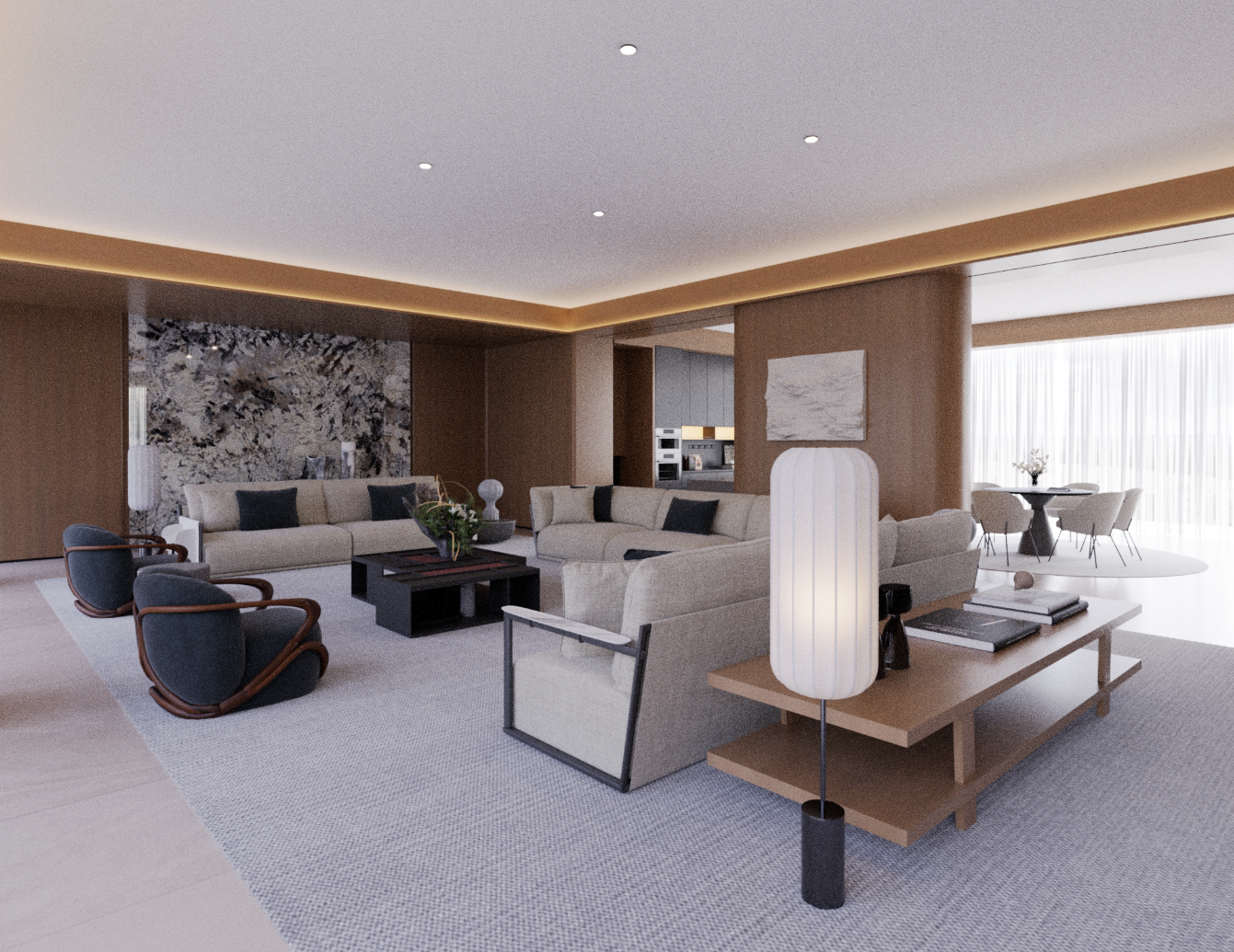
                                a6000f67-5210-479b-b0cd-2df0624d3ce4.png
                                The latest version of the scene rendering function is very good! I hope to further expand it by setting different rendering resolutions and environment settings for each scene, so that the differences in each scene can be rendered in batches at once
                                a copy of my test!

                                pixelcruncherP 1 Reply Last reply
                                Reply Quote 3
                                • pixelcruncherP
                                  pixelcruncher Extension Creator @lightscape
                                  last edited by pixelcruncher

                                  @lightscape Nice interior! Are you working as an interior designer? It looks grainy still, are you enabling the AI denoiser?

                                  Presets have been coming up for a while. I'm working on them, but I don't think I can slip them in the next release.

                                  I'm the developer of Rayscaper: https://rayscaper.com/ - Fast and easy rendering for SketchUp.

                                  1 Reply Last reply
                                  Reply Quote 1
                                  • pixelcruncherP
                                    pixelcruncher Extension Creator
                                    last edited by pixelcruncher

                                    Hey, Rayscaper users!

                                    Rayscaper 0.9.103 Beta is available.

                                    Heads-up: I couldn't upload 0.9.103 to the SketchUcation store yet, so the store still has 0.9.102. Please download it directly: Rayscaper_Win_0.9.103_Beta.rbz.

                                    I recommend upgrading to the latest version.

                                    Save Your Animation as a Video

                                    File > Render Animation... now turns the frames into an MP4 once the last one is saved, in H.264 or H.265 with a choice of quality. No more stitching PNGs together in another program, and you can let it delete the frames afterwards. See the Animation guide.
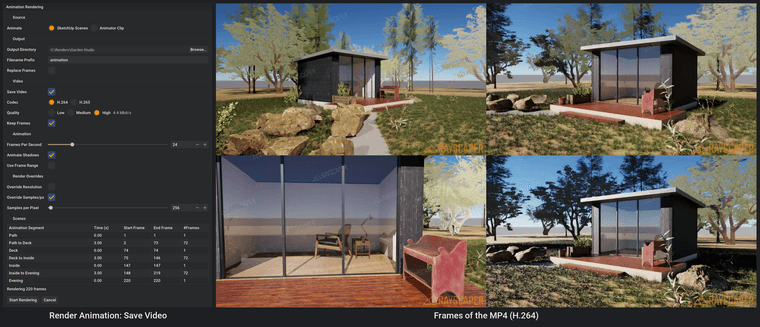
                                    Rayscaper's Render Animation dialog with Save Video on: codec H.264 or H.265, quality Low, Medium or High, and Keep Frames. Next to it, four frames of the rendered MP4: a small black garden studio with a wooden deck in a sunny garden with trees and rocks.

                                    Render Fredo6 Animator Clips

                                    Animate your model with Fredo6 Animator and pick the clip in File > Render Animation...: Rayscaper renders every frame of it, with the camera, the moving objects and the timing all coming from Animator. More on that in Render Fredo6 Animator clips with Rayscaper. See the Fredo6 Animator guide.
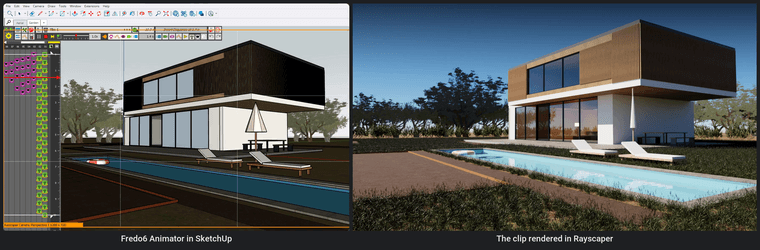
                                    Left: SketchUp with the Fredo6 Animator timeline next to a modern two-storey villa with a pool, a float and a folded parasol. Right: the same clip rendered photorealistically in Rayscaper, the villa in warm sunlight behind a blue pool.

                                    Lights With Real Brightness

                                    Pick a 60 W bulb, an LED downlight, a window or the sun from the presets and the light comes out as bright as the real thing, in lumen, cd/m² or lux. New lights start as a real light too, so a room lit at night looks right without guessing Watts. See Light Presets.
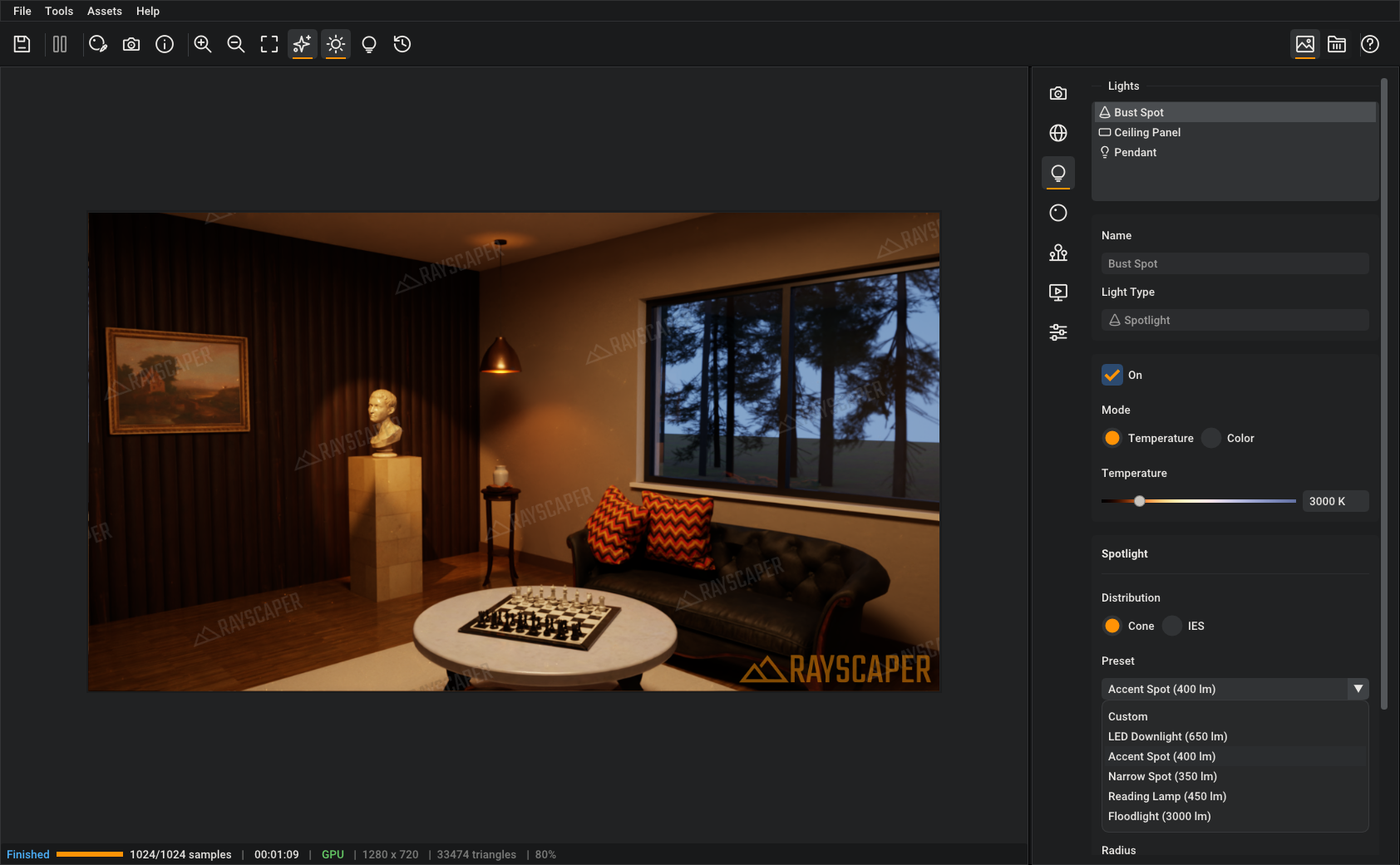
                                    Rayscaper's light editor with the preset list of a spotlight open: LED Downlight 650 lm, Accent Spot 400 lm, Narrow Spot 350 lm, Reading Lamp 450 lm and Floodlight 3000 lm. Next to it, the render of a lounge at night with a marble bust lit by the spot.

                                    See and Aim Your Lights in SketchUp

                                    Select a light and SketchUp shows the cone of a spotlight, the radius of a point light or the spread of an area light, so you see what it lights before you render.
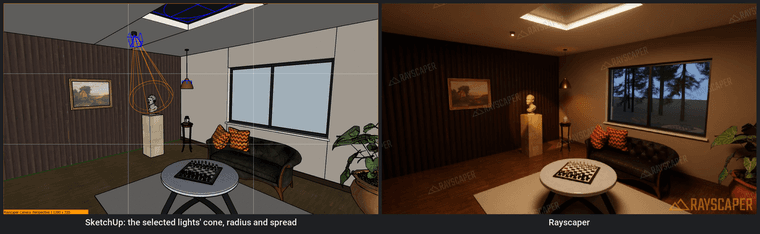
                                    Left: a lounge in SketchUp with lights selected. Orange lines show the cone of a spotlight over a marble bust, with a dashed circle where it is at full brightness, and the spread of a ceiling panel. Right: the same lounge rendered in Rayscaper at night.

                                    The new Aim Light tool turns a light towards the point you click, and a right click on a light gives a Rayscaper submenu to edit, turn off, aim or change its type. See Aiming a Light.
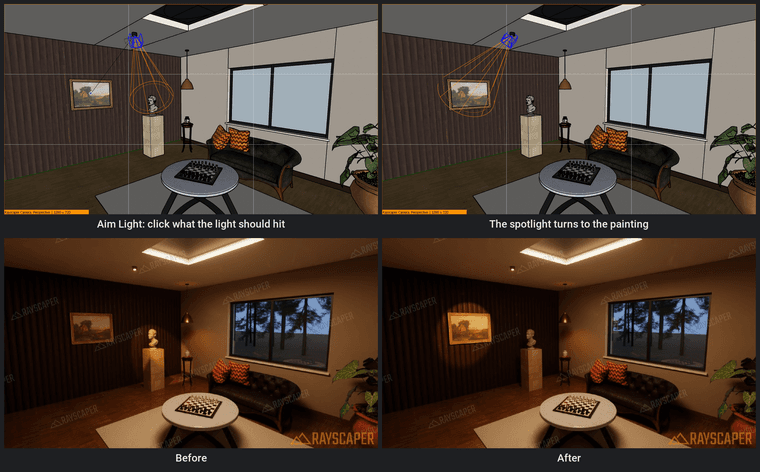
                                    Four panels. Top: in SketchUp, the Aim Light tool clicks a painting on the wall, and the cone of the spotlight turns from the bust to the painting. Bottom: the render before, with the painting in the dark, and after, with the painting lit by the spot.

                                    Material ID, Object ID and Render Passes

                                    Two new render methods paint every material or every object in a flat color, ready for selections in Photoshop. See Material ID.
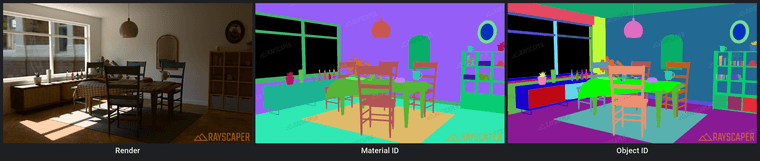
                                    Three versions of a sunlit breakfast room: the Rayscaper render, the Material ID render with every material in its own flat color, and the Object ID render with every object in its own flat color.

                                    File > Render Scenes... saves them as passes next to each render, together with Albedo and Ambient Occlusion. See Passes.
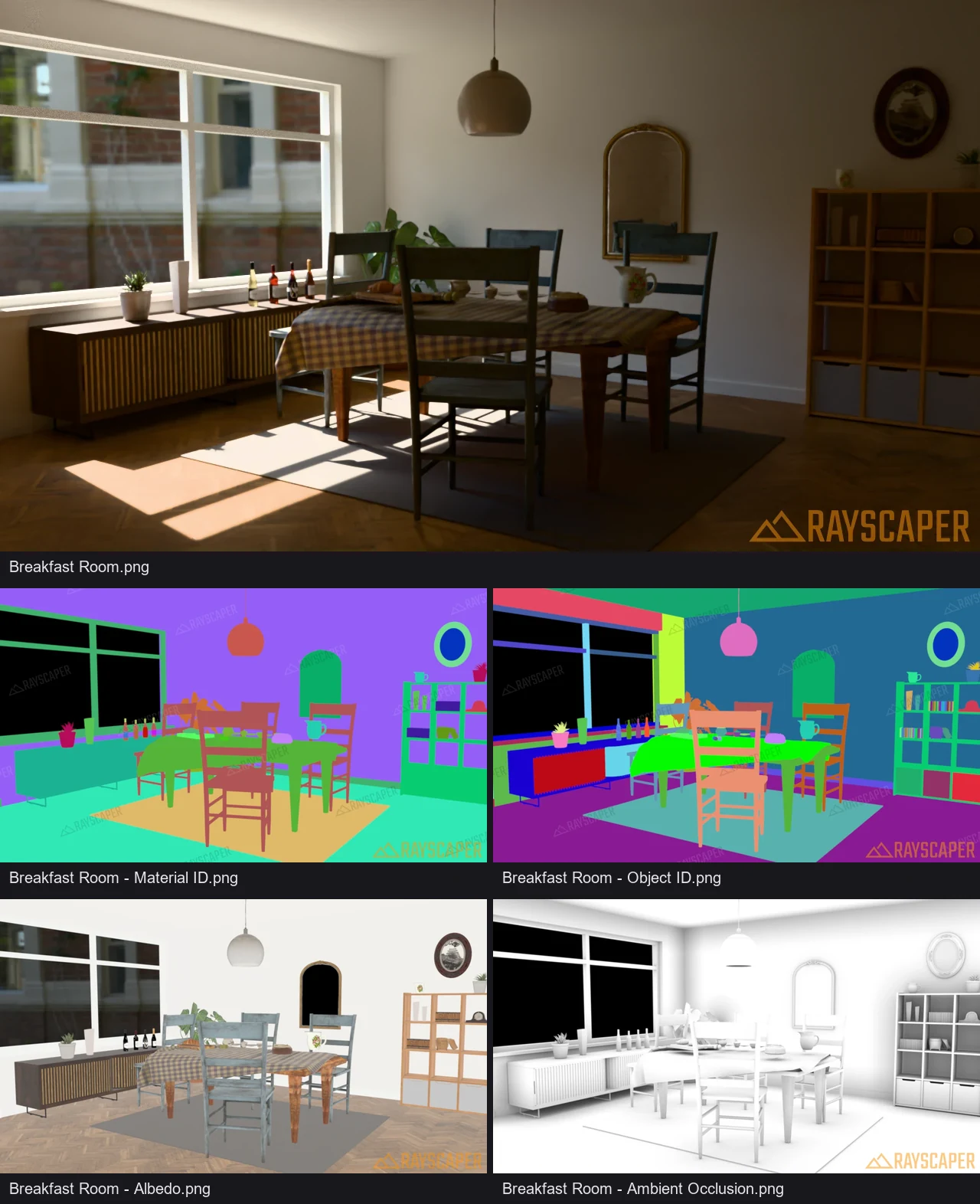
                                    The images that Render Scenes saves for a scene named Breakfast Room: the render, and its Material ID, Object ID, Albedo and Ambient Occlusion passes, each file named after the scene and the pass.

                                    Translucency

                                    Curtains, lampshades and leaves now glow when the light comes from behind them. Set Translucency in the Standard material, or pick the Fabric or Sheer Fabric finish. See Translucency.
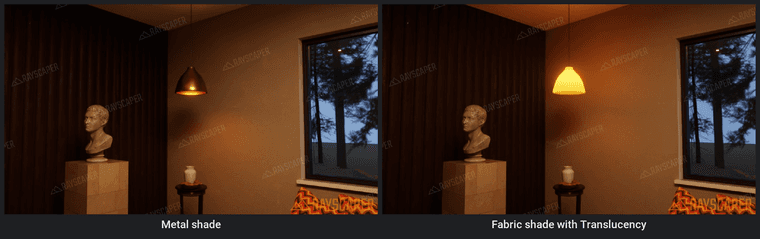
                                    Two renders of a pendant lamp in a lounge at night. Left: a dark metal shade that only lights downward. Right: a fabric shade with Translucency that glows warm yellow and lights the room.

                                    What Changed?

                                    • Save animations as an MP4 video: Render Animation encodes the frames into a video once the last one is saved, in H.264 or H.265 with a choice of quality, and can delete the frames afterwards.
                                    • Render Fredo6 Animator clips from File > Render Animation...
                                    • Add light presets with real brightness: bulbs, downlights, an LED panel, a window, the sun and more. Set a light's intensity in lumen, cd/m² or lux, and new lights start as a real light: a 60 W bulb, an LED downlight, an LED panel or the sun.
                                    • Draw the cone of a spotlight, the radius of a point light and the spread of an area light in SketchUp while a light is selected.
                                    • Add an Aim Light tool that turns a light in the model towards the point you click.
                                    • Add a Rayscaper submenu to the context menu of selected lights: Edit in Rayscaper, Turn Off/On, Aim and Change Type.
                                    • Add Material ID and Object ID render methods, and render passes (Material ID, Albedo, AO, ...) to Render Scenes.
                                    • Add Translucency to the Standard material, for curtains, lampshades and leaves lit from behind.
                                    • Change the size of an area light in Rayscaper's light editor.
                                    • Keep the settings of a light when it is copied in SketchUp, and show how many copies of a component share a light's settings.
                                    • Keep the aspect ratio when typing the width or height of the resolution, with a link button to turn it off.
                                    • Let thin glass reflect according to its IOR, so windows and picture frame glass modelled as a single face reflect.
                                    • Remodel the light components with an arrow that shows where a light shines, and recognize lights that SketchUp renamed when models are merged.
                                    • Show a notification instead of quitting when the GPU runs out of memory for a large render, and render at most 134 megapixels (a 16384 x 8192 panorama).
                                    • Fix a SketchUp crash when moving a group whose new components reached Rayscaper out of order, and groups missing from the render after such an operation.
                                    • Fix the crash when SketchUp 2027 quits.
                                    • Keep hidden nested tag folders hidden when their parent folder is made visible, and follow tag folder moves in the render.
                                    • Fix crashes when removing lights, groups and components while rendering.

                                    Full release notes: rayscaper.com/manual/release-notes

                                    Help Me Build the Community 👍

                                    If you like Rayscaper, please share your renders (final or work-in-progress, it doesn't matter)! This is motivating and helps me showcase its capabilities to new users.

                                    Follow me on X.

                                    Happy Rendering!
                                    Thomas

                                    I'm the developer of Rayscaper: https://rayscaper.com/ - Fast and easy rendering for SketchUp.

                                    1 Reply Last reply
                                    Reply Quote 0
                                    • KrassK
                                      Krass
                                      last edited by

                                      Génial ! (Pardon my french)

                                      Krass

                                      1 Reply Last reply ♥
                                      Reply Quote 1
                                      • KrassK
                                        Krass
                                        last edited by

                                        Everything you added this time is isefull

                                        Krass

                                        pixelcruncherP 1 Reply Last reply
                                        Reply Quote 1
                                        • pixelcruncherP
                                          pixelcruncher Extension Creator @Krass
                                          last edited by

                                          @Krass said:

                                          Everything you added this time is isefull

                                          Some of these features, like Fredo animator integration, have been on my hard disk 90% finished for a looong time. I'm taking a different approach now and just releasing things instead of anxiously fretting about perfection.

                                          I'm the developer of Rayscaper: https://rayscaper.com/ - Fast and easy rendering for SketchUp.

                                          1 Reply Last reply
                                          Reply Quote 1
                                          • KrassK
                                            Krass
                                            last edited by

                                            Be aware that automatically generating an MP4 file involves compression; for the final edit of a high-quality project, it is indeed better to work with individual PNG files and let the editing software handle the compression later. That said, having the option to generate an immediate preview is very useful—just be sure to check "Keep Frames" if you intend to use the output for your final edit.


                                            Krass

                                            1 Reply Last reply
                                            Reply Quote 1

                                            Hello! It looks like you're interested in this conversation, but you don't have an account yet.

                                            Getting fed up of having to scroll through the same posts each visit? When you register for an account, you'll always come back to exactly where you were before, and choose to be notified of new replies (either via email, or push notification). You'll also be able to save bookmarks and upvote posts to show your appreciation to other community members.

                                            With your input, this post could be even better 💗

                                            Register Login
                                            • 1
                                            • 2
                                            • 25
                                            • 26
                                            • 27
                                            • 28
                                            • 29
                                            • 28 / 29
                                            • First post
                                              Last post
                                            Buy SketchPlus
                                            Buy SUbD
                                            Buy WrapR
                                            Buy eBook
                                            Buy Modelur
                                            Buy Vertex Tools
                                            Buy SketchCuisine
                                            Buy FormFonts

                                            Advertisement