sketchucation logo sketchucation
    • Login
    Oops, your profile's looking a bit empty! To help us tailor your experience, please fill in key details like your SketchUp version, skill level, operating system, and more. Update and save your info on your profile page today!
    🚨 Skimp | 25% Off until March 30 Buy Now

    Rayscaper New Releases

    Scheduled Pinned Locked Moved Extensions & Applications Discussions
    rayscaperrender
    419 Posts 11 Posters 52.7k Views 12 Watching
    Loading More Posts
    • Oldest to Newest
    • Newest to Oldest
    • Most Votes
    Reply
    • Reply as topic
    Log in to reply
    This topic has been deleted. Only users with topic management privileges can see it.
    • A Offline
      Alattab @Krass
      last edited by

      @Krass Thank you for your efforts.

      1 Reply Last reply Reply Quote 2
      • N Offline
        NeilNovotny
        last edited by

        I am trying to turn an image on a television into an emmiter. I thought I remember seeing that it was not possible in Rayscraper but I can't seem to find that thread again. Is that still the case? And if so, is that possibly something that could added in a future release? Right now I am adding that in post production, but it would be very handy if the feature could be done within Rayscraper.

        P 1 Reply Last reply Reply Quote 0
        • Mike AmosM Offline
          Mike Amos
          last edited by

          I have not been able to replicate the effect yet.

          Absentia mortis praesentiam vitae probat, vita autem est argumentum constantiae.

          1 Reply Last reply Reply Quote 0
          • KrassK Offline
            Krass
            last edited by Krass

            Hello, there is a tip to do that for a fixed picture : put an emissive plane a few centimeters behind your image then increase "transmission"

            image.png

            Krass

            1 Reply Last reply Reply Quote 2
            • Mike AmosM Offline
              Mike Amos
              last edited by

              Thanks for the tip/reminder.

              Absentia mortis praesentiam vitae probat, vita autem est argumentum constantiae.

              1 Reply Last reply Reply Quote 0
              • P Offline
                pixelcruncher Extension Creator @NeilNovotny
                last edited by

                @NeilNovotny We don't support texture emission yet, but it's on our feature list. For now, you can follow the tip @krass posted.

                Cheers,
                Thomas

                I'm the developer of Rayscaper: https://rayscaper.com/ - Fast and easy rendering for SketchUp.

                1 Reply Last reply Reply Quote 0
                • N Offline
                  NeilNovotny
                  last edited by

                  Excellent. And thank you for the help. After working with Twilight for so long, I am slowly working my way through Rayscraper.

                  1 Reply Last reply Reply Quote 1
                  • P Offline
                    pixelcruncher Extension Creator
                    last edited by

                    Hey, Rayscaper users!

                    Rayscaper 0.9.87 Beta is available. You can get it via:

                    • The SketchUcation store.
                    • Direct download: Rayscaper_Win_0.9.87_Beta.rbz.

                    I recommend upgrading to the latest version.

                    What Changed?

                    • Add tri-planar mapping support for textures. Materials can now use tri-planar projection instead of UV mapping, which avoids stretched textures on surfaces without proper UVs.
                    • Automatically apply tri-planar mapping to PolyHaven materials when the model has no UVs. Downloaded materials now look correct out of the box without manual texture coordinate setup.
                    • Sort the material list alphabetically to match SketchUp's material panel ordering.
                    • Fix the Asset Manager sometimes getting stuck in a loading state when switching between assets quickly.
                    • Fix color space detection for opacity and roughness textures. These textures now render correctly when using automatic color space detection.
                    • Fix environment power slider feeling awkward near zero. The slider now smoothly blends to zero instead of snapping discontinuously at the far left.

                    Full release notes: rayscaper.com/manual/release-notes

                    Help Me Build the Community πŸ‘

                    If you like Rayscaper, please share your renders (final or work-in-progress, it doesn't matter)! This is motivating and helps me showcase its capabilities to new users.

                    Follow me on X.

                    Happy Rendering!
                    Thomas

                    I'm the developer of Rayscaper: https://rayscaper.com/ - Fast and easy rendering for SketchUp.

                    1 Reply Last reply Reply Quote 1
                    • KrassK Offline
                      Krass
                      last edited by

                      Thanks a lot Pixelcruncher, tri-planar mapping is great improvement !

                      Krass

                      1 Reply Last reply Reply Quote 1
                      • KrassK Offline
                        Krass
                        last edited by

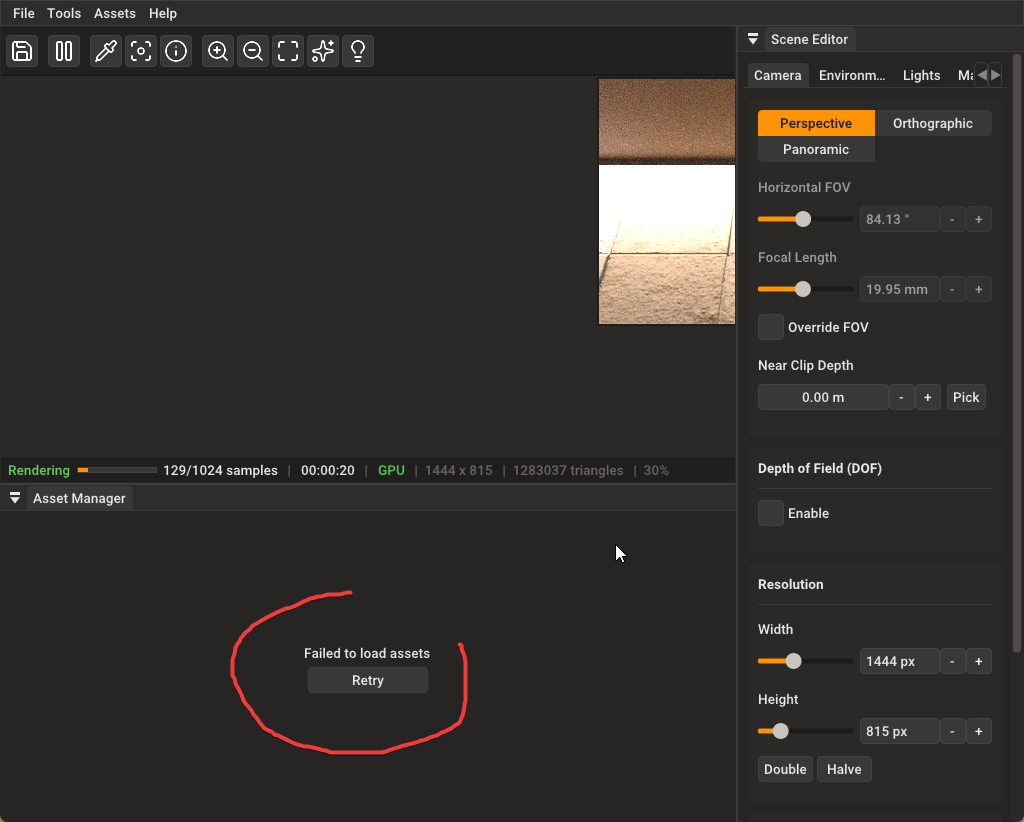
                        a small issue

                        SketchUp_SRj0cvssLp.png

                        Krass

                        P 1 Reply Last reply Reply Quote 0
                        • KrassK Offline
                          Krass
                          last edited by

                          I just sent you my log file

                          Krass

                          1 Reply Last reply Reply Quote 0
                          • Mike AmosM Offline
                            Mike Amos
                            last edited by

                            IMHO, there is zero requirement to "Load assets" full stop. Perhaps instead, just have links to load what we need at the time. It gets in the way and for me has little in the way of voracity for the render in hand. Sorry, just my ten pence worth.

                            Absentia mortis praesentiam vitae probat, vita autem est argumentum constantiae.

                            P 2 Replies Last reply Reply Quote 0
                            • KrassK Offline
                              Krass
                              last edited by Krass

                              I don't entirely agree, especially since the assets are only loaded as links... the thumbnails are loaded, unless I'm mistaken. It's very lightweight and convenient. On the contrary, I'd like to have a whole catalog of PBR materials like this one, without having to manually enter each map. The catalog is available, for example, at https://3dassets.one/?q=&license=any&sort=latest, but we're not going to ask Thomas to do that work again.

                              Furthermore, the size and presentation of the materials is rarely done this well in a rendering program. Just take a look at V-Ray.

                              Krass

                              1 Reply Last reply Reply Quote 0
                              • P Offline
                                pixelcruncher Extension Creator @Krass
                                last edited by

                                @Krass Thanks for the log file, I'm looking into this.

                                I'm the developer of Rayscaper: https://rayscaper.com/ - Fast and easy rendering for SketchUp.

                                1 Reply Last reply Reply Quote 0
                                • P Offline
                                  pixelcruncher Extension Creator @Mike Amos
                                  last edited by

                                  @Mike-Amos said:

                                  IMHO, there is zero requirement to "Load assets" full stop. Perhaps instead, just have links to load what we need at the time. It gets in the way and for me has little in the way of voracity for the render in hand. Sorry, just my ten pence worth.

                                  @Krass said:

                                  I don't entirely agree, especially since the assets are only loaded as links... the thumbnails are loaded, unless I'm mistaken. It's very lightweight and convenient. On the contrary, I'd like to have a whole catalog of PBR materials like this one, without having to manually enter each map. The catalog is available, for example, at https://3dassets.one/?q=&license=any&sort=latest, but we're not going to ask Thomas to do that work again.

                                  Furthermore, the size and presentation of the materials is rarely done this well in a rendering program. Just take a look at V-Ray.

                                  This is only loading the thumbnails. Loading the actual assets, which can be several megabytes, is done on demand. I.e. why you drag & drop an asset on your scene.

                                  Having the assets at your fingertips is one of the reasons people like Rayscaper so much, so I'm not dropping that.

                                  https://3dassets.one/?q=&license=any&sort=latest, but we're not going to ask Thomas to do that work again.

                                  Happy to support more asset providers, as long as they offer them as cc0. I don't have the funds to license assets to ship with Rayscaper.

                                  Cheers,
                                  Thomas

                                  I'm the developer of Rayscaper: https://rayscaper.com/ - Fast and easy rendering for SketchUp.

                                  1 Reply Last reply Reply Quote 0
                                  • P Offline
                                    pixelcruncher Extension Creator @Mike Amos
                                    last edited by

                                    @Mike-Amos If you don't like them, I can add a small feature to hide this panel so you can have more viewport?

                                    I'm the developer of Rayscaper: https://rayscaper.com/ - Fast and easy rendering for SketchUp.

                                    1 Reply Last reply Reply Quote 1
                                    • Mike AmosM Offline
                                      Mike Amos
                                      last edited by

                                      Yes please, the less visual clutter the better.

                                      Absentia mortis praesentiam vitae probat, vita autem est argumentum constantiae.

                                      1 Reply Last reply Reply Quote 1
                                      • P Offline
                                        pixelcruncher Extension Creator
                                        last edited by

                                        Hey, Rayscaper users!

                                        Rayscaper 0.9.91 Beta is available. You can get it via:

                                        • The https://sketchucation.com/plugin/2677-rayscaper.
                                        • Direct download: https://rayscaper-releases.s3.amazonaws.com/SketchUp/Windows/Rayscaper_Win_0.9.91_Beta.rbz.

                                        I recommend upgrading to the latest version.

                                        What Changed?

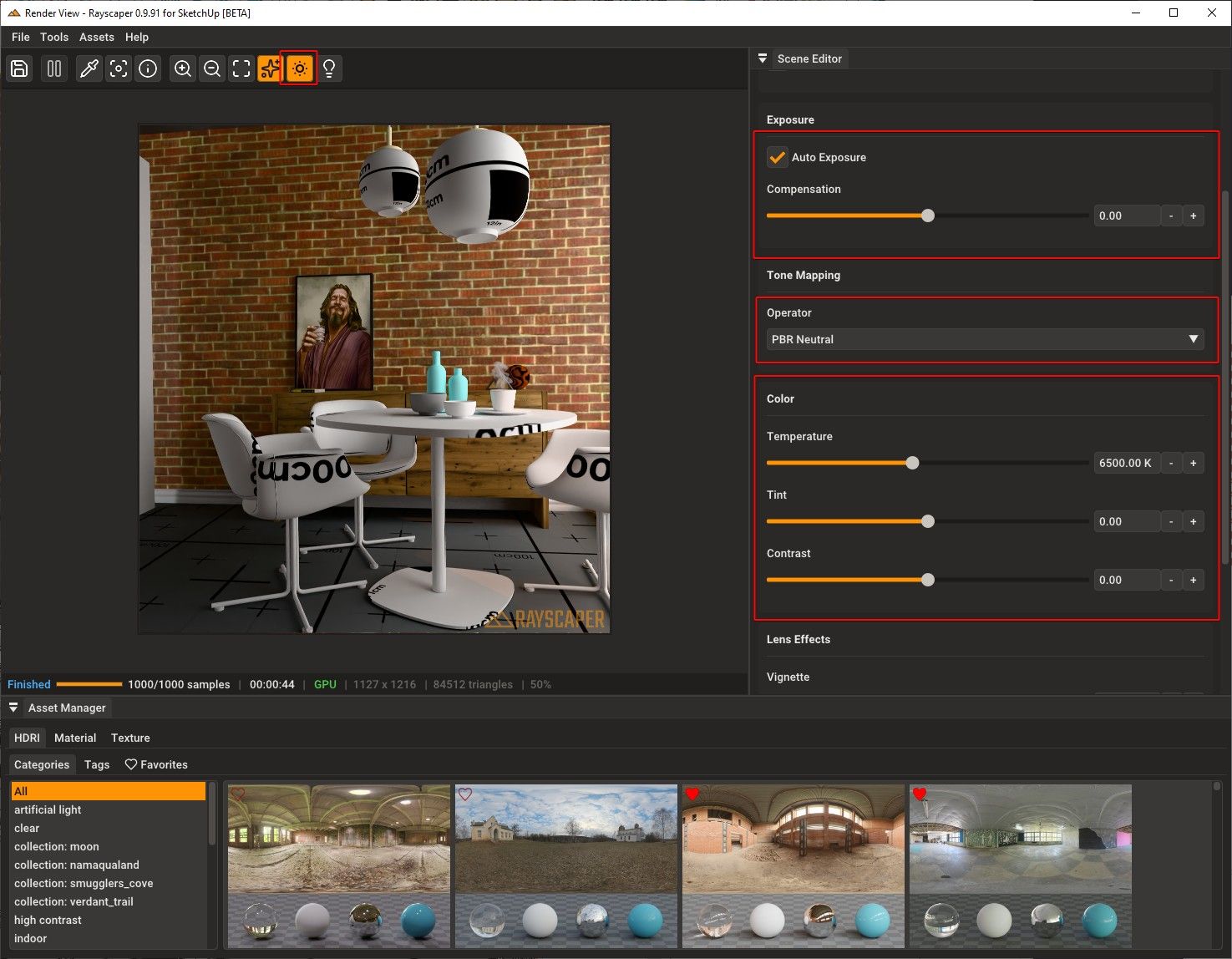
                                        • Add tone mapping options β€” choose from ACES Filmic, Filmic (Hable), PBR Neutral, Linear, or Reinhard to control the look of your renders.
                                        • Add color grading controls β€” fine-tune renders with white balance temperature, tint, and contrast sliders.
                                        • Add auto-exposure β€” exposure now adjusts automatically to scene lighting, with a toolbar toggle and compensation slider.
                                        • Improve asset library reliability β€” fix occasional failures when browsing or downloading Poly Haven assets.

                                        Below screenshot shows the new post-processing capabilities:
                                        4507dc66-abc6-40f7-ba3a-c5f8df92ce83-image.jpeg

                                        Full release notes: https://rayscaper.com/manual/release-notes/

                                        Help Me Build the Community πŸ‘

                                        If you like Rayscaper, please share your renders (final or work-in-progress, it doesn't matter)! This is motivating and helps me showcase its
                                        capabilities to new users.

                                        Follow me on https://x.com/rayscaper3d.

                                        Happy Rendering!
                                        Thomas

                                        I'm the developer of Rayscaper: https://rayscaper.com/ - Fast and easy rendering for SketchUp.

                                        KrassK 1 Reply Last reply Reply Quote 1
                                        • KrassK Offline
                                          Krass @pixelcruncher
                                          last edited by

                                          @pixelcruncher said:

                                          Add tone mapping options β€” choose from ACES Filmic, Filmic (Hable), PBR Neutral, Linear, or Reinhard to control the look of your re

                                          aaaah, je m'y mets tout de suite
                                          merci !

                                          Krass

                                          1 Reply Last reply Reply Quote 0

                                          Hello! It looks like you're interested in this conversation, but you don't have an account yet.

                                          Getting fed up of having to scroll through the same posts each visit? When you register for an account, you'll always come back to exactly where you were before, and choose to be notified of new replies (either via email, or push notification). You'll also be able to save bookmarks and upvote posts to show your appreciation to other community members.

                                          With your input, this post could be even better πŸ’—

                                          Register Login
                                          • 1
                                          • 2
                                          • 17
                                          • 18
                                          • 19
                                          • 20
                                          • 21
                                          • 21 / 21
                                          • First post
                                            Last post
                                          Buy SketchPlus
                                          Buy SUbD
                                          Buy WrapR
                                          Buy eBook
                                          Buy Modelur
                                          Buy Vertex Tools
                                          Buy SketchCuisine
                                          Buy FormFonts

                                          Advertisement