Rayscaper New Releases
-
I think my friend @majid requested that before as well
 He has a keen eye for this.
Given that the Twilight website is offline, is there a source where I can find these things? Maybe I can actually provide tools for using Twilight materials in Rayscaper, or at least the same templates.
-
@Krass I will have a look soon to help you out here, stay tuned.
-
are you both talking about Twilight render ?
-
@Krass said in Rayscaper New Releases:
are you both talking about Twilight render ?
Yes, @majid and @Mike-Amos are talking about Twilight render. But I'm not too familiar with it myself. But it seems to have a couple of dearly missed features?
-
Twilight render was great, but Rayscaper is marvelous compared to it.
I can give you the last version of Twilight -
Yep, trying to get to grips with the actual process or getting them back into the wild.
-
I think I figured something out about the blue material bug, I can make it happen in any file if I use the "edit texture in external editor" in the sketchup material editor, It shows up as blue.
(Another thing I noticed, is that If i edit a material in sketchup, it does not automatically update the material in rayscaper.) -
I think I figured something out about the blue material bug, I can make it happen in any file if I use the "edit texture in external editor" in the sketchup material editor, It shows up as blue.
That's a good clue. I think it also has to do with SketchUp's colorized textures only. But I haven't looked at that part in depth.
(Another thing I noticed, is that If i edit a material in sketchup, it does not automatically update the material in rayscaper.)
This is by design; You should press the reload button in the Rayscaper material editor. I could add an "auto-sync" option to do this automatically. Rayscaper has a richer set of material capabilities than SketchUp. I assumed you want to edit the materials in Rayscaper, and that it would be counterproductive to override them from SketchUp repeatedly. Maybe that's not a reasonable workflow assumption.
-
okay, thanks (a feature request- maybe you can make a seperate reload button for the regular texture, for the metalness, roughness, and normal maps, so If I edit the regular texture in sketchup but want to keep the metallness changes in rayscaper I can do that.)
-
Hi,
when I display a SketchUp scene in RS, the hidden tags within that scene are still visible.And there's still this problem with certain groups containing other groups and components that don't display unless everything inside is exploded. And I can't always explode everything, as I have variations to make in subsequent steps.
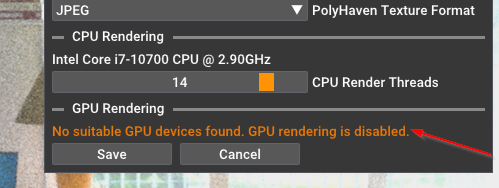
And i no graphic card
Krass
-
Hey, Rayscaper users!
Rayscaper 0.9.79 Beta is available. You can get it via:
- The SketchUcation store.
- Direct download: link.
I recommend upgrading to the latest version.
What Changed?
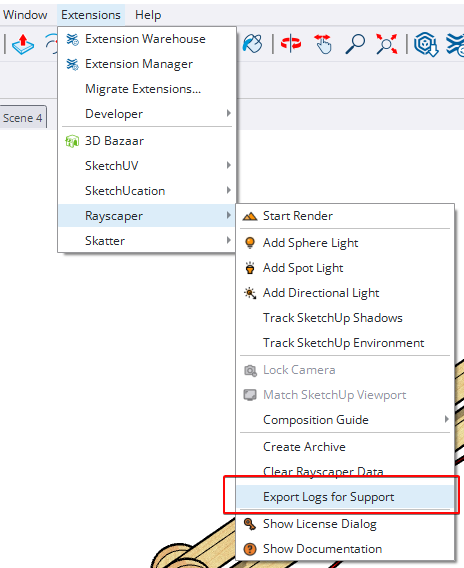
- Add log export feature. You can now export Rayscaper logs directly from the application menu, making it easier to
share diagnostic information when reporting issues. You can access it via the SketchUp menu bar:
Extensions > Rayscaper > Export Logs for Support. - Add a reset button for the post-processing tab. Quickly restore default post-processing settings with a single click.
Help Me Build the Community

If you like Rayscaper, please share your renders (final or work-in-progress, it doesn't matter)! This is motivating and helps me showcase its capabilities
to new users.Follow me on https://x.com/rayscaper3d.
Happy Rendering!
Thomas -
when I display a SketchUp scene in RS, the hidden tags within that scene are still visible.
Do you mind sharing the scene via e-mail?
And there's still this problem with certain groups containing other groups and components that don't display unless everything inside is exploded. And I can't always explode everything, as I have variations to make in subsequent steps.
Same here, a scene with screenshots of the components would help a lot.
And i no graphic card
Can you check with the latest version I just released? Also check if that version brings the icons back. I think this has to do with your broken installation.
Regards,
ThomasI'm the developer of Rayscaper: https://rayscaper.com/ - Fast and easy rendering for SketchUp.
-
Hi,
anyway, it's fixed, the latest version installed correctly.As for objects on hidden tags, it's still the same; objects on hidden tags in the SU viewport are displayed in the Rayscaper render.
-
I finally understand how to use the denoiser. You might initially think that a low-resolution render will be calculated faster... But actually, when the denoiser is applied during rendering, especially when the render resolution is high, the denoising is very clean.
It might seem obvious to you, but it took me a while to figure it out. So I leave the denoiser at full power and immediately set the render size to 2k or higher. -
Thomas, you asked me why I apply an upscale layer after a ray-scaping render. For scenes with windows, I have to do two renders, like a photographer: a light one for the room's exposure and a dark one to replace the "blown-out," overexposed parts of the window. D5 Render doesn't have this problem because its renders aren't truly photographic; they're a kind of pseudo-pathtracing.
-
On this page I show a comparison slider between the original rendering and the changes that Magnific Upscale adds
https://jskup.fr/comparatif-rayscaper-magnific-upscale/
Of course, we then have to go back through Photoshop to correct the errors that the upscaling process generates.
-
Just to confirm, your GPU is working again and your icons are back?
As for objects on hidden tags, it's still the same; objects on hidden tags in the SU viewport are displayed in the Rayscaper render.
Thanks for reporting. I could find a scene to reproduce it. Seems to happen only for components/groups nested within other groups. I will have a look at this bug.
I finally understand how to use the denoiser. You might initially think that a low-resolution render will be calculated faster... But actually, when the denoiser is applied during rendering, especially when the render resolution is high, the denoising is very clean.
It might seem obvious to you, but it took me a while to figure it out. So I leave the denoiser at full power and immediately set the render size to 2k or higher.
I should document that better. The denoiser works on the full resolution image. And it works now as a post-processing step, so enable/disable won't impact the rendering.
Thomas, you asked me why I apply an upscale layer after a ray-scaping render. For scenes with windows, I have to do two renders, like a photographer: a light one for the room's exposure and a dark one to replace the "blown-out," overexposed parts of the window. D5 Render doesn't have this problem because its renders aren't truly photographic; they're a kind of pseudo-pathtracing.
That's a clever trick, thanks for sharing. Does this mean the tone-mapping operations you are getting in the post-processing step aren't sufficient for you? Should there be more options to provide a better image from the get-go?
Regards,
Thomas -
And there's still this problem with certain groups containing other groups and components that don't display unless everything inside is exploded. And I can't always explode everything, as I have variations to make in subsequent steps.
@Krass - Do you mind sending me a scene where this happens? I would like to investigate.
-
ok, I will send you the scene. Regarding the issue of geometry not displaying when enclosed in groups and subgroups, if I find an earlier version where I haven't broken everything down inside. As for exposure, there may be aspects I don't fully understand, but generally I have this problem: like in photography, if you take an interior shot focused on objects, your window will be white, with saturated light. If you focus on the window, the outside landscape, a digital camera will make the interior extremely dark so you can see the trees and the garden. Just like the human eye. Except our eyes are very fast and correct in microseconds, which allows us to see both the exterior and the interior so clearly. That's light sensitivity. If there's a way...
-
Hey, Rayscaper users!
Happy holidays, and all the best for 2026!
Rayscaper 0.9.82 Beta is available. You can get it via:
- The SketchUcation store.
- Direct download: link.
I recommend upgrading to the latest version.
What Changed?
Lighting Enhancements
- Area Light Support: Create realistic soft lighting effects with area lights, perfect for architectural and product visualization
- Multi-Selection for Lights: Select multiple lights at once using SHIFT or CTRL from SketchUp, the lights overlay, or the lights tab for easier management in complex scenes
- Light Component Preview: See a preview of light components in the light tool for easier and more accurate placement
- Light Grouping: Group Rayscaper light components within SketchUp groups and component definitions for better organization
- Enhanced Light Icons: Improved visual feedback with new light icons throughout the interface
Material & Texture Improvements
- Material Selection Context Menu: Right-click on materials in the asset manager for quick access to common operations
- Export Selected Materials: Export materials from your current scene for reuse in other projects
- Auto-Wire Alpha Textures: Textures with alpha channels in SketchUp automatically connect to the opacity channel in Rayscaper materials
- Float Texture Multipliers: Adjust the strength of roughness and metallic textures with new multiplier controls
- SketchUp 2025 PBR Support: Metallic and roughness factors from SketchUp 2025's PBR materials now properly apply as texture multipliers
Animation
- SketchUp Scene Animation: Render animations based on SketchUp scenes, including sun and shadow positions - perfect for creating time-lapse renders showing how lighting changes throughout the day
Interface Improvements
- Updated Color Scheme: Refreshed Rayscaper color scheme for better visual clarity
- Improved Render Status Bar: Clearer visual indicators make it easier to monitor rendering progress
- Better Tooltips: Rewritten tooltips throughout the interface for improved clarity and user-friendliness
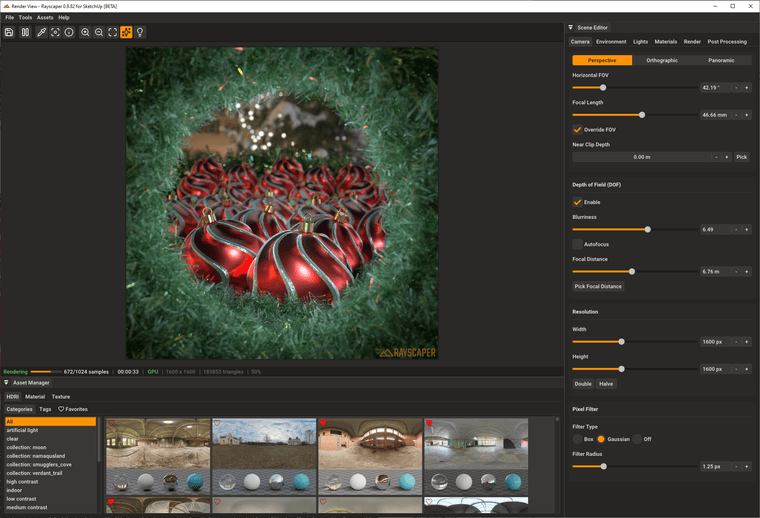
Here's a nice XMas render by @rich-o-brien
Help Me Build the Community
If you like Rayscaper, please share your renders (final or work-in-progress, it doesn't matter)! This is motivating and helps me showcase its capabilities
to new users.Follow me on https://x.com/rayscaper3d.
Happy Rendering!
Thomas



Hello! It looks like you're interested in this conversation, but you don't have an account yet.
Getting fed up of having to scroll through the same posts each visit? When you register for an account, you'll always come back to exactly where you were before, and choose to be notified of new replies (either via email, or push notification). You'll also be able to save bookmarks and upvote posts to show your appreciation to other community members.
With your input, this post could be even better 💗
Register Login


Advertisement