Rayscaper New Releases
-
Hey folks,
I'm creating this thread to group all Rayscaper releases. When a new release of Rayscaper is available, we will append it to this thread. This way, all the information about Rayscaper releases stays together.
Update October 2026: Rayscaper is in late beta. The current version is 0.9.99, and 1.0 is close. It runs on Windows, and macOS is in beta.
The latest build is always available on SketchUcation: here. What changed in each version is in the release notes.
You can use Rayscaper without a license, with limitations: renders are limited to 1280 px, carry a watermark, and can't be used commercially. You can buy a license here on SketchUcation ($74.99 for SU premium users, $99 for non-premium users). It's a one-time payment.
Quick Tips
- If this is your first time installing Rayscaper, have a look at our installation instructions.
- If you installed Rayscaper before, have a look at our upgrade guide.
- Your first render in two minutes: the Quick Start with a free demo scene, and its video:
- The manual covers every feature, with a short video tutorial on most pages.
Reach Out
When you get stuck, have questions, give some feedback or just want to say hi. Don't hesitate to create a post in this forum (Extensions & Applications Discussions) or send me a private message. We have a documentation section on finding help.
Happy Rendering!
Thomas -
Rayscaper 0.9.1
You can get the latest for Rayscaper, Windows, version 0.9.1 Beta in the SketchUcation plugin store.
Changes since the last build:
- Add support for SketchUp colorized textures.
- Display the SketchUp icon in the user interface when textures use images embedded in the skp file.
- Rename the Rayscaper menu item "Preferences..." to "Settings..."
Happy Rendering!
Thomas -
Rayscaper 0.9.2
You can get the latest for Rayscaper, Windows, version 0.9.2 Beta in the SketchUcation plugin store.
Changes since the last build:
- Improve global UV editing. We will load the transformation of the first image texture in the global UV editor instead of using default values. This speeds up the UV editing workflow.
- Support inference locking for the Rayscaper light tools:
- Holding down shift locks the current inferred direction, if any.
- Pressing down the arrow keys locks to an axis direction.
- Fix the black spotlight using CPU rendering when configuring the falloff as zero.
Happy Rendering!
Thomas -
Hey folks,
Rayscaper 0.9.7 is available in the SketchUcation store. More improvements, so we recommend you upgrade to the latest version.
What changed?
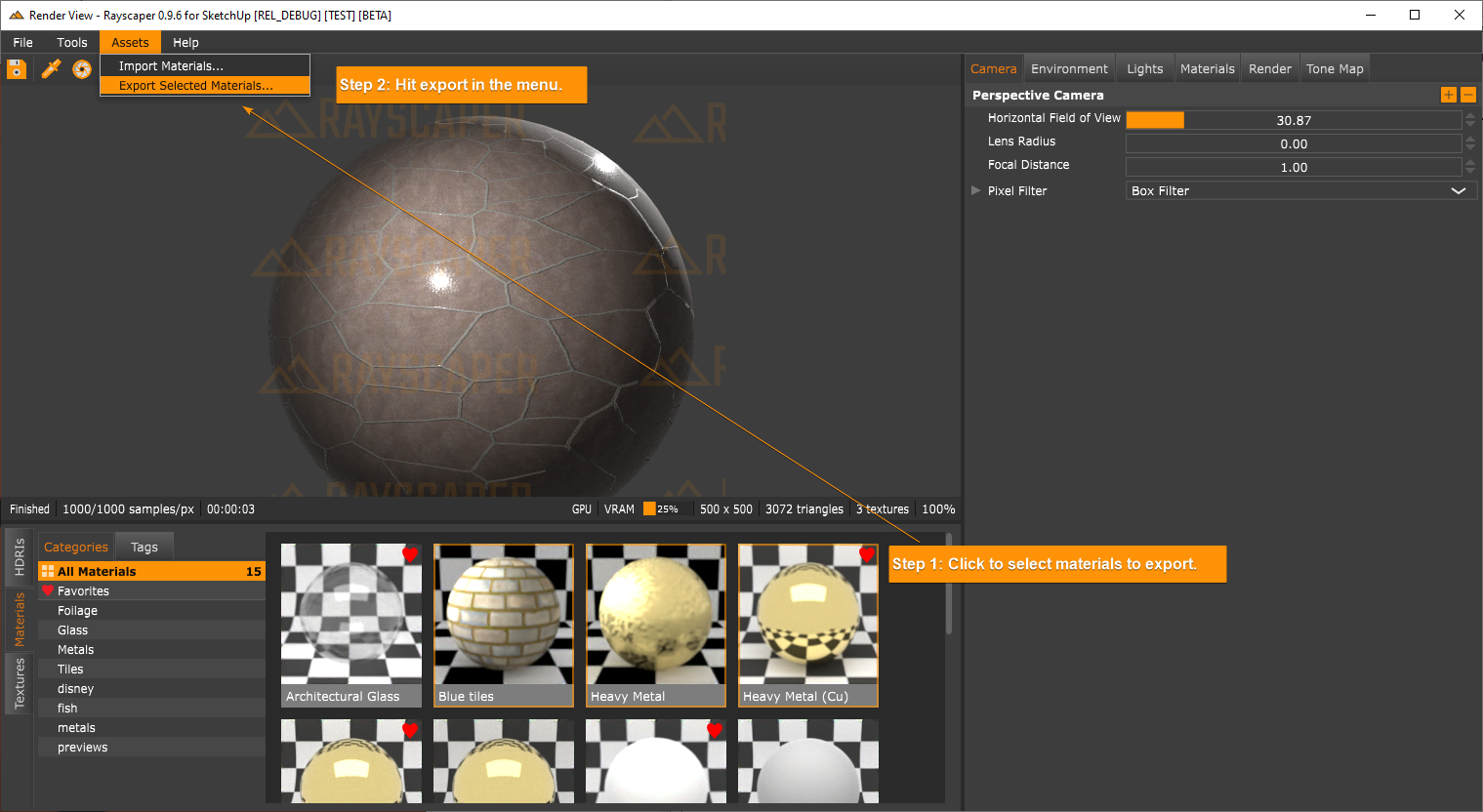
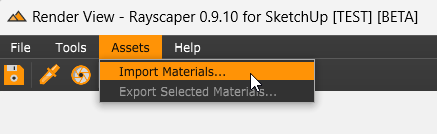
Support import and export of Rayscaper materials. You can now share materials with other Rayscaper users. Importing and exporting can be done via the assets menu:
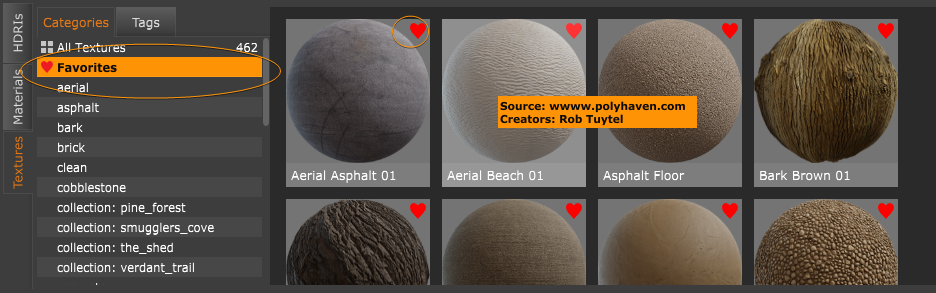
Add the option to mark assets as favorites. This is done by clicking on the heart icon in the user interface.
We removed material previews in the material editors. They take up precious rendering resources and hamper interactivity on low-end machines. Rayscaper should feel more responsive now. If people can't live without them, then we can think of a way to add them back.
Happy Rendering!
I'm the developer of Rayscaper: https://rayscaper.com/ - Fast and easy rendering for SketchUp.
-
Hey folks,
Rayscaper 0.9.7 is available in the SketchUcation store. It has more improvements, so we recommend upgrading to the latest version.
What Changed?
Support units for sliders and text boxes (not all sliders have it yet). For length units, Rayscaper will display values in units configured for the model (cm, mm, yd, etc).
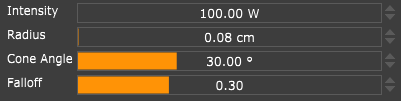
Fix a bug in the sphere light. The sphere light would become black when the radius increased, so the lights started
intersecting geometry.Fix wonky behavior with the spotlight. The spotlight would become very bright when configuring a radius of zero.
Happy Rendering!
I'm the developer of Rayscaper: https://rayscaper.com/ - Fast and easy rendering for SketchUp.
-
Hey, Rayscaper lovers (and haters?),
Rayscaper 0.9.8 is available in the SketchUcation store . It has more improvements, so we recommend upgrading to the latest version
What Changed?
-
Fix a self-intersection bug causing dark lines in CPU renders.
-
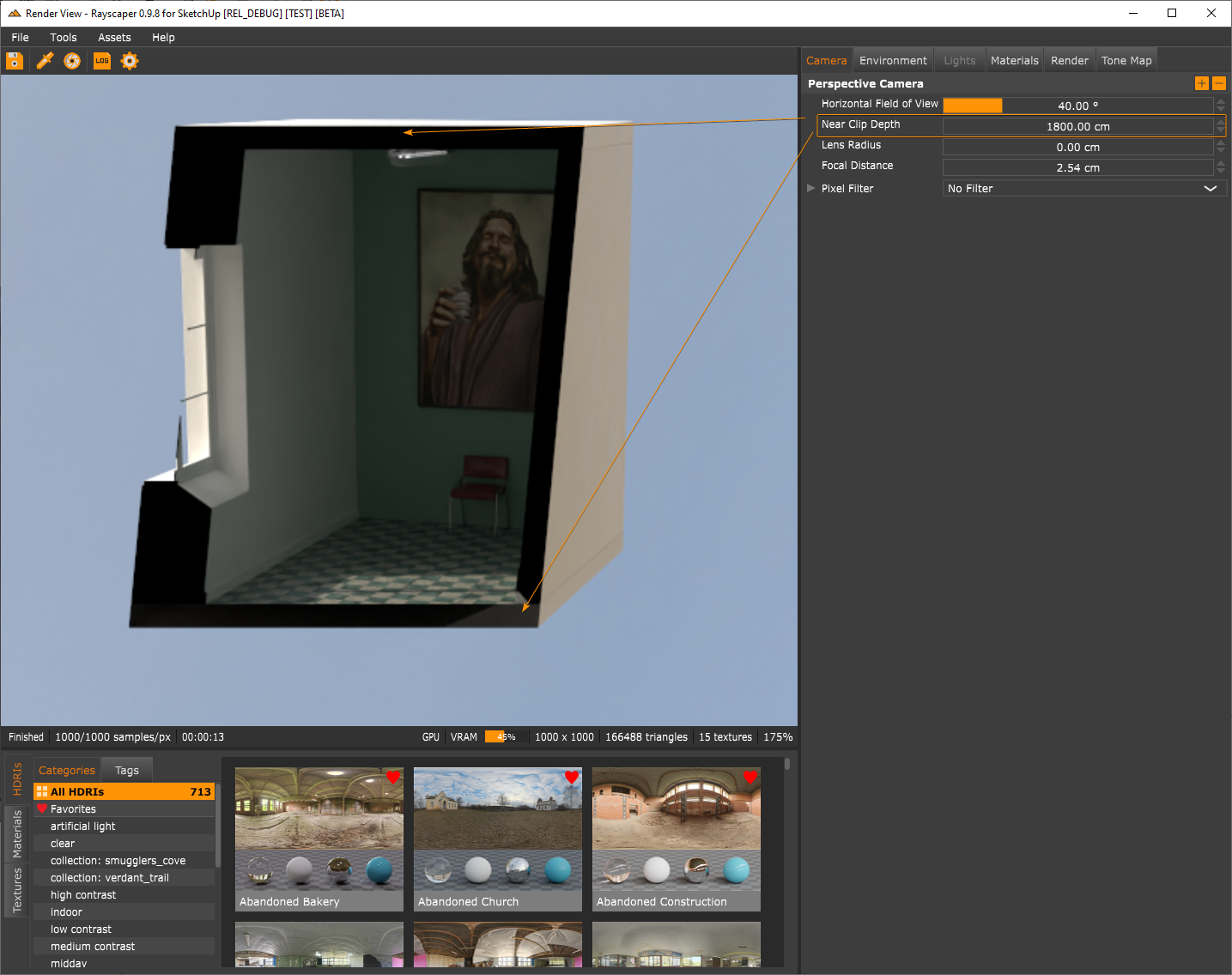
Add support for a near-clipping plane to the camera. With the near-clip plane, you can configure a near-clip plane at a distance orthogonal to the camera, and Rayscaper will cut away all geometry before the clip plane. It's not as powerful as section cuts (which are planned), but it can help for some use cases.
-
Improve the sliders in Rayscaper:
- Every slider now supports dragging.
- Scrolling is consistent across sliders. Each mouse scroll wheel increment/decrement will step up/down by one slider step value. Holding shift will step up or down with 10x the slider step value.
-
Make global illumination (GI) the default render method for new scenes. Using approximate GI as the initial render method might give new Rayscaper users the wrong impression because of its non-physical hacks and limitations.
Happy Rendering!
-
-
Hey, Rayscaper users!
Rayscaper 0.9.10 is available (0.9.9 was a test release) in the SketchUcation store. More good stuff so we recommend you upgrade to this version.
What Changed?
- Support for SketchUp 2024.
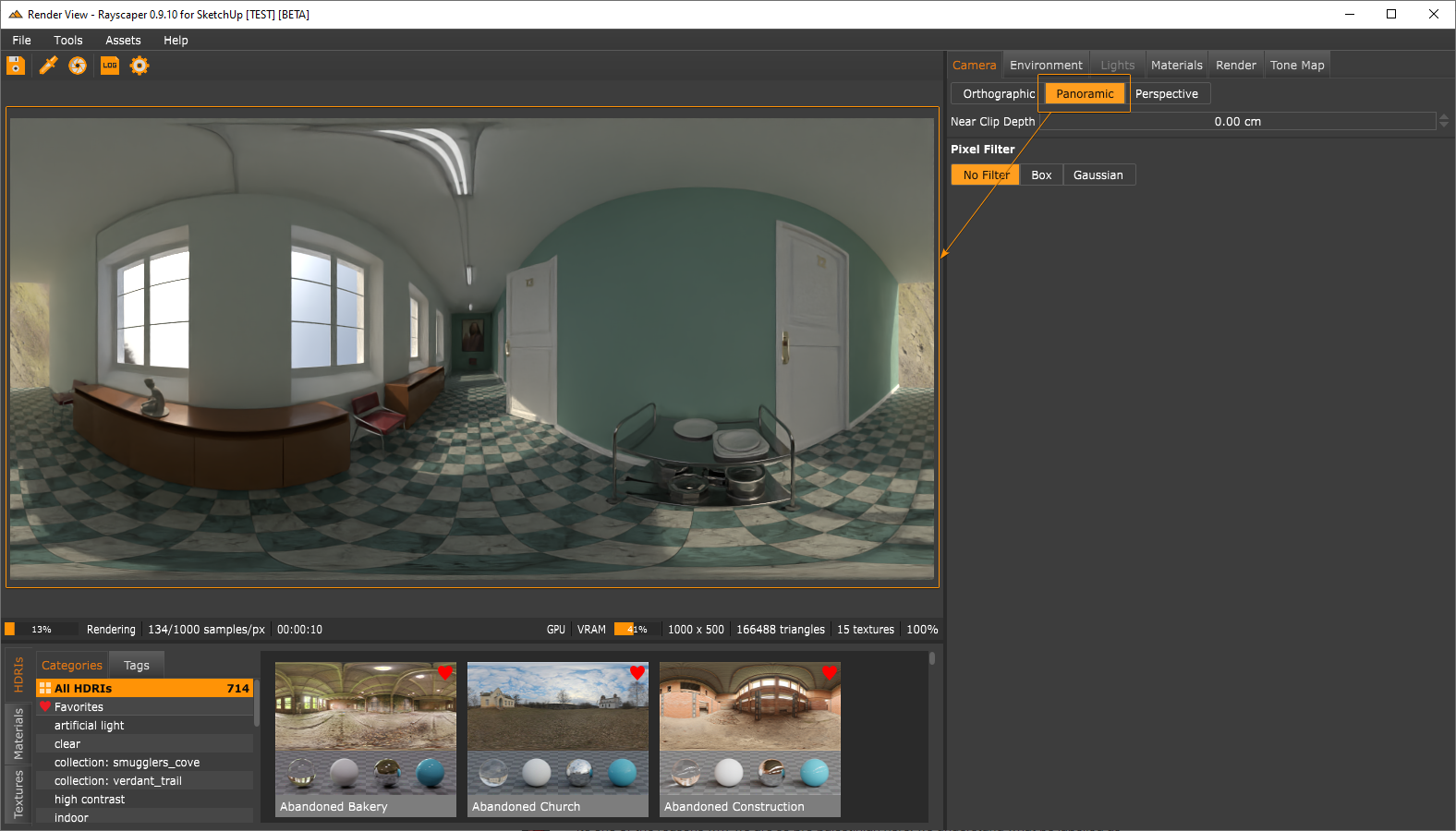
- Add a panoramic projection mode to the camera.
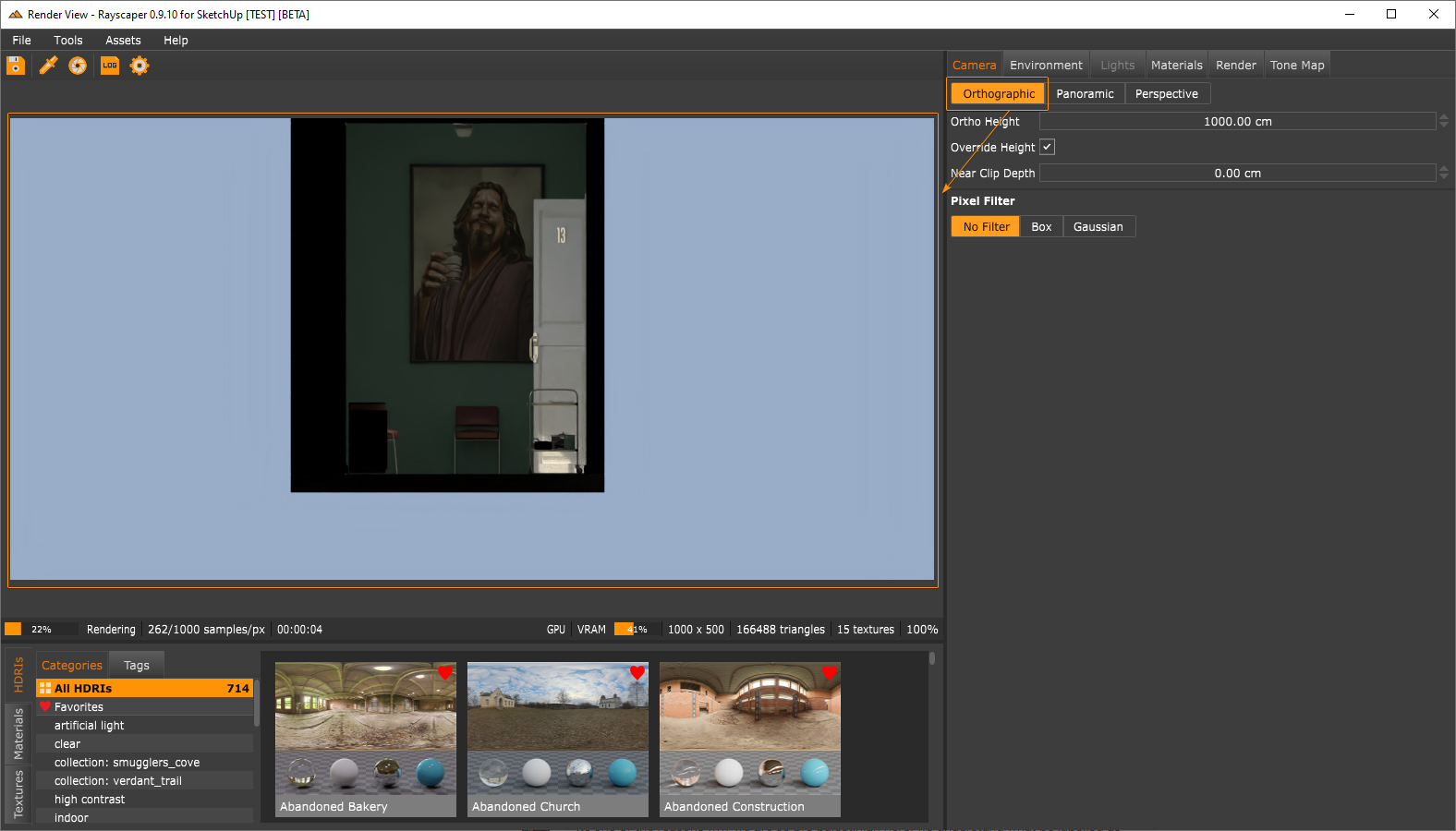
- Add an orthographic projection mode. The camera is the Rayscaper equivalent of the parallel projection in SketchUp.
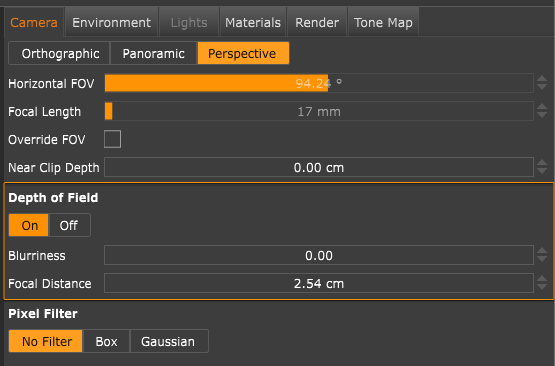
- Optionally sync the SketchUp field-of-view with the Rayscaper perspective camera. Note that the FOV in SketchUp differs from the value displayed in Rayscaper because SketchUp uses a vertical FOV value while Rayscaper uses a horizontal FOV.
- Add a focal length control to the perspective camera. This is coupled to the horizontal FOV. I introduced this for users who prefer to work with focal length instead of FOV.
- Add a toggle to turn DOF on/off explicitly.
- Express the depth-of-field effect with a blurriness value instead of lens radius. This should make it easier to control the DOF effect.
- Bugfix: Ensure the rendered image keeps panning when the render restarts. Before this change, the panning would reset on every render restart, which was annoying.
Happy Rendering!
I'm the developer of Rayscaper: https://rayscaper.com/ - Fast and easy rendering for SketchUp.
-
@pixelcruncher
You need to talk with @fredo6-animator and discuss having RayScaper as an option with his Animator plugin. -
@ntxdave Definitely! Animation support will be part of the 1.0 version.
I'm the developer of Rayscaper: https://rayscaper.com/ - Fast and easy rendering for SketchUp.
-
@pixelcruncher Does that mean with the Animator plugin?
-
I was thinking about having SketchUp camera animation support and support for Fredo6 animator. But I need to reach out to @fredo6 to discuss how to achieve that.
Cheers,
ThomasI'm the developer of Rayscaper: https://rayscaper.com/ - Fast and easy rendering for SketchUp.
-
@pixelcruncher That is what I was trying to suggest. I also suggested to Fredo6 that he contact you. In the past I have used Twilight Render but that is headed toward the end and from what I haves seen your renderer would be a good alternative.
 :
:
Something else to think about in the future is the ability to view a rendered model in a 3D model viewer.
-
@ntxdave Thanks for the suggestion. @fredo6 reached out to me. I now understand the work required for the integration with Animator, which will happen in the future.
Something else to think about in the future is the ability to view a rendered model in a 3D model viewer.
What do you mean by a 3D model viewer? Can you provide an example of other rendering software that offers this feature?
Thanks,
ThomasI'm the developer of Rayscaper: https://rayscaper.com/ - Fast and easy rendering for SketchUp.
-
@pixelcruncher
Well there are three areas I have been looking at.-
Trimble Connect allows you to save a SketchUp model that can later be viewed in 3D. Since this is all native SU materials and etc. it would be neat if your rendering features could be included.
-
A SketchUp midel can also be uploaded to Sketchfab. I am not sure but I think Sketchfab saves them in a glb file format. They also allow you to do some “rendering” in their editor but being able to export your rendered version would be neat. After you have exported your midel to them you can then embed a link to the model on a web page and it will then be presented in a full 3D format (this is kind of something mikar to the Trimble Connect I discussed above).
-
A 3rd option would be that SketchUp also allows you to save a model as a glb format. There are several products ou there that will then allow you to present a glb file in a 3D format on a web page. Many of those tools also allow you to some “rendering” as part of their tools.. It would be neat if you could export the rendered version of the model to a glb format. I have to admit that I have been having some issues with this one because I do not have a web server and most of these tools rely on a couple of javascript tools that I do not/can not have installed on my laptop.
I know that this is a little far out there but given the growth in the 3D world it would be really neat to be able to share a rendered midel in a full 3D environment instead of just images and movies.
Press F1...thank me later
-
-
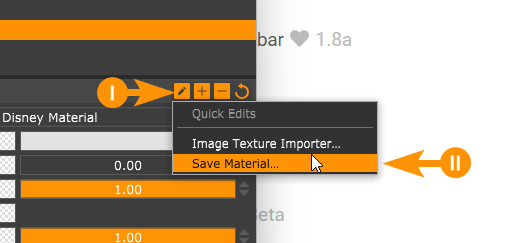
I am wondering is there any way to save the materials I make, locally?
-
@majid said in Rayscaper New Releases:
I am wondering is there any way to save the materials I make, locally?
Download the free D'oh Book for SketchUp 📖
-
@ntxdave That's an interesting idea, but I don't have the resources as a solo developer to create a separate 3D viewer. Currently, I focus on making a great integrated rendering plugin for SketchUp.
-
@Rich-O-Brien thanks, and were exactly they will be saved?
I will share my screen, as it is slightly different. -
@majid said in Rayscaper New Releases:
@Rich-O-Brien thanks, and were exactly they will be saved?
I will share my screen, as it is slightly different.Materials are saved here...
C:\Users\SomeName\AppData\Roaming\Rayscaper\UserAssetsTo import materials you use this menu...
Download the free D'oh Book for SketchUp 📖
-
@Rich-O-Brien Thanks a million. I am wondering if there is any way to have a "custom" preview (model) instead of the default sphere.




Hello! It looks like you're interested in this conversation, but you don't have an account yet.
Getting fed up of having to scroll through the same posts each visit? When you register for an account, you'll always come back to exactly where you were before, and choose to be notified of new replies (either via email, or push notification). You'll also be able to save bookmarks and upvote posts to show your appreciation to other community members.
With your input, this post could be even better 💗
Register Login


Advertisement