sketchucation logo sketchucation
    • Login
    Oops, your profile's looking a bit empty! To help us tailor your experience, please fill in key details like your SketchUp version, skill level, operating system, and more. Update and save your info on your profile page today!
    ⚠️ Important | Libfredo 15.6b introduces important bugfixes for Fredo's Extensions Update

    Rayscaper New Releases

    Scheduled Pinned Locked Moved Extensions & Applications Discussions
    rayscaperrender
    295 Posts 9 Posters 18.8k Views 10 Watching
    Loading More Posts
    • Oldest to Newest
    • Newest to Oldest
    • Most Votes
    Reply
    • Reply as topic
    Log in to reply
    This topic has been deleted. Only users with topic management privileges can see it.
    • ntxdaveN Offline
      ntxdave
      last edited by

      OK, I just gave things a second go round and things are not generating correctly when I use the "render only" option.

      Here is my SketchUp model which you can use for testing/messing around.
      Test - 2.skp

      P 1 Reply Last reply Reply Quote 0
      • P Offline
        pixelcruncher Extension Creator @Krass
        last edited by pixelcruncher

        @Krass I didn't modify the materials, just used them as they came from SketchUp. But it's possible ofcourse:

        forrest_alpha.png

        But maybe it's more intuitive to use the alpha channel from the color slot immediately if one exists?

        I'm the developer of Rayscaper: https://rayscaper.com/ - Fast and easy rendering for SketchUp.

        1 Reply Last reply Reply Quote 0
        • P Offline
          pixelcruncher Extension Creator @ntxdave
          last edited by pixelcruncher

          @ntxdave - In your test file, it had a ton of geometry generated in the model. If I tried to re-create your scene again, step-by-step I got this:

          dd712e8e-3743-4569-a781-6b9b75a44c68-image.png

          Can you try to just generate the grass on the plane, a first step and see if that works?

          As a sanity check, you are using Rayscaper 0.9.72?

          I'm the developer of Rayscaper: https://rayscaper.com/ - Fast and easy rendering for SketchUp.

          ntxdaveN 1 Reply Last reply Reply Quote 0
          • K Offline
            Krass
            last edited by

            Great!

            Krass

            1 Reply Last reply Reply Quote 0
            • ntxdaveN Offline
              ntxdave @pixelcruncher
              last edited by ntxdave

              @pixelcruncher said in Rayscaper New Releases:

              As a sanity check, you are using Rayscaper 0.9.72?

              Yes, I have updated to Rayscaper 0.9.72. I am having ongoing problems. I will let you know more when I can. I will try to create a very basic file and show what I am see both if I generate in model and with render only.

              It is probably going to be much later though. I want to get to the bottom of the problem(s) I am seeing.

              P 1 Reply Last reply Reply Quote 0
              • P Offline
                pixelcruncher Extension Creator @ntxdave
                last edited by

                @ntxdave Sounds good!

                I'm the developer of Rayscaper: https://rayscaper.com/ - Fast and easy rendering for SketchUp.

                1 Reply Last reply Reply Quote 0
                • K Offline
                  Krass
                  last edited by

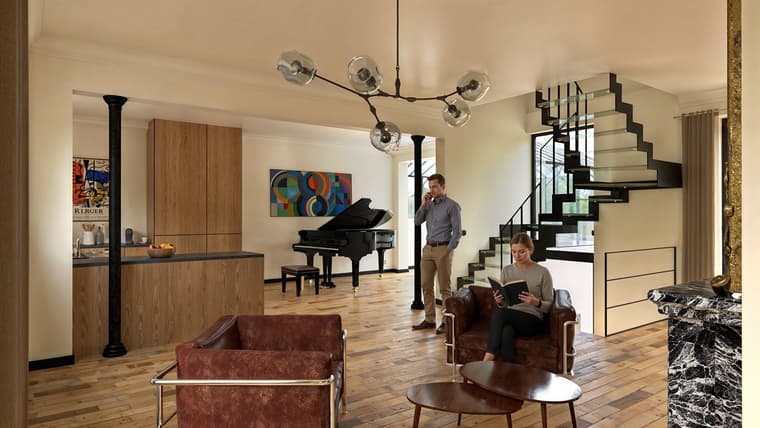
                  Rayscaper 0.9.71 renders / Photoshop / Nano Banana for the characters / Magnific Upscale
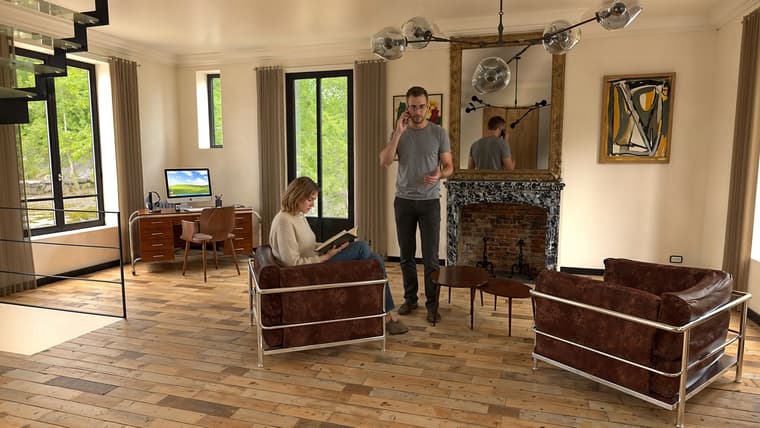
                  1finalweb.jpg

                  2finalweb.jpg

                  Krass

                  1 Reply Last reply Reply Quote 1
                  • K Offline
                    Krass
                    last edited by Krass

                    Compared to D5 Render Plus and D5 Render AI Enhancement, it's much better

                    D5 is faster, but its path tracing is a sham
                    https://jskup.fr/wp-content/uploads/2025/11/scene-6.FB_.jpg

                    Krass

                    P 1 Reply Last reply Reply Quote 0
                    • P Offline
                      pixelcruncher Extension Creator @Krass
                      last edited by

                      @Krass

                      Compared to D5 Render Plus and D5 Render AI Enhancement, it's very mediocre!

                      What exactly is mediocre, or what are you missing? That helps me improve the software. Now I can only guess at what's mediocre compared to D5 render.

                      Cheers,
                      Thomas

                      I'm the developer of Rayscaper: https://rayscaper.com/ - Fast and easy rendering for SketchUp.

                      1 Reply Last reply Reply Quote 0
                      • K Offline
                        Krass
                        last edited by

                        Sorry Pixelcruncher, that's my faulty translation... I really want to highlight Rayscaper! I love the photorealistic quality of RS's path tracing. I meant the opposite in my post and I've corrected it.


                        Krass

                        1 Reply Last reply β™₯ Reply Quote 0
                        • P Offline
                          pixelcruncher Extension Creator
                          last edited by

                          Sorry Pixelcruncher, that's my faulty translation... I really want to highlight Rayscaper! I love the photorealistic quality of RS's path tracing. I meant the opposite in my post and I've corrected it.

                          Phew πŸ˜“ I'm happy you like it!

                          I'm the developer of Rayscaper: https://rayscaper.com/ - Fast and easy rendering for SketchUp.

                          1 Reply Last reply Reply Quote 0
                          • K Offline
                            Krass
                            last edited by

                            I made a blunder, but my post has been corrected.

                            Krass

                            1 Reply Last reply Reply Quote 1
                            • S Offline
                              sashapepperspray
                              last edited by

                              I just noticed a bug, Most files (I think it is if they were created before 2026, and I am opening them in 2026) that I open the rayscaper window in, all the faces are blue, and I have to reset every material to see the textures.
                              Also, One file (it is on the warehouse here https://3dwarehouse.sketchup.com/model/6e2af6cd-7fde-487b-99f4-919da24ecd11/the-original-second-temple) whenever I open rayscaper in it, sketchup just closes.
                              here si pictures of the first bug
                              rayscaper try.png
                              Screenshot 2025-11-15 230204.png

                              P S 2 Replies Last reply Reply Quote 1
                              • P Offline
                                pixelcruncher Extension Creator @sashapepperspray
                                last edited by

                                @sashapepperspray

                                Thanks for the bug report.

                                Do you mind sending me a file where the first issue happens (i.e., the faces without materials)?

                                For the second issue, I can reproduce this with the temple model. I will have a look at it.

                                Regards,
                                Thomas

                                I'm the developer of Rayscaper: https://rayscaper.com/ - Fast and easy rendering for SketchUp.

                                S 1 Reply Last reply Reply Quote 0
                                • S Offline
                                  sashapepperspray @pixelcruncher
                                  last edited by Rich O Brien

                                  @pixelcruncher said in Rayscaper New Releases:

                                  produce this wit
                                  here is one with the bug, the stone texture does not work.
                                  terrrain.skp

                                  P 1 Reply Last reply Reply Quote 0
                                  • P Offline
                                    pixelcruncher Extension Creator @sashapepperspray
                                    last edited by

                                    @sashapepperspray Thanks for the scene! I can reproduce it, so that will help me fix it.

                                    I'm the developer of Rayscaper: https://rayscaper.com/ - Fast and easy rendering for SketchUp.

                                    1 Reply Last reply Reply Quote 0
                                    • P Offline
                                      pixelcruncher Extension Creator
                                      last edited by

                                      Hey, Rayscaper users!

                                      Rayscaper 0.9.77 Beta is available. You can get it via:

                                      • The SketchUcation store.
                                      • Direct download: link.

                                      I recommend upgrading to the latest version.

                                      What Changed?

                                      • Add Bloom and Glare post-processing effects. Enhance your renders with cinematic quality.
                                      • Add visual feedback for render failures. A red "RENDER FAILED" text now appears when rendering encounters errors,
                                        making it immediately clear when something goes wrong.
                                      • GUI enhancements: Improved sliders and tooltips. Sliders now have dedicated input boxes for more precise control.
                                      • Fix texture environment image update. Loading a new HDRI would not restart the render.
                                      • Bugfix: Fix grayscale image display in ImGui. Grayscale images were showing as red due to improper handling of
                                        single-channel pixel formats.
                                      • Add procedural sky environment support. You can now create realistic sky environments directly in Rayscaper without
                                        needing HDRI images. Perfect for quick outdoor renders with physically-based sky and sun simulation.
                                      • Add SketchUp environment tracking support (SketchUp 2025 or higher). Rayscaper can now automatically track and sync
                                        with SketchUp's environment settings.
                                      • Add PBR material support for SketchUp 2025. SketchUp 2025's new PBR materials are now supported and will
                                        automatically convert to Rayscaper's material system with proper metallic, roughness, and normal map values. Note:
                                        Rayscaper does not support power/scale multipliers on image textures, so if your SketchUp PBR material uses a
                                        roughness or metallic texture with a scale value other than 1.0, that scaling will not be applied in Rayscaper.
                                      • Bring back archive creation. You can now export your complete scene, including all assets, to a zip archive for easy
                                        sharing and backup.
                                      • Separate max depth settings by path type. Advanced users can now configure maximum ray bounce depths separately for
                                        diffuse, glossy, and transmission paths for more control over render quality and performance.
                                      • Bugfix: Fix FloatImageTexture color space handling. Float textures (like roughness and metallic maps) now correctly
                                        use linear color space for accurate rendering.
                                      • Bugfix: Fix noise texture deserialization. Noise textures saved in previous versions now load correctly and don't
                                        crash Rayscaper. @sashapepperspray - This should fix the crash you saw opening your file.
                                      • Bugfix: Avoid duplicate SketchUp shadow light. The sun/shadow light from SketchUp will no longer appear twice in the
                                        scene.

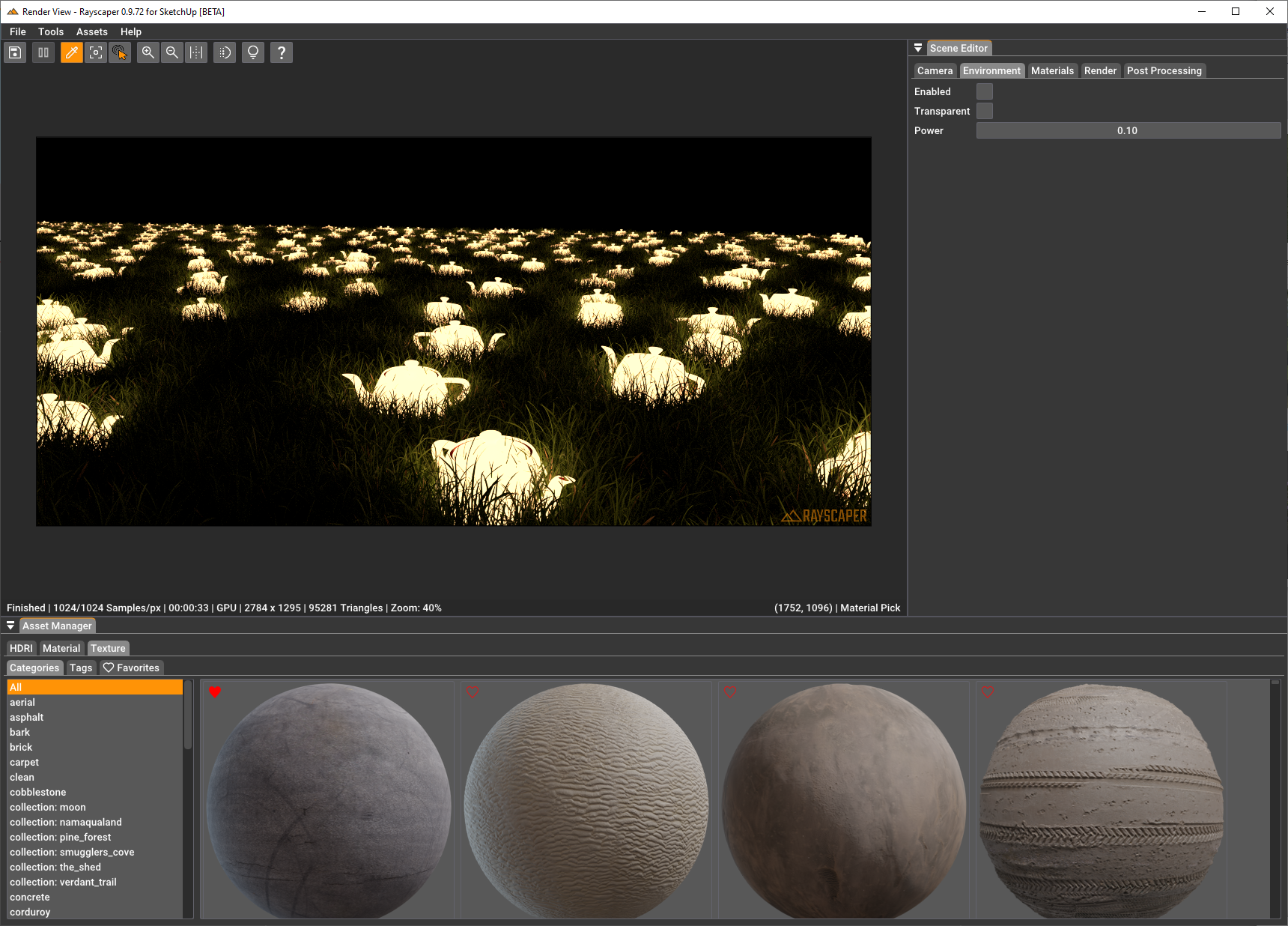
                                      The following screenshot shows the user interface enhancements:
                                      577dc74b-33f3-4c7c-ad82-be03085d841e-image.png

                                      Render by @Rich-O-Brien using bloom & glare for more realism:
                                      c127535b-4ac3-4026-b46a-24e56e10ee53-image.png

                                      Help Me Build the Community πŸ‘

                                      If you like Rayscaper, please share your renders (final or work-in-progress, it doesn't matter)! This is motivating and helps me showcase its capabilities
                                      to new users.

                                      Follow me on https://x.com/rayscaper3d.

                                      Happy Rendering!
                                      Thomas

                                      I'm the developer of Rayscaper: https://rayscaper.com/ - Fast and easy rendering for SketchUp.

                                      S 1 Reply Last reply Reply Quote 0
                                      • K Offline
                                        Krass
                                        last edited by

                                        thanks, great !

                                        secrataire.jpg

                                        Krass

                                        1 Reply Last reply Reply Quote 3
                                        • S Offline
                                          sashapepperspray @pixelcruncher
                                          last edited by

                                          @pixelcruncher thank you so much!

                                          1 Reply Last reply Reply Quote 1
                                          • K Offline
                                            Krass
                                            last edited by Krass

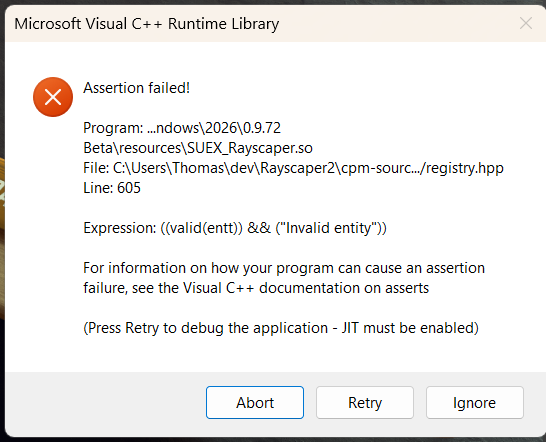
                                            I had to uninstall the extension store and I got an error message from Rayscaper.
                                            And now I'm having the same problem again after reinstalling Rayscaper 9.77.

                                            b041e94f-89bb-4ce0-9857-8db2986cea69-image.png

                                            Krass

                                            P 1 Reply Last reply Reply Quote 0
                                            • 1
                                            • 2
                                            • 11
                                            • 12
                                            • 13
                                            • 14
                                            • 15
                                            • 13 / 15
                                            • First post
                                              Last post
                                            Buy SketchPlus
                                            Buy SUbD
                                            Buy WrapR
                                            Buy eBook
                                            Buy Modelur
                                            Buy Vertex Tools
                                            Buy SketchCuisine
                                            Buy FormFonts

                                            Advertisement