sketchucation logo sketchucation
    • 登入
    Oops, your profile's looking a bit empty! To help us tailor your experience, please fill in key details like your SketchUp version, skill level, operating system, and more. Update and save your info on your profile page today!
    🔌 Smart Spline | Fluid way to handle splines for furniture design and complex structures. Download

    Rayscaper New Releases

    已排程 已置頂 已鎖定 已移動 Extensions & Applications Discussions
    rayscaperrender
    407 貼文 11 Posters 40.4k 瀏覽 12 Watching
    正在載入更多貼文
    • 從舊到新
    • 從新到舊
    • 最多點贊
    回覆
    • 在新貼文中回覆
    登入後回覆
    此主題已被刪除。只有擁有主題管理權限的使用者可以查看。
    • P 離線
      pixelcruncher Extension Creator @Krass
      最後由 編輯

      @Krass said in Rayscaper New Releases:

      Hello, Pixelcruncher,
      I'have installed RS 9.6.9
      I'm testing it. When I hide a SU tag it stays visible. The only way seems to Hide a group so that it will not be visible. So: we can't use Hide/reveal Tags?

      Visibility should work with tags and tag folders. Maybe you hit a bug, can you provide me with a screen recording, or a scene where I can reproduce this behavior?

      SketchUp_6mMdsz4irP.mp4

      I'm the developer of Rayscaper: https://rayscaper.com/ - Fast and easy rendering for SketchUp.

      1 條回覆 最後回覆 回覆 引用 0
      • KrassK 離線
        Krass
        最後由 編輯

        Hi,
        I just installed version 9.7.0. I'm testing with a new file, a cube that I place on a "cube" tag.
        If I hide the cube tag, Sketchup crashes.

        Krass

        P 1 條回覆 最後回覆 回覆 引用 0
        • KrassK 離線
          Krass
          最後由 編輯

          if i open an existing model and launch Rayscaper and reveal a hidden tag sketchup crashes

          Krass

          P 1 條回覆 最後回覆 回覆 引用 0
          • KrassK 離線
            Krass
            最後由 Krass 編輯

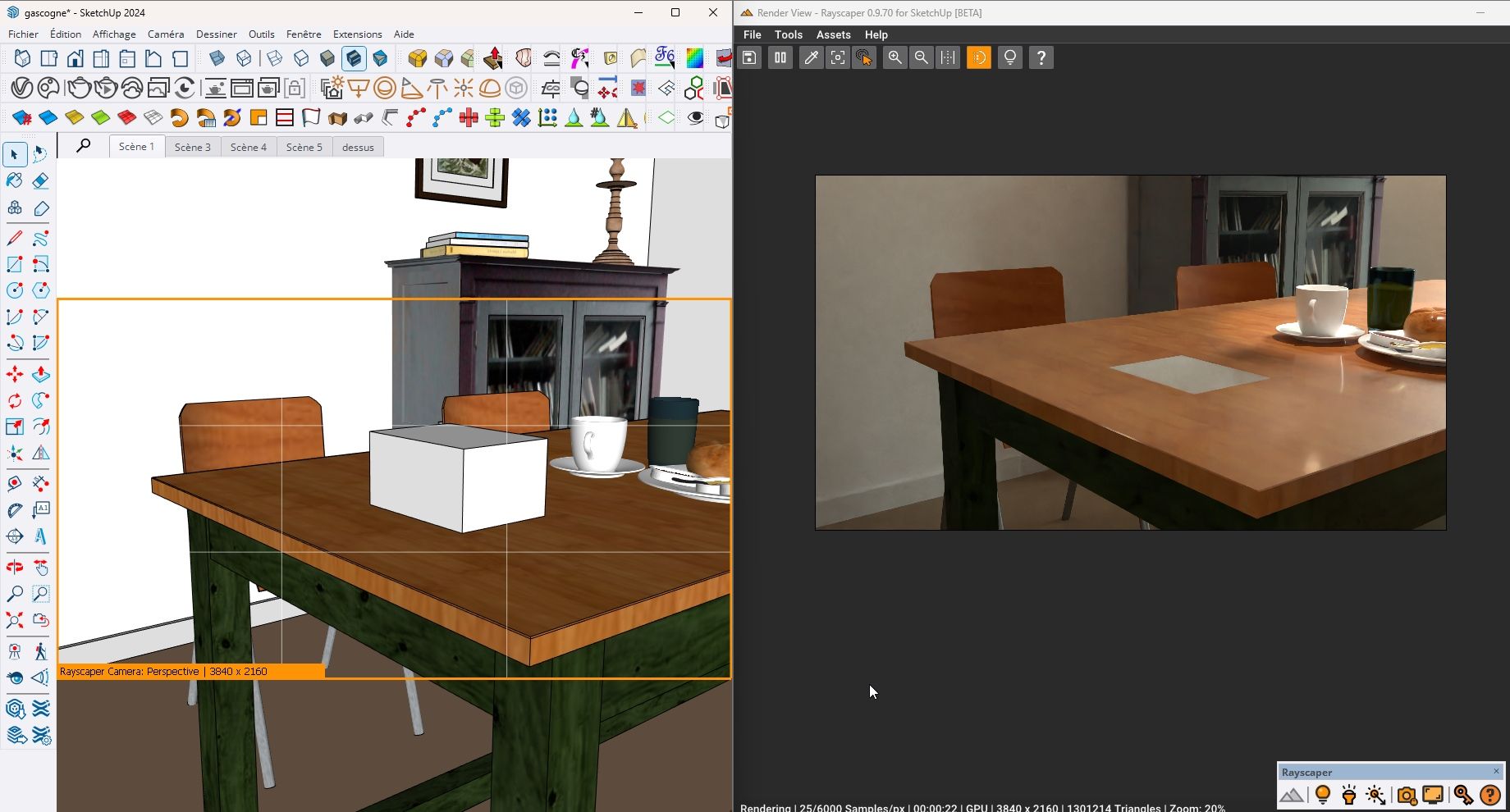
            It has trouble updating the display if I add geometry. I have to restart Rayscaper. but it is a rather heavy model. It also seems to work well in this version.
            cap rays.jpg

            Krass

            1 條回覆 最後回覆 回覆 引用 1
            • P 離線
              pixelcruncher Extension Creator @Krass
              最後由 編輯

              @Krass said in Rayscaper New Releases:

              Hi,
              I just installed version 9.7.0. I'm testing with a new file, a cube that I place on a "cube" tag.
              If I hide the cube tag, Sketchup crashes.

              @Krass said in Rayscaper New Releases:

              if i open an existing model and launch Rayscaper and reveal a hidden tag sketchup crashes

              Hey @Krass

              I'm not following your workflow. What do you mean by placing on a "cube" tag? Do you create the cube and then tag it or do something else first? Would be great if you could send me a quick screen recording or some screenshots of your workflow.

              Cheers,
              Thomas

              I'm the developer of Rayscaper: https://rayscaper.com/ - Fast and easy rendering for SketchUp.

              1 條回覆 最後回覆 回覆 引用 0
              • P 離線
                pixelcruncher Extension Creator @Krass
                最後由 編輯

                @Krass Can you e-mail or DM me this scene so I can have a look? Thanks!

                I'm the developer of Rayscaper: https://rayscaper.com/ - Fast and easy rendering for SketchUp.

                1 條回覆 最後回覆 回覆 引用 0
                • KrassK 離線
                  Krass
                  最後由 編輯

                  I just sent you an email

                  Krass

                  1 條回覆 最後回覆 回覆 引用 0
                  • KrassK 離線
                    Krass
                    最後由 編輯

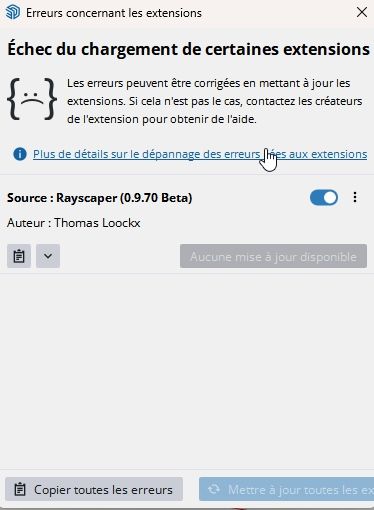
                    Hi, I had to reinstall SketchUp 2024 and I can't install Rayscaper 9.7.0. Thanks for your help.
                    echec rayscaper.jpg

                    Krass

                    P 1 條回覆 最後回覆 回覆 引用 0
                    • P 離線
                      pixelcruncher Extension Creator @Krass
                      最後由 編輯

                      @Krass, I'm working on a fix for 2024. I will keep you posted.

                      I'm the developer of Rayscaper: https://rayscaper.com/ - Fast and easy rendering for SketchUp.

                      1 條回覆 最後回覆 回覆 引用 0
                      • KrassK 離線
                        Krass
                        最後由 編輯

                        That's strange, because I previously managed to use RS in SU 2024...

                        Krass

                        P 1 條回覆 最後回覆 回覆 引用 0
                        • P 離線
                          pixelcruncher Extension Creator @Krass
                          最後由 pixelcruncher 編輯

                          @Krass True, but we found a bug in the SketchUp SDK (https://forums.sketchup.com/t/sdk-compatibility-issue-sureftype-enum-change-between-2024-and-2026-sdks/341530/9), that didn't surface yet in older versions of Rayscaper because we weren't using that code. It got broken in one of the previous updates. EDIT: 2025 and 2026 are fine; this only impacts 2024.

                          I'm the developer of Rayscaper: https://rayscaper.com/ - Fast and easy rendering for SketchUp.

                          1 條回覆 最後回覆 回覆 引用 1
                          • KrassK 離線
                            Krass
                            最後由 編輯

                            No worries, in the meantime I reinstalled my version 9.6.4 which works fine, good luck!

                            Krass

                            P 1 條回覆 最後回覆 回覆 引用 0
                            • P 離線
                              pixelcruncher Extension Creator @Krass
                              最後由 編輯

                              @Krass I sent you an e-mail with a test build. Let me know if it works (or not).

                              I'm the developer of Rayscaper: https://rayscaper.com/ - Fast and easy rendering for SketchUp.

                              1 條回覆 最後回覆 回覆 引用 0
                              • KrassK 離線
                                Krass
                                最後由 編輯

                                yes! thanks Pixelcruncher, thanks for this so fastresolution, it works well

                                Krass

                                1 條回覆 最後回覆 回覆 引用 1
                                • P 離線
                                  pixelcruncher Extension Creator
                                  最後由 pixelcruncher 編輯

                                  Hey, Rayscaper users!

                                  Rayscaper 0.9.72 Beta is available. You can get it via:

                                  • The SketchUcation store.
                                  • Direct download: link.

                                  I recommend upgrading to the latest version.

                                  What Changed?

                                  • Rayscaper now supports direct integration with the Skatter plugin. Render-only Skatter data can now be ingested directly from Skatter, bypassing the
                                    SketchUp viewport. This offloads complex instancing and geometry handling to Rayscaper, keeping SketchUp responsive and lightweight during rendering.
                                    Perfect for large vegetation or scattering setups — just hit render and let Rayscaper handle the heavy lifting. (@ntxdave Thanks for connecting me with the Skatter people).
                                  • Bugfix: push/pull geometry would not properly propagate to Rayscaper.
                                  • Fix Rayscaper for SketchUp 2024, caused by a breaking change in the SketchUp SDK. Note: Going forward, Rayscaper will only support the latest three
                                    SketchUp releases because now that it's for sure that the SDK is not backwards compatible, it's too much overhead for me to maintain more versions. The
                                    current version supports: SketchUp 2026, SketchUp 2025 & SketchUp 2024.
                                  • Make materials assigned to a SketchUp group or component instance work again. cc: @sashapepperspray

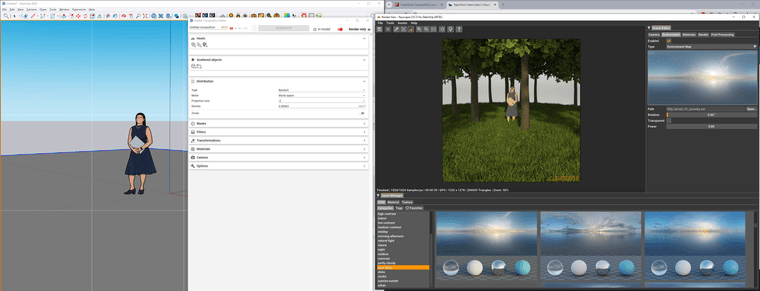
                                  Here's a screenshot of a simple forest I created using Skatter:
                                  de55a14a-48bb-471e-a4be-82d8a8ff48e6-image.png

                                  Help Me Build the Community 👍

                                  If you like Rayscaper, please share your renders (final or work-in-progress, it doesn't matter)! This is motivating and helps me showcase its capabilities
                                  to new users.

                                  Follow me on https://x.com/rayscaper3d.

                                  Happy Rendering!
                                  Thomas

                                  I'm the developer of Rayscaper: https://rayscaper.com/ - Fast and easy rendering for SketchUp.

                                  S 1 條回覆 最後回覆 回覆 引用 1
                                  • ntxdaveN 離線
                                    ntxdave
                                    最後由 編輯

                                    But now I need to be remember how to make RayScaper work with Skatter.

                                    Press F1...thank me later

                                    1 條回覆 最後回覆 回覆 引用 0
                                    • ntxdaveN 離線
                                      ntxdave
                                      最後由 編輯

                                      So far, I cannot get Rayscaper to work with Skatter. Need some help.

                                      Press F1...thank me later

                                      P 1 條回覆 最後回覆 回覆 引用 0
                                      • KrassK 離線
                                        Krass
                                        最後由 編輯

                                        That's impressive! With Skatter... well done!

                                        Krass

                                        ntxdaveN 1 條回覆 最後回覆 回覆 引用 0
                                        • ntxdaveN 離線
                                          ntxdave @Krass
                                          最後由 Rich O Brien 編輯

                                          @Krass said in Rayscaper New Releases:

                                          That's impressive! With Skatter... well done!

                                          Don’t know what I am doing wrong but it is not working for me. 😞

                                          Press F1...thank me later

                                          1 條回覆 最後回覆 回覆 引用 0
                                          • KrassK 離線
                                            Krass
                                            最後由 編輯

                                            I don't use Skatter... sorry

                                            Krass

                                            1 條回覆 最後回覆 回覆 引用 0
                                            • 1
                                            • 2
                                            • 10
                                            • 11
                                            • 12
                                            • 13
                                            • 14
                                            • 20
                                            • 21
                                            • 12 / 21
                                            • 第一個貼文
                                              最後的貼文
                                            Buy SketchPlus
                                            Buy SUbD
                                            Buy WrapR
                                            Buy eBook
                                            Buy Modelur
                                            Buy Vertex Tools
                                            Buy SketchCuisine
                                            Buy FormFonts

                                            Advertisement

