sketchucation logo sketchucation
    • 登入
    Oops, your profile's looking a bit empty! To help us tailor your experience, please fill in key details like your SketchUp version, skill level, operating system, and more. Update and save your info on your profile page today!
    🔌 Easy Offset | Offset selected faces in SketchUp in positive and negative offsets. Download

    Rayscaper Alpha Version Available

    已排程 已置頂 已鎖定 已移動 Extensions & Applications Discussions
    114 貼文 14 Posters 4.4k 瀏覽 14 Watching
    正在載入更多貼文
    • 從舊到新
    • 從新到舊
    • 最多點贊
    回覆
    • 在新貼文中回覆
    登入後回覆
    此主題已被刪除。只有擁有主題管理權限的使用者可以查看。
    • P 離線
      pixelcruncher Extension Creator
      最後由 編輯

      @jo-ke said:

      is it possible to do an emitter with textures? like in my example the sign of the tramway?

      This is also planned for one of the upcoming releases but it's not there yet.

      @jo-ke said:

      why can't I get rid of the blue textures? they are textured in SU and all faces are frontfaces

      Hmm, this usually means that the face doesn't have a material assigned to it. Or the image textures couldn't be found.

      Can you select the material in the Rayscaper viewport with the material picker?

      SketchUp_M1qe4CZdsR.png

      Once, selected can you try to reload the material via the reload button? This will refresh the material, resetting it to the latest changes made in SketchUp.
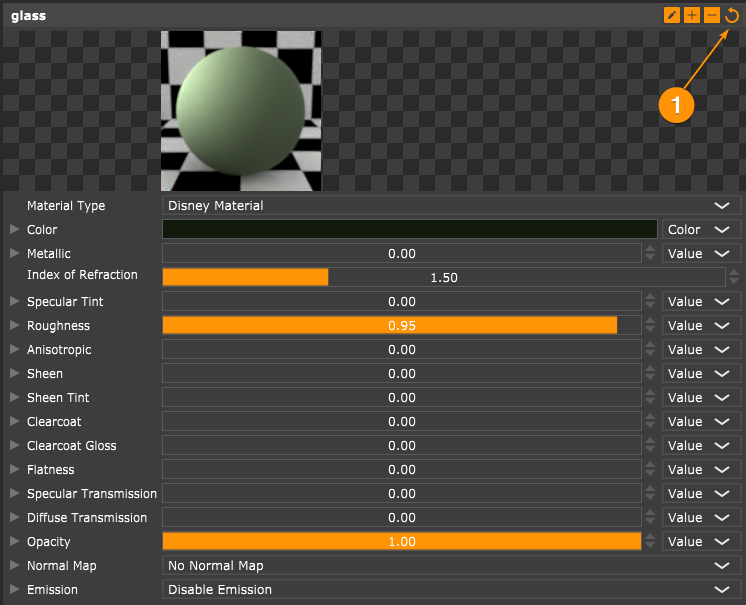
      SketchUp_320jbL7KED.png

      If all that fails, can you send me the scene? You can zip up the scene with all Rayscaper settings and textures using the following button on the Rayscaper toolbar:

      SketchUp_t3Eg0AVbJx.png

      You can either send me a private message or send it to thomas@rayscaper.com.

      I appreciate your patience!

      Cheers,
      Thomas

      I'm the developer of Rayscaper: https://rayscaper.com/ - Fast and easy rendering for SketchUp.

      1 條回覆 最後回覆 回覆 引用 0
      • jo-keJ 離線
        jo-ke
        最後由 編輯

        I installed your app at my notebook at home.

        unfortunately sketchup is crashing after using your plugin...

        maybe my notebook is to old...

        everytime i load a file worked with your app sketchup crushes.

        I removed your plugin and fortunately sketchup works again.

        so I have to ry tomorrow in the office.

        http://www.zz7.de

        1 條回覆 最後回覆 回覆 引用 0
        • P 離線
          pixelcruncher Extension Creator
          最後由 編輯

          @jo-ke said:

          I installed your app at my notebook at home.

          unfortunately sketchup is crashing after using your plugin...

          maybe my notebook is to old...

          everytime i load a file worked with your app sketchup crushes.

          I removed your plugin and fortunately sketchup works again.

          so I have to ry tomorrow in the office.

          Yikes, that's not good! Sorry about that.

          • Rayscaper creates a log file under your home directory named SUEX_Rayscaper.log (e.g., C:/Users/Thomas Loockx/SUEX_Rayscaper.log). Do you mind getting me that file?
          • What version of SU are you using?

          I'm the developer of Rayscaper: https://rayscaper.com/ - Fast and easy rendering for SketchUp.

          1 條回覆 最後回覆 回覆 引用 0
          • jo-keJ 離線
            jo-ke
            最後由 編輯

            I am using 23.1.340 64 bits

            arguments; SUEX_Rayscaper
            Current dir; C;\ProgramData\SketchUp\SketchUp 2023\SketchUp
            File verbosity level; 0
            date       time         ( uptime  ) [ thread name/id ]                   file;line     v| 
            2024-01-04 20;15;43.430 (   0.034s) [main thread     ]             loguru.cpp;770   INFO| Logging to 'C;\Users\Kehlj/SUEX_Rayscaper.log', mode; 'w', verbosity; 0
            2024-01-04 20;15;43.613 (   0.218s) [main thread     ]      AppController.cpp;73    INFO| Running Rayscaper version 0.7.3
            2024-01-04 20;15;43.614 (   0.218s) [main thread     ]      AppController.cpp;74    INFO| System info; Intel(R) Core(TM) i7-7700HQ CPU @ 2.80GHz (4 cores), 31 GB ram
            2024-01-04 20;15;43.614 (   0.218s) [main thread     ]      AppController.cpp;75    INFO| OS info; Windows 10 (64-bit)
            2024-01-04 20;15;43.614 (   0.219s) [main thread     ]      AppController.cpp;80    INFO| Host app; SketchUp Pro, 23.1.340
            2024-01-04 20;15;43.614 (   0.219s) [main thread     ]SketchupWindowFloater.c;28    INFO| Found SketchUp window handle (title; SketchUp); 0000000000511A04
            2024-01-04 20;15;43.629 (   0.233s) [main thread     ]       Orchestrator.cpp;90    INFO| All workers stopped
            2024-01-04 20;17;31.214 ( 107.818s) [main thread     ]       Orchestrator.cpp;90    INFO| All workers stopped
            2024-01-04 20;17;31.214 ( 107.818s) [main thread     ]       Orchestrator.cpp;90    INFO| All workers stopped
            2024-01-04 20;17;32.864 ( 109.468s) [main thread     ]             loguru.cpp;485   INFO| atexit
            

            http://www.zz7.de

            1 條回覆 最後回覆 回覆 引用 0
            • P 離線
              pixelcruncher Extension Creator
              最後由 編輯

              Thanks for sharing the log!

              Based on the PC specs I see in the log, Rayscaper should just work fine for your laptop. Also from the logs it looks like the application runs fine for 109 seconds and then just exits, so no crash (note: I'm not disputing it's not crashing on your laptop, just that it seems like it didn't crash based on this log file).

              A couple of questions:

              • Does SU crash for you immediately if you start up, or if you load a specific file, or if you start rendering that file?
              • Does it work for any other files, or for the default empty scene?
              • Do you mind reproducing the crash again and sending me another log file?

              Appreciate your help!

              Cheers,
              Thomas

              I'm the developer of Rayscaper: https://rayscaper.com/ - Fast and easy rendering for SketchUp.

              1 條回覆 最後回覆 回覆 引用 0
              • jo-keJ 離線
                jo-ke
                最後由 編輯

                I am back in my office and have the same issue.

                I can not open again the file of the tramway, that I saved with the render settings a day before.

                When I open an empty skp file it works, when I open the tramwayfile su imidiatly crashs.

                I'll send you my file via email, to inspect.

                here is the protocol:

                arguments; SUEX_Rayscaper
                Current dir; C;\ProgramData\SketchUp\SketchUp 2023\SketchUp
                File verbosity level; 0
                date       time         ( uptime  ) [ thread name/id ]                   file;line     v| 
                2024-01-05 09;16;43.616 (   0.026s) [main thread     ]             loguru.cpp;770   INFO| Logging to 'C;\Users\KehlJ/SUEX_Rayscaper.log', mode; 'w', verbosity; 0
                2024-01-05 09;16;43.778 (   0.188s) [main thread     ]      AppController.cpp;73    INFO| Running Rayscaper version 0.7.3
                2024-01-05 09;16;43.779 (   0.189s) [main thread     ]      AppController.cpp;74    INFO| System info; Intel(R) Core(TM) i7-7700 CPU @ 3.60GHz (4 cores), 15 GB ram
                2024-01-05 09;16;43.779 (   0.189s) [main thread     ]      AppController.cpp;75    INFO| OS info; Windows 10 (64-bit)
                2024-01-05 09;16;43.779 (   0.189s) [main thread     ]      AppController.cpp;80    INFO| Host app; SketchUp Pro, 23.1.340
                2024-01-05 09;16;43.779 (   0.189s) [main thread     ]SketchupWindowFloater.c;28    INFO| Found SketchUp window handle (title; SketchUp); 0000000000030BF2
                2024-01-05 09;16;43.788 (   0.198s) [main thread     ]       Orchestrator.cpp;90    INFO| All workers stopped
                2024-01-05 09;16;44.019 (   0.428s) [                ]   AssLibController.cpp;74    INFO| Loaded 1133 assets in 248.82 millis


                http://www.zz7.de

                1 條回覆 最後回覆 回覆 引用 0
                • jo-keJ 離線
                  jo-ke
                  最後由 編輯

                  I created a new scene, imported the same model, hit the refresh but some faces still remained blue.

                  I've sent you the file to review what's wrong.

                  http://www.zz7.de

                  1 條回覆 最後回覆 回覆 引用 0
                  • jo-keJ 離線
                    jo-ke
                    最後由 編輯

                    next problems:

                    I created a scene, that I ususally use for my customers.

                    1: the drawer is not visible in render
                    2: the renderfile is not saved.
                    3: when I reopen the file SU again crushed
                    4: it is not possible to recover the skp file

                    really not a good start...

                    If you want, I can send you the Skp
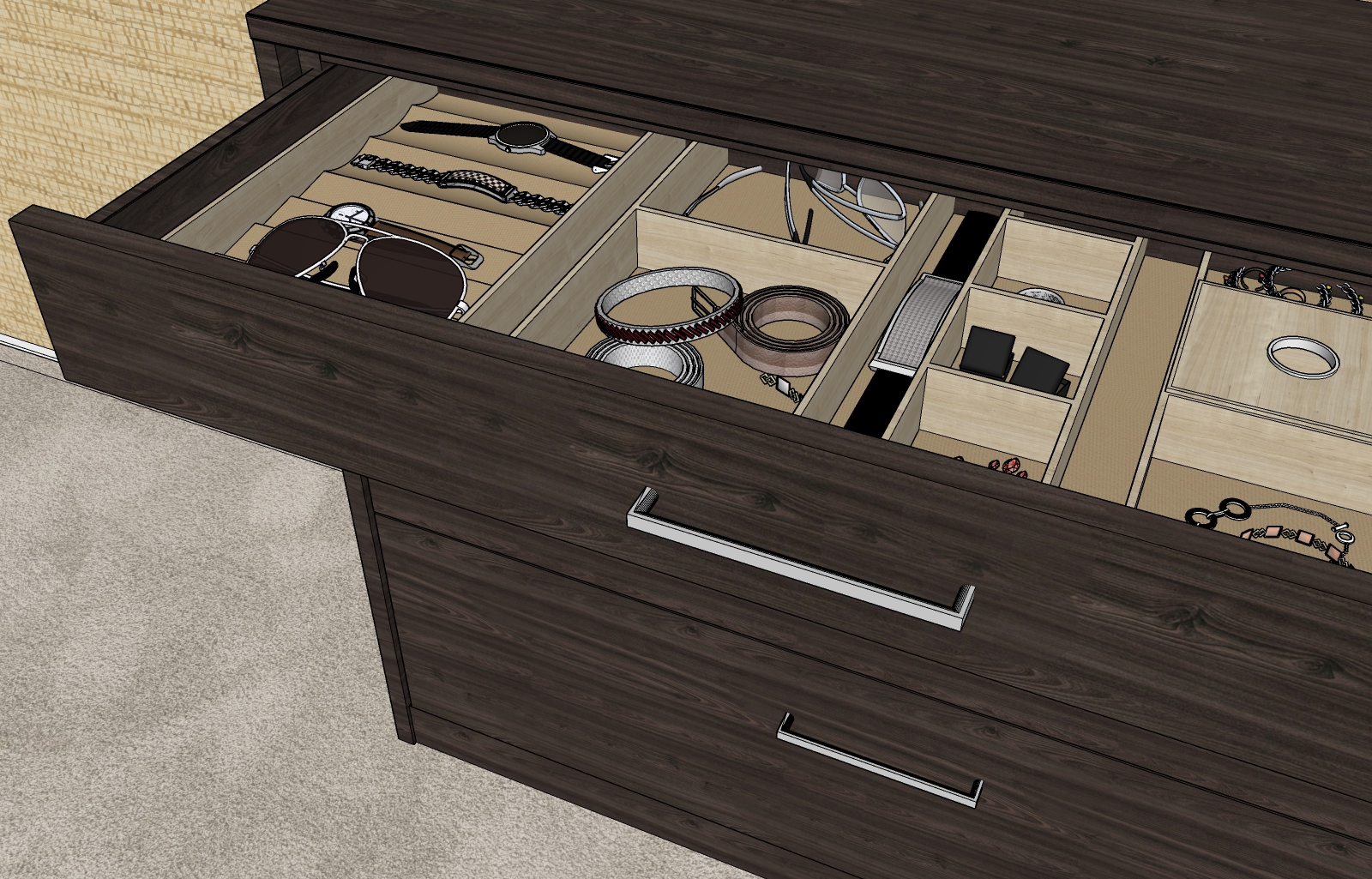

                    test3-0.jpg


                    test3-1.jpg

                    http://www.zz7.de

                    1 條回覆 最後回覆 回覆 引用 0
                    • jo-keJ 離線
                      jo-ke
                      最後由 編輯

                      fortunately it is possible to recover the file, when opening an empty one and importing the old one....

                      but the rayscaper- materialsettings of the model are lost

                      http://www.zz7.de

                      1 條回覆 最後回覆 回覆 引用 0
                      • majidM 離線
                        majid
                        最後由 編輯

                        I am getting better at it.


                        int1.jpg


                        3.jpg

                        My inspiring A, B, Sketches book: https://sketchucation.com/shop/books/intermediate/2612-alphabet-inspired-sketches--inspiring-drills-for-architects--3d-artists-and-designers-

                        1 條回覆 最後回覆 回覆 引用 0
                        • Rich O BrienR 離線
                          Rich O Brien Moderator
                          最後由 編輯

                          That's very nice Majid. DOF is perfect.

                          Download the free D'oh Book for SketchUp 📖

                          1 條回覆 最後回覆 回覆 引用 0
                          • jo-keJ 離線
                            jo-ke
                            最後由 編輯

                            thank you Thomas:
                            one problem is solved:

                            a 15 year old path with a "ü" inside was the problem.

                            I have to rename it.

                            I took the file to another folder and I can open it.

                            interseting: more textures are blue now, I have to refresh each texture to get rid of the blue color.

                            and the drawer is suddenly visible.

                            The file was able to save and this is my first result:


                            test3-001.png

                            http://www.zz7.de

                            1 條回覆 最後回覆 回覆 引用 0
                            • P 離線
                              pixelcruncher Extension Creator
                              最後由 編輯

                              @jo-ke said:

                              next problems:

                              I created a scene, that I ususally use for my customers.

                              1: the drawer is not visible in render
                              2: the renderfile is not saved.
                              3: when I reopen the file SU again crushed
                              4: it is not possible to recover the skp file

                              really not a good start...

                              If you want, I can send you the Skp
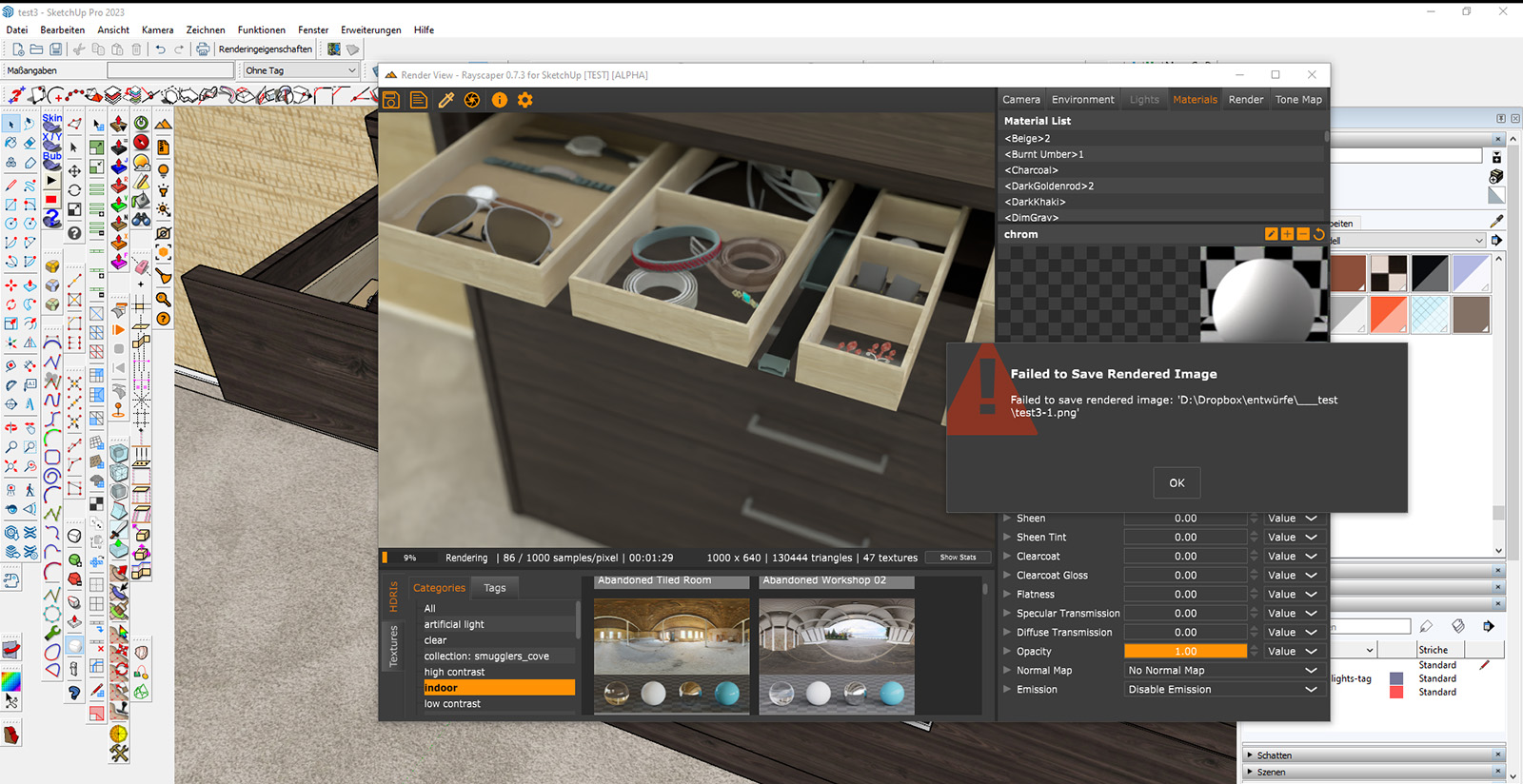
                              Do you mind sending the scene so I check why the drawer is not rendering?

                              I'm the developer of Rayscaper: https://rayscaper.com/ - Fast and easy rendering for SketchUp.

                              1 條回覆 最後回覆 回覆 引用 0
                              • P 離線
                                pixelcruncher Extension Creator
                                最後由 編輯

                                @jo-ke said:

                                thank you Thomas:
                                one problem is solved:

                                a 15 year old path with a "ü" inside was the problem.

                                I have to rename it.

                                I took the file to another folder and I can open it.

                                interseting: more textures are blue now, I have to refresh each texture to get rid of the blue color.

                                and the drawer is suddenly visible.

                                The file was able to save and this is my first result:
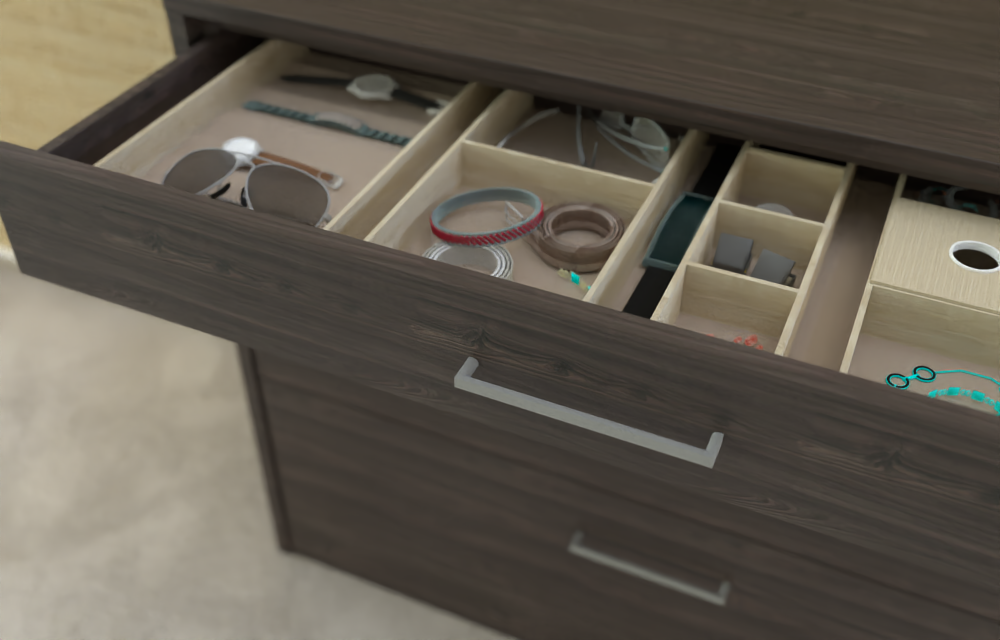
                                Hmm, you shouldn't reload everything by hand, so that's another bug. One thing I found interesting is that there are a ton of texture load failures when peeking at the log file you sent me just now:

                                Like for example:
                                2024-01-05 14:00:39.847 ( 156.978s) [PreProcessWorker] ImageLoader.h:73 ERR| Image 'C:\Users\KehlJ\Downloads\Fencing_Diamond_Mesh.png' does not exist.
                                2024-01-05 14:00:39.847 ( 156.978s) [PreProcessWorker] ImageLoader.h:73 ERR| Image 'C:\Users\KehlJ\Downloads\Translucent_Glass_Sky_Reflection_.jpg' does not exist.
                                2024-01-05 14:00:39.847 ( 156.978s) [PreProcessWorker] ImageLoader.h:73 ERR| Image 'D:\Dropbox\su\texturen\holzboden\22. R3107L Wiÿnia Hamilton 130 x130 cm Pfleiderer.jpg' does not exist.

                                So it looks like Rayscaper has issues loading those files.

                                Regards,
                                Thomas

                                I'm the developer of Rayscaper: https://rayscaper.com/ - Fast and easy rendering for SketchUp.

                                1 條回覆 最後回覆 回覆 引用 0
                                • P 離線
                                  pixelcruncher Extension Creator
                                  最後由 編輯

                                  @majid said:

                                  I am getting better at it.

                                  Ooh very nice, always happy to see renders made with Rayscaper. Keep them coming!

                                  I'm the developer of Rayscaper: https://rayscaper.com/ - Fast and easy rendering for SketchUp.

                                  1 條回覆 最後回覆 回覆 引用 0
                                  • jo-keJ 離線
                                    jo-ke
                                    最後由 編輯

                                    I've sent you the file with the cabinet, to inspect.

                                    http://www.zz7.de

                                    1 條回覆 最後回覆 回覆 引用 0
                                    • ntxdaveN 離線
                                      ntxdave
                                      最後由 編輯

                                      I would like to suggest that RayScaper reach out to thr Twilight Render team and see if it would be possible for the two teams/companies work out some type of merger/get together. TR has announced a “sunset” although they have had a great product and excellent support team. Looking at where RayScaper is headed and where TR has been, it seems like they could possibly come up with a great product with a great support team.

                                      Just to let you know, I have made the same proposal to the TR team.

                                      Press F1...thank me later

                                      1 條回覆 最後回覆 回覆 引用 0
                                      • Rich O BrienR 離線
                                        Rich O Brien Moderator
                                        最後由 編輯

                                        Download the free D'oh Book for SketchUp 📖

                                        1 條回覆 最後回覆 回覆 引用 0
                                        • ntxdaveN 離線
                                          ntxdave
                                          最後由 編輯

                                          One more suggestion: start a forum. Maybe it is too early though. 😉

                                          Press F1...thank me later

                                          1 條回覆 最後回覆 回覆 引用 0
                                          • P 離線
                                            pixelcruncher Extension Creator
                                            最後由 編輯

                                            @jo-ke said:

                                            I reinstalled rayscaper on my notebook.

                                            I reopend the test file, that I made yesterday, but most of material are lost.

                                            The file is saved in my dropbox.

                                            So this one worked after refreshing the HDRI? Still I think that’s a bug, Rayscaper shouldn’t have amnesia and forget about your configuration.

                                            If this happens again, would you mind sending the log? That should give me a clue of why it failed to load the HDRI.

                                            Thanks,
                                            Thomas

                                            I'm the developer of Rayscaper: https://rayscaper.com/ - Fast and easy rendering for SketchUp.

                                            1 條回覆 最後回覆 回覆 引用 0
                                            • 1
                                            • 2
                                            • 3
                                            • 4
                                            • 5
                                            • 6
                                            • 3 / 6
                                            • 第一個貼文
                                              最後的貼文
                                            Buy SketchPlus
                                            Buy SUbD
                                            Buy WrapR
                                            Buy eBook
                                            Buy Modelur
                                            Buy Vertex Tools
                                            Buy SketchCuisine
                                            Buy FormFonts

                                            Advertisement