sketchucation logo sketchucation
    • Conectarse
    Oops, your profile's looking a bit empty! To help us tailor your experience, please fill in key details like your SketchUp version, skill level, operating system, and more. Update and save your info on your profile page today!
    šŸ”Œ Smart Spline | Fluid way to handle splines for furniture design and complex structures. Download

    [Plugin][$] ThruPaint - v2.8d - 13 May 25


    Programado Fijo Cerrado Movido Plugins
    187 Mensajes 53 Posters 34.0k Visitas 53 Watching
    Cargando mƔs mensajes
    • MĆ”s antiguo a mĆ”s nuevo
    • MĆ”s nuevo a mĆ”s antiguo
    • Mayor nĆŗmero de Votos
    Responder
    • Responder como tema
    Accede para responder
    Este tema ha sido borrado. Solo los usuarios que tengan privilegios de administración de temas pueden verlo.
    • J Desconectado
      jsinmichael
      Última edición por

      This is a great tool. Thank you. Any chance of being able to pick colors from the default "Materials" color wheel or incorporate one of your own? Will the color picker only select color from the canvas?

      Thanks!
      J

      1 Respuesta Última respuesta Responder Citar 0
      • fredo6F Desconectado
        fredo6
        Última edición por

        @jsinmichael said:

        This is a great tool. Thank you. Any chance of being able to pick colors from the default "Materials" color wheel or incorporate one of your own? Will the color picker only select color from the canvas?

        Normally, if you create a material in the Sketchup native material browser, it should appear in the ThruPaint browser under the Model tab.
        This is why ThruPaint has not material creation and edition capability.

        1 Respuesta Última respuesta Responder Citar 0
        • N Desconectado
          NadinA2022
          Última edición por

          Good afternoon, I faced a problem: when start the plugin, the button lights up in blue, saying that the plugin is active, but the window for working as usual does not appear, how to fix it?Thanks.
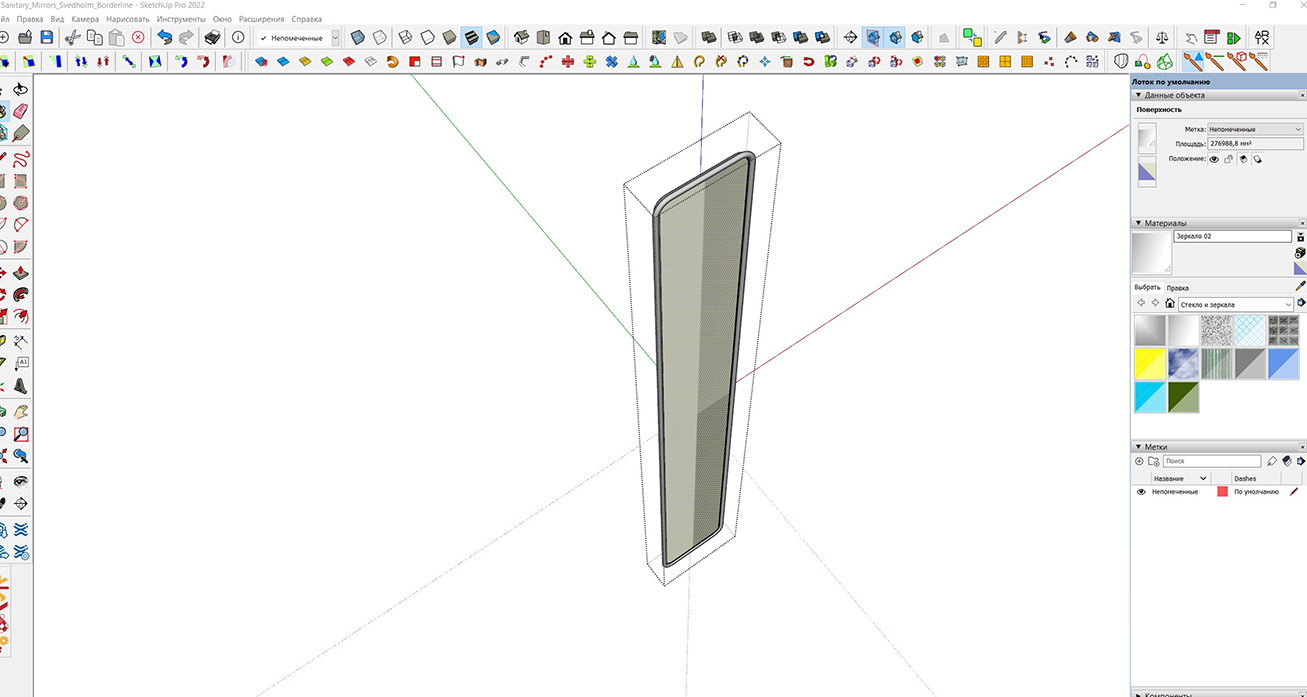

          p.jpg

          1 Respuesta Última respuesta Responder Citar 0
          • kdewinterK Desconectado
            kdewinter
            Última edición por

            Any update to have NCS colors implemented?

            1 Respuesta Última respuesta Responder Citar 0
            • fredo6F Desconectado
              fredo6
              Última edición por

              @kdewinter said:

              Any update to have NCS colors implemented?

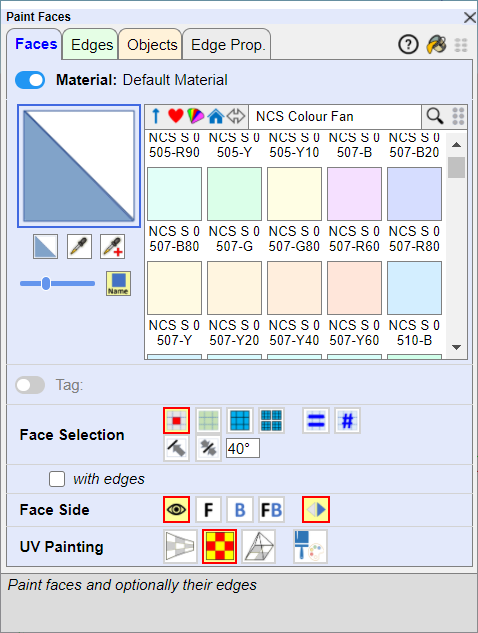
              NCS is included.

              ThruPaint - NCS color fan.png

              kdewinterK 1 Respuesta Última respuesta Responder Citar 0
              • JQLJ Desconectado
                JQL
                Última edición por

                Hi Fredo,

                I'm having an issue with Thrupaint where I can't use the gizmo to move textures around.

                Here's a gif:

                https://media.giphy.com/media/3yUT06FBclTVW1aHPw/giphy.gif

                www.casca.pt
                Visit us on facebook!

                1 Respuesta Última respuesta Responder Citar 0
                • fredo6F Desconectado
                  fredo6
                  Última edición por

                  Can you open the Ruby Console to see if there are errors

                  1 Respuesta Última respuesta Responder Citar 0
                  • JQLJ Desconectado
                    JQL
                    Última edición por

                    Nothing showing in the console

                    www.casca.pt
                    Visit us on facebook!

                    1 Respuesta Última respuesta Responder Citar 0
                    • fredo6F Desconectado
                      fredo6
                      Última edición por

                      Does the Gizmo works on other faces?

                      1 Respuesta Última respuesta Responder Citar 0
                      • J Desconectado
                        jkoll66
                        Última edición por

                        I'm having an issue where the Paint Face toolbar won't load. I've attached a screenshot and the console log. Thanks in advance for any help.
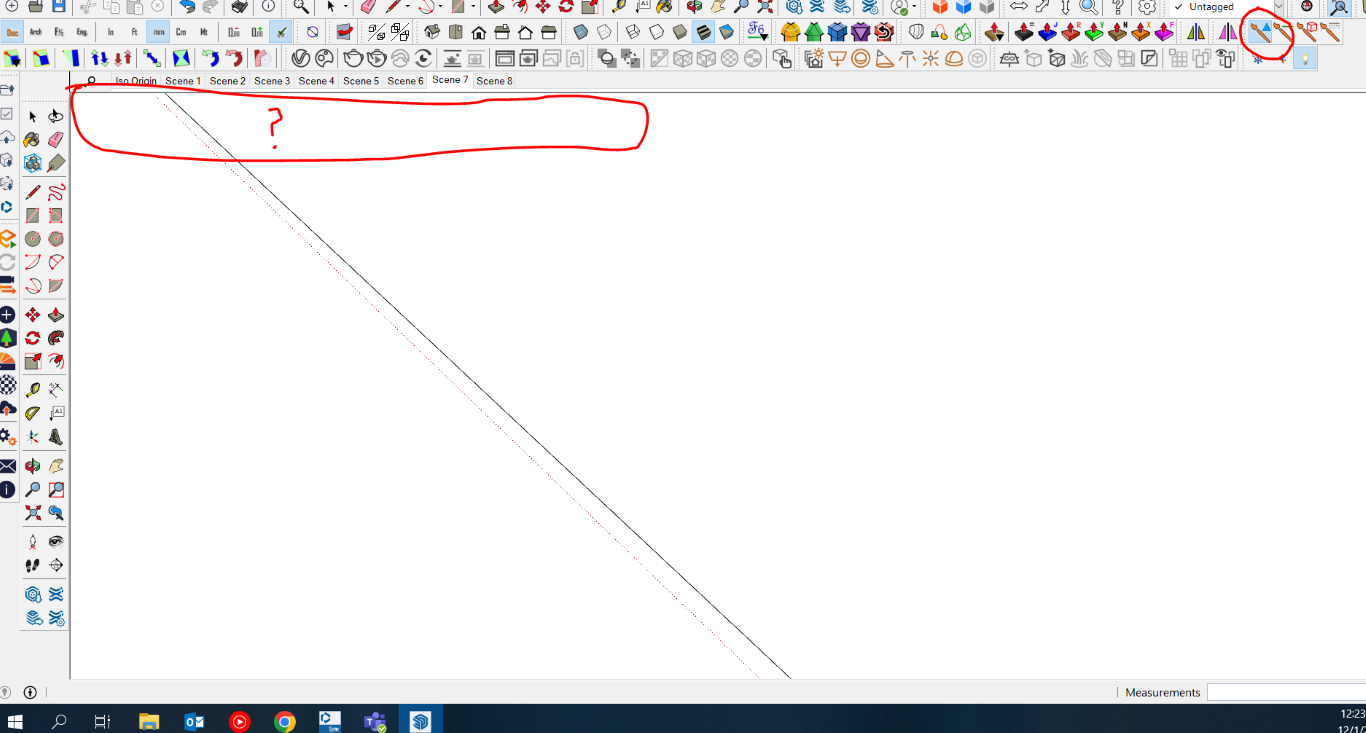

                        Console Log


                        Screenshot

                        1 Respuesta Última respuesta Responder Citar 0
                        • fredo6F Desconectado
                          fredo6
                          Última edición por

                          I think you probably need to reboot your PC and tell me if this make it work.

                          1 Respuesta Última respuesta Responder Citar 0
                          • JQLJ Desconectado
                            JQL
                            Última edición por

                            Hi Fredo,

                            The gizmo works sometimes but not on others. I can't seem to find a pattern.

                            I also have an issue that I didn't have with the prior version of thrupaint.

                            When I try to paint a texture continually on surfaces I can't see the red/green axis anymore, as I used to be able with Thrupaint 1.

                            I notice that things are working, but that visual cue isn't there.

                            Thanks,

                            João

                            www.casca.pt
                            Visit us on facebook!

                            1 Respuesta Última respuesta Responder Citar 0
                            • fredo6F Desconectado
                              fredo6
                              Última edición por

                              @jql said:

                              When I try to paint a texture continually on surfaces I can't see the red/green axis anymore, as I used to be able with Thrupaint 1.

                              With ThruPaint 2, the axes are now triggered when you are close to an edge. Otherwise, if you are in the middle of a face, the direction of axes is the one that the Paint Bucket would take.

                              1 Respuesta Última respuesta Responder Citar 0
                              • JQLJ Desconectado
                                JQL
                                Última edición por

                                Even so, this is also very random. Sometimes I see it, but most of the times I don't. Do you think this might be related to dpi?

                                www.casca.pt
                                Visit us on facebook!

                                1 Respuesta Última respuesta Responder Citar 0
                                • fredo6F Desconectado
                                  fredo6
                                  Última edición por

                                  Can you keep the Ruby console opened to check for errors.

                                  1 Respuesta Última respuesta Responder Citar 0
                                  • JQLJ Desconectado
                                    JQL
                                    Última edición por

                                    I will.

                                    www.casca.pt
                                    Visit us on facebook!

                                    1 Respuesta Última respuesta Responder Citar 0
                                    • JQLJ Desconectado
                                      JQL
                                      Última edición por

                                      I got one but things were actually working:

                                      Error; #<TypeError; nil can't be coerced into Integer>
                                      c;/users/joao/appdata/roaming/sketchup/sketchup 2023/sketchup/plugins/fredo6_thrupaint/thrupainttool.rbe;1336;in `-'
                                      c;/users/joao/appdata/roaming/sketchup/sketchup 2023/sketchup/plugins/fredo6_thrupaint/thrupainttool.rbe;1336;in `handle_move'
                                      c;/users/joao/appdata/roaming/sketchup/sketchup 2023/sketchup/plugins/fredo6_thrupaint/thrupainttool.rbe;4200;in `onMouseMove'
                                      

                                      www.casca.pt
                                      Visit us on facebook!

                                      1 Respuesta Última respuesta Responder Citar 0
                                      • JQLJ Desconectado
                                        JQL
                                        Última edición por

                                        Hi Fredo, I'd like that the axis, that show up when you want to repaint a texture, would appear as they used to be in Thrupaint 1. Many times it's really difficult to paint a face by making the mouse pointer close to the correct edge. It might be hidden or in a position where it's hard to get right and Thrupaint one was perfect in this regard.

                                        Do you think that would be possible to revert? Maybe give us the option again?

                                        www.casca.pt
                                        Visit us on facebook!

                                        1 Respuesta Última respuesta Responder Citar 0
                                        • fredo6F Desconectado
                                          fredo6
                                          Última edición por

                                          @jql said:

                                          Hi Fredo, I'd like that the axis, that show up when you want to repaint a texture, would appear as they used to be in Thrupaint 1. Many times it's really difficult to paint a face by making the mouse pointer close to the correct edge. It might be hidden or in a position where it's hard to get right and Thrupaint one was perfect in this regard.

                                          Do you think that would be possible to revert? Maybe give us the option again?

                                          The No-Axis option allows painting with UV direction taken from model axes (as the Paint Bucket tool), which is not possible with the old ThruPaint.

                                          I can certainly introduce a Default Parameter setting to disable this behavior.

                                          However, I don't understand why you have difficulty getting close to edges.

                                          1 Respuesta Última respuesta Responder Citar 0
                                          • JQLJ Desconectado
                                            JQL
                                            Última edición por

                                            It requires more accuracy and some times the edge is hidden. Before I would simply point to a face and when the gizmo was closer to a corner than the others the red and green axis immediately popped up. It was much faster and predictable.

                                            www.casca.pt
                                            Visit us on facebook!

                                            1 Respuesta Última respuesta Responder Citar 0
                                            • 1
                                            • 2
                                            • 3
                                            • 4
                                            • 5
                                            • 9
                                            • 10
                                            • 3 / 10
                                            • First post
                                              Last post
                                            Buy SketchPlus
                                            Buy SUbD
                                            Buy WrapR
                                            Buy eBook
                                            Buy Modelur
                                            Buy Vertex Tools
                                            Buy SketchCuisine
                                            Buy FormFonts

                                            Advertisement