sketchucation logo sketchucation
    • Login
    Oops, your profile's looking a bit empty! To help us tailor your experience, please fill in key details like your SketchUp version, skill level, operating system, and more. Update and save your info on your profile page today!
    ⚠️ Update | Sketchucation Tools 5.0.8 released with licensing improvements and bugfixes Download

    Fredo6

    Scheduled Pinned Locked Moved SketchUp Discussions
    sketchup
    16 Posts 4 Posters 5.9k Views 4 Watching
    Loading More Posts
    • Oldest to Newest
    • Newest to Oldest
    • Most Votes
    Reply
    • Reply as topic
    Log in to reply
    This topic has been deleted. Only users with topic management privileges can see it.
    • Rich O BrienR
      Rich O Brien Moderator
      last edited by

      Go to https://sketchucation.com/pluginstore and set Author dropdown to Fredo...

      https://i.imgur.com/Llw0BJ5.png

      Now set the list display to Full List...

      https://i.imgur.com/bWfoIRW.png

      Click More Info

      https://i.imgur.com/mrWYGVg.png

      Now you can click the Documention tab...

      https://i.imgur.com/Q1F9867.png

      Download the free D'oh Book for SketchUp πŸ“–

      1 Reply Last reply
      Reply Quote 0
      • S
        Scozzarella
        last edited by

        Thank you very much

        1 Reply Last reply
        Reply Quote 0
        • S
          Scozzarella
          last edited by

          I purchased a bundle Fredo6 but I can't find in Sketchup the Extension License panel for validating

          1 Reply Last reply
          Reply Quote 0
          • Rich O BrienR
            Rich O Brien Moderator
            last edited by

            @scozzarella said:

            I purchased a bundle Fredo6 but I can't find in Sketchup the Extension License panel for validating

            Go to Tools > Fredo Collection > [Extension Name] > License

            Download the free D'oh Book for SketchUp πŸ“–

            1 Reply Last reply
            Reply Quote 0
            • TIGT
              TIG Moderator
              last edited by

              To expand on what Rich said...

              You need to have installed the latest versions of the SketchUcation Toolset [v4.2.5] and Lib Fredo [giving the SCF-license dialog as v5.4]

              You need to install each of the bundled extensions...
              Restart SketchUp after all of the installations to ensure every thing syncs...
              The extensions will each have an entry in the Tools > Fredo Collection submenu.
              In each extension's submenu it will have a 'License...' item.
              Click on this to open the License dialog [which should show v5.4 top-left], which can then be used to validate that extension by connecting it to the saved SCF-license files which you have saved on your computer previously...
              After all are processed you should be good-to-go...

              TIG

              1 Reply Last reply
              Reply Quote 0
              • S
                Scozzarella
                last edited by

                Thank you for answer but in Mac version the path is different.

                Then Round Corner doesn't work and appear message SU20016, Why

                1 Reply Last reply
                Reply Quote 0
                • TIGT
                  TIG Moderator
                  last edited by

                  Your profiles says v2021 - so why are you now talking about v2016 ?
                  Fredo's extensions are normally for >= v2017 !
                  As is the SketchUcation Toolset v4.2.5 and the newer Lib Fredo !
                  These are needed for the licensing to work.

                  The Tools menu items are the same on PC & MAC...
                  Folder/File paths might vary slightly but are essentially the same ??

                  Please correct you reply and confirm the problems again...

                  TIG

                  1 Reply Last reply
                  Reply Quote 0
                  • Dave RD
                    Dave R
                    last edited by

                    @scozzarella said:

                    Then Round Corner doesn't work and appear message SU20016, Why

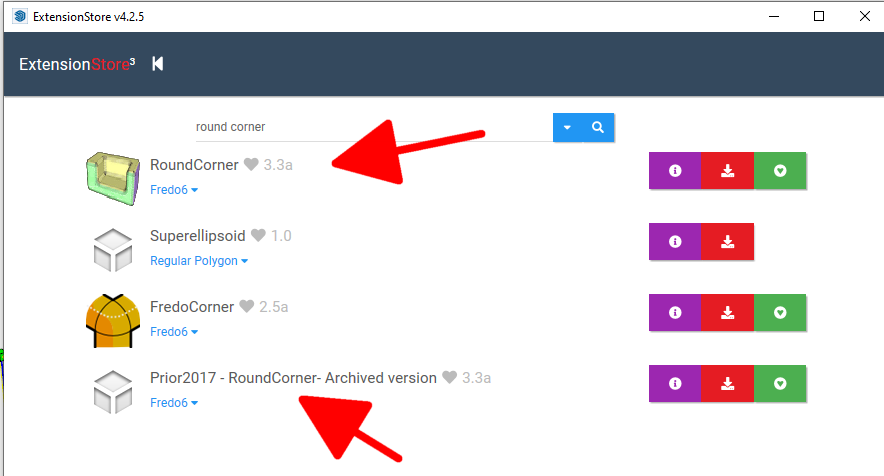
                    There are two versions of Round Corner, one of them is for SketchUp 2016 and earlier. It sounds like you've installed that one instead of the version for 2017 and newer.
                    Screenshot - 4_14_2022 , 8_20_29 AM.png

                    Etaoin Shrdlu

                    %

                    (THERE'S NO PLACE LIKE)

                    G28 X0.0 Y0.0 Z0.0

                    M30

                    %

                    1 Reply Last reply
                    Reply Quote 0
                    • S
                      Scozzarella
                      last edited by

                      Thank you very much. Now all works

                      1 Reply Last reply
                      Reply Quote 0
                      • Dave RD
                        Dave R
                        last edited by

                        @scozzarella said:

                        Now all works

                        What did you do to fix it?

                        Etaoin Shrdlu

                        %

                        (THERE'S NO PLACE LIKE)

                        G28 X0.0 Y0.0 Z0.0

                        M30

                        %

                        1 Reply Last reply
                        Reply Quote 0
                        • TIGT
                          TIG Moderator
                          last edited by

                          You need the now somewhat old legacy versions of Fredo's extensions and the legacy Lib Fredo if you have an older version of SketchUp (< v2017), but I don't think the SketchUcation Toolset or its SCF licensing system will work on such old versions of extensions anyway !

                          TIG

                          1 Reply Last reply
                          Reply Quote 0
                          • S
                            Scozzarella
                            last edited by

                            But FredoCorner is not with Bundle

                            1 Reply Last reply
                            Reply Quote 0
                            • Dave RD
                              Dave R
                              last edited by

                              @scozzarella said:

                              But FredoCorner is not with Bundle

                              No. It's not included in the bundle. You can get that license separately.

                              As TIG has asked you several times, please verify the version of SketchUp you are using. Your profile indicates 2021 Free/Make but there is no such version.

                              Etaoin Shrdlu

                              %

                              (THERE'S NO PLACE LIKE)

                              G28 X0.0 Y0.0 Z0.0

                              M30

                              %

                              1 Reply Last reply
                              Reply Quote 0
                              • TIGT
                                TIG Moderator
                                last edited by

                                FredoCorner is licensed separately from the bundle...
                                But you need v2017 or newer to have the correct installations to license FredoCorner [or any other extensions] !
                                So please clarify what SketchUp version you are using...

                                TIG

                                1 Reply Last reply
                                Reply Quote 0
                                • S
                                  Scozzarella
                                  last edited by

                                  SU 2022

                                  1 Reply Last reply
                                  Reply Quote 0

                                  Hello! It looks like you're interested in this conversation, but you don't have an account yet.

                                  Getting fed up of having to scroll through the same posts each visit? When you register for an account, you'll always come back to exactly where you were before, and choose to be notified of new replies (either via email, or push notification). You'll also be able to save bookmarks and upvote posts to show your appreciation to other community members.

                                  With your input, this post could be even better πŸ’—

                                  Register Login
                                  • 1 / 1
                                  • First post
                                    Last post
                                  Buy SketchPlus
                                  Buy SUbD
                                  Buy WrapR
                                  Buy eBook
                                  Buy Modelur
                                  Buy Vertex Tools
                                  Buy SketchCuisine
                                  Buy FormFonts

                                  Advertisement


