sketchucation logo sketchucation
    • 登入
    Oops, your profile's looking a bit empty! To help us tailor your experience, please fill in key details like your SketchUp version, skill level, operating system, and more. Update and save your info on your profile page today!
    🔌 Smart Spline | Fluid way to handle splines for furniture design and complex structures. Download

    Modeling a twisted shelf

    已排程 已置頂 已鎖定 已移動 SketchUp Discussions
    sketchup
    23 貼文 7 Posters 3.2k 瀏覽 7 Watching
    正在載入更多貼文
    • 從舊到新
    • 從新到舊
    • 最多點贊
    回覆
    • 在新貼文中回覆
    登入後回覆
    此主題已被刪除。只有擁有主題管理權限的使用者可以查看。
    • pbacotP 離線
      pbacot
      最後由 編輯

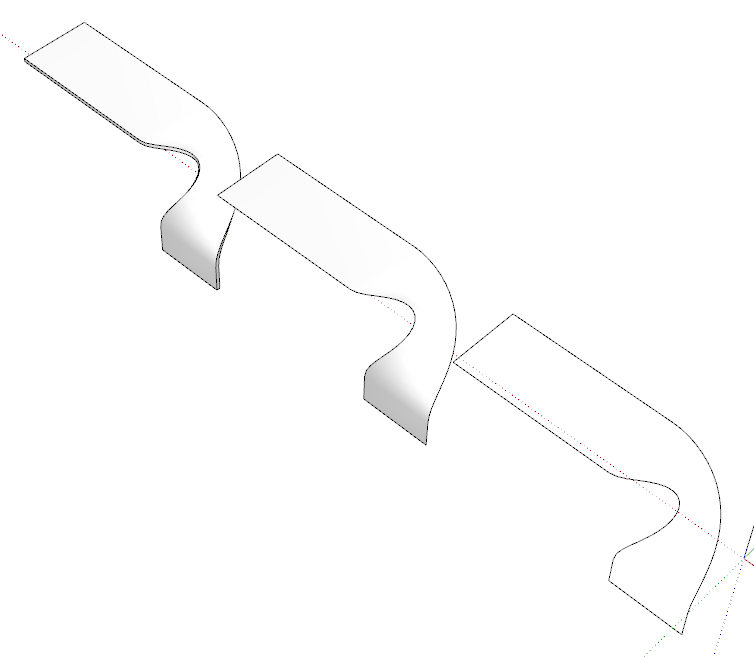
      I had a request to include this shelf in a rendering and I sort of got by but the geometry was actually trash and I can't figure out a good way to do it. I ended up having to construct rails in 3d and use BZ Toolbar to manipulate and smooth them. I used SSB, JPP, Curviloft, Fredoscale, Quadface tools, Vertex tools and a bunch of mouse work and got crumby results.

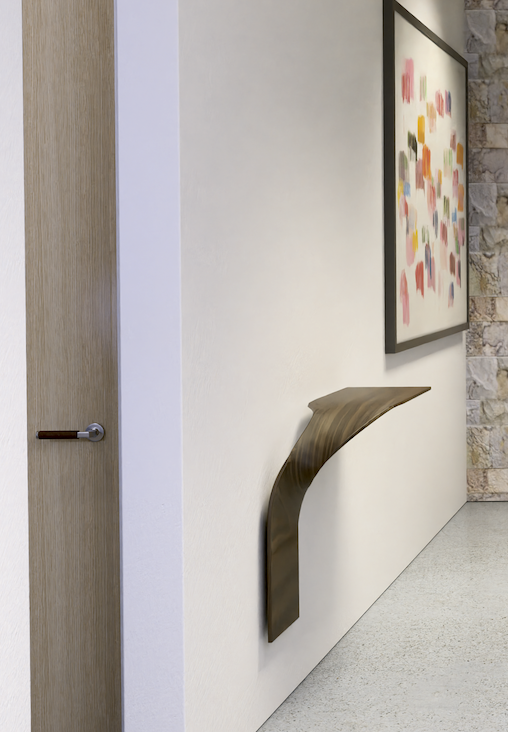
      So I wonder if there's any ideas on how to proceed on something like this. The object is like a rectangle that is crimped at the middle twisted at 90° and bent down 90°. (Bezier surface?).

      I hope this is interesting to someone, but don't feel it's urgent--I am just bugged by not having an idea for this to get good geometry--which would probably survive a JPP.
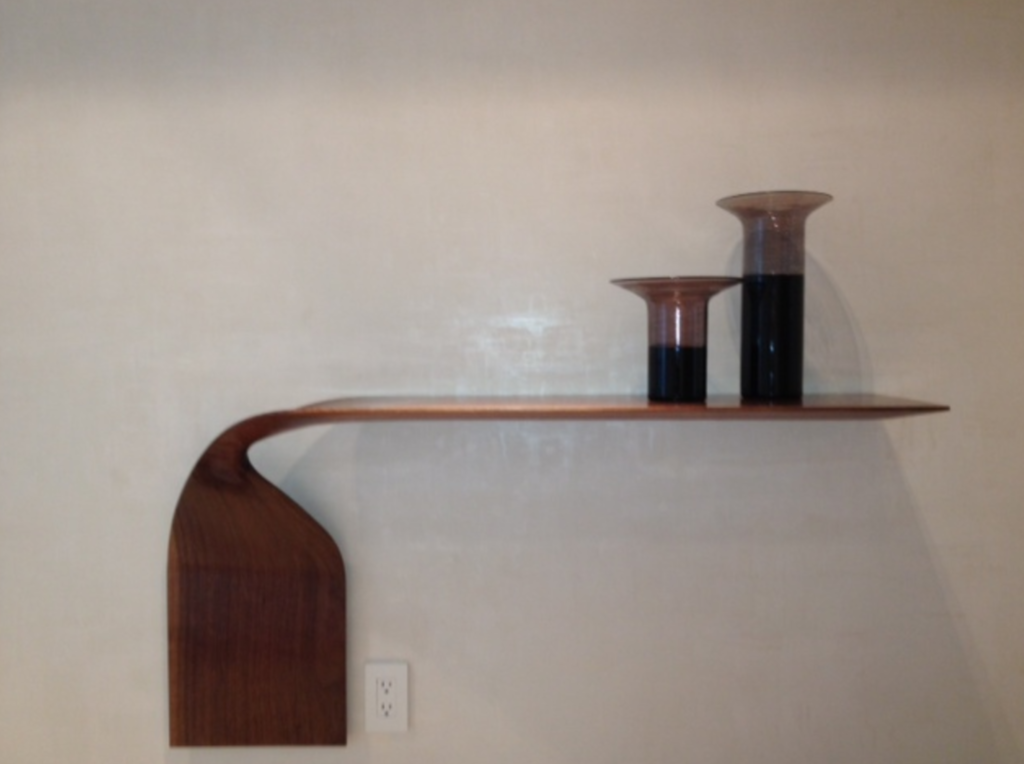

      shelf 1.pdf


      shelf 2.pdf


      Screen Shot 2022-01-14 at 12.48.23 PM.png

      MacOSX MojaveSketchUp Pro v19 Twilight v2 Thea v3 PowerCADD

      1 條回覆 最後回覆 回覆 引用 0
      • Dave RD 離線
        Dave R
        最後由 編輯

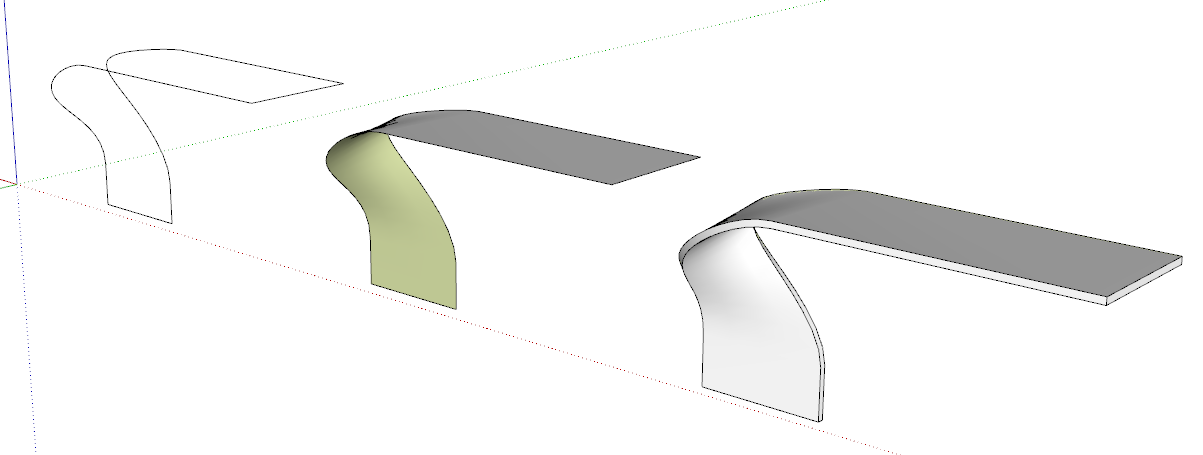
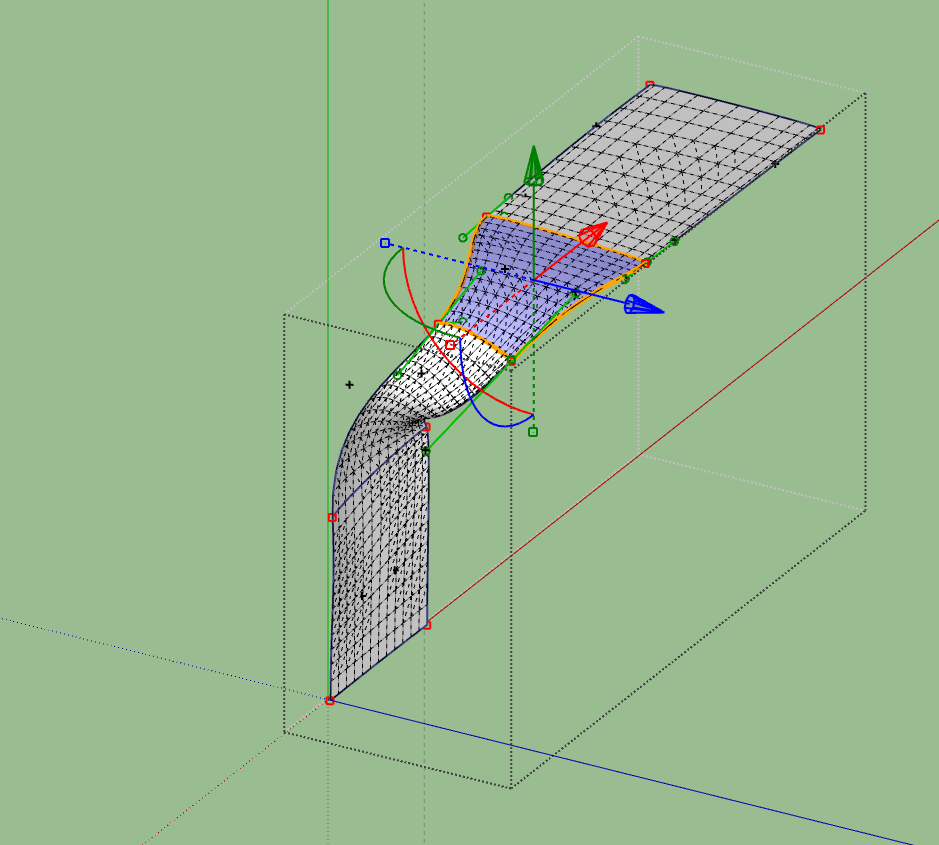
        Maybe something like this? I started with a large box and then used the Bezier tool in FredoSpline to draw some curves representing the top edge of the shelf. Then I used TIG's Extrude Edges by Rails (probably could have used Curviloft, instead) to create a surface and then Joint Push/Pull to give it thickness.
        Screenshot - 1_14_2022 , 3_58_49 PM.png

        Screenshot - 1_14_2022 , 4_02_27 PM.png

        Etaoin Shrdlu

        %

        (THERE'S NO PLACE LIKE)

        G28 X0.0 Y0.0 Z0.0

        M30

        %

        1 條回覆 最後回覆 回覆 引用 0
        • pbacotP 離線
          pbacot
          最後由 編輯

          Wow! That looks good--and clearly way faster than my attempt. I guess this one DOES require drawing out the paths in 3d.

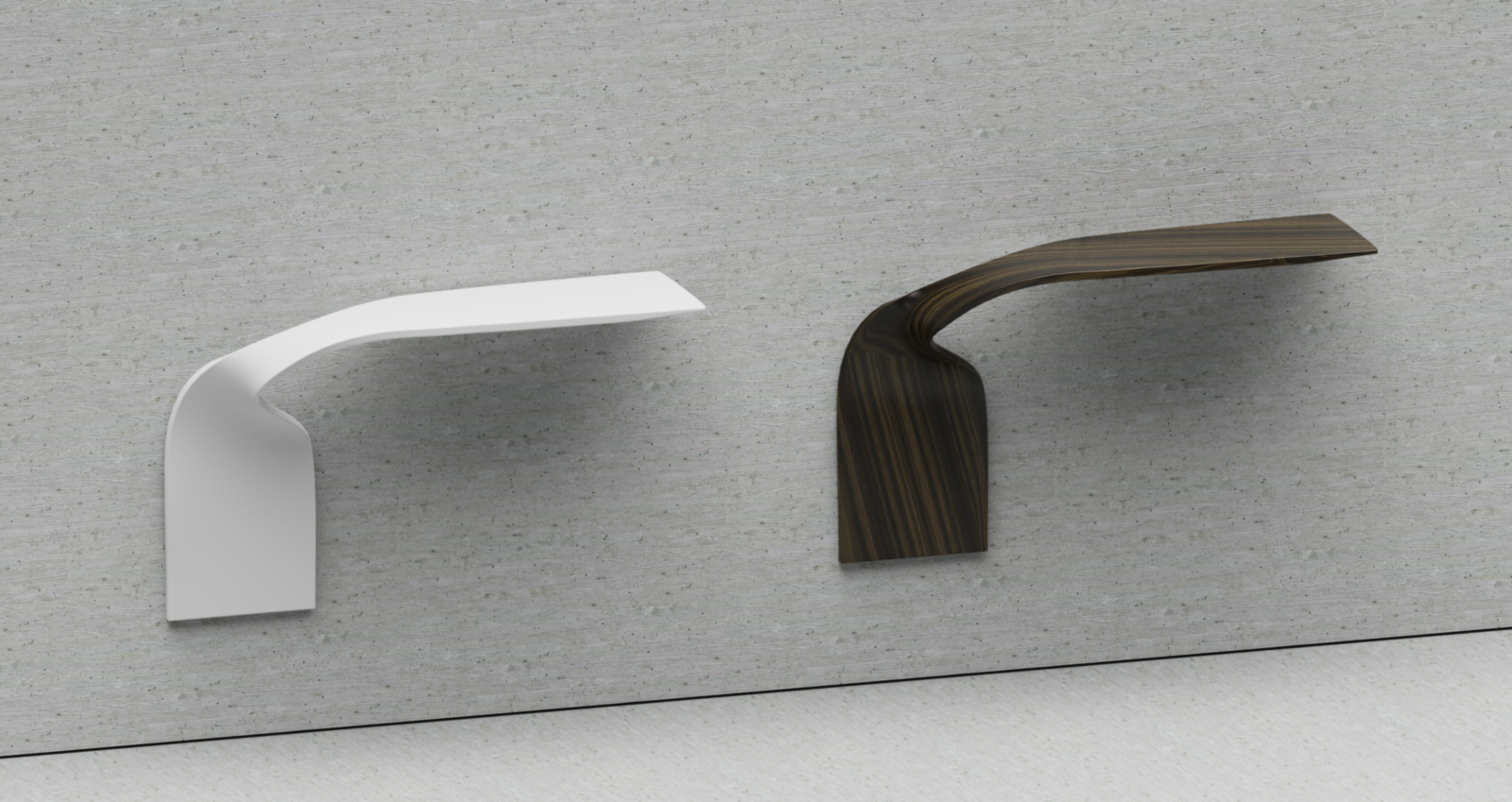
          There's an integral crimp at the center of the curve where the surface dips between the rails. That's why I used SSB, which had trouble leaving a nice grid at the upper part. I forgot to mention that I also used a lot of Artisan sculpting to try to get it right, much fussing. In the end I didn't get much of a dip in the material and it really doesn't show / matter in this rendering. Here is what I had (detail of the rendering). Also was unable to get other than "burl-like" texture at the bottom part.

          I'll try your method (didn't use a block for reference--that should help, and didn't use Fredo Spline) and get back to you. Thanks a bunch, Dave. It's encouraging.

          Screen Shot 2022-01-14 at 2.32.18 PM.png

          MacOSX MojaveSketchUp Pro v19 Twilight v2 Thea v3 PowerCADD

          1 條回覆 最後回覆 回覆 引用 0
          • Dave RD 離線
            Dave R
            最後由 編輯

            Good luck.

            FWIW I find it useful to create a box or other 3D shape to "build" the 3D Bezier curve in because it gives me a better frame of reference for the shape.

            Etaoin Shrdlu

            %

            (THERE'S NO PLACE LIKE)

            G28 X0.0 Y0.0 Z0.0

            M30

            %

            1 條回覆 最後回覆 回覆 引用 0
            • pbacotP 離線
              pbacot
              最後由 編輯

              Woops I just noticed there is a twist missing from your version. It's hard to visualize, unless you open the second pdf file that has the plan view. The front edge of the shelf ends up on the inside edge against the wall. Or put another way, the top surface of the shelf ends up facing out instead of facing the wall.

              MacOSX MojaveSketchUp Pro v19 Twilight v2 Thea v3 PowerCADD

              1 條回覆 最後回覆 回覆 引用 0
              • Dave RD 離線
                Dave R
                最後由 編輯

                I wasn't trying to exactly reproduce the shelf you show. Just give you and idea. I didn't keep the model, either. You should be able to use the same basic idea, though.

                Etaoin Shrdlu

                %

                (THERE'S NO PLACE LIKE)

                G28 X0.0 Y0.0 Z0.0

                M30

                %

                1 條回覆 最後回覆 回覆 引用 0
                • pbacotP 離線
                  pbacot
                  最後由 編輯

                  Thanks for the inspiration.

                  Well I thought I'd try Bezier Surface and that took some learning and time. I got carried away with the polygons it seems. Still having trouble texturing this one.

                  I WILL look at Bezier Spline.

                  Screen Shot 2022-01-14 at 7.18.11 PM.png


                  SHELF-Scene 1.png

                  MacOSX MojaveSketchUp Pro v19 Twilight v2 Thea v3 PowerCADD

                  1 條回覆 最後回覆 回覆 引用 0
                  • BoxB 離線
                    Box
                    最後由 編輯

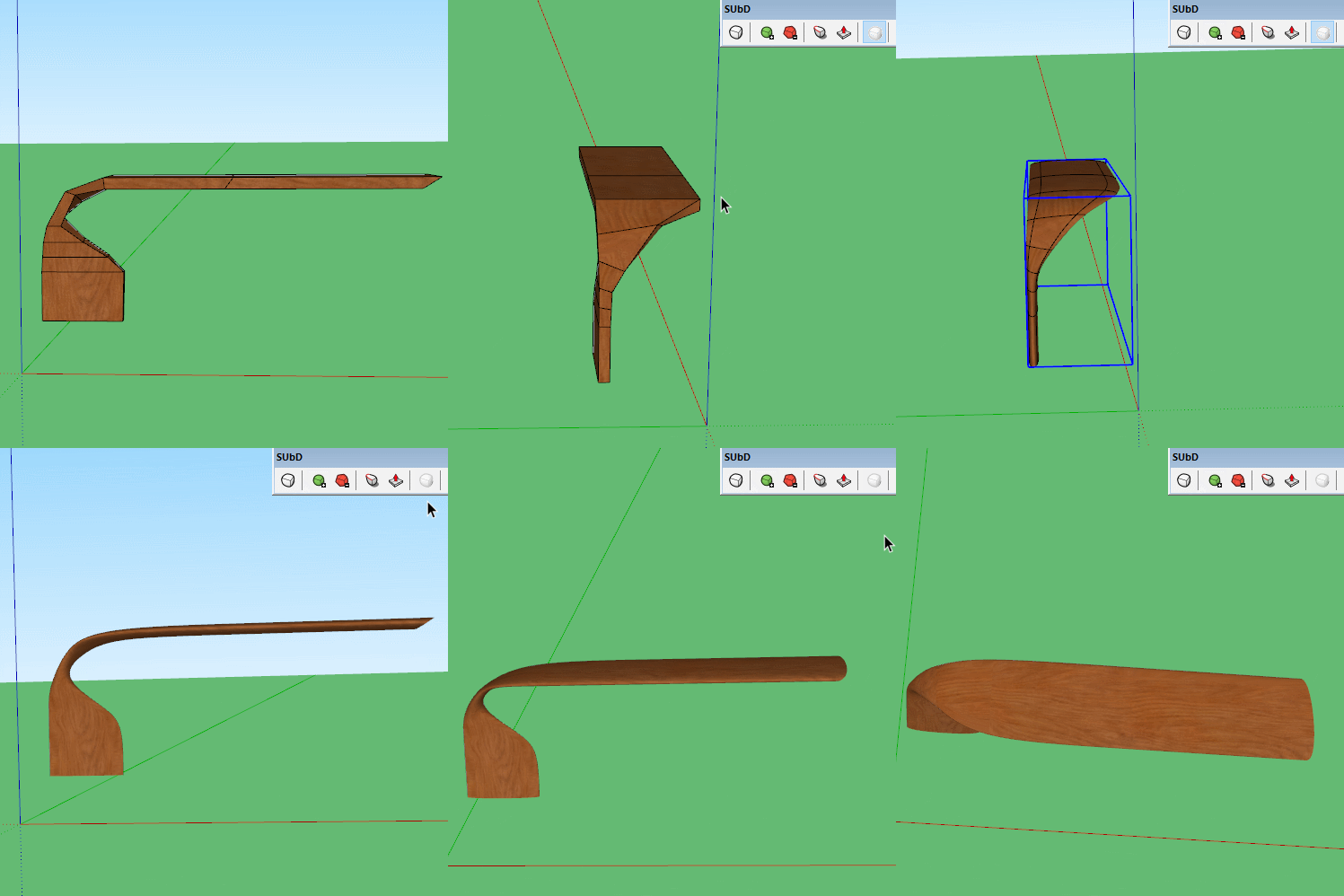
                    Here's a very basic SUbD version.


                    Twist shelf.gif

                    1 條回覆 最後回覆 回覆 引用 0
                    • pbacotP 離線
                      pbacot
                      最後由 編輯

                      Thanks Box! it seems that if you know what to draw for the proxy(?), SubD would be fast. I haven't got into it. This is one of the few organic challenges I have had in work projects. I do need to do terrain modeling, however. I wonder if SubD could be used in that. Or do you use it in puffy furniture?

                      MacOSX MojaveSketchUp Pro v19 Twilight v2 Thea v3 PowerCADD

                      1 條回覆 最後回覆 回覆 引用 0
                      • Rich O BrienR 線上
                        Rich O Brien Moderator
                        最後由 編輯

                        I would lean towards Curviloft and SUbD to arrive at the final form...

                        pbacot-twisted-shelf.skp

                        https://i.imgur.com/mnkcK17.png

                        To create the initial rails to loft I did use Vertex Tools with a soft falloff to pinch the rails as needed...

                        https://i.imgur.com/c6VqSxf.png

                        ...making the curved portions had identical segments counts so topology remained even.

                        With some UV mapping and 2 levels of subdivision you get somewhat close.

                        https://i.imgur.com/H4SR6Zw.png

                        Dave's version is yum!

                        Download the free D'oh Book for SketchUp 📖

                        1 條回覆 最後回覆 回覆 引用 0
                        • Dave RD 離線
                          Dave R
                          最後由 編輯

                          @rich o brien said:

                          Dave's version is yum!

                          Not as yummy as yours, though.

                          Etaoin Shrdlu

                          %

                          (THERE'S NO PLACE LIKE)

                          G28 X0.0 Y0.0 Z0.0

                          M30

                          %

                          1 條回覆 最後回覆 回覆 引用 0
                          • pilouP 離線
                            pilou
                            最後由 編輯

                            FredoScale 2.0 itself is not sufficient : Slicer + Twist + Bend ? (with little sections resize)

                            Frenchy Pilou
                            Is beautiful that please without concept!
                            My Little site :)

                            1 條回覆 最後回覆 回覆 引用 0
                            • pbacotP 離線
                              pbacot
                              最後由 編輯

                              @pilou said:

                              FredoScale 2.0 itself is not sufficient : Slicer + Twist + Bend ? (with little sections resize)

                              I tried a lot with Fredoscale. I couldn't figure out how to make it work. Then I turned to drawing rails in 3d.

                              MacOSX MojaveSketchUp Pro v19 Twilight v2 Thea v3 PowerCADD

                              1 條回覆 最後回覆 回覆 引用 0
                              • pbacotP 離線
                                pbacot
                                最後由 編輯

                                @rich o brien said:

                                I would lean towards Curviloft and SUbD to arrive at the final form...

                                Thanks Rich. So it seems you start with a rough profile, easier to work out, Curviloft that. How do you get the extra edges around the border? Then you texture it, how?

                                I tried Artisan to smooth your model, and it did pretty well but took the texture off . With Artisan Brush I got the texture back on, and it looks OK (on the top of the model anyway--back is a mess, but you can't see it).

                                MacOSX MojaveSketchUp Pro v19 Twilight v2 Thea v3 PowerCADD

                                1 條回覆 最後回覆 回覆 引用 0
                                • Rich O BrienR 線上
                                  Rich O Brien Moderator
                                  最後由 編輯

                                  @pbacot said:

                                  Thanks Rich. So it seems you start with a rough profile, easier to work out, Curviloft that. How do you get the extra edges around the border?

                                  Yes, CurviLoft > LoftbySpline with segments set to 1 for the main top face...

                                  https://i.imgur.com/DTGfaPR.png

                                  Next is JointPushPull to thicken and then I use QFT > Select Ring to select top ring and QFT > Connect Edges with the following for Segments/Pinch...

                                  https://i.imgur.com/P1OCdUV.png

                                  ...to add holding edges. Repeat this for the shelf edge...

                                  https://i.imgur.com/FClIvOh.png

                                  Run SUbD at 2 levels to test form...

                                  https://i.imgur.com/xzEOUz6.png

                                  @pbacot said:

                                  Then you texture it, how?

                                  When I'm happy with the form I return to the proxy and add UV seams and UV unwrap with WrapR...

                                  https://i.imgur.com/bX5Onlm.png

                                  ...and import the UVs back the SketchUp.

                                  https://i.imgur.com/oJOS50i.png

                                  You can now replace the checker texture with a seamless wood image or send the mesh the Substance Painter to texture in there.

                                  https://i.imgur.com/qQOOS41.png

                                  As a side note, SUbD has support for WrapR attributes and likewise WrapR supports SUbD attritbutes so running a subdivision on the proxy will maintain UVs. 👍

                                  Download the free D'oh Book for SketchUp 📖

                                  1 條回覆 最後回覆 回覆 引用 0
                                  • pbacotP 離線
                                    pbacot
                                    最後由 編輯

                                    Excellent!

                                    I also try to do some things with QFT but I really know how to use it effectively. I don't know of any tutorials and the tool tips don't show for it, on my system at least.

                                    MacOSX MojaveSketchUp Pro v19 Twilight v2 Thea v3 PowerCADD

                                    1 條回覆 最後回覆 回覆 引用 0
                                    • Rich O BrienR 線上
                                      Rich O Brien Moderator
                                      最後由 編輯

                                      @pbacot said:

                                      I also try to do some things with QFT but I really know how to use it effectively. I don't know of any tutorials and the tool tips don't show for it, on my system at least.

                                      It's a particular workflow you adopt over time. To me its my most used extension for SketchUp. I forgot to mention it because I've so many functions as shortcuts I tend to forget its not in vanilla SU.

                                      Hope that info helps you make this model yourself at some point. It's a really good case study for anyone interested in organic form etc.

                                      Download the free D'oh Book for SketchUp 📖

                                      1 條回覆 最後回覆 回覆 引用 0
                                      • pilouP 離線
                                        pilou
                                        最後由 編輯

                                        Sorry what is "QFT" ? 😳

                                        Frenchy Pilou
                                        Is beautiful that please without concept!
                                        My Little site :)

                                        1 條回覆 最後回覆 回覆 引用 0
                                        • pbacotP 離線
                                          pbacot
                                          最後由 編輯

                                          @rich o brien said:

                                          Hope that info helps you make this model yourself at some point. It's a really good case study for anyone interested in organic form etc.

                                          Yes I got a lot of good ideas from this!. I'd love to learn more about QFT somehow.

                                          I also enjoyed using Bezier Surface and learned a lot about it--though I'm still at trial and error level with it. I used your video for pointers!

                                          MacOSX MojaveSketchUp Pro v19 Twilight v2 Thea v3 PowerCADD

                                          1 條回覆 最後回覆 回覆 引用 0
                                          • TIGT 離線
                                            TIG Moderator
                                            最後由 編輯

                                            @Pilou

                                            QFT == Quad Face Tools

                                            TIG

                                            1 條回覆 最後回覆 回覆 引用 0
                                            • 1
                                            • 2
                                            • 1 / 2
                                            • 第一個貼文
                                              最後的貼文
                                            Buy SketchPlus
                                            Buy SUbD
                                            Buy WrapR
                                            Buy eBook
                                            Buy Modelur
                                            Buy Vertex Tools
                                            Buy SketchCuisine
                                            Buy FormFonts

                                            Advertisement