sketchucation logo sketchucation
    • 登入
    Oops, your profile's looking a bit empty! To help us tailor your experience, please fill in key details like your SketchUp version, skill level, operating system, and more. Update and save your info on your profile page today!
    🔌 Smart Spline | Fluid way to handle splines for furniture design and complex structures. Download

    [Plugin] LordOfTheToolbars - v2.9c - 20 Dec 24


    已排程 已置頂 已鎖定 已移動 Plugins
    481 貼文 92 Posters 356.7k 瀏覽 91 Watching
    正在載入更多貼文
    • 從舊到新
    • 從新到舊
    • 最多點贊
    回覆
    • 在新貼文中回覆
    登入後回覆
    此主題已被刪除。只有擁有主題管理權限的使用者可以查看。
    • Dave RD 離線
      Dave R
      最後由 編輯

      @awadrummer said:

      Am I missing something? I out of nowhere started receiving the error message "This version of LordOfTheToolbars (2.5a) has expired Please upgrade to the latest version", I haven't upgraded Sketchup.

      The message has nothing to do with updating SketchUp. What version of SketchUp are you using, anyway? Your forum profile says pre-2013.

      @awadrummer said:

      I tried uninstalling and re-installing the plugin. I've tried updating the Sketchucation extension. I can't get this message to go away or get my custom toolbars back. Was there an update that wasn't posted to the site? Is there any way I can diagnose and resolve this issue?

      Uninstalling and reinistalling it won't fix it. Fredo will need to update it to extend the expiration date. If you look at the extension's page in the Extension Store you'll see it expires 31 October.

      Link Preview Image
      LordOfTheToolbars | SketchUcation

      3D SketchUp Community for Design and Engineering Professionals.

      favicon

      (sketchucation.com)

      Etaoin Shrdlu

      %

      (THERE'S NO PLACE LIKE)

      G28 X0.0 Y0.0 Z0.0

      M30

      %

      1 條回覆 最後回覆 回覆 引用 0
      • A 離線
        awadrummer
        最後由 awadrummer 編輯

        Hi Dave, I am running SketchUp Pro 2021 Version 21.1.332 64-bit

        Sorry, I just saw the last half of your reply. Just making sure I understand correctly, the plugin is just totally unusable until he updates the expiration date on his end right?

        1 條回覆 最後回覆 回覆 引用 0
        • Dave RD 離線
          Dave R
          最後由 編輯

          @awadrummer said:

          I am running SketchUp Pro 2021

          Thanks for updating your profile.

          Hopefully Fredo will be along in the morning and update LOTT.

          Etaoin Shrdlu

          %

          (THERE'S NO PLACE LIKE)

          G28 X0.0 Y0.0 Z0.0

          M30

          %

          1 條回覆 最後回覆 回覆 引用 0
          • A 離線
            awadrummer
            最後由 編輯

            @dave r said:

            @awadrummer said:

            I am running SketchUp Pro 2021

            Thanks for updating your profile.

            Hopefully Fredo will be along in the morning and update LOTT.

            Yes hopefully so. I noticed he put "Free for now", I'm not opposed to paying for it. I purchased all his other plugins without hesitation when they went paid. Thanks for the help!

            1 條回覆 最後回覆 回覆 引用 0
            • T 離線
              thanoscy
              最後由 編輯

              31 oct 2023 stops working... no update for 2.5a.. please release new update

              1 條回覆 最後回覆 回覆 引用 0
              • panixiaP 離線
                panixia
                最後由 編輯

                @awadrummer said:

                Am I missing something? I out of nowhere started receiving the error message "This version of LordOfTheToolbars (2.5a) has expired Please upgrade to the latest version", I haven't upgraded Sketchup. I tried uninstalling and re-installing the plugin. I've tried updating the Sketchucation extension. I can't get this message to go away or get my custom toolbars back. Was there an update that wasn't posted to the site? Is there any way I can diagnose and resolve this issue?

                I have the exact same problem.
                I basically cant't use Sketchup without LOTT, I rebuilt my whole Sketchup interface with custom toolbar and palettes.
                I hope Fredo can fix this quickly. 😢

                1 條回覆 最後回覆 回覆 引用 0
                • M 離線
                  MrWip
                  最後由 編輯

                  Same issue here, I'm a bit panicking !

                  http://www.wip-archi.com

                  1 條回覆 最後回覆 回覆 引用 0
                  • B 離線
                    blend02
                    最後由 編輯

                    im having the same problem, lets hope they gonna update the version or just the expired date, we need LOTT

                    1 條回覆 最後回覆 回覆 引用 0
                    • fredo6F 離線
                      fredo6
                      最後由 編輯

                      NEW RELEASE: LordOfTheToolbars v2.6a - 31 Oct 23

                      Requirements

                      • LibFredo6: v14.2a or above
                      • Sketchup version: SU2017 and above

                      LordOfTheToolbars 2.6a includes

                      • Extension of validity
                      • Future compatibility

                      Home Page of LordOfTheToolbars for information and Download.

                      Main post of this LordOfTheToolbars thread.

                      1 條回覆 最後回覆 回覆 引用 0
                      • panixiaP 離線
                        panixia
                        最後由 編輯

                        Thank you so much, Fredo! ☀

                        1 條回覆 最後回覆 回覆 引用 0
                        • O 離線
                          optimaforever
                          最後由 編輯

                          I panicked too. Lost 2 hours at noon trying to figure out where was the problem.
                          There was !!Lordofthetoolbars folder in my sketchup plugin folder, I am in admin mode and yet the LOT plugin is not loaded at boot.
                          I had updated all my plugins and scripts as asked by SU and with the Sketchucation toolbar.
                          No idea of the culprit.
                          And then, I had an idea.

                          What if the FredoLib wasn't correctly updated? No red flags whatsoever from SU nor SKU toolbar but, what if I FORCE UPDATE FredoLib?

                          I just did that and TADAAAH LOT is back with its toolbars. 😄

                          1 條回覆 最後回覆 回覆 引用 0
                          • Dave RD 離線
                            Dave R
                            最後由 編輯

                            @optimaforever said:

                            what if I FORCE UPDATE FredoLib?

                            What if you open the Sketchucation Extension Store and click on the red button at the top? If there are extensions from Sketchucation that need updating, they would be shown there. I did that earlier today and it showed a couple of Fredo6's extensions needed updating. I clicked on Update All and now it loks like this:
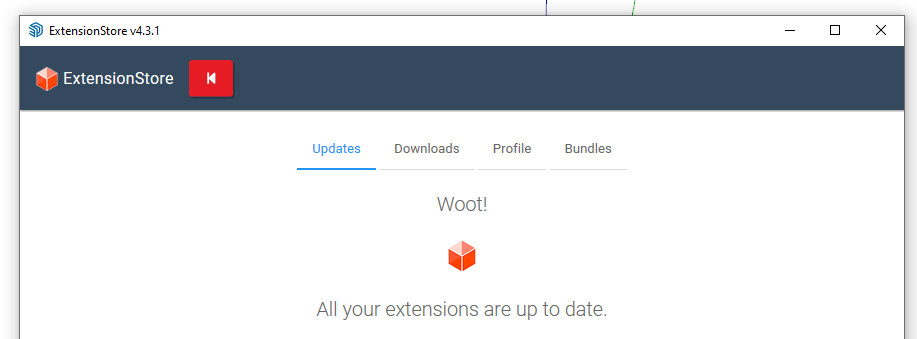
                            Screenshot - 10_31_2023 , 8_16_36 AM.png

                            Etaoin Shrdlu

                            %

                            (THERE'S NO PLACE LIKE)

                            G28 X0.0 Y0.0 Z0.0

                            M30

                            %

                            1 條回覆 最後回覆 回覆 引用 0
                            • O 離線
                              optimaforever
                              最後由 編輯

                              @dave r said:

                              @optimaforever said:

                              what if I FORCE UPDATE FredoLib?

                              What if you open the Sketchucation Extension Store and click on the red button at the top? If there are extensions from Sketchucation that need updating, they would be shown there. I did that earlier today and it showed a couple of Fredo6's extensions needed updating. I clicked on Update All and now it loks like this:
                              [attachment=0:3nz2sv2x]<!-- ia0 -->Screenshot - 10_31_2023 , 8_16_36 AM.png<!-- ia0 -->[/attachment:3nz2sv2x]

                              Precisely.
                              I did that and it updated several things, including LibFredo.
                              Therefore I wans't suspecting LibFredo but it was actually the problem.

                              1 條回覆 最後回覆 回覆 引用 0
                              • Dave RD 離線
                                Dave R
                                最後由 編輯

                                @optimaforever said:

                                I did that and it updated several things, including LibFredo.

                                I open that window two or three times a month to see if there are any extensions that need updating. I also have Fredo's Check Fredo6 Plugins for Update setup so that it offers to check every 15 days. As you know, Fredo is very active with making updates and bug fixes to his extensions so it's worth keeping your installation of them up to date. The last LibFredo6 update occurred in late August.

                                Etaoin Shrdlu

                                %

                                (THERE'S NO PLACE LIKE)

                                G28 X0.0 Y0.0 Z0.0

                                M30

                                %

                                1 條回覆 最後回覆 回覆 引用 0
                                • O 離線
                                  optimaforever
                                  最後由 編輯

                                  @dave r said:

                                  @optimaforever said:

                                  I did that and it updated several things, including LibFredo.

                                  I open that window two or three times a month to see if there are any extensions that need updating. I also have Fredo's Check Fredo6 Plugins for Update setup so that it offers to check every 15 days. As you know, Fredo is very active with making updates and bug fixes to his extensions so it's worth keeping your installation of them up to date. The last LibFredo6 update occurred in late August.

                                  Indeed, Fredo keeps updating his plugins but I must reckon his update check window bugs me more than I find it useful. I never push the check update button as I prefer SU or Extension store toolbar way of warning for updates. Now you make me realize, I wrote 999 days before the next update check 😄 Very nice idea, thanks Dave! 😄
                                  What I'd suggest to Fredo is to include LibFredo as a mandatory download when updating all his plugins. Anyway it takes an additional fraction of seconds these days with the download speeds. Anyway you need to reboot SU so...

                                  1 條回覆 最後回覆 回覆 引用 0
                                  • S 離線
                                    Studiospectre
                                    最後由 編輯

                                    Unfortunately my menu bar is still completely gone 😞
                                    I think I'll finally upgrade from 21 to 23 or even 24 and port everything over, I think I'm going to be forced to eventually. I know I'm whining but it's such a pain to move over all your plugins and extensions. Such is life.
                                    Anyhow, Thanks Fredo, you do amazing work.

                                    1 條回覆 最後回覆 回覆 引用 0
                                    • Dave RD 離線
                                      Dave R
                                      最後由 編輯

                                      @studiospectre said:

                                      Unfortunately my menu bar is still completely gone 😞

                                      Try restarting SketchUp.

                                      @studiospectre said:

                                      I think I'll finally upgrade from 21 to 23 or even 24

                                      What version of SketchUp are you currently using? Your profile says 2015.

                                      SketchUp 2024 isn't available yet.

                                      @studiospectre said:

                                      ... but it's such a pain to move over all your plugins and extensions.

                                      It shouldn't be. After installing the new version of SketchUp, install the current version of the Sketchucation Extension Store, sign in to Sketchucation with it, and install your extension bundle. That will install the most current versions of your extensions from Sketchucation.
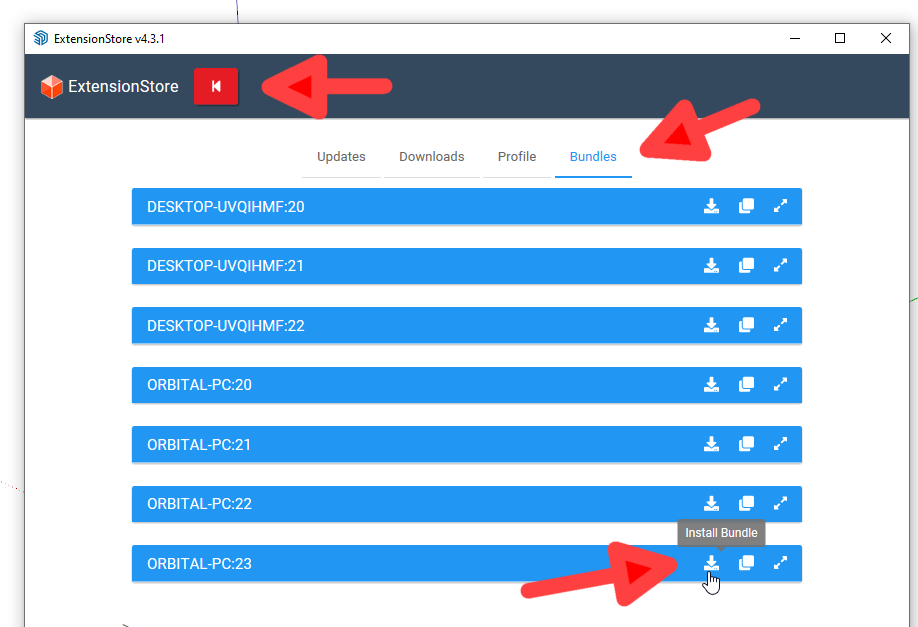
                                      Screenshot - 10_31_2023 , 8_59_26 AM.png

                                      Etaoin Shrdlu

                                      %

                                      (THERE'S NO PLACE LIKE)

                                      G28 X0.0 Y0.0 Z0.0

                                      M30

                                      %

                                      1 條回覆 最後回覆 回覆 引用 0
                                      • panixiaP 離線
                                        panixia
                                        最後由 編輯

                                        @studiospectre said:

                                        Unfortunately my menu bar is still completely gone 😞
                                        I think I'll finally upgrade from 21 to 23

                                        Naa.. It works fine in 2021 (tbh it works way better than it does on 2023 due to the 23 UI limitation).
                                        You probably messed up the install.

                                        Make sure to download and install this:

                                        Link Preview Image
                                        LibFredo6 | SketchUcation

                                        3D SketchUp Community for Design and Engineering Professionals.

                                        favicon

                                        (sketchucation.com)

                                        THEN download and install this:

                                        Link Preview Image
                                        LordOfTheToolbars | SketchUcation

                                        3D SketchUp Community for Design and Engineering Professionals.

                                        favicon

                                        (sketchucation.com)

                                        Reboot Sketchup and you toolbars will show up again.

                                        1 條回覆 最後回覆 回覆 引用 0
                                        • M 離線
                                          maximumselfish
                                          最後由 編輯

                                          Personal Commands => menu still not working. New personal command creation is not available.

                                          1 條回覆 最後回覆 回覆 引用 0
                                          • S 離線
                                            SCMC Newcomers
                                            最後由 編輯

                                            This tool looks awesome! However, I can't drag any icon to any palette. Can someone kindly enlighten me?


                                            1 條回覆 最後回覆 回覆 引用 0
                                            • 1
                                            • 2
                                            • 3
                                            • 4
                                            • 5
                                            • 24
                                            • 25
                                            • 3 / 25
                                            • 第一個貼文
                                              最後的貼文
                                            Buy SketchPlus
                                            Buy SUbD
                                            Buy WrapR
                                            Buy eBook
                                            Buy Modelur
                                            Buy Vertex Tools
                                            Buy SketchCuisine
                                            Buy FormFonts

                                            Advertisement