SCFLicense: Extension Licensing on Sketchucation
-
@celestinf said in SCFLicense: Extension Licensing on Sketchucation:
Bonjour,
Hello I take the liberty of writing to you because I acquired several licenses in 2023 that I can see in my License space. I had to change my hard drive and reinstall all the elements of my pc. When I launch the fredoscale from sketchup, for example, I get the message telling me to buy or use my license. So I'm going to load the License in my License space that I then validate by sketchup and I get the message "error in license validation, request to sketchupaction ERROR_A0B. Can you give me the procedure so that I can correct this? Thank youPlease run the Window > Libfredo Settings > Fredo6 Plugins Information for Sketchucation Support menu command in SketchUp and copy/paste the output into your reply.
-
Hello,
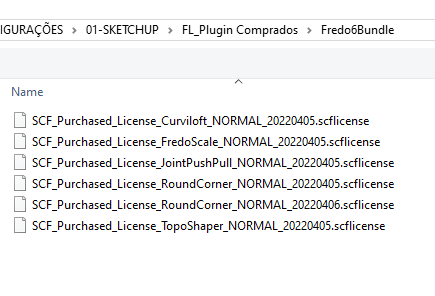
I bought FredoBundle in 2022, permanent licenses, and it was working fine. But now I receive a message that is "Not Licensed". Try to validate it but without success. the folder with the licenses still there but somehow it doesn't recognise the files....
try to download my licenses again but still not recognize them.
I update all the Fredo plugins using ExtensionStore v4.2.9, but still not working
please, any help on that? thanks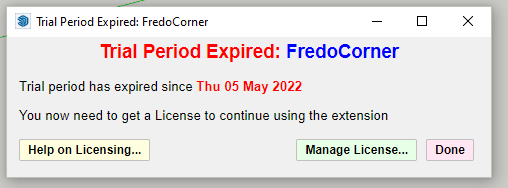
-
@chiklopes said in SCFLicense: Extension Licensing on Sketchucation:
using ExtensionStore v4.2.9
Please update Sketchucation Tools to 4.4.1 it has the latest licensing system

Sketchucation Tools | SketchUcation
3D SketchUp Community for Design and Engineering Professionals.
(sketchucation.com)
You can upgrade Sketchucation Tools directly from within our ExtensionStore. Restart SketchUp after installation and re-license.
-
-
@chiklopes
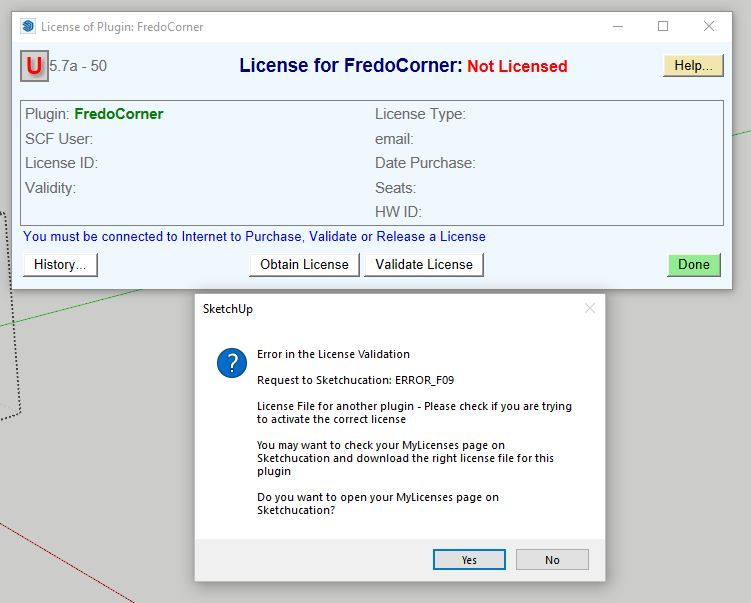
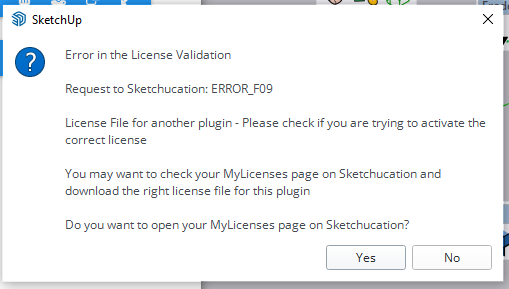
That error says you are trying to us a license file for another plugin [extension].
This can occur if, for example, you have a license for RoundCorner and you try to use it for FredoCorner - these are two different extensions and need their own licenses...Please give more details if this isn't the case.
-
@Rich-O-Brien
Bonjour voici selon votre demande, par contre petite question que je me pose pour re-installer les plugins, j'avais initialement sauvegardé les fichiers de l'ancien disque dur sur une clef USB que j'ai ensuite recopier dans le nouveau DD dans les fichiers destinés. Peut être que cette méthode n'est pas bonne et que j'aurais dû re-installer l'ensemble depuis sketchupaction en repartant de façon traditionnelle?+0100
- Platform: x64-mswin64_140 - Ruby: 2.7.1
- Sketchup: 21.0.339
- LibFredo6: v14.6a
- LibFredo6 Binary loaded
- Sketchucation ExtensionStore: 4.3.0
- SCFLicense: v6.0e - 72
- Fredo6 Plugins
Curviloft v2.0a
FredoScale v3.5a
FredoSpline v2.5a
JointPushPull v4.8a
RoundCorner v3.3a
ToolsOnSurface v2.5a - SCFLicense directory present
Signature File: 2022-06-22 14:16:52 +0200
ClothWorks: 2024-03-23 12:13:34 +0100
Curviloft: 2023-06-02 15:34:57 +0200
FredoSpline: 2023-04-19 13:32:33 +0200
JointPushPull: 2023-04-06 11:15:28 +0200
RoundCorner: 2023-03-02 12:40:52 +0100
-
@celestinf said in SCFLicense: Extension Licensing on Sketchucation:
Sketchucation ExtensionStore: 4.3.0
Please update Sketchucation Tools to v 4.4.1
Launch using Extensions > Sketchucation > ExtensionStore or via toolbar icon
Click Bell and update
Restart SketchUp
Activate License
-
okay thanks.
it works now.
But also, I guess one mistake was what @TIG said. I was mixing RoundCorner with FredoCorner...
thanks again both -
I have bought a licence how ever it doesent work i just get this message
An error occoured in comunication with sketchucation.please help
-
@mohamed888 said in SCFLicense: Extension Licensing on Sketchucation:
I have bought a licence how ever it doesent work i just get this message
An error occoured in comunication with sketchucation.please help

SCFLicense: Extension Licensing on Sketchucation
@Lprawita That is your network blocking access to our server. Please whitelist *.sketchucation.com or activate on a less strict network
sketchucation (community.sketchucation.com)
-
@Rich-O-Brien
how can i do that -
@mohamed888 Either in your firewall or your networks policy settings
Its a client side restriction you are facing that's impossible for us to circumvent. You need to find whether its software, hardware or policy related. Our server is up and activating licenses.
-
@Rich-O-Brien
thank you problem solve
i see the problem repeated a lot in the community here
i recommend this video https://youtu.be/UKfcCpoYH5I -
@celestinf
Salut afin de dire ce que j'ai fais. J'ai totalement desinstallé sketchup et supprimé l'ensemble des fichiers dans le roaming.... Après ré-installation, j'ai tout téléchargé depuis votre site sans utiliser ou copier les fichiers que j'avais sauvegardé et cela refonctionne correctement merci du temps passé.
Bonne journéeHi in order to say what I did. I totally uninstalled sketchup and deleted all the files in the roaming.... After re-installation, I downloaded everything from your site without using or copying the files I had saved and it works properly again thanks for the time spent. Have a nice day
-
Ich habe am 12.11.24 eine Lizenz für das 50 Dollar inkl FAT ca 60 Dollar Fredo Paket ausgewählt und per PayPal bezahlt. Der Bezahlvorgang lief ohne Probleme. Heute sehe ich, dass PayPal die Zahlung abgelehnt hat. Haben Sie eine Ahnung warum?
Andere Zahlungen am gleichen Tag auf deutsche Konten liefen ohne Probleme.
Grüße FranzI selected a license for the 50 dollar incl. VAT approx. 60 dollar Fredo package on 12.11.24 and paid via PayPal. The payment process went without any problems. Today I see that PayPal declined the payment. Do you have any idea why? Other payments on the same day to German accounts went without any problems. Greetings Franz
-
@frajo Sometimes banks will initiate the charge but when it comes to authorising it doesn't complete for any number of reasons.
In some instances there some third party that sits between your account and PayPal. For instance we see in Poland there's a third party called P24 that Polish visitiors use for online payments. 9/10 these fail because they are authorised payment processors that we use.
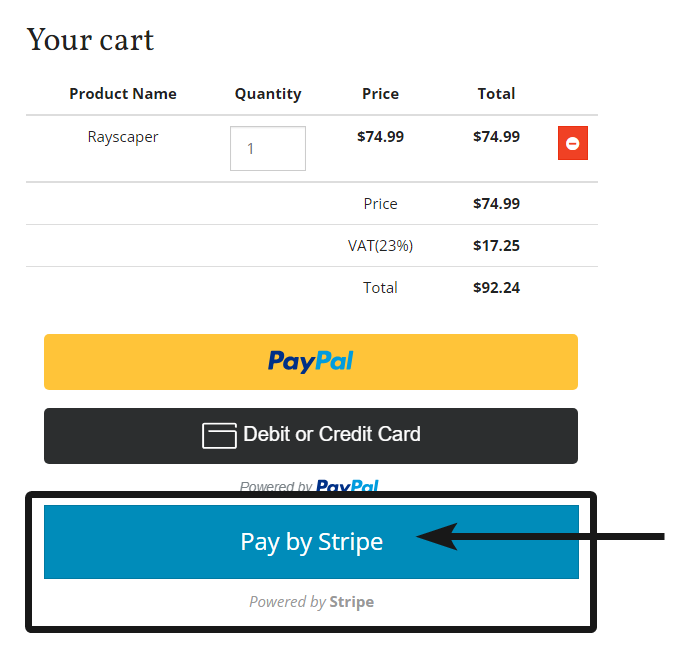
So if you have some type third party banking solution that you use to purchase items I would use our Stripe payment processor. It is more bank friendly in some cases than PayPal.
-
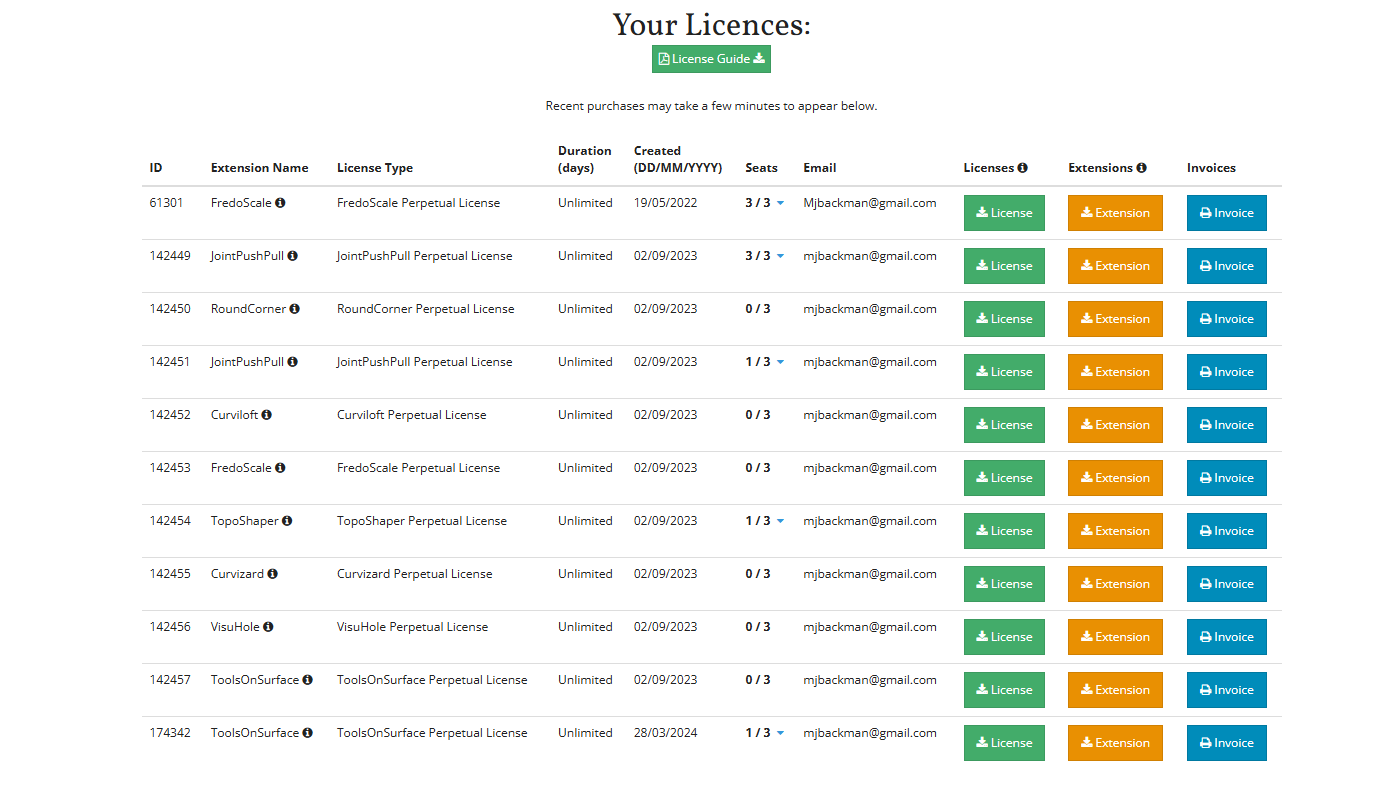
Thru paint does not show up in "my licenses"
-
@Mike-Backman When did you purchase a license? Do you have multiple accounts?
-
Olá!
Já adquiri a compra da licença e estou no aguardo da ativação da mesma. -
@FERREIRA-DOS-SANTOS said in SCFLicense: Extension Licensing on Sketchucation:
Olá!
Já adquiri a compra da licença e estou no aguardo da ativação da mesma.Hello! I have already purchased the license purchase and am waiting for it to be activated.
Licenses are at https://sketchucation.com/webshop/my-licences.php



Hello! It looks like you're interested in this conversation, but you don't have an account yet.
Getting fed up of having to scroll through the same posts each visit? When you register for an account, you'll always come back to exactly where you were before, and choose to be notified of new replies (either via email, or push notification). You'll also be able to save bookmarks and upvote posts to show your appreciation to other community members.
With your input, this post could be even better 💗
Register Login


Advertisement