SCFLicense: Extension Licensing on Sketchucation
-
I can't validate FredoSpline on the 3rd PC, details were sent to support and Rich please take a look ASAP
-
@stuart65 said:
I am completely locked out now since received an Error in the licence validation message and also that licence seats are exceeded. I have only installed on my only laptop.
Do you want to release one or all of the 3 seats currently taken?
-
@alfananda said:
Yeah, but the thing is I already released on all my devices, but it is still counted on sketchucation license page. Is there anything I can do according the issue?
You currently have 2 seats taken for TopoShaper.
Do you still have a problem?
-
@rich o brien said:
@numerobis said:
So it's 8 individual licenses and not one bundle license?
Yes
@numerobis said:
And all licenses need to be checked every few days?
The license does ping occasionally. Unsure of the time frame though. Fredo would know more.
@numerobis said:
So there must be a permanent connection to the internet?
Not really. Tools will work offline if you validated while online.
Yes, it deactivates after a few days without internet access, I activated it again today and for some areas where I need to hook up a VPN it is awful.
-
@xyhcwu said:
Yes, it deactivates after a few days without internet access, I activated it again today and for some areas where I need to hook up a VPN it is awful.
What's the issue? If you mask your IP through VPN and that software is not whitelisted to allow communication with a particular URL you will encounter problems.
I'm not sure what frequency Fredo has set on his license check. That's under his control. But allowing your VPN to communicate is under your control.
-
@fredo6 said:
@alfananda said:
Yeah, but the thing is I already released on all my devices, but it is still counted on sketchucation license page. Is there anything I can do according the issue?
You currently have 2 seats taken for TopoShaper.
Do you still have a problem?
Yeah, can you help me to release all of the seat? All of my purchased license. I will do the validate from the start again. Appreciate it. Thankyou
-
@alfananda said:
@fredo6 said:
@alfananda said:
Yeah, but the thing is I already released on all my devices, but it is still counted on sketchucation license page. Is there anything I can do according the issue?
You currently have 2 seats taken for TopoShaper.
Do you still have a problem?
Yeah, can you help me to release all of the seat? All of my purchased license. I will do the validate from the start again. Appreciate it. Thankyou
Because I dont know why, some of the checkbox seat doesn't appear and it is frustating me.
-
@alfananda said:
Because I dont know why, some of the checkbox seat doesn't appear and it is frustating me.
It happens when you validate using an older version of Sketchucation Tools that did not have online release.
Updating all devices to the latest releases will enable online releasing at https://sketchucation.com/webshop/my-licences.php
-
@rich o brien said:
@xyhcwu said:
Yes, it deactivates after a few days without internet access, I activated it again today and for some areas where I need to hook up a VPN it is awful.
What's the issue? If you mask your IP through VPN and that software is not whitelisted to allow communication with a particular URL you will encounter problems.
I'm not sure what frequency Fredo has set on his license check. That's under his control. But allowing your VPN to communicate is under your control.
What I mean is that Sketchup cannot connect to the network without my VPN and the Fredo plugin cannot automatically verify the license, then after a while it asks to activate it again.
Next I need to turn on the VPN to connect to the network to activate the license, as I don't use my VPN very often, so it causes this to be repeated over and over again.
Wish it had a longer auto-verify time -
Hey, I have a license for the cloth work plugin with three seats. My old pc broke and crashed; how do I remove the seat occupied by a dead and inactive computer?
-
bonjour,
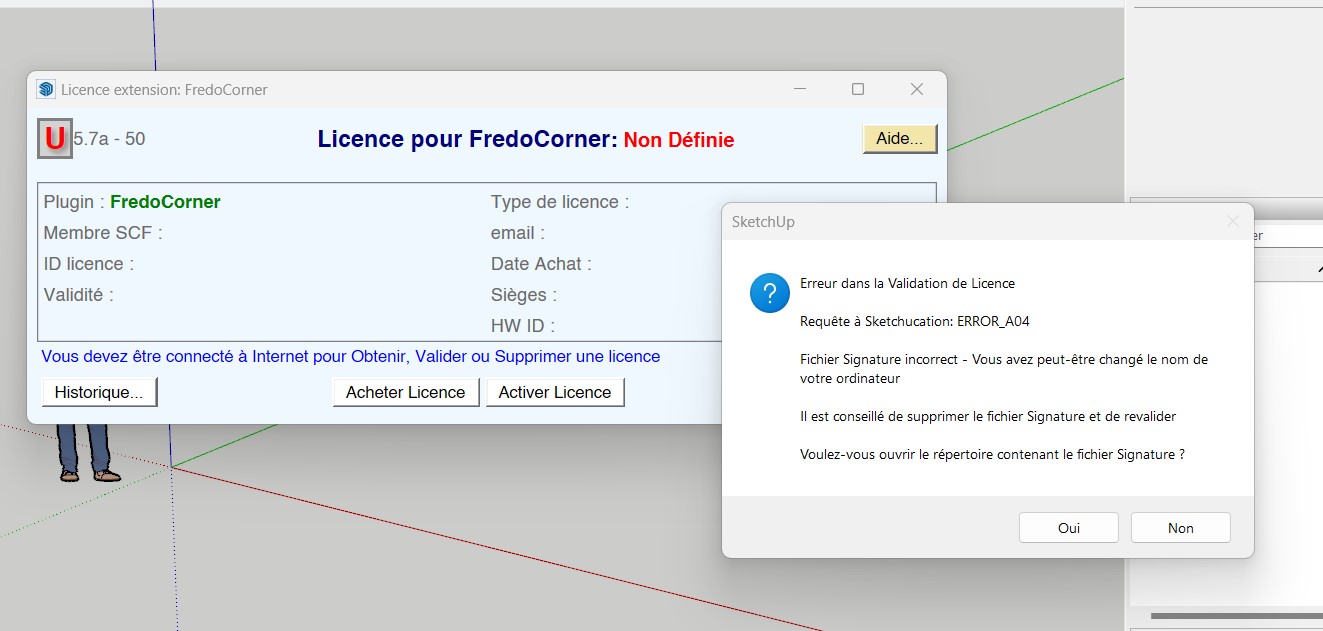
j'ai acheté la licence round corner et la licence fredocorner mais je n'arrive a intsaller aucune des deux. J'ai ce message d'erreur et quand jessais d'enlever le lien signature rien ne change...
-
Your screenshot shows you have an old version of the licensing system installed.
Please update to the newest versions of the SketchUcation toolset [for the newer licensing] and LibFredo6.
After the installation restart SketchUp to sync everything...
If you still have problems let us know...Votre capture d'écran montre que vous avez installé une ancienne version du système de licence.
Veuillez mettre à jour les dernières versions de l'ensemble d'outils SketchUcation [pour la nouvelle licence] et LibFredo6.
Après l'installation, redémarrez SketchUp pour tout synchroniser...
Si vous avez encore des problèmes, faites-le nous savoir... -
malheureusement rien n'a changer... quand je supprime le fichier signature et que je revalide j'ai une fenetre avec B03 qui saffiche.
-
Something has changed - it's now a B03 error message ! [I'm not even sure what that means because it's not listed... hopefully Fredo can explain it]
Meanwhile can you provide a screenshot of the licensing dialog - so we can see the version now... the version of the SketchUcation toolset and LibFredo6...Quelque chose a changé - c'est maintenant un message d'erreur B03 ! [Je ne suis même pas sûr de ce que cela signifie parce que ce n'est pas répertorié... j'espère que Fredo pourra l'expliquer]
En attendant, pouvez-vous fournir une capture d'écran de la boîte de dialogue de licence - afin que nous puissions voir la version maintenant... la version de l'ensemble d'outils SketchUcation et LibFredo6... -
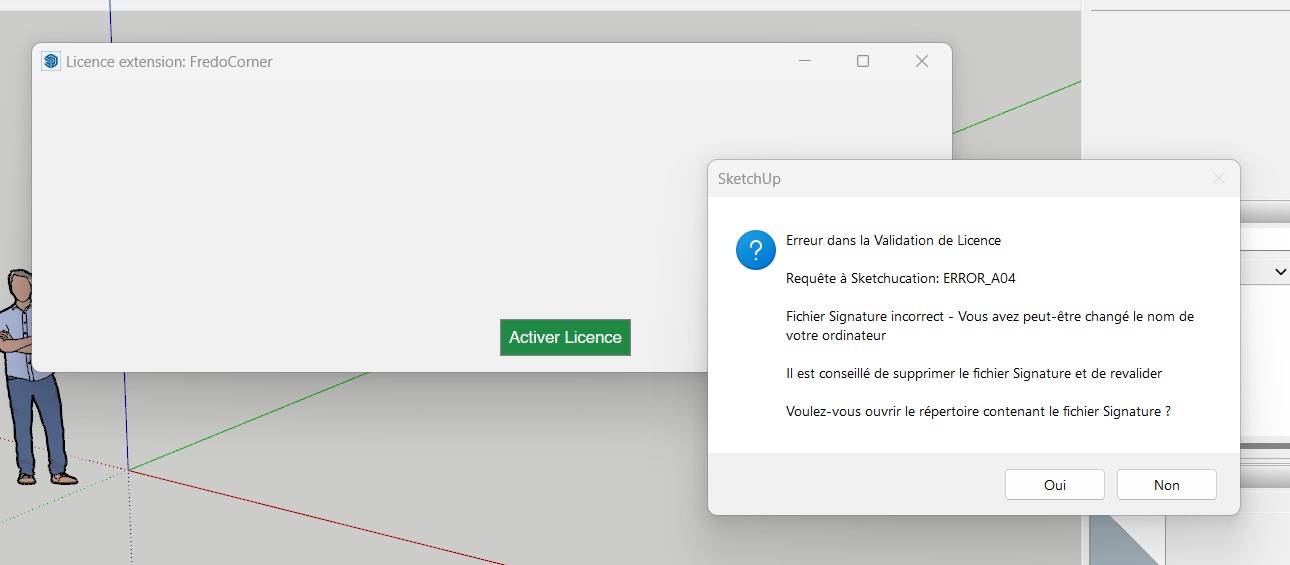
la fenetre ne s'affiche pas correctement pour le moment je pense que ma photo ne va pas vous aider...
-
I'll get Fredo to become involved - it's his expertise...
Je vais demander à Fredo de s'impliquer - c'est son expertise...
-
@selenaveber said:
la fenetre ne s'affiche pas correctement pour le moment je pense que ma photo ne va pas vous aider...
Did you upgrade both LibFredo6 and SketchucationStore?
If the dialog content does not display, can you try to slightly resize it.
Avez-vous mis à jour LibFredo6 et SketchucationStore ?
Si le contenu de la boîte de dialogue ne s'affiche pas, pouvez-vous essayer de la redimensionner légèrement.
-
hello. i need help on whitelisting the sketchucation domain. im having the same problem about the licensing validation. kindly help ASAP
-
kindly help with the roundcorner license validation issue please.
-
@guess15 said:
im having the same problem about the licensing validation. kindly help ASAP
What version of SketchUp are you using? What operating system? Kindly update your forum profile ASAP.
Do you have the current version of LibFredo6 and the Sketchucation ExtensionStore installed?
Show any messages you are getting when you try to validate the RoundCorner license.




Hello! It looks like you're interested in this conversation, but you don't have an account yet.
Getting fed up of having to scroll through the same posts each visit? When you register for an account, you'll always come back to exactly where you were before, and choose to be notified of new replies (either via email, or push notification). You'll also be able to save bookmarks and upvote posts to show your appreciation to other community members.
With your input, this post could be even better 💗
Register Login


Advertisement