sketchucation logo sketchucation
    • Login
    Oops, your profile's looking a bit empty! To help us tailor your experience, please fill in key details like your SketchUp version, skill level, operating system, and more. Update and save your info on your profile page today!
    ⚠️ Important | Libfredo 15.6a introduces important bugfixes for Fredo's Extensions Update

    Follow me into different radius

    Scheduled Pinned Locked Moved SketchUp Discussions
    sketchup
    30 Posts 4 Posters 5.1k Views 4 Watching
    Loading More Posts
    • Oldest to Newest
    • Newest to Oldest
    • Most Votes
    Reply
    • Reply as topic
    Log in to reply
    This topic has been deleted. Only users with topic management privileges can see it.
    • L Offline
      Leggy
      last edited by

      here's the dwg


      may help

      1 Reply Last reply Reply Quote 0
      • fredo6F Offline
        fredo6
        last edited by

        @leggy said:

        hi im getting this message

        For Curviloft to operate correctly, you need to select only the external contours, not the inner corner edges. Watch the short video by Box again.

        Fredo

        1 Reply Last reply Reply Quote 0
        • L Offline
          Leggy
          last edited by

          Aha ok thanks for that ill try again on Monday

          1 Reply Last reply Reply Quote 0
          • BoxB Offline
            Box
            last edited by

            For a bit of clarity, in my gif you see me select all of it and show that it doesn't work as it highlights too many edges, then I hold down shift to deselect the corner faces. You could also activate the tool with nothing selected and just click on the edges you need.

            1 Reply Last reply Reply Quote 0
            • L Offline
              Leggy
              last edited by

              hi I followed your example and got this, any ideas

              thanks so much for your time


              curviloft test.png

              1 Reply Last reply Reply Quote 0
              • Dave RD Offline
                Dave R
                last edited by

                Why don't you upload the SKP file so we can see what you started with?

                Etaoin Shrdlu

                %

                (THERE'S NO PLACE LIKE)

                G28 X0.0 Y0.0 Z0.0

                M30

                %

                1 Reply Last reply Reply Quote 0
                • L Offline
                  Leggy
                  last edited by

                  here you are


                  curviloft test.skp

                  1 Reply Last reply Reply Quote 0
                  • Dave RD Offline
                    Dave R
                    last edited by

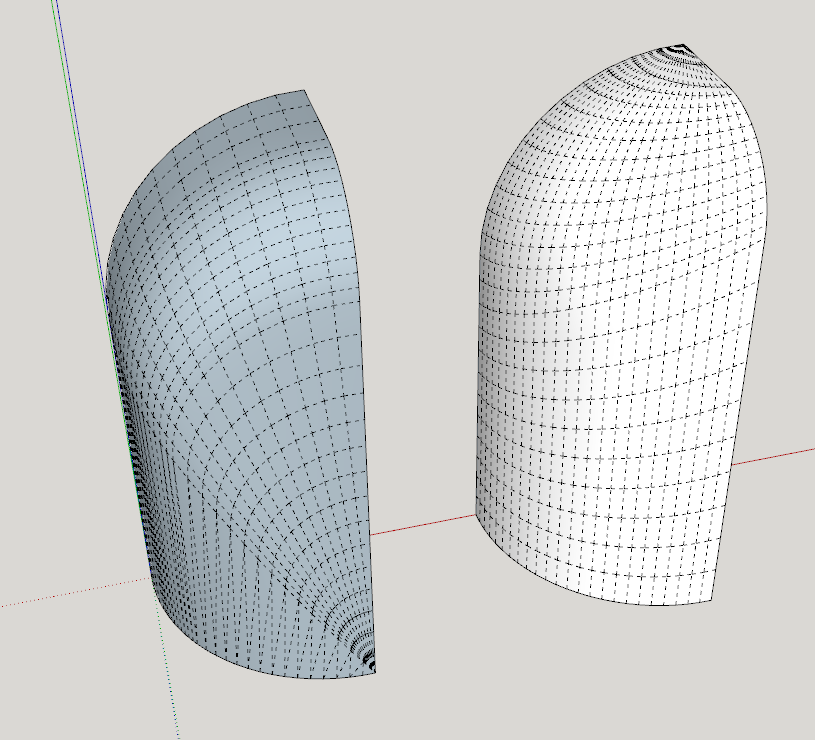
                    Does the white one look more like what you want?
                    Screenshot - 1_10_2020 , 9_06_46 AM.png

                    curviloft test.skp

                    Etaoin Shrdlu

                    %

                    (THERE'S NO PLACE LIKE)

                    G28 X0.0 Y0.0 Z0.0

                    M30

                    %

                    1 Reply Last reply Reply Quote 0
                    • L Offline
                      Leggy
                      last edited by

                      exactly, is it to do with the order you pick the lines?

                      1 Reply Last reply Reply Quote 0
                      • Dave RD Offline
                        Dave R
                        last edited by

                        No. The bottom arc has 24 segments so I divided the straight lines on the sides and top so there is a total of 24 segments up each side (including the segments in the arcs at the top.

                        Etaoin Shrdlu

                        %

                        (THERE'S NO PLACE LIKE)

                        G28 X0.0 Y0.0 Z0.0

                        M30

                        %

                        1 Reply Last reply Reply Quote 0
                        • L Offline
                          Leggy
                          last edited by

                          how did you do that?

                          1 Reply Last reply Reply Quote 0
                          • Dave RD Offline
                            Dave R
                            last edited by

                            Do what? Divide the edges? I right clicked on an edge, selected Divide and then entered the correct number.

                            Etaoin Shrdlu

                            %

                            (THERE'S NO PLACE LIKE)

                            G28 X0.0 Y0.0 Z0.0

                            M30

                            %

                            1 Reply Last reply Reply Quote 0
                            • L Offline
                              Leggy
                              last edited by

                              Clever , the problem with the video is the curser leaves the screen so you can’t see what he clicked

                              1 Reply Last reply Reply Quote 0
                              • Dave RD Offline
                                Dave R
                                last edited by

                                Which video are you referring to?

                                Etaoin Shrdlu

                                %

                                (THERE'S NO PLACE LIKE)

                                G28 X0.0 Y0.0 Z0.0

                                M30

                                %

                                1 Reply Last reply Reply Quote 0
                                • L Offline
                                  Leggy
                                  last edited by

                                  The one from box

                                  1 Reply Last reply Reply Quote 0
                                  • L Offline
                                    Leggy
                                    last edited by

                                    The one from box

                                    1 Reply Last reply Reply Quote 0
                                    • Dave RD Offline
                                      Dave R
                                      last edited by

                                      The only things I saw where the cursor wasn't visible was when he made a group after context clicking on the selected geometry and then when he moved the cursor to bring the Entity Info panel up to show that it's a solid group.

                                      Etaoin Shrdlu

                                      %

                                      (THERE'S NO PLACE LIKE)

                                      G28 X0.0 Y0.0 Z0.0

                                      M30

                                      %

                                      1 Reply Last reply Reply Quote 0
                                      • 1
                                      • 2
                                      • 2 / 2
                                      • First post
                                        Last post
                                      Buy SketchPlus
                                      Buy SUbD
                                      Buy WrapR
                                      Buy eBook
                                      Buy Modelur
                                      Buy Vertex Tools
                                      Buy SketchCuisine
                                      Buy FormFonts

                                      Advertisement