sketchucation logo sketchucation
    • 登入
    Oops, your profile's looking a bit empty! To help us tailor your experience, please fill in key details like your SketchUp version, skill level, operating system, and more. Update and save your info on your profile page today!
    🔌 Smart Spline | Fluid way to handle splines for furniture design and complex structures. Download

    [Plugin] ClothWorks v1.8.0 - 28 Apr 2024

    已排程 已置頂 已鎖定 已移動 Plugins
    699 貼文 161 Posters 669.9k 瀏覽 161 Watching
    正在載入更多貼文
    • 從舊到新
    • 從新到舊
    • 最多點贊
    回覆
    • 在新貼文中回覆
    登入後回覆
    此主題已被刪除。只有擁有主題管理權限的使用者可以查看。
    • Dave RD 離線
      Dave R
      最後由 編輯

      As Rich suggested, share the file that shows CLothworks crashing SketchUp so we can try to help you. No point in trying to sort it out on your own when there's help freely available.

      Etaoin Shrdlu

      %

      (THERE'S NO PLACE LIKE)

      G28 X0.0 Y0.0 Z0.0

      M30

      %

      1 條回覆 最後回覆 回覆 引用 0
      • A 離線
        Anton_S
        最後由 編輯

        @hank_hogan said:

        At firts I tried default setting suggested by plugin. Then I tried settings presented in plugin's author in manual. All leads to the same effect... but ok, I see I'm in the minority of users with such problem, so it's cause must be on my end. Will keep looking. Thank You all for help.

        Hi,

        Thank you for the report!

        Would it be possible for you to share the model with me? You can send me a private message or email to clothworks@sketchucation.com

        Thanks,
        Anton

        1 條回覆 最後回覆 回覆 引用 0
        • Mike AmosM 離線
          Mike Amos
          最後由 編輯

          For some reason I have no xontextaul menu with right click. Has somethng changed?

          Stay well folks.

          Absentia mortis praesentiam vitae probat, vita autem est argumentum constantiae.

          1 條回覆 最後回覆 回覆 引用 0
          • A 離線
            Anton_S
            最後由 編輯

            @mike amos said:

            For some reason I have no xontextaul menu with right click. Has somethng changed?

            Stay well folks.

            Make sure you're right-clicking on top level group/component to see the clothworks context menu.

            1 條回覆 最後回覆 回覆 引用 0
            • Mike AmosM 離線
              Mike Amos
              最後由 編輯

              Yes mate, got that and the basics. Something wrong with the model. At least that's the only thing I can come up with. Tried a new model and the context menue was apparent. Completed the process fine this time.

              What can you do when clicknology has a fit of 'sod you'.

              Absentia mortis praesentiam vitae probat, vita autem est argumentum constantiae.

              1 條回覆 最後回覆 回覆 引用 0
              • F 離線
                FelipeMagalhaes Newcomers
                最後由 編輯

                Hello!
                I'm trying to find a way to simulate a cloth but with rounded corners and not using the Adaptive Grid subdivision, since it really messes up the mesh.

                Is there someone?
                Tks

                1 條回覆 最後回覆 回覆 引用 0
                • Dave RD 離線
                  Dave R
                  最後由 編輯

                  @felipemagalhaes said:

                  Hello!since it really messes up the mesh.

                  How does it mess up the mesh? Share your .skp file so we can see.

                  I don't have any issues with the mesh on a cloth with rounded corners and Adaptive Grid.
                  Screenshot - 2_15_2023 , 2_05_41 PM.png

                  Etaoin Shrdlu

                  %

                  (THERE'S NO PLACE LIKE)

                  G28 X0.0 Y0.0 Z0.0

                  M30

                  %

                  1 條回覆 最後回覆 回覆 引用 0
                  • F 離線
                    FelipeMagalhaes Newcomers
                    最後由 編輯

                    @dave r said:

                    @felipemagalhaes said:

                    Hello!since it really messes up the mesh.

                    How does it mess up the mesh? Share your .skp file so we can see.

                    I don't have any issues with the mesh on a cloth with rounded corners and Adaptive Grid.
                    [attachment=2:1bx2g7pn]<!-- ia2 -->Screenshot - 2_15_2023 , 2_05_41 PM.png<!-- ia2 -->[/attachment:1bx2g7pn]

                    I found a way to solve my problem.
                    When I was trying to apply the Adaptive Grid, it was messing up the mesh next to the edges by putting too much tension on it. By doing that, in the end of the simulation it was visible some rough distortions (even with more subdivisions applyed).

                    However, by putting some suportive lines on the mesh the Adaptive Grid could spread the subdivision more uniformly, than the problem around the edges was gone.

                    Anyway, thank you for your help.
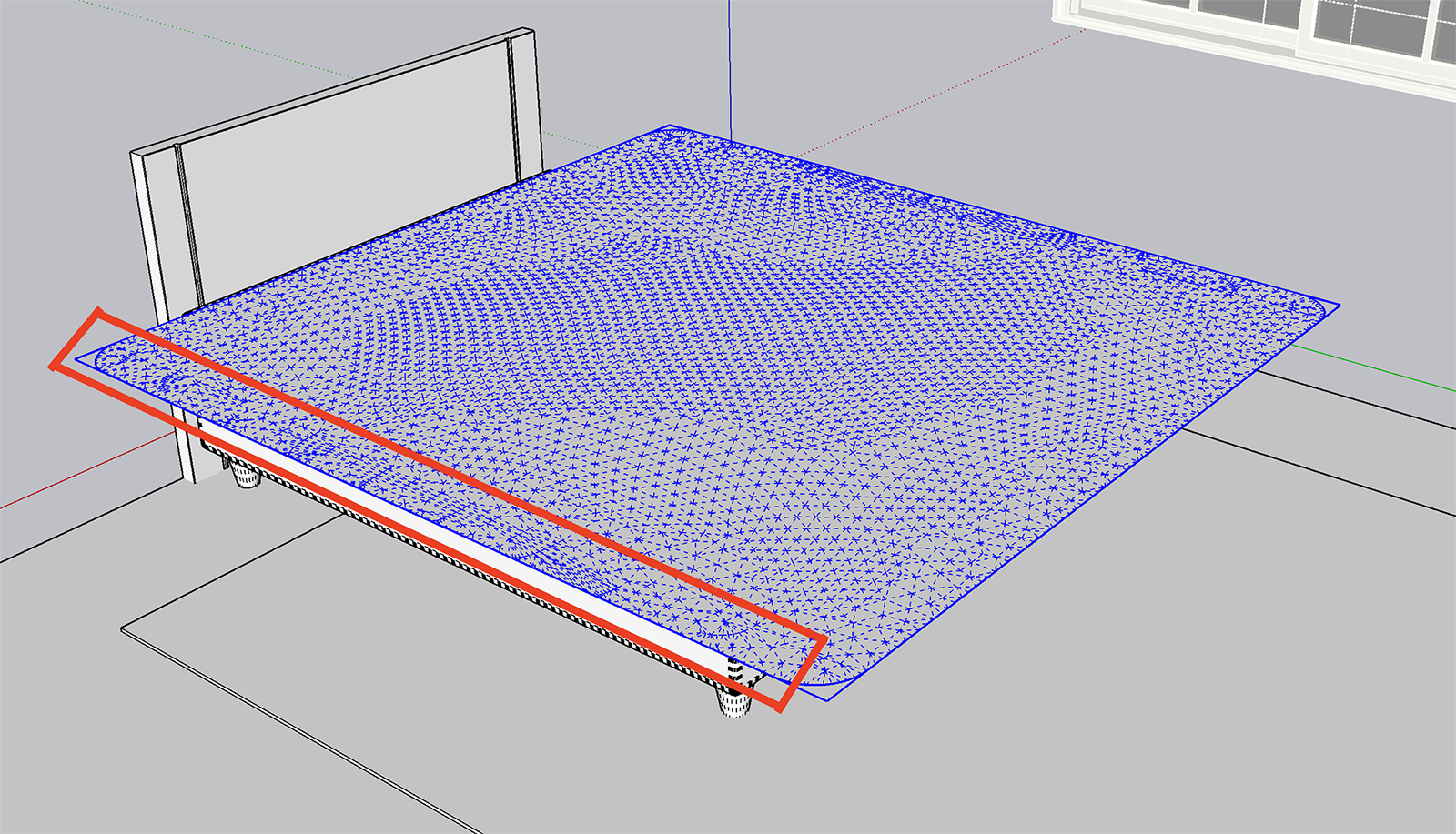

                    Rough Edges


                    Better edges with suport lines

                    1 條回覆 最後回覆 回覆 引用 0
                    • A 離線
                      Anton_S
                      最後由 編輯

                      @felipemagalhaes said:

                      @dave r said:

                      @felipemagalhaes said:

                      Hello!since it really messes up the mesh.

                      How does it mess up the mesh? Share your .skp file so we can see.

                      I don't have any issues with the mesh on a cloth with rounded corners and Adaptive Grid.
                      [attachment=2:14cvwrh9]<!-- ia2 -->Screenshot - 2_15_2023 , 2_05_41 PM.png<!-- ia2 -->[/attachment:14cvwrh9]

                      I found a way to solve my problem.
                      When I was trying to apply the Adaptive Grid, it was messing up the mesh next to the edges by putting too much tension on it. By doing that, in the end of the simulation it was visible some rough distortions (even with more subdivisions applyed).

                      However, by putting some suportive lines on the mesh the Adaptive Grid could spread the subdivision more uniformly, than the problem around the edges was gone.

                      Anyway, thank you for your help.
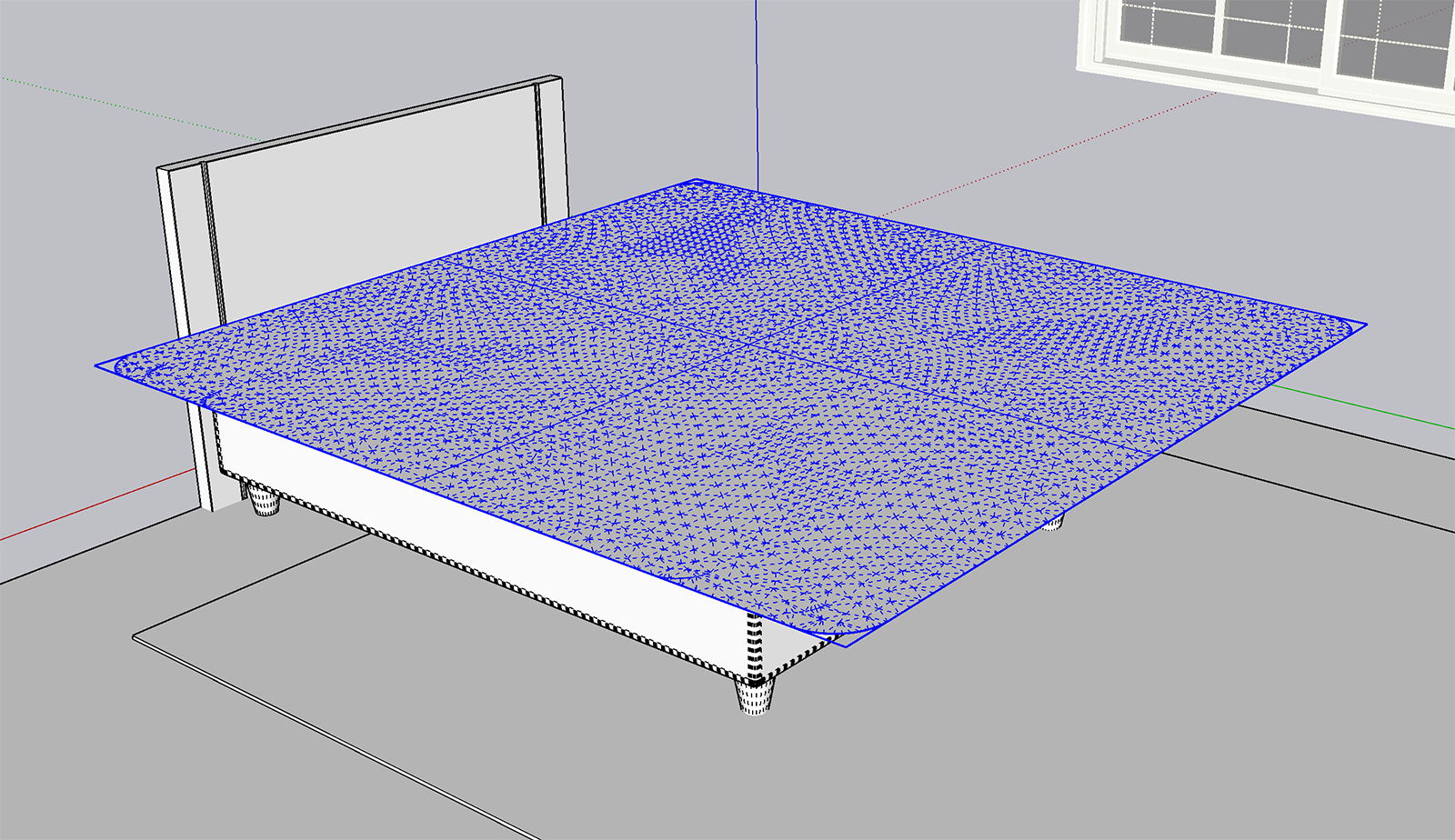
                      Nice find! Yes, adding supportive lines allows you to control the subdivision. This does however suggest some improvements to the subdivision are needed. Thanks for your insight.

                      1 條回覆 最後回覆 回覆 引用 0
                      • B 離線
                        BottiAgustin Newcomers
                        最後由 編輯

                        realmente una locura este plugin. te felicito 👍 👍 👍

                        1 條回覆 最後回覆 回覆 引用 0
                        • Mike AmosM 離線
                          Mike Amos
                          最後由 編輯

                          Trying to drape a roof canvas on an AFV, gets squirelly every time lately. Crash #537781

                          As per usual, something basic, can you tell me where I messed up please?

                          I know, barely trust myself to cross the road, sinusitis. Jubbly.

                          Absentia mortis praesentiam vitae probat, vita autem est argumentum constantiae.

                          1 條回覆 最後回覆 回覆 引用 0
                          • M 離線
                            mahsa1995
                            最後由 編輯

                            Hello

                            I'm trying to make a sheer material drape but the cloth is giving me one face that I can apply material too. (the back face of the material (grey part) How can I have two sided cloth? i hope this makes sense

                            1 條回覆 最後回覆 回覆 引用 0
                            • Dave RD 離線
                              Dave R
                              最後由 編輯

                              @mahsa1995 said:

                              ... but the cloth is giving me one face that I can apply material too. (the back face of the material (grey part) How can I have two sided cloth?

                              Share the SketchUp model file so we can see what you've got. You should be able to apply the material to both sides.

                              Etaoin Shrdlu

                              %

                              (THERE'S NO PLACE LIKE)

                              G28 X0.0 Y0.0 Z0.0

                              M30

                              %

                              1 條回覆 最後回覆 回覆 引用 0
                              • R 離線
                                rebrandrianne
                                最後由 編輯

                                Hi,

                                Is it possible to make round objects (group) a cloth? example; making a round cushion?

                                I now only can work with rectangle groups?

                                Greetings,

                                Rianne

                                1 條回覆 最後回覆 回覆 引用 0
                                • Dave RD 離線
                                  Dave R
                                  最後由 編輯

                                  @rebrandrianne said:

                                  Hi,

                                  Is it possible to make round objects (group) a cloth? example; making a round cushion?

                                  You can use a circle for the coth. Drape it over a rounded form for a cushion if you want.

                                  Circle as Cloth

                                  Etaoin Shrdlu

                                  %

                                  (THERE'S NO PLACE LIKE)

                                  G28 X0.0 Y0.0 Z0.0

                                  M30

                                  %

                                  1 條回覆 最後回覆 回覆 引用 0
                                  • I 離線
                                    i5963c
                                    最後由 編輯

                                    I acquired a license for ClothWorks, and installed the plugin and activated the license as specified in the instructions.
                                    The plugin appears in the Sketchup menu (also with right click) and the icons are visible in the toolbar.
                                    However, a feature that is apparently linked to the paid license (i.e. 'compressing' the pins) doesn't work. I can only select the set of individual pins, but the Gizmo to manipulate the combined pins is never activated.
                                    I tried already to release the license, uninstall, exit and relaunch Sketchup, reinstall the plugin and re-activate the license. It all doesn't help...
                                    I have the plugin installed on 2 PC's (Windows 10 and 11). It doesn't work on both PC's (the license is valid for 3 devices, by the way).
                                    Any suggestions to fix this issue are highly appreciated. I bought this plugin basically to do some modelling of curtains, and without the feature to compress the pins, this plugin is quite useless to me.

                                    1 條回覆 最後回覆 回覆 引用 0
                                    • Dave RD 離線
                                      Dave R
                                      最後由 編輯

                                      Do you also have the current version of the Sketchucation Extension Store installed?

                                      Etaoin Shrdlu

                                      %

                                      (THERE'S NO PLACE LIKE)

                                      G28 X0.0 Y0.0 Z0.0

                                      M30

                                      %

                                      1 條回覆 最後回覆 回覆 引用 0
                                      • I 離線
                                        i5963c
                                        最後由 編輯

                                        Hi, I think so. I have version 4.3.1. Not sure if it's really the most recent version?

                                        I don't recall how I installed it. The SketchUcation store (and also this site) lacks indeed a bit of userfriendlyness in my view. Difficult to navigate as far as I'm able to do.

                                        By the way, I also have the Fredo6 bundle installed (via the SketchUcation store) and that works fine. I installed this bundle half a year ago (together with the most up-to-date version of the SketchUcation store at that time). The ClothWorks extension (that I acquired some days ago) dates from before this date, so I would assume that my actual SketchUcation store version must be compatible with the (older) ClothWorks extension?

                                        1 條回覆 最後回覆 回覆 引用 0
                                        • Rich O BrienR 離線
                                          Rich O Brien Moderator
                                          最後由 編輯

                                          @i5963c said:

                                          Hi, I think so.....

                                          Please run the Window > Libfredo Settings > Fredo6 Plugins Information for Sketchucation Support menu command in SketchUp and copy/paste the output into your reply.

                                          Download the free D'oh Book for SketchUp 📖

                                          1 條回覆 最後回覆 回覆 引用 0
                                          • I 離線
                                            i5963c
                                            最後由 編輯

                                            Hello, please find the requested info below.

                                            Fredo6 Plugins Information on 2024-01-19 17:33:54 +0100

                                            • Platform: x64-mingw32 - Ruby: 2.2.4
                                            • Sketchup: 17.2.2555
                                            • LibFredo6: v14.2a
                                            • LibFredo6 Binary loaded
                                            • Sketchucation ExtensionStore: 4.3.1
                                            • SCFLicense: v6.1a - 72
                                            • Fredo6 Plugins

                                              Curviloft v1.9b - licensed FULL
                                              Curvizard v2.4b - licensed FULL
                                              FredoScale v3.5a - licensed FULL
                                              JointPushPull v4.7a - licensed FULL
                                              MatSim v1.2b
                                              MoveAlignMe v1.2a
                                              RoundCorner v3.3a - licensed FULL
                                              ToolsOnSurface v2.5a - licensed FULL

                                            • SCFLicense directory present

                                              Signature File: 2023-05-29 20:03:34 +0200
                                              ClothWorks: 2024-01-19 15:51:06 +0100
                                              Curviloft: 2023-05-29 20:45:27 +0200
                                              Curvizard: 2023-05-29 20:45:50 +0200
                                              FredoScale: 2023-05-29 20:47:48 +0200
                                              JointPushPull: 2023-05-29 20:48:02 +0200
                                              RoundCorner: 2023-05-29 20:46:08 +0200
                                              ToolsOnSurface: 2023-05-29 20:46:39 +0200
                                              TopoShaper: 2023-05-29 20:47:11 +0200
                                              VisuHole: 2023-05-29 20:47:28 +0200

                                            1 條回覆 最後回覆 回覆 引用 0
                                            • 1
                                            • 2
                                            • 27
                                            • 28
                                            • 29
                                            • 30
                                            • 31
                                            • 34
                                            • 35
                                            • 29 / 35
                                            • 第一個貼文
                                              最後的貼文
                                            Buy SketchPlus
                                            Buy SUbD
                                            Buy WrapR
                                            Buy eBook
                                            Buy Modelur
                                            Buy Vertex Tools
                                            Buy SketchCuisine
                                            Buy FormFonts

                                            Advertisement

