Double-Cut - Cut through double-sided walls
-
The problem is related with hole cutting components.
They are not creating new geometry as they are not actually cutting away the face, they're just displaying it differently... actually they are hiding it. But the face is still there.
Sectioncut face doesn't usually draw the face on the section but draws the edges of the faces that have been cut by hole cutting components.
This requires some manual cleaning on Section cut face side, which is usually not that hard to do. For folks using skalp, it might ruin the workflow... I don't use it.
-
Whaat,
Could you please post your instruction gif files at 1/2 the speed.
This will make it easier to follow each step.Regards,
Ray -
@jql said:
...it might ruin the workflow... I don't use it.
Oh no! I was so excited that double cut was going to save me huge amounts of time, and now I have to pick whether I am more invested in double-cut or Skalp. Super bummed about this.
Anyone think this has a chance of changing ever?
-
@minimalex said:
Anyone think this has a chance of changing ever?
I see two ways:
- Either Trimble exposes something in their API for section plugins to aknowledge the openning as true geometry and not a hidden face.
- Or Skalp finds a workaround for that. Skalp is, itself a plugin built on incredibly well thought workarounds so they might find a way if you ask them.
The good news is that there are other plugins that suffered from this issue in the past and solved it.
The first one I noticed was Fredotools Report on Area. If you would report on a wall with 2x2m it would report 4m2. If you'd glue a holecutting component to it, it would still report the 4m2 even if the window should have subtracted it's area from the 4m2. Fredo solved it at the time when I reported. I don't know how he did it, of course.
Blendup was exporting faces with holecutting components without holes. After reporting the "bug" the fix was to explode the components, export the model, undo the explosion. It works very fast and everything looks as it was before.
Probably there are many more examples that I'm not aware of.
I don't use skalp, but if you report that to the developers probably they will take a look.
-
Thanks Dale for a great plugin!
Purchased as soon as I saw it was out.An issue I'm having, is when placing a cutting door on an inside wall. I place it of course on the very bottom of the wall. What happens is that there is Z-fighting/Overlapping faces between three different elements:
1. The bottom face of the wall.
2. The newly generated double-cut reveals geometry.
3. The Flooring component.Easiest is to hide the bottom face of the wall, but then there is still Z-fighting between the the double-cut reveals and the flooring.
Deleting faces from the flooring is not an option.
Deleting/hiding the reveals is possible, but it's very cumbersome at the moment - unlocking the reveals element, finding the face and deleting/hiding. If the component is then moved, have to redo this procedure again because the reveals are regenerated. This makes it very difficult for a dynamic design process.Would it be possible to have an option for hiding the bottom reveal? And an option for hiding all the reveals all together?
(With some components the reveals are already part of the cutting component)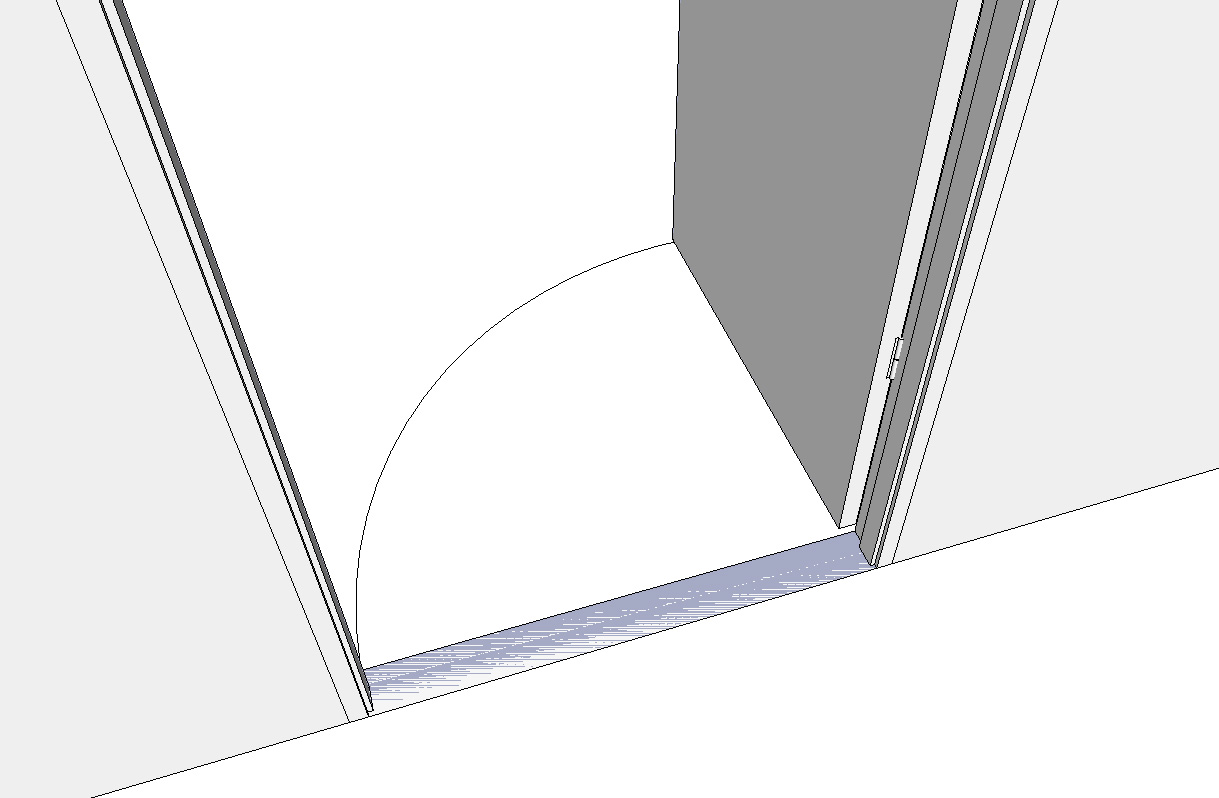
-
Thanks for your input, halroach.
Yes, this is a known issue. We hope to be able to improve it in the future. The recommended workflow is to use the Double-cut explode locked groups option (right-click menu) after you have finalized the position of your door. Then, you can easily erase the un-wanted faces at the base of the door.
-
I had to disable this tool because itit tends to connect to opposite facade of the bldng (I work wich thin walls). Some kind of depth value must be added.
-
@rv1974 said:
I had to disable this tool because itit tends to connect to opposite facade of the bldng (I work wich thin walls). Some kind of depth value must be added.
What do you mean, you work with thin walls?
-
rv1974 probably only models the outer shell, not wall thicknesses, etc.
-
yep, a I need this tool locally (say for arcades), not as general treatment.
-
@whaat said:
Thanks for your input, halroach.
Yes, this is a known issue. We hope to be able to improve it in the future. The recommended workflow is to use the Double-cut explode locked groups option (right-click menu) after you have finalized the position of your door. Then, you can easily erase the un-wanted faces at the base of the door.
Yes this has always been an issue with components cutting a solid at the edge... in this case a sill.
I've thought for ages that any any attempt at solving the puzzle of cutting through walls [ie solids] would be done with .... eh, solid tools. The subtract tool removes the section of wall to make the opening and when the opening is removed the subtract tool is reversed.
I am no programmer so wouldn't know if that can even be done but it just seems logical to me.
-
10 YEARS I have been asking for this tool and its finally here!!! TAKE MY MONEY!!!!
-
UPDATE: Double-cut now offers a 15 day free trial.
https://mindsightstudios.com/double-cut/ -
I think I found a bug which causes Sketchup to crash. I seem to have narrowed it down to double-cut, and specific dynamic components. It happened to me on 3 different PCs with windows 10 and Sketchup 2017.
To recreate the crash:
- pull into the model attached dynamic component. It's a table from Sketchup's Dynamic Components Training collection.
- right click > save as > save it to the desktop
- Drag and drop the newly saved component into the same sketchup model where the original is in.
- scale the new component > Crash!
Best if more people check to be sure it's this plugin and not something else...
-
@halroach said:
I think I found a bug which causes Sketchup to crash. I seem to have narrowed it down to double-cut, and specific dynamic components. It happened to me on 3 different PCs with windows 10 and Sketchup 2017.
To recreate the crash:
- pull into the model attached dynamic component. It's a table from Sketchup's Dynamic Components Training collection.
- right click > save as > save it to the desktop
- Drag and drop the newly saved component into the same sketchup model where the original is in.
- scale the new component > Crash!
Best if more people check to be sure it's this plugin and not something else...
Thank you very much for the report! We will check it out
-
Nice but Is this possible insert windows into the wall, not on the wall ?
-
@snowz said:
Nice but Is this possible insert windows into the wall, not on the wall ?
If you mean to recess the window frame more in the wall, I think that really depends on how you make the component. In the video you see a simple cutting rectangle component makes a simple 3d hole. The geometry for the window frame that you create in the component could be anywhere in relation to the cutting plane.
-
Just downloaded and tried Double Cut. 2 Big problems though;
- It works great until you group the wall, then it reverts to single cut native mode.
- Section fill (both Skalp and Native SI) does not work with Double Cut. i assume this is because the internal cut faces of the opening are grouped with the window (cutting object) not the wall (the object being cut.
It would be a great pluggin that I'd definitely buy if they fixed these issues.
-
Has anyone had issues installing / getting double-cut to work? I purchased and added the extension using the extension manager,and although it shows to be installed, enabled (and even shows up under 'Extensions' as an option on the pull down ribbon), but the pull down menue task list is all greyed out except 'Licence...'. What am I missing?
-
@jasondag said:
Has anyone had issues installing / getting double-cut to work? I purchased and added the extension using the extension manager,and although it shows to be installed, enabled (and even shows up under 'Extensions' as an option on the pull down ribbon), but the pull down menue task list is all greyed out except 'Licence...'. What am I missing?
have you added the licence?









Advertisement