Wish list for Sketchup 2018
-
I would like the Windows version to have 2 or more files open at once - I gather the Mac version already has this feature.
-
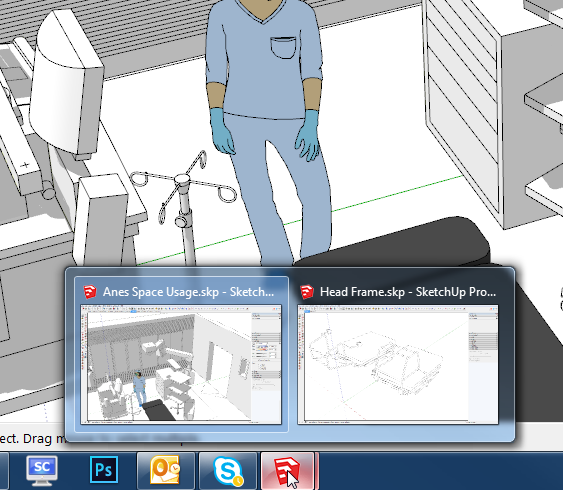
John, you can have 2 or more SketchUp files open at once in Windows. I regularly have 2 or 3 going at the same time.
Right now on my PC.
-
@john sayers said:
I would like the Windows version to have 2 or more files open at once - I gather the Mac version already has this feature.
On a MAC you only ever have one instance of SketchUp running - but then that one app can have several models [SKPs] open at the same time.With Windows [PC] you have individual instances of SketchUp running - each is limited to have one model [SKP] loaded at any one time.
If you open another model from within an instance of SketchUp, then that instance's current model closes and the chosen model opens.
If you use Windows Explorer to open another model [SKP] - e.g. by double-clicking the model-file's icon in its folder, then you will get another instance of SketchUp started, using that chosen model loaded into it - and any previously open models will be unaffected by this and persist, each running inside their own instance of SketchUp...In Windows it's just a matter of how you open each model which determines if any models that are already open survive ...
-
Yes Dave - but you have to open separate sketchup programs - you can't just be on the one open sketchup and load another and have them both in the one open version and switch between the two.
-
What difference does it make? As on the Mac, you can only work one of them at a time.
-
As I don't use a mac I'm just wondering if you have an advantage in that when you go from one model to the other does the current tool stay selected.
By that I mean, with windows each instance is a separate workspace, so if you have the move tool active in one it won't necessarily be active in the other and you need to change focus and then change tool.
Does it work the other way on mac, that you open two model in one workspace so swapping from one to the other is using the one toolset? -
@kuu said:
- DWG/DXF that doesn't break lines on 2D import. The current 2D export in particular is terrible, need to not break lines, preserve groups and components, layers and layer colors...
- Fills / hatches on section cuts. (And a way to handle section planes better too... it becomes unwieldy fast)
- Improved material browser / editor (macOS !!!) + basic texture mapping tools
- Snap on imported vector PDFs. I could swear this used to exist and was removed some versions ago.
- External Reference Manager, for Components / DWGs / PDF underlays so they can be easily reloaded / unloaded / replaced. Would be great for large projects and collaboration.
- Multiple viewports / split screen. Like pretty much any other 3D modeling program out there...
- macOS single window mode. Sometimes floating palettes are nice, but sometimes they make me feel like smothering kittens. Custom tool palettes would be nice too
- Layer Manager
- Improved dimensions and text
Very nice list for us architects though I'd ignore section cut fills. I'd ask for that as a styles option as SectionCutFace manual filling is key to my workflow and detailing.
-
A scene manager to go along your layer manager and ability to customize which scenes show up on scene tab.
-
I'd like to have my materials linked to a texture file instead of always dealing with an embeded texture. They'd show a low res texture but when the file is changed the low res is changed. Renderers would work with the high res though.
-
I'd love to have linestyles for Sketchup and have all visual aspects of sketchup be controlled within layout. Dimensions would look the same as layout's, leaders too, texts, etc...
-
Layout could be a built in style manager for sketchup that would override all visual aspects of a sketchup viewport.
-
I'd also love that sections could be multiplanar and managed from Layout too. Add a section poly line in a Layout floor plan viewport and that multiplanar section would be created in Sketchup.
-
I'd like to be able to have multiple active sections simultaneously which is slightly different that a multiplanar section.
-
More love for StyleBuilder.
It could be the perfect portal to adding more visual fluff to your models.
-
I still cant get on with those darn trays!
-
Barry, where do you want the utility windows to be displayed?
-
@dave r said:
Barry, where do you want the utility windows to be displayed?
Short answer... anywhere I want, with infinite sizeability and a lot of flexibility.
I know you will say all doable with new trays, but they are a pain to organize.
I spent 10 years with the old system. Did they ask us if we wanted a new one? Certainly didn't ask me.
Ok, I give in, I have just spent half an hour making a tray for each dialogue which is as close as I can get to the old GUI. I will see how I get on...
..OK, I already hate it...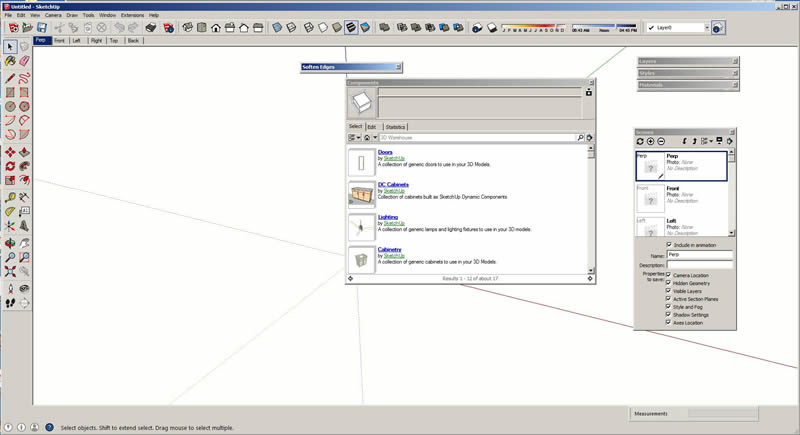
-
Barry, I get it although I can't understand wanting the windows scattered all over the drawing space. Would you be constantly moving them out of your way so you can see the model? Ever since the stacking windows were released I've stacked them on the right side out side of the drawing space where they are neat and orderly and never covered any of the model. This is my SU2015.
[url=https://flic.kr/p/qpU5Ba]
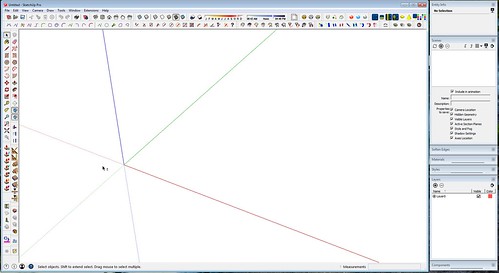
For me, the trays are natural with the added bonus of more real estate for toolbar buttons at the top. I rarely need a window to be wider than the default but it's easy enough to drag the tray to make it wider when I do.
-
Oh well, guess I will have to learn to live with them, thanks Dave.
-
somthing i would call DEEP SELECTION AND MOVE
say one has a window, door or anything else whichs is composed of multiple groups and components .. if one was to change the size one hast to go into each individual "object" and move stuff around...
what deep select and move would do, it would allow for multiple objects including nested objects to be preselected and then make it possible to select lines/faces or vertices (i look at thom thom here
 ) of all objects and nested objects at once and move them...
this would make the process in su pretty damn nice
for the moment fredos stretch tool can do something like shit with stretch with reference point method but its a bit cumbersome...
if someone would find this as cool as i would - give me a +1
thanks for your readers attention
-
@bsfranza said:
somthing i would call DEEP SELECTION AND MOVE
say one has a window, door or anything else whichs is composed of multiple groups and components .. if one was to change the size one hast to go into each individual "object" and move stuff around...
what deep select and move would do, it would allow for multiple objects including nested objects to be preselected and then make it possible to select lines/faces or vertices (i look at thom thom here
) of all objects and nested objects at once and move them...this would make the process in su pretty damn nice
for the moment fredos stretch tool can do something like shit with stretch with reference point method but its a bit cumbersome...
if someone would find this as cool as i would - give me a +1
thanks for your readers attention
Sorry, I can't give you a thumbs-up because I have no idea what you are talking about

But I would be pleased to give you a serious THUMBS-UP for your beautiful English interpolated from, (I assume), German.

-
@baz said:
Sorry, I can't give you a thumbs-up because I have no idea what you are talking about
I think he means to not have to click continuously to dig into groups/components.
If you ever used Fredos Animator you are able to select deep into a component from a dropdown list.
I think this is requesting similar behaviour to save the digging to get to the meat.
-
Isn't this a bit like what outliner does?
@rich o brien said:
@baz said:
Sorry, I can't give you a thumbs-up because I have no idea what you are talking about
I think he means to not have to click continuously to dig into groups/components.
If you ever used Fredos Animator you are able to select deep into a component from a dropdown list.
I think this is requesting similar behaviour to save the digging to get to the meat.
-
@rich o brien said:
@baz said:
Sorry, I can't give you a thumbs-up because I have no idea what you are talking about
I think he means to not have to click continuously to dig into groups/components.
If you ever used Fredos Animator you are able to select deep into a component from a dropdown list.
I think this is requesting similar behaviour to save the digging to get to the meat.
Aha, OK got it.
-
I would like to see a lockable inference for angles with the line tool
-
Introduce the option to switch OFF the new inferences, they are a pain and I for one would like them gone.











Advertisement