sketchucation logo sketchucation
    • 登入
    Oops, your profile's looking a bit empty! To help us tailor your experience, please fill in key details like your SketchUp version, skill level, operating system, and more. Update and save your info on your profile page today!
    ⚠️ Important | Libfredo 15.6b introduces important bugfixes for Fredo's Extensions Update

    SOLVED: Replacing image texture without upsetting mapping

    已排程 已置頂 已鎖定 已移動 SketchUp Discussions
    sketchup
    23 貼文 9 Posters 8.7k 瀏覽 9 Watching
    正在載入更多貼文
    • 從舊到新
    • 從新到舊
    • 最多點贊
    回覆
    • 在新貼文中回覆
    登入後回覆
    此主題已被刪除。只有擁有主題管理權限的使用者可以查看。
    • T 離線
      thomaslaidesign
      最後由 編輯

      here are the maps


      M1.jpg


      M2.jpg

      1 條回覆 最後回覆 回覆 引用 0
      • C 離線
        caronte01
        最後由 編輯

        Try this:
        -Copy your base component
        -Make the copy unique and save it to disk
        -Open the copy and make a small adjustment to the material (colorize it). and save it.
        -In the original file, reload the modified component. There should be 2 different materials in the editor, one for each component.
        -Go to the new component, and edit the texture in an external editor, and paste the new texture over the old one. Make sure the textures line up. Flatten the image and save it.

        When loading from disk, sketchup tries to maintain visual fidelity of components and materials, so when it finds a similarly named comp or material with different definition, it creates a new material or component definition.

        1 條回覆 最後回覆 回覆 引用 0
        • T 離線
          thomaslaidesign
          最後由 編輯

          Ok will try this .... similar to the export/import method which also works.

          Now imagine a row of 10 similar objects and the hassle trying to get 1 to 10 on them. There should be a simple command/plugin to split any material and make it unlinked and unique.

          1 條回覆 最後回覆 回覆 引用 0
          • Mistro11M 離線
            Mistro11
            最後由 編輯

            Another way is to combine both textures into one map and simply move the UV of the second cone to the desired area of the map....hope that helps.

            i7-4930k @3.4/3.7GHz, 32Gb RAM, NVidia GTX 980Ti 6Gb, Windows 7 Pro 64bit
            Structural Integrity is Not Just Physical...It's in the Design and Purpose

            1 條回覆 最後回覆 回覆 引用 0
            • C 離線
              caronte01
              最後由 編輯

              Agreed. A make unique material option would be ideal.

              1 條回覆 最後回覆 回覆 引用 0
              • T 離線
                thomaslaidesign
                最後由 編輯

                @Mistro11

                What we are aiming at is a scenario where:

                Instead of shifting around a relatively complex UVW mapping,
                simply flip in/out unique material texture images onto group/component copies.

                1 條回覆 最後回覆 回覆 引用 0
                • Mistro11M 離線
                  Mistro11
                  最後由 編輯

                  @thomaslaidesign said:

                  @Mistro11

                  What we are aiming at is a scenario where:

                  Instead of shifting around a relatively complex UVW mapping,
                  simply flip in/out unique material texture images onto group/component copies.

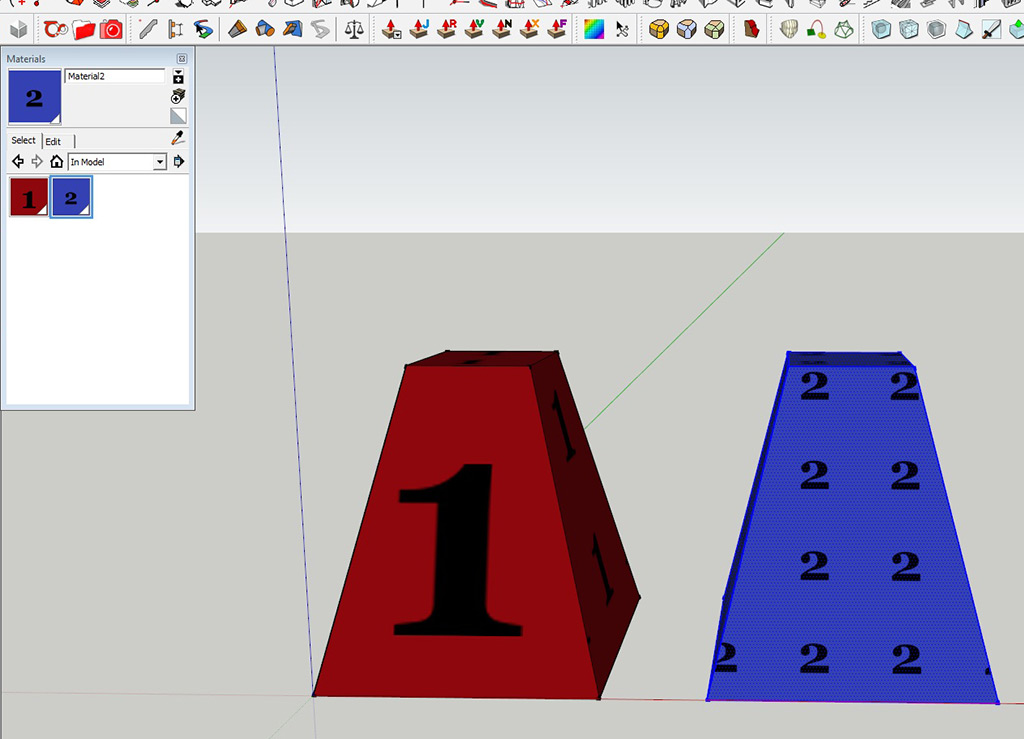
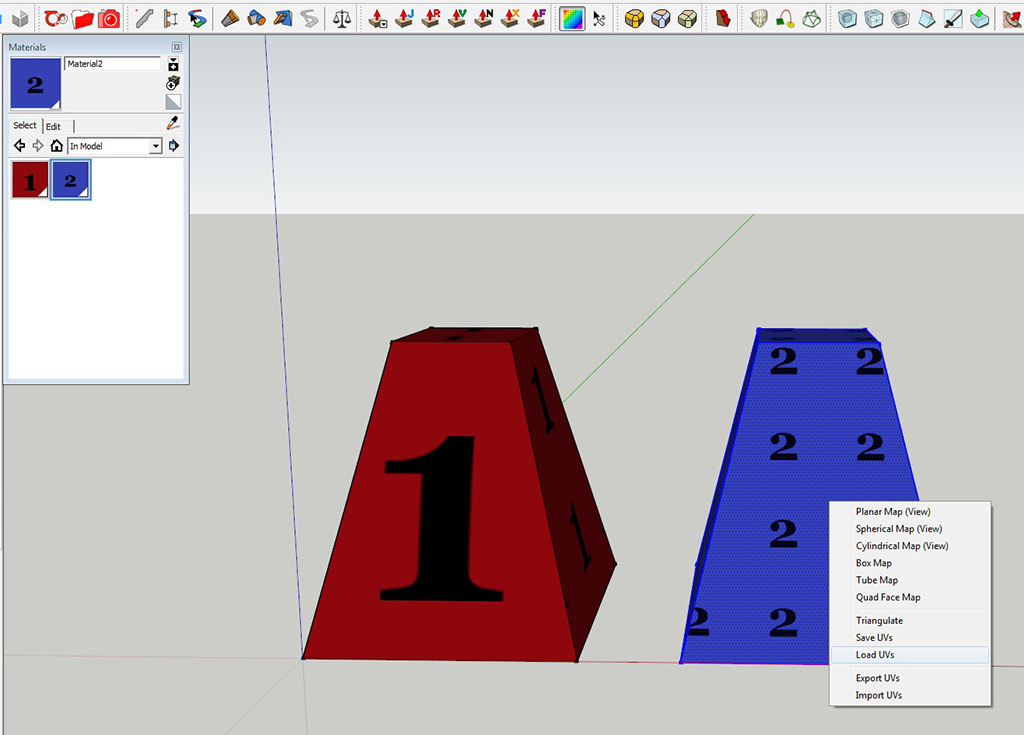
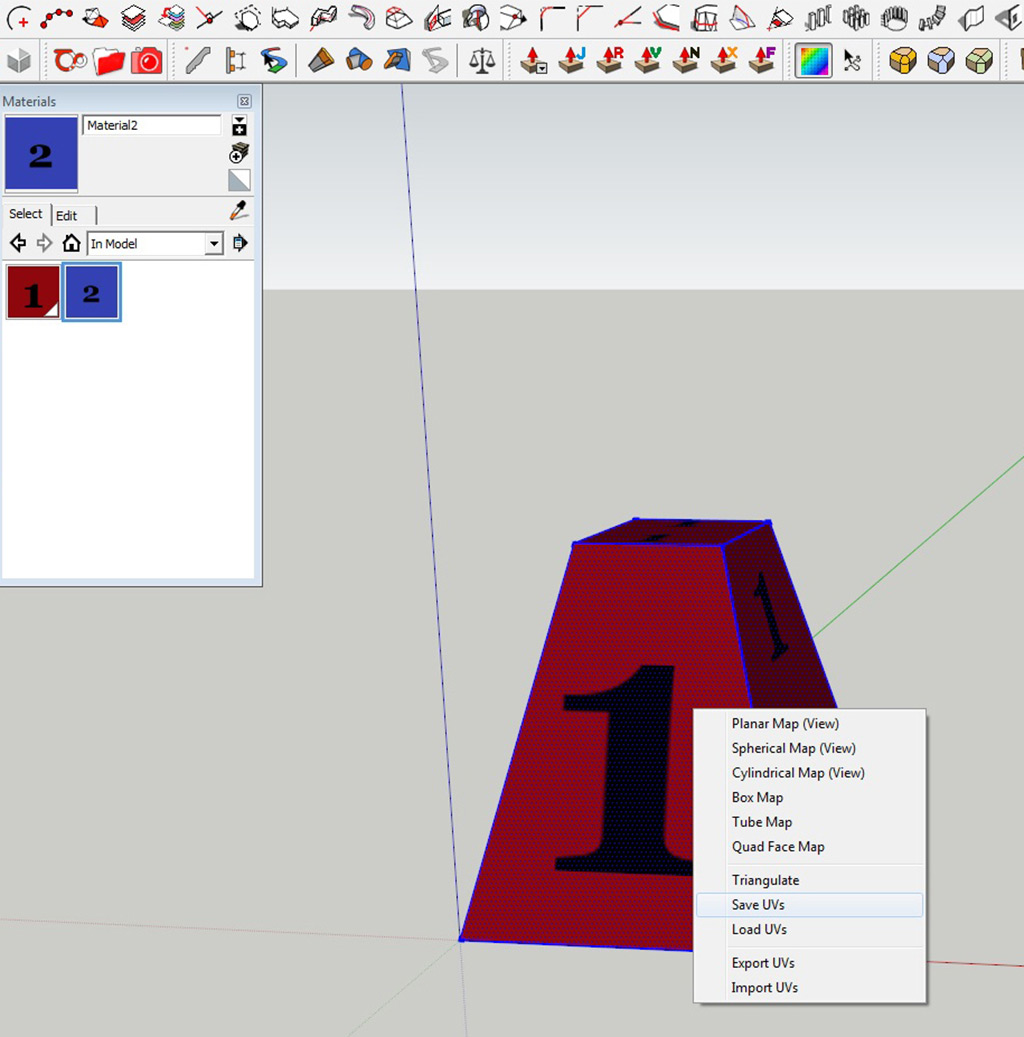
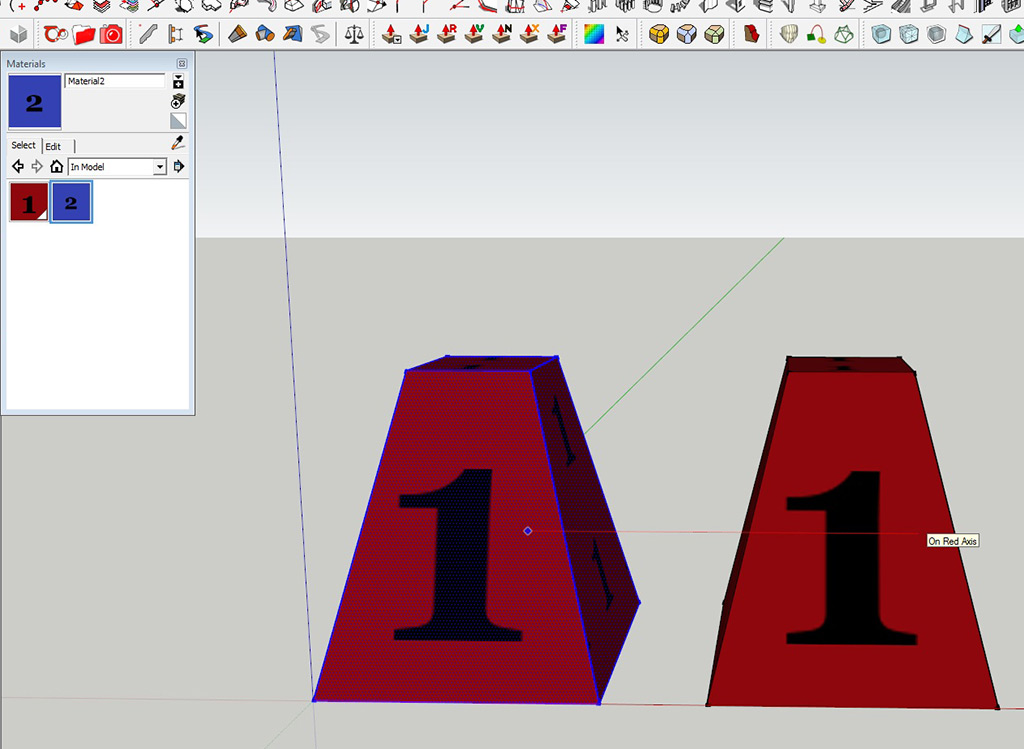
                  Ok, I see....If you have Sketch UV, you can save the UV of the 1st cone, apply new texture to the second one and load the UV.....
                  ConeCopyUVTest.jpg

                  ConeCopyUVTest2.jpg

                  ConeCopyUVTest3.jpg

                  ConeCopyUVTest4.jpg

                  ConeCopyUVTest5.jpg

                  i7-4930k @3.4/3.7GHz, 32Gb RAM, NVidia GTX 980Ti 6Gb, Windows 7 Pro 64bit
                  Structural Integrity is Not Just Physical...It's in the Design and Purpose

                  1 條回覆 最後回覆 回覆 引用 0
                  • T 離線
                    thomaslaidesign
                    最後由 編輯

                    @Mistro11

                    Wow! Thanks for the Plug-in info.....

                    Good things come in little plug-in packages!
                    SOLVED!

                    1 條回覆 最後回覆 回覆 引用 0
                    • duanekempD 離線
                      duanekemp
                      最後由 編輯

                      I'm so glad this question was asked. Was having the same issue and ran into some bumps. The answers here help. Had a brain fart and forgot about SketchUV's save function. Good call. Thanks.

                      Duane Kemp

                      Kemp Productions
                      Puidoux, Switzerland
                      Gallery:
                      https://duanekemp.artstation.com/

                      1 條回覆 最後回覆 回覆 引用 0
                      • fredo6F 離線
                        fredo6
                        最後由 編輯

                        There is a similar function in ThruPaint...

                        1 條回覆 最後回覆 回覆 引用 0
                        • P 離線
                          PapcioKris
                          最後由 編輯

                          EZ solution here. NO PLUGINS

                          1. Map your OBJECT1 with MAP1
                          2. Open another instance of SU
                          3. Copy & paste your OBJECT1 to SU2 (It is mapped correctly)
                          4. Replace MAP1 with MAP2 (only texture) in SU1
                          5. Copy & paste your OBJECT1 From SU1 to SU2
                          6. BAM! You have OBJECT2 in SU2 with MAP2

                          You might want to rename your materials after all.

                          1 條回覆 最後回覆 回覆 引用 0
                          • N 離線
                            nlipovac
                            最後由 編輯

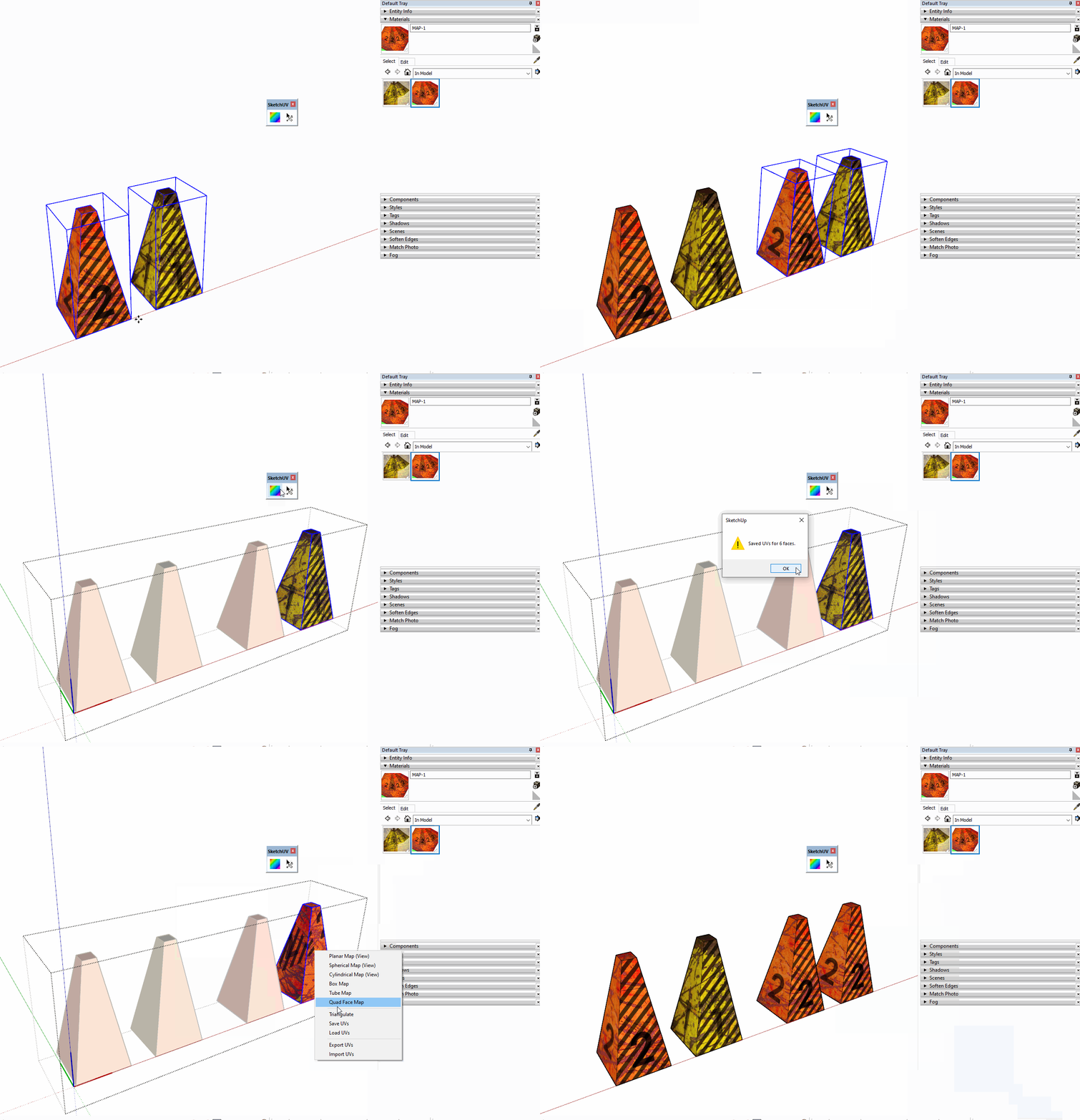
                            I see it says it is Solved but here is my use of SketchUV Save and Load UV feature.

                            SketchUV

                            1 條回覆 最後回覆 回覆 引用 0
                            • 1
                            • 2
                            • 1 / 2
                            • 第一個貼文
                              最後的貼文
                            Buy SketchPlus
                            Buy SUbD
                            Buy WrapR
                            Buy eBook
                            Buy Modelur
                            Buy Vertex Tools
                            Buy SketchCuisine
                            Buy FormFonts

                            Advertisement