[Tutorial] Animator Quick Start
-
Could I ask a question?
Love the plugin fredo - looks harder to use than it actually was so that was good news
I'm making a few 60sec videos to show my boss a new way of presenting work. My settings was set at 20fps and speed of 0.75.
However when playing the mov/MP4 file created I get a stutter every second or 2 - making it a bit unwatchable.
Anyone come by the same problem?
I can't post the video on the forum but I can private message it to anyone who think they can help.
I'm trying one now at 45fps - seeing if that makes a difference
There is a option to use QuickTime screen record to record a window once I've made the animater plugin film which will take a lot much less time to process but will take up much more mb- so perhaps not a solution
-
@applemango85 said:
I'm making a few 60sec videos to show my boss a new way of presenting work. My settings was set at 20fps and speed of 0.75.
However when playing the mov/MP4 file created I get a stutter every second or 2 - making it a bit unwatchable.
Anyone come by the same problem?
I can't post the video on the forum but I can private message it to anyone who think they can help.
Difficult to say without seeing the model and animation.
You can PM it to me and I'll have a look.Fredo
-
I redone 2 of my 3 animations in 45fps which seems to have solved the smoothness issue touch wood.
The 3rd animation is being redone now so I should know for sure soon
Is it normal for a 2min 45fps animation to take 3-5 hrs to process into video format?
Fortunately I have both a laptop and desktop mac- and both pretty powerful so the time it’s taking seems excessive
-
@applemango85 said:
Is it normal for a 2min 45fps animation to take 3-5 hrs to process into video format?
Good remark.
The only way to capture the viewport in Ruby is a method (view.write_image), which may take from 0.1s to 3-4 second to get the viewport and put it in a PNG file, depending on:
- the size of your viewport resolution
- the complexity of the model
I would propose that you execute the following one-line command in your Ruby console
t0 = Time.now ; Sketchup.active_model.active_view.write_image("C:/toto.png") ; puts "Time = #{Time.now-t0}s"This will give you the minimum time to generate a single frame.
You can also get the resolution of the viewport by typing the two commands
Sketchup.active_model.active_view.vpwidth
and
Sketchup.active_model.active_view.vpheightNOTE: From the parameters you give, 2 minute video at 45 fps, so 5,400 frames, if it takes 4 hours, then each frame takes 2.6 second in average to be generated.
Fredo
-
Great Animator Fredo! Once I got my system issues fixed I was able to create my animation in less than 10 min after watching the tutorials. So now I want to try something, is it possible for a object or group to "fly-in" from off scene? Like if I want to have screws installed in a component at a certain time point? For example, in the first 4 seconds of my animation, a group is moved into another component, at this point, I want a group of screws to come flying in from off scene and then place themselves in the clip at 5 seconds, do their thing, then finish the clip as normal. Possible?
-
Hi mgfranz!
You might like to take a look at a tutorial by Justin Geis which shows you how to create an exploded view animation using Animator. Around about the 5:30 mark, Justin shows you how to reverse the explosion so that might give you some idea of how to achieve the effect you want.
The tutorial can be found at:
Let us know how you get on.
NF
-
@archiblog said:
Hi mgfranz!
You might like to take a look at a tutorial by Justin Geis which shows you how to create an exploded view animation using Animator. Around about the 5:30 mark, Justin shows you how to reverse the explosion so that might give you some idea of how to achieve the effect you want.
The tutorial can be found at:
Let us know how you get on.
NF
Thanks NF, but I don't think using the explosion will work in this instance since I have the need to place a total of 12 screws in 3 different locations. I suppose I could do some Easing on the fly-in group, let me do some research. I have attached my SU and animation file for a visual reference, just remove the .txt extension.
-
Ok, it took a while, but I got it figured out. I had to create a variety of transitions, once I placed the objects in the correct location I backed out the object to a location off-scene, then just reversed the movements.
- Fixed the screws in place
- Backed them off
- Moved them off scene
- Created transition to move them back
- Created transition to move them again
- And again.
Not real pretty, but it works. Still may play with some linear motions, but I got it solved. Not sure why the graphics are pixilated, .avi sucks, .mp4 is fine. I'll play with FPS.
-
Looked OK to me. You did what I was going to suggest, but didn't as I got sidetracked out (wife!) as I was going to reply.
-
It's in my plan to address these types of movement, with a Move-to tool (also to be used to align objects in bulk).
Fredo
-
Hey, thanks for this excellent plugin.
I got a problem with that ffmpeg I download it and it works.
but when I get in to do Extension i push the find the ffmpeg nothing happens.
maybe you know how to fix it? -
@snapkin said:
I got a problem with that ffmpeg I download it and it works.
but when I get in to do Extension i push the find the ffmpeg nothing happens.
maybe you know how to fix it?This is a bug which I fixed in LibFredo6 8.4g, just released.
Fredo
-
I need some help, I cannot seem to be able to get multiple objects to follow a path properly, anyone know how to achieve this?
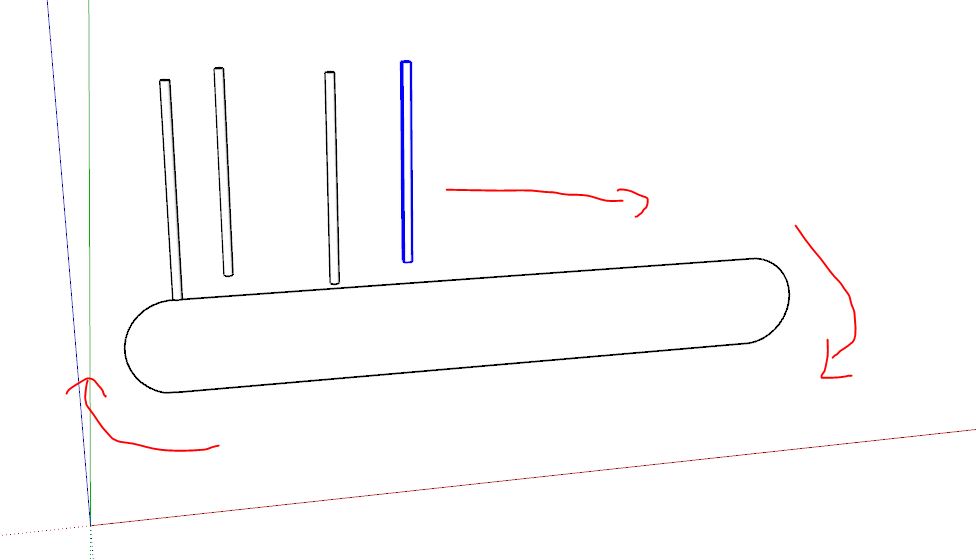
-
@solo said:
I need some help, I cannot seem to be able to get multiple objects to follow a path properly, anyone know how to achieve this?
[attachment=0:14vt9cpa]<!-- ia0 -->rotation.JPG<!-- ia0 -->[/attachment:14vt9cpa]
If they do not need to move indepently, how would it be to group them?
-
@solo said:
I need some help, I cannot seem to be able to get multiple objects to follow a path properly, anyone know how to achieve this?
The Follow Path tool (like other tools) allows to select several objects (keep CTRL depressed).
Fredo
-
I've got the same problem in Sketchup 2018

I copied the ffmpeg.exe and executed it in the directory C:\Users(User Name)\AppData\Roaming\SketchUp\SketchUp 2018\SketchUp\Plugins and in the directory: C:\Users(User Name)\AppData\Roaming\SketchUp\SketchUp 2018\SketchUp\Plugins\Fredo6_!LibFredo6
WITH NO AVAIL!!!
Any help, please?!This is the error from Ruby console:
Error: #<Errno::ENOENT: No such file or directory @ dir_s_mkdir - C:/Users/Chip/Desktop/TPOS/Animator Videos/Pressure gauge - 21-Sep-2018 09-57-10 - Gauge 3/4>
c:/users/chip/appdata/roaming/sketchup/sketchup 2018/sketchup/plugins/fredo6_!libfredo6/body_lib6videomanager.rbe:921:inmkdir' c:/users/chip/appdata/roaming/sketchup/sketchup 2018/sketchup/plugins/fredo6_!libfredo6/body_lib6videomanager.rbe:921:inmovie_create_folder'
c:/users/chip/appdata/roaming/sketchup/sketchup 2018/sketchup/plugins/fredo6_!libfredo6/body_lib6videomanager.rbe:831:inmovie_top_generate' c:/users/chip/appdata/roaming/sketchup/sketchup 2018/sketchup/plugins/fredo6_animator/animatortool.rbe:2204:inmovie_dialog_call_back'
c:/users/chip/appdata/roaming/sketchup/sketchup 2018/sketchup/plugins/fredo6_animator/animatordialogvideogeneration.rbe:381:incall' c:/users/chip/appdata/roaming/sketchup/sketchup 2018/sketchup/plugins/fredo6_animator/animatordialogvideogeneration.rbe:381:innotify_result'
c:/users/chip/appdata/roaming/sketchup/sketchup 2018/sketchup/plugins/fredo6_animator/animatordialogvideogeneration.rbe:449:inon_close' c:/users/chip/appdata/roaming/sketchup/sketchup 2018/sketchup/plugins/fredo6_animator/animatordialogvideogeneration.rbe:412:inblock in dialog_create'
c:/users/chip/appdata/roaming/sketchup/sketchup 2018/sketchup/plugins/fredo6_!libfredo6/body_lib6webwdlg.rbe:583:incall' c:/users/chip/appdata/roaming/sketchup/sketchup 2018/sketchup/plugins/fredo6_!libfredo6/body_lib6webwdlg.rbe:583:inj_onclose'
c:/users/chip/appdata/roaming/sketchup/sketchup 2018/sketchup/plugins/fredo6_!libfredo6/body_lib6webwdlg.rbe:293:inblock in create_dialog' c:/users/chip/appdata/roaming/sketchup/sketchup 2018/sketchup/plugins/fredo6_!libfredo6/body_lib6webwdlg.rbe:322:incall'
c:/users/chip/appdata/roaming/sketchup/sketchup 2018/sketchup/plugins/fredo6_!libfredo6/body_lib6webwdlg.rbe:322:inclose' c:/users/chip/appdata/roaming/sketchup/sketchup 2018/sketchup/plugins/fredo6_!libfredo6/body_lib6webwdlg.rbe:322:inclose'
c:/users/chip/appdata/roaming/sketchup/sketchup 2018/sketchup/plugins/fredo6_animator/animatordialogvideogeneration.rbe:460:inclose_validate' c:/users/chip/appdata/roaming/sketchup/sketchup 2018/sketchup/plugins/fredo6_animator/animatordialogvideogeneration.rbe:1251:inparam_dialog_callback'
c:/users/chip/appdata/roaming/sketchup/sketchup 2018/sketchup/plugins/fredo6_!libfredo6/body_lib6webwdlg.rbe:752:incall' c:/users/chip/appdata/roaming/sketchup/sketchup 2018/sketchup/plugins/fredo6_!libfredo6/body_lib6webwdlg.rbe:752:inj_action'
c:/users/chip/appdata/roaming/sketchup/sketchup 2018/sketchup/plugins/fredo6_!libfredo6/body_lib6webwdlg.rbe:634:inj_callback' c:/users/chip/appdata/roaming/sketchup/sketchup 2018/sketchup/plugins/fredo6_!libfredo6/body_lib6webwdlg.rbe:622:inblock in j_dispatch' -
Is "Pressure gauge - 21-Sep-2018 09-57-10 - Gauge 3/4" the name of your file? If so, then 3/4 is probably creating an issue, as '/' is used as a folder separator.
Fredo
-
@migmat said:
PROBLEM GENERATING VIDEO with ffmpg.exe INSKETCHUP 2013 (Works Animator for this versión?)
1- Animator Beta Works OK
2- Install ffmpeg.exe in LibFredo6 (disapear the red text to Find the ffmpeg.exe)
3- Make a simple animation that Works fine in preview
4- Try to generate a video with defaut parameters. Push the button "Test Image" and also work
5- Push the button "Generate Video" and NOTHING HAPPENDS. Sketchup continues inside the animator plugin. I can exit and star again the plugin,but nothing happends.I instal the two versión of ffmpeg.exe, the last and the 3.2 (more stable).
Thanks in advance
PROBLEM SOLVED!!!!
M8, I had the same problem until I figured it out. When you name your "Film" in Animator, DON'T USE symbols like the followings (the ones that Windows files creator wouldn't allow it either): \ / : * ? " <> and |. Change the name using other symbols (all the rest, the allowed ones) and TACHA!!
Regards to all readers and SU/Animator users. Chip -
I can not find the button of the Animator plugin in Sketchup 2018. Is it visible in my extension manager but I can not open the plugin. What do i need to do?
-







Advertisement