[Plugin] TIG-LayerWatcher
-
Here's v6.0.
http://sketchucation.com/pluginstore?pln=TIG_LayerWatcher
It has better reporting of geometry assignment to Layer0 on completion.
It also has a few background security tweaks too. -
Here's v7.0 http://sketchucation.com/pluginstore?pln=TIG_LayerWatcher Its code loading regime has been adjusted in an attempt to avoid an occasional glitch with v2016.
-
TIG,
Thank you for the "clever plugin".I can not find a reference to the plugin other than in
SketchUcation Plugins Manager and in the "Plugins" folder.How would I "easily" check on which version I am running in the future?
All the best for the New Year!

-
@facer said:
TIG,
Thank you for the "clever plugin".I can not find a reference to the plugin other than in
SketchUcation Plugins Manager and in the "Plugins" folder.How would I "easily" check on which version I am running in the future?
All the best for the New Year!
Window>Preferences
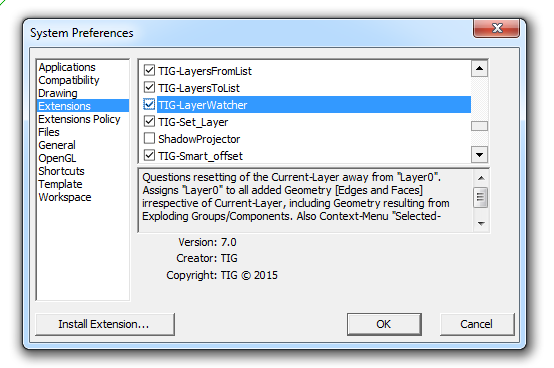
-
Thank you Dave R,
I did not see the plugin's summary at the bottom last time I looked:
Version 7.0
Creator: TIG
Copyright: TIG (c) 2015 -
Here's v8.0 http://sketchucation.com/pluginstore?pln=TIG_LayerWatcher It fixes a reported glitch - where the Layer Observer [spotting the resetting of the current-layer away from Layer0] was not getting transferred across when a new SKP was opened. Now fixed.

-
Here's v9.0 http://sketchucation.com/pluginstore?pln=TIG_LayerWatcher
Read the revised Usage notes on its PluginStore page...BugSplats on MACs when immediately undoing Make Group / Component now avoided.
Note that it no longer reassigns the layers of natively Exploded Containers' Geometry [because an unsolvable undo-stack overflow problem when > ~200 pieces of geometry are moved into their new context, because then undo of the explode becomes impossible],
BUT there is a new context-menu item "Explode-To-Layer0" - it is only available if the selected Containers are not on Layer0 - it then explodes the Containers and reassigns Layer0 to the resultant Geometry: this explode is then once again properly one-step undo-able, irrespective of the amount of geometry getting moved and reassigned to Layer0.
Otherwise its processes and tools are generally as in v8.0...
-
TIG - thank you for this plugin! I've assigned the Explode-To-Layer0 command to my keyboard shortcut, the only problem is that since this is a context sensitive command, groups on layer0 won't explode with my shortcut. The solution is to also use [Plugin] Layer Zero Fixup Tools by slbaumgartner and assign that to your shortcut.
http://sketchucation.com/forums/viewtopic.php?p=375498#p375498
Dan
-
You don't need to use "Explode to Layer0" if the container is assigned "Layer0" - therefore it doesn't appear in the context-menu in that case, you can just explode it and its contents will go onto Layer0 anyway...
The purpose of this alternative exploder is that if the container is on Layer1 and you do a native Explode the geometry that was inside it on Layer0 arrives on Layer1, this alternative way always explodes onto Layer0.However I can see times when you might want to use the "Explode to Layer0" on a number of containers, some of which are already assigned Layer0 and they will they get skipped.
I'll adjust the code and update... -
Here's v9.1 http://sketchucation.com/pluginstore?pln=TIG_LayerWatcher "Explode-To-Layer0" now works on all Containers, even those already assigned Layer0.
Its final reporting dialog is also enhanced. -
TIG, sorry if I'm requesting in wrong thread..
Would it be possible to make a tiny script that would silently (via shortcut) repeat the last layer assignment?
For example I move some geometry to layer 'entourage' then in the future I select other objects, hit shortcut key and they would go to previously assigned 'entourage'.
Thank you for attention -
@rv1974 said:
TIG, sorry if I'm requesting in wrong thread..
Would it be possible to make a tiny script that would silently (via shortcut) repeat the last layer assignment?
For example I move some geometry to layer 'entourage' then in the future I select other objects, hit shortcut key and they would go to previously assigned 'entourage'.
Thank you for attention
It'd be very convoluted, with observers finding changed entities, but even then I can't see how you spot it's been given a new layer, you only know that it has somehow 'changed' but not how it was before that ?
So I think the answer is, 'No.'
-
another option: a small non-modal floating window with one combobox containg layer list to choose from (even hidden ones!) and one button 'assign' (to selected)?
-
Having slept on it, the answer is now, 'maybe'...
Imagine this [new] tool...
It has TWO menu entries:- 'Reassign Layer'
- 'Repeat Reassign Layer'
They can each have their own shortcuts set up...
The first tool reassigns Selected Containers to a Layer picked from a dropdown list in a dialog.
The second tool is the same, but this time does it not ask for you to chose a Layer from a dialog - it remembers the last chosen Layer name - unless of course the tool has not been used this session or the previous Layer no longer exists - in which case it does ask you to choose...
PS: I'll PM you an example...
-
Hi TiG, indeed a great piece of code this is.
I had repeated SU crashes on selecting a component and then changing my mind and picking another one in the Component pane before dropping the first one.
Disabled all my plugins and finally tracked the bug down to LayerWatcher (v9.1 or maybe before). It being the only one left in the Plugins folder (but for the SU ones).
No crash when LayerWatcher is removed.
SU 2016, OS El Capitan.
It can easily be reproduced.
Has anybody else experienced that ? -
Do you have the latest version of the Extension.
It was changed following similar reports...
It's now at v9.1
http://sketchucation.com/pluginstore?pln=TIG_LayerWatcher
If you still have problems please report back... -
Sorry I thought I mentioned that it is indeed 9.1
It says
9.1 20160312 "Explode-To-Layer0" now works on all Containers, even those .... " -
I have tried the steps you outlined with changing selected [external] components in the browser on a PC and there is no problem.
But I can replicate it on a MAC...This has not been reported like this before.
The LayerWatcher adds an observer on the entities collection in the model and also the entities collections for all definition's in the model - so it can see if faces or edges are being drawn on a Layer that's not Layer0 and reassign to it.Looks like MAC's SketchUp deals with the temporary external-component-add differently from a PC.
On a PC it seems that although the selected external-component appears on the cursor you can choose to NOT place it [ESC or pick another component or tool], and that external-component is still added to the model's components.
On a MAC is is shown in the model's components list, but it is removed if it's not placed.
I can also trigger this [inconsistently] on a MAC if I select an existing model component to add and while it's on the cursor waiting to be placed I select another external-component to add instead...After some testing I find I can now prevent it happening on a MAC by using a begin..rescue and a start_timer when adding the observer etc...
Version 10.0 is in the pipeline, watch for updates...
-
Great. !
Pretty useful for me to have all entities of an exploded group back on Layer 0. -
Here's v10.0
http://sketchucation.com/pluginstore?pln=TIG_LayerWatcher
Observers to assign new geometry to Layer0 now trapped to avoid MAC BugSplat if multiple external-components picked, but not then added to model.





Advertisement