sketchucation logo sketchucation
    • 登入
    Oops, your profile's looking a bit empty! To help us tailor your experience, please fill in key details like your SketchUp version, skill level, operating system, and more. Update and save your info on your profile page today!
    ⚠️ Important | Libfredo 15.6b introduces important bugfixes for Fredo's Extensions Update

    Export all textures in model to one image file?

    已排程 已置頂 已鎖定 已移動 SketchUp Discussions
    sketchup
    26 貼文 12 Posters 8.0k 瀏覽 12 Watching
    正在載入更多貼文
    • 從舊到新
    • 從新到舊
    • 最多點贊
    回覆
    • 在新貼文中回覆
    登入後回覆
    此主題已被刪除。只有擁有主題管理權限的使用者可以查看。
    • EddyNLE 離線
      EddyNL
      最後由 編輯

      Hello folks,

      I'm looking to use my old SketchUp geo models in a new game called Cities: Skylines.
      Unfortunately the game accepts only one image file for the textures.

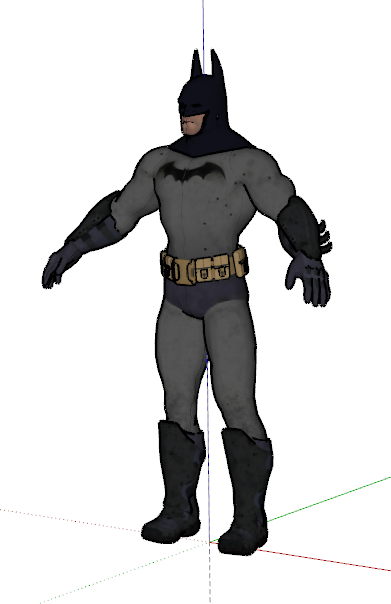
      I have this model with about 90 seperate textures:

      http://i.imgur.com/3W4Nr7T.jpg

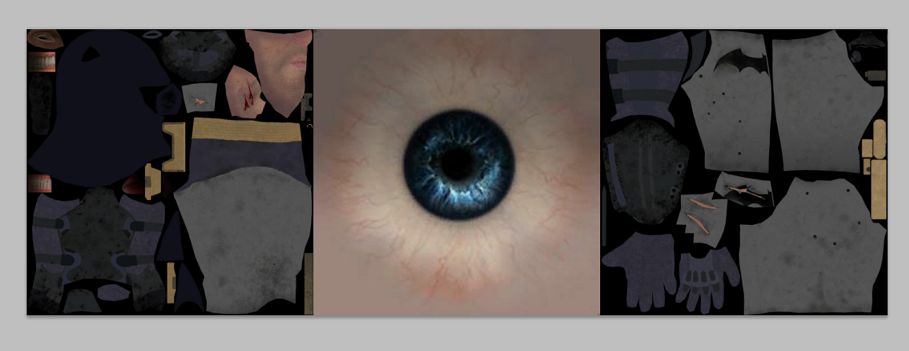
      Can I export all of its textures into a single file? Like this example?

      http://i.imgur.com/RK3N27t.jpg

      Cheers Eduardo

      viewtopic.php?f=271&t=11903 Modelling my city for Google Earth!

      1 條回覆 最後回覆 回覆 引用 0
      • Rich O BrienR 離線
        Rich O Brien Moderator
        最後由 編輯

        Not in SketchUp but if you export it and use an app that has texture atlas uv method you can do what you need.

        Download the free D'oh Book for SketchUp 📖

        1 條回覆 最後回覆 回覆 引用 0
        • EddyNLE 離線
          EddyNL
          最後由 編輯

          Thanks Rich,

          There is no super-duper SU plugin? 😞

          viewtopic.php?f=271&t=11903 Modelling my city for Google Earth!

          1 條回覆 最後回覆 回覆 引用 0
          • Rich O BrienR 離線
            Rich O Brien Moderator
            最後由 編輯

            LightUp can make a baked atlas map.

            So, yes there is a super-duper plugin.

            Download the free D'oh Book for SketchUp 📖

            1 條回覆 最後回覆 回覆 引用 0
            • TIGT 線上
              TIG Moderator
              最後由 編輯

              This simple script might do some of what you want.

              File goes in Plugins folder [install it from the RBZ].

              In the Ruby Console type [or copy/paste]: TIG::TextureBaker.new()

              All Textures in the Model are assembled into a 'ComboTexture' Material.
              Which contains a 'ComboTexture.png' image which you can export.
              You could also add code to export it automatically.
              The textures are arranged side by side, but you can manually edit the image to rearrange them, or add an algorithm into the code to arrange in a block rather than a line.

              This is a beta-version - please save before using in case of issues - it's not yet in the Pluginstore...


              TIG-TextureBaker.rbz

              TIG

              1 條回覆 最後回覆 回覆 引用 0
              • Rich O BrienR 離線
                Rich O Brien Moderator
                最後由 編輯

                Does this respect mapping? Or just create a collage?

                Download the free D'oh Book for SketchUp 📖

                1 條回覆 最後回覆 回覆 引用 0
                • TIGT 線上
                  TIG Moderator
                  最後由 編輯

                  It's a collage of swatches for all of the model's textures side-by-side.
                  It could be adjusted to include mapped [skewed] textures as additional swatches.
                  ?

                  TIG

                  1 條回覆 最後回覆 回覆 引用 0
                  • JQLJ 離線
                    JQL
                    最後由 編輯

                    But does it merge all materials into one big material wich is applied in the different faces with different UV's so it seems a lot of different materials?

                    www.casca.pt
                    Visit us on facebook!

                    1 條回覆 最後回覆 回覆 引用 0
                    • TIGT 線上
                      TIG Moderator
                      最後由 編輯

                      No. 😞
                      It sort of does what the OP wanted.
                      It merges all textures into one material.
                      BUT then the user must apply that to the faces, positioning the texture on each face so that the relevant part of the image is used.
                      I can see that if it's 'tiling' this will cause issues...
                      To map the faces is far more complex and involved... I'll think about it... 😕

                      TIG

                      1 條回覆 最後回覆 回覆 引用 0
                      • Rich O BrienR 離線
                        Rich O Brien Moderator
                        最後由 編輯

                        picpick-001.png

                        picpick-002.png

                        that's pretty awesome nonetheless.... 👍

                        Download the free D'oh Book for SketchUp 📖

                        1 條回覆 最後回覆 回覆 引用 0
                        • JQLJ 離線
                          JQL
                          最後由 編輯

                          I didn't know batman had supercharged blue laser emitting nipples

                          www.casca.pt
                          Visit us on facebook!

                          1 條回覆 最後回覆 回覆 引用 0
                          • JQLJ 離線
                            JQL
                            最後由 編輯

                            @tig said:

                            I can see that if it's 'tiling' this will cause issues...
                            To map the faces is far more complex and involved... I'll think about it... 😕

                            Tig I guess you know that this is being increasingly requested by game developers that want to use sketchup. If you'd succeed on this endeavor probably sketchup would get and immediate amount of new users as not everyone is aware of Ligth Up capabilities.

                            I guess that, with the new hype around game engines and arch viz, probably this would be the right time frame to shoot at it...

                            www.casca.pt
                            Visit us on facebook!

                            1 條回覆 最後回覆 回覆 引用 0
                            • iichiversiiI 離線
                              iichiversii
                              最後由 編輯

                              Whaaaaaaa, Tig you gotta further develop this, JQL is right, it's what game developers need when using sketchup, it's the lack of texture atlas capabilities that gets to me

                              Bring on the Rain...

                              1 條回覆 最後回覆 回覆 引用 0
                              • jiminy-billy-bobJ 離線
                                jiminy-billy-bob
                                最後由 編輯

                                +1 for JQL on this !

                                25% off Skatter for SketchUcation Premium Members

                                1 條回覆 最後回覆 回覆 引用 0
                                • DanielLee5D 離線
                                  DanielLee5
                                  最後由 編輯

                                  If you want to create a collage may be you should use a special collage making software? (http://ams-collage.com/ for example) I guess it would take less time and efforts..

                                  1 條回覆 最後回覆 回覆 引用 0
                                  • thomthomT 離線
                                    thomthom
                                    最後由 編輯

                                    I've been looking into exporting to Cities Skylines myself. First thing I ran into was that FBX files from SketchUp would not load in the game. I did however find a way to patch them - and I wrote an extension to automate this: http://www.thomthom.net/thoughts/2015/04/export-from-sketchup-to-cities-skylines/

                                    As for creating a single texture, that's a challenge. I have a bunch of models for building in my town - from my previous job at an architectural office. They also have multiple maps.

                                    I did one test where I manually merged four maps into one. But with models like the one you have - that's trickier.

                                    I haven't used it myself yet - but it looks like Dale Martens' SketchUV might be an alternative: http://sketchucation.com/pluginstore?pln=DM_SketchUV

                                    It let you link up to third party UV mapping tools such as RoadKill: http://www.pullin-shapes.co.uk/page8.htm

                                    Not sure if there is an automatic way to merge multi-maps into one. Would be nice.
                                    The challenge here is that the game prefer certain image sizes:

                                    @unknownuser said:

                                    Generally the buildings use 1024x1024 maps, or 1024x512 if the building is small or simple. If working on a large building, try to see if it can be fitted in 2048x1024 size before making a 2048x2048 sized map. We try to refrain using 2048x2048 maps, and use them only in really important and huge buildings, such as a stadium or an airport.

                                    http://www.skylineswiki.com/Asset_Editor

                                    So one would have to extract all textures, try to fit them into 1024x1024 - meaning you'd also have to resample it. Then there is the challenge of determining which texture is the most important - you don't want a small item in your model which happen to currently be using a huge texture to occupy most of the space in the unified texture. (Maybe it's possible to determine by the size of the mesh it's applied to - but this get complicated very quickly.)

                                    You probably have to account for doing some UV unwrapping and spend some time in PhotoShop. Or possibly there are tools that let you composite these maps inside a 3d editor. I think I saw that in a video once - though I don't recall which one it was.

                                    Thomas Thomassen — SketchUp Monkey & Coding addict
                                    List of my plugins and link to the CookieWare fund

                                    1 條回覆 最後回覆 回覆 引用 0
                                    • thomthomT 離線
                                      thomthom
                                      最後由 編輯

                                      Here's one way of doing it - if you have 3dsmax:
                                      https://www.youtube.com/watch?v=V33AWgKkWYU

                                      Maybe something similar can be done as an extension, make copies of the faces onto a flat surface. Use a packing solver to fit them into a square. Then one could use the Make Unique Texture function in SketchUp which merges the selected coplanar faces into a simple texture (Which I think might be 1024x1024...). The packing solver is the challenge here. Looking for libraries of polygon packing solvers.

                                      Thomas Thomassen — SketchUp Monkey & Coding addict
                                      List of my plugins and link to the CookieWare fund

                                      1 條回覆 最後回覆 回覆 引用 0
                                      • thomthomT 離線
                                        thomthom
                                        最後由 編輯

                                        Here's another one - where he's using something called Substance Painter to create the textures:
                                        https://youtu.be/M4Gz1tgW61o?t=47m4s

                                        Haven't used it myself, but looking at the video it looks really nice.
                                        https://www.allegorithmic.com/products/substance-painter

                                        Thomas Thomassen — SketchUp Monkey & Coding addict
                                        List of my plugins and link to the CookieWare fund

                                        1 條回覆 最後回覆 回覆 引用 0
                                        • F 離線
                                          francolino
                                          最後由 編輯

                                          tig.texturebaker.rb is a fake i became a member paying and is not working ...dont' post thing is are not working just for stealing money !

                                          1 條回覆 最後回覆 回覆 引用 0
                                          • TIGT 線上
                                            TIG Moderator
                                            最後由 編輯

                                            @francolino said:

                                            tig.texturebaker.rb is a fake i became a member paying and is not working ...dont' post thing is are not working just for stealing money !

                                            You have made several basic errors in your assumptions.

                                            You do NOT need to have a paid membership to download.
                                            I do NOT post things that do NOT work.
                                            I am NOT stealing your money.
                                            But rather, you are wasting it.

                                            To accuse me, or SketchUcation, of stealing from you is tantamount to a libel !

                                            Had you read its guidance notes - and I do describe it as an example 'beta' script - then you might appreciate how it is intended to be used...
                                            You DO need to do some work to complete the process...
                                            It might not work how you hope, but it works as advertised...
                                            Reread the notes...

                                            As I said, it was a freely offered example of code to be tried out - for any member to download and test - whether or not they had a paid membership !

                                            AND it's now several years old, and things have moved on...

                                            TIG

                                            1 條回覆 最後回覆 回覆 引用 0
                                            • 1
                                            • 2
                                            • 1 / 2
                                            • 第一個貼文
                                              最後的貼文
                                            Buy SketchPlus
                                            Buy SUbD
                                            Buy WrapR
                                            Buy eBook
                                            Buy Modelur
                                            Buy Vertex Tools
                                            Buy SketchCuisine
                                            Buy FormFonts

                                            Advertisement