sketchucation logo sketchucation
    • 登入
    Oops, your profile's looking a bit empty! To help us tailor your experience, please fill in key details like your SketchUp version, skill level, operating system, and more. Update and save your info on your profile page today!
    🔌 Smart Spline | Fluid way to handle splines for furniture design and complex structures. Download

    [Plugin][$] Profile Builder 2

    已排程 已置頂 已鎖定 已移動 Plugins
    219 貼文 40 Posters 58.8k 瀏覽 40 Watching
    正在載入更多貼文
    • 從舊到新
    • 從新到舊
    • 最多點贊
    回覆
    • 在新貼文中回覆
    登入後回覆
    此主題已被刪除。只有擁有主題管理權限的使用者可以查看。
    • O 離線
      otb designworks
      最後由 編輯

      Great news, thanks!

      Cheers, Chuck

      OTB Designworks is on Youtube

      6 core nMP, 32 gig RAM, (2) D700 GPU's, dual monitors

      1 條回覆 最後回覆 回覆 引用 0
      • deaneauD 離線
        deaneau
        最後由 編輯

        Hi Whaat, is it possible to change the currency?. If possible historical curency, too.

        so i could show in my historical project "The Berlin Wall And Inner German Border" the cost of this over the years. Thanks.

        MADE, BORN AND LIVING IN BERLIN
        Big Thank You to all Programmers
        Some German words are so long that they have a perspective. M.Twain

        1 條回覆 最後回覆 回覆 引用 0
        • W 離線
          Whaat
          最後由 編輯

          @deaneau said:

          Hi Whaat, is it possible to change the currency?. If possible historical curency, too.

          so i could show in my historical project "The Berlin Wall And Inner German Border" the cost of this over the years. Thanks.

          Hi Deaneau,
          In 2.1, you can change the currency in the Report Settings dialog (access from the Quantifier). Is this what you mean?

          SketchUp Plugins for Professionals

          1 條回覆 最後回覆 回覆 引用 0
          • R 離線
            rv1974
            最後由 編輯

            Whaat, I've got some project with kilometers of the attached railing which get turned in a funky manner. My problem is I have to do a lot of stupid manual work. Here's a brief description:

            To get the desired state (1) I build a rough one with the assembly (2) I managed to create.
            Then I manuallyadd some sub-assembly (3) in a 'pale red' areas, explode assembly (2) in order to delete unneeded studs in the corners and rotate the green element (3) appropriately.
            Important note: Our local safety regulations demand vertical netgaps <= 10cm. So in the final output I manage to respect this standard.

            The question is Could my manual labor get solved in my assemly?


            Untitled.skp


            Capture.JPG

            1 條回覆 最後回覆 回覆 引用 0
            • W 離線
              Whaat
              最後由 編輯

              @rv1974 said:

              Whaat, I've got some project with kilometers of the attached railing which get turned in a funky manner. My problem is I have to do a lot of stupid manual work. Here's a brief description:

              To get the desired state (1) I build a rough one with the assembly (2) I managed to create.
              Then I manuallyadd some sub-assembly (3) in a 'pale red' areas, explode assembly (2) in order to delete unneeded studs in the corners and rotate the green element (3) appropriately.
              Important note: Our local safety regulations demand vertical netgaps <= 10cm. So in the final output I manage to respect this standard.

              The question is Could my manual labor get solved in my assemly?

              Hi rv1974,

              These types of assemblies are currently quite tough to do in PB2 as a one step assembly. You are on the right track to break this up into multiple assemblies. It becomes a multi-step process but it is still much faster than doing the whole thing manually. I made a slight change with your corner posts which should save you a bit of time. If you split your corner posts and use a junctions setback, I think you can still get the effect you want at the corners without having to rotate element 4.


              Modified-Railing-Assembly.skp

              SketchUp Plugins for Professionals

              1 條回覆 最後回覆 回覆 引用 0
              • W 離線
                Whaat
                最後由 編輯

                @kaas said:

                Hi Dale,

                I updated to the new version of ProfileBuilder and now I get these warnings at every startup of SketchUp. PB works fine though.
                I just tested and de-installed PB and the errors are gone. Re-installed PB again and they are back.

                Any idea how to resolve this?

                regards,
                Max
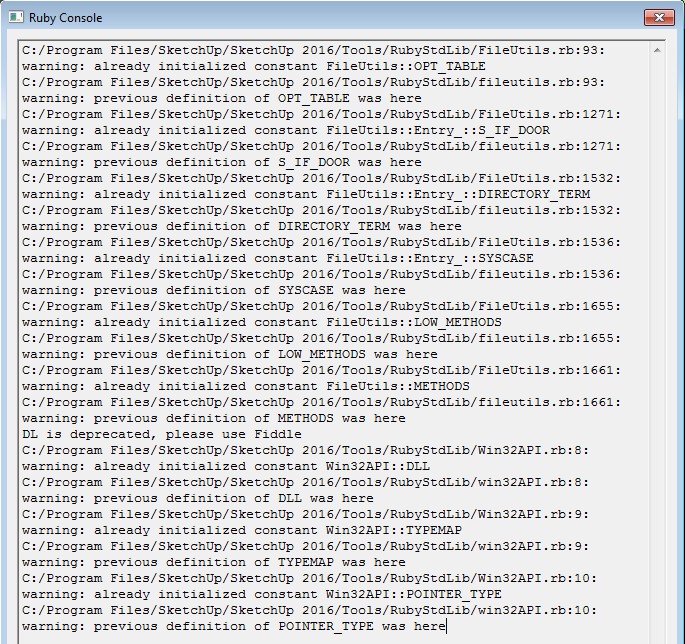
                Hi Max,
                Thanks for reporting this strange issue. I'll look into this and try to get it sorted out. You are the first one to report this so I wonder if there is a conflict with another plugin that you have.

                Can you please post the full text of the error and not just a screenshot? Thanks!

                SketchUp Plugins for Professionals

                1 條回覆 最後回覆 回覆 引用 0
                • K 離線
                  kaas
                  最後由 編輯

                  @whaat said:

                  Hi Max,
                  Thanks for reporting this strange issue. I'll look into this and try to get it sorted out. You are the first one to report this so I wonder if there is a conflict with another plugin that you have.

                  Can you please post the full text of the error and not just a screenshot? Thanks!

                  Strange coincidence. Will investigate by cleaning the plugin folder and adding one by one.

                  C:/Program Files/SketchUp/SketchUp 2016/Tools/RubyStdLib/FileUtils.rb:93: warning: already initialized constant FileUtils::OPT_TABLE
                  C:/Program Files/SketchUp/SketchUp 2016/Tools/RubyStdLib/fileutils.rb:93: warning: previous definition of OPT_TABLE was here
                  C:/Program Files/SketchUp/SketchUp 2016/Tools/RubyStdLib/FileUtils.rb:1271: warning: already initialized constant FileUtils::Entry_::S_IF_DOOR
                  C:/Program Files/SketchUp/SketchUp 2016/Tools/RubyStdLib/fileutils.rb:1271: warning: previous definition of S_IF_DOOR was here
                  C:/Program Files/SketchUp/SketchUp 2016/Tools/RubyStdLib/FileUtils.rb:1532: warning: already initialized constant FileUtils::Entry_::DIRECTORY_TERM
                  C:/Program Files/SketchUp/SketchUp 2016/Tools/RubyStdLib/fileutils.rb:1532: warning: previous definition of DIRECTORY_TERM was here
                  C:/Program Files/SketchUp/SketchUp 2016/Tools/RubyStdLib/FileUtils.rb:1536: warning: already initialized constant FileUtils::Entry_::SYSCASE
                  C:/Program Files/SketchUp/SketchUp 2016/Tools/RubyStdLib/fileutils.rb:1536: warning: previous definition of SYSCASE was here
                  C:/Program Files/SketchUp/SketchUp 2016/Tools/RubyStdLib/FileUtils.rb:1655: warning: already initialized constant FileUtils::LOW_METHODS
                  C:/Program Files/SketchUp/SketchUp 2016/Tools/RubyStdLib/fileutils.rb:1655: warning: previous definition of LOW_METHODS was here
                  C:/Program Files/SketchUp/SketchUp 2016/Tools/RubyStdLib/FileUtils.rb:1661: warning: already initialized constant FileUtils::METHODS
                  C:/Program Files/SketchUp/SketchUp 2016/Tools/RubyStdLib/fileutils.rb:1661: warning: previous definition of METHODS was here
                  DL is deprecated, please use Fiddle
                  C:/Program Files/SketchUp/SketchUp 2016/Tools/RubyStdLib/Win32API.rb:8: warning: already initialized constant Win32API::DLL
                  C:/Program Files/SketchUp/SketchUp 2016/Tools/RubyStdLib/win32API.rb:8: warning: previous definition of DLL was here
                  C:/Program Files/SketchUp/SketchUp 2016/Tools/RubyStdLib/Win32API.rb:9: warning: already initialized constant Win32API::TYPEMAP
                  C:/Program Files/SketchUp/SketchUp 2016/Tools/RubyStdLib/win32API.rb:9: warning: previous definition of TYPEMAP was here
                  C:/Program Files/SketchUp/SketchUp 2016/Tools/RubyStdLib/Win32API.rb:10: warning: already initialized constant Win32API::POINTER_TYPE
                  C:/Program Files/SketchUp/SketchUp 2016/Tools/RubyStdLib/win32API.rb:10: warning: previous definition of POINTER_TYPE was here

                  1 條回覆 最後回覆 回覆 引用 0
                  • K 離線
                    kaas
                    最後由 編輯

                    Hi Dale,

                    I updated to the new version of ProfileBuilder and now I get these warnings at every startup of SketchUp. PB works fine though.
                    I just tested and de-installed PB and the errors are gone. Re-installed PB again and they are back.

                    Any idea how to resolve this?

                    regards,
                    Max


                    profileBuilderError.jpg

                    1 條回覆 最後回覆 回覆 引用 0
                    • K 離線
                      kaas
                      最後由 編輯

                      @Dale, turns out its two of my own plugins that have something to do with this as well although, if I de-install ProfileBuilder the warnings are gone.

                      I have two plugins that use:
                      require 'win32API'
                      require 'FileUtils'

                      I was under the impression that using 'require' would prevent these kind of issues. Am I mistaken here?
                      You are using the same in PB?

                      1 條回覆 最後回覆 回覆 引用 0
                      • R 離線
                        rv1974
                        最後由 編輯

                        Whaat, thank you for help\clarifications. At least I'm glad I use the plugin effectively and hope for PB improvements in future. I this particular case if I'm not mistaken the current BP doesn't let me 'infill only' and 'infill special every approx n cm' components.
                        And of course even not being 100% polished PB saves me tons of time for sure!

                        1 條回覆 最後回覆 回覆 引用 0
                        • W 離線
                          Whaat
                          最後由 編輯

                          @kaas said:

                          @Dale, turns out its two of my own plugins that have something to do with this as well although, if I de-install ProfileBuilder the warnings are gone.

                          I have two plugins that use:
                          require 'win32API'
                          require 'FileUtils'

                          I was under the impression that using 'require' would prevent these kind of issues. Am I mistaken here?
                          You are using the same in PB?

                          That is very strange because I do not 'require' those libraries for PB2.

                          Perhaps when you have PB2 installed, it changes the timing or sequence of your plugins being loaded which results in the error being displayed. I am guessing one of your plugins has set the following:

                          Sketchup.debug_mode = true

                          Try searching your plugins for this expression. If you find it, change it to 'false' and see if that solves your problem.

                          SketchUp Plugins for Professionals

                          1 條回覆 最後回覆 回覆 引用 0
                          • K 離線
                            kaas
                            最後由 編輯

                            Very strange indeed.

                            I did find the 'debug_mode=' in 1 of my plugins and changed it to false. Also unloaded tt_solidinspector2 that was reported using that argument.

                            Still the same errors appear. I might do a fresh re-install of all the plugins in the near future.
                            thanks for looking into this.

                            1 條回覆 最後回覆 回覆 引用 0
                            • jujuJ 離線
                              juju
                              最後由 編輯

                              Has there been an update to PB2.1? I see it is to the top of the list when i go to EW and organize plugins by "most recent", however it doesn't show in My Extensions as needing to be updated?

                              Save the Earth, it's the only planet with chocolate.

                              1 條回覆 最後回覆 回覆 引用 0
                              • W 離線
                                Whaat
                                最後由 編輯

                                @juju said:

                                Has there been an update to PB2.1? I see it is to the top of the list when i go to EW and organize plugins by "most recent", however it doesn't show in My Extensions as needing to be updated?

                                Hi juju,

                                If you have 2.1 already, there is no need to update at this time. The EW probably shows it as most recent because I made a change to the EW page.

                                SketchUp Plugins for Professionals

                                1 條回覆 最後回覆 回覆 引用 0
                                • R 離線
                                  rv1974
                                  最後由 編輯

                                  Hm.. Sometimes I can't scale entities created with PB2


                                  kkkl.skp

                                  1 條回覆 最後回覆 回覆 引用 0
                                  • W 離線
                                    Whaat
                                    最後由 編輯

                                    @rv1974 said:

                                    Hm.. Sometimes I can't scale entities created with PB2

                                    PB2 actually disables scaling Profile entities that were created with PB2.

                                    Because PB2 is a parametric tool, users are encouraged to use the parametric features of PB2 to change the dimensions of the entity rather than the scale tool. When the scale tool is used, things can get messed up, especially in quantity reports.

                                    SketchUp Plugins for Professionals

                                    1 條回覆 最後回覆 回覆 引用 0
                                    • M 離線
                                      mwm5053
                                      最後由 編輯

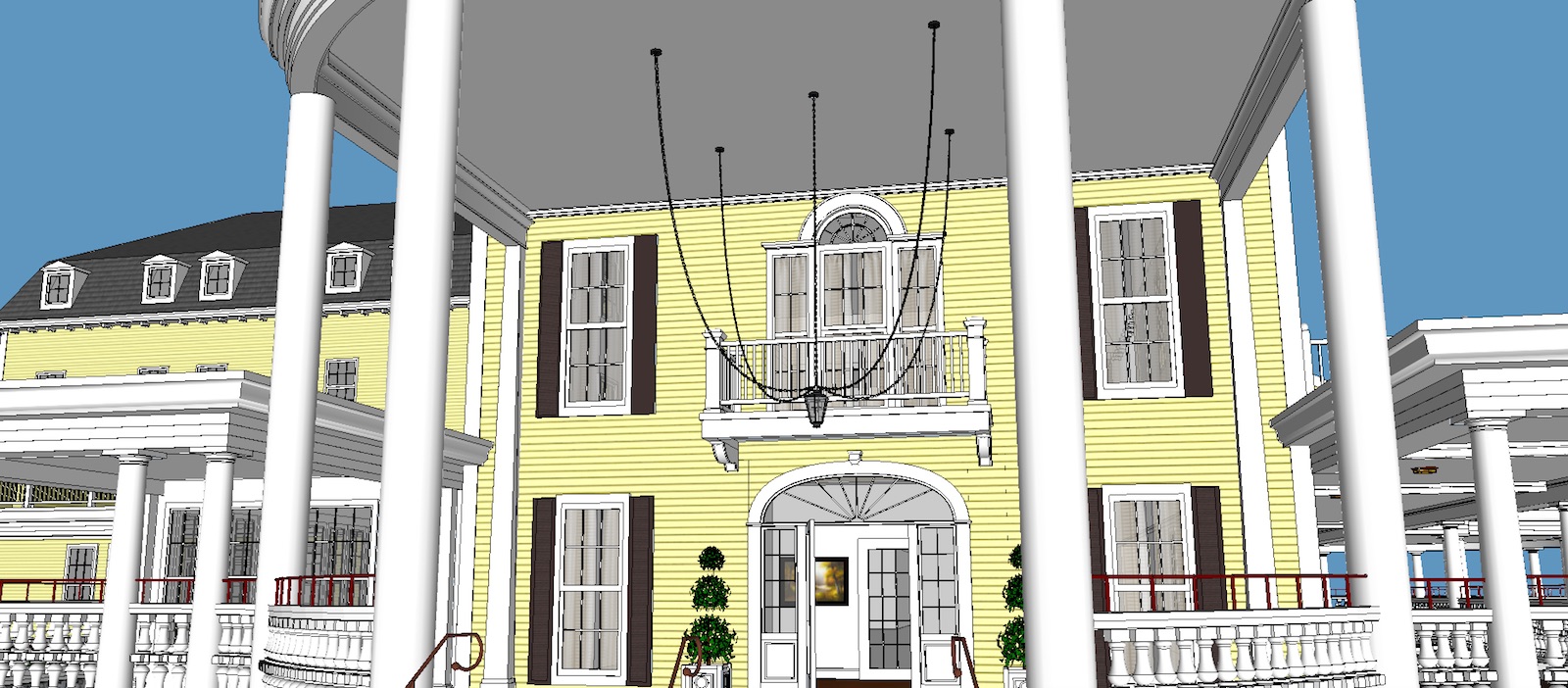
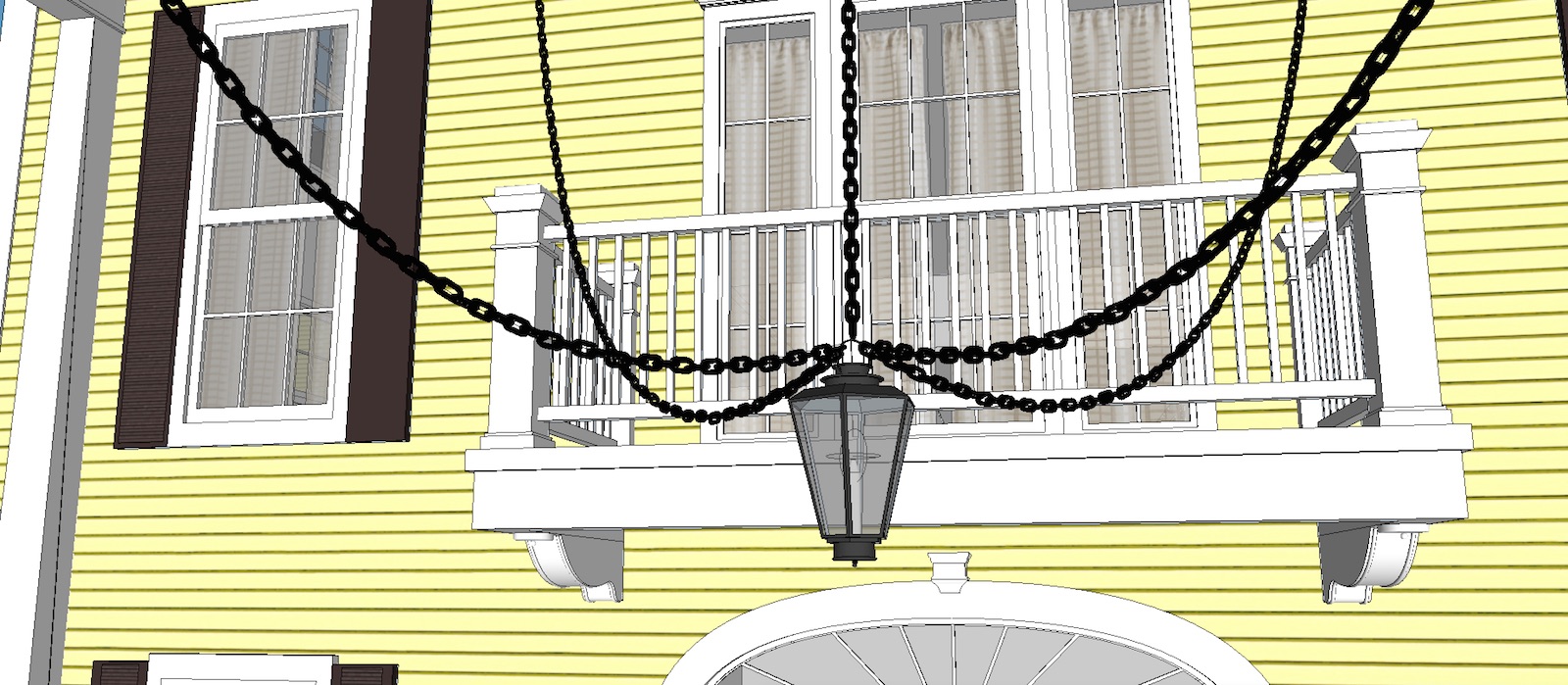
                                      Dale this plugin is great, I've used the original PB for years but the ability to create my own profiles and the assembly builder really made this chain possible.
                                      Well with the money
                                      Thanks
                                      Walt

                                      Profile Builder 2 chain.jpg


                                      PB 2 closeup.jpg

                                      2011 iMac
                                      SU 2015 Pro, 2017 Make
                                      V2 Twilight
                                      macOS Sierra 10.12.5

                                      1 條回覆 最後回覆 回覆 引用 0
                                      • W 離線
                                        Whaat
                                        最後由 編輯

                                        @mwm5053 said:

                                        Dale this plugin is great, I've used the original PB for years but the ability to create my own profiles and the assembly builder really made this chain possible.
                                        Well with the money
                                        Thanks
                                        Walt
                                        Wow, thanks Walt! That is so great to hear!

                                        Would you be interested in copy / pasting your post into a review at the EW page?
                                        http://extensions.sketchup.com/en/content/profile-builder-2

                                        Cheers,
                                        Dale

                                        SketchUp Plugins for Professionals

                                        1 條回覆 最後回覆 回覆 引用 0
                                        • M 離線
                                          mwm5053
                                          最後由 編輯

                                          Done for sure

                                          2011 iMac
                                          SU 2015 Pro, 2017 Make
                                          V2 Twilight
                                          macOS Sierra 10.12.5

                                          1 條回覆 最後回覆 回覆 引用 0
                                          • W 離線
                                            Whaat
                                            最後由 編輯

                                            @mwm5053 said:

                                            Done for sure

                                            Thanks so much!

                                            SketchUp Plugins for Professionals

                                            1 條回覆 最後回覆 回覆 引用 0
                                            • 1
                                            • 2
                                            • 7
                                            • 8
                                            • 9
                                            • 10
                                            • 11
                                            • 10 / 11
                                            • 第一個貼文
                                              最後的貼文
                                            Buy SketchPlus
                                            Buy SUbD
                                            Buy WrapR
                                            Buy eBook
                                            Buy Modelur
                                            Buy Vertex Tools
                                            Buy SketchCuisine
                                            Buy FormFonts

                                            Advertisement