Drag and drop images
-
Still works for me [v2014M1]
I think there's an Explorer setting about allowing drag-n-drop ?
Can you do it with a SKP ?? -
I've used Make 14M1 (started as admin) to test, and I'm not able to insert images or models with drag and drop...

-
Same for me. But been that way since 2013.
-
Drag and drop works fine for me. Images and .skp
-
I WANT IT BACK!
-
Try hitting escape key while left clicking the image file.
-
Check this is set right...
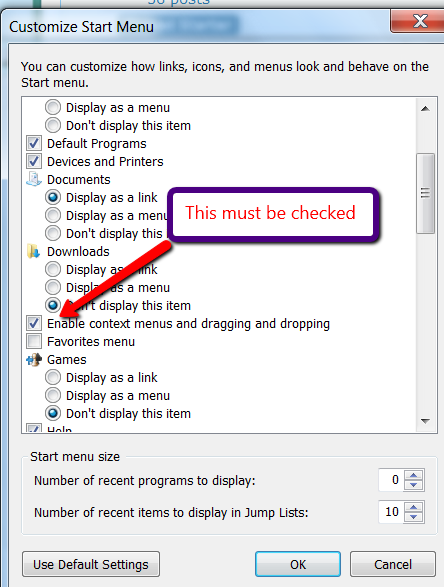 And also running SketchUp as Admin when you yourself are not an Admin, might just mean that it looks like plain-old-User 'you' are trying to affect an Admin's process [the SKP] ?
Try the steps listed in the attached PDF to fix it on Win8 [& 7 too] DnDwin78.pdf -
I'm having the same problem with sketchup pro 2015 on windows 10. I can't drag and drop images into sketchup.
I've tried what it says in the pdf (which was for windows 7 and 8 but tried anyway). I added the interactive group, and it worked for a while... I later accidentally unchecked one of the permissions for the new interactive group, and since then I can't get it working again...
-
You cannot drag-and-drop files from Windows Explorer onto a program's window if that program is running as administrator.
An application with a lower privilege cannot talk to a higher [admin] one.
And weirdly Windows Explorer never runs as admin !
So try changing your SketchUp.exe properties > compatibility to NOT run as admin !
This might cause other issues [like permissions etc if you didn't initially install it as an admin] - BUT it will then allow drag-and-drop of Image files onto SketchUp ! -
@tig said:
You cannot drag-and-drop files from Windows Explorer onto a program's window if that program is running as administrator.
An application with a lower privilege cannot talk to a higher [admin] one.
And weirdly Windows Explorer never runs as admin !
So try changing your SketchUp.exe properties > compatibility to NOT run as admin !
This might cause other issues [like permissions etc if you didn't initially install it as an admin] - BUT it will then allow drag-and-drop of Image files onto SketchUp !I just came into the forum to tell you I solved the issue by unchecking "run as admin", and lo and behold, you've beat me to it! You've already replied.
Thanks Tig! It works!





Hello! It looks like you're interested in this conversation, but you don't have an account yet.
Getting fed up of having to scroll through the same posts each visit? When you register for an account, you'll always come back to exactly where you were before, and choose to be notified of new replies (either via email, or push notification). You'll also be able to save bookmarks and upvote posts to show your appreciation to other community members.
With your input, this post could be even better 💗
Register Login


Advertisement