Unreal 4 Engine
-
Adam They look Great!
Does Lightup have the ability regarding textures to ..... mmm how to explain it (they'll be a word or phase for it) so in Koolaas the textures reflect a roughness so some parts reflect smooth and some rough. the corridor for instance in the movie shows thisheres another example of Unreal 4 - its german
http://www.gamestar.de/videos/trailer,3/unreal-engine-4,76683.htmlc
-
here it is found it on youtube
-
Another Koolaa inspired by RobertPencil
-
@cmeed said:
Adam They look Great!
Does Lightup have the ability regarding textures to ..... mmm how to explain it (they'll be a word or phase for it) so in Koolaas the textures reflect a roughness so some parts reflect smooth and some rough. the corridor for instance in the movie shows thisheres another example of Unreal 4 - its german
http://www.gamestar.de/videos/trailer,3/unreal-engine-4,76683.htmlc
Sure, its called a specular map and controls which parts of the texture reflect. LightUp creates one automatically for you from your base texture based on grayscale brightness. If you need (or have) something different, you can set a filename with an image. See this video: https://www.youtube.com/watch?v=22FSi1aT2bg (around 10m30s in).
Adam
-
Architecture Real-time - Unreal Engine 4
-
-
One more Unreal Engine Architecture video.
-
wow
-
now especially since Unreal engine is now free, we should be seeing more arch viz from this platform.
-
@jenujacob said:
now especially since Unreal engine is now free, we should be seeing more arch viz from this platform.
That is just it, we are on a Sketchup forum discussing a new engine but there does not seem to be any support for skp files, so how will the workflow go?
I am very interested in using Unreal but I refuse to have to use a 3rd party software to bridge the two as it makes no sense to complicate my workflow.
So, the challenge goes out as to how SKP and Unreal can work together or if if can.
-
You could use the SDKs of both apps to make a direct pipeline between both.
There's probably one already out there.
I wonder how lightup fbx export would work? It is used a lot in Unity from what I understand.
-
@solo said:
... so how will the workflow go?... the challenge goes out as to how SKP and Unreal can work together or if if can.
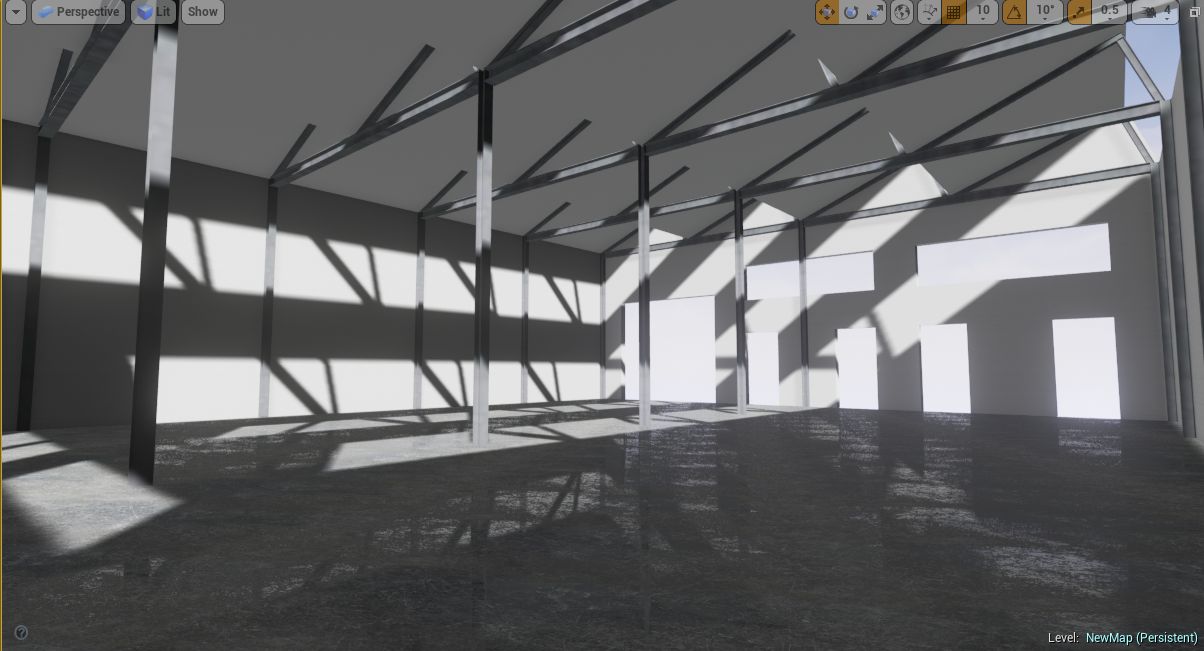
I just tried Unreal using this workflow:
- meters as unit in Sketchup
- fbx output from Sketchup.
- textures used were in size n2 (512x512 for instance)
Import the fbx in Unreal:
- place the mesh in the scene, rescale if needed
- refine / add more objects and save selected overwrite the fbx file in Sketchup and re-import in Unreal. no need to re-scale and material settings (bump / reflection in Unreal)are preserved.
Works nicely for a simple scene. What kind of problems / challenges are you expecting?
-
The latest Unreal includes better uv unwrapping. Suitable for simple geometry such as walls and floors etc. I'm not sure of the details but what was lacking before was uvs and a 2nd uv channel when the fbx exported from SU. I think this is now generated and simple unwrapping is done in unreal. I have managed to get a model in and lit. I only played for 10mins or so when I heard about the new feature.
But it can't handle unwrapping anything complicated like a person. -
So from a brief dig around I see Unreal only imports fbx and obj meshes, and so far I have not been successful importing materials, some translate but most do not.
What is needed is an exporter of some sort.
-
I have been experimenting just a little with Game Engines. My understanding has been that Sketchup files don’t work that well with game Engines because the models need to be UV mapped properly. Therefore, I have assumed that it is always need to have tome 3rd party tool to do the UV mapping, for example Blender. Anyway, I am still novice with these so please correct if I am wrong.
-
miikka1978 - previousily the workflow has needed an extra software to generate uv maps but the latest builds 4.5 (I think) onwards have had a new way of uv mapping on the import but only on simple geometry.
I still don't think it's a full proof. Or do I think, we as sketchup users, are going to be blessed by the makers with an easy way in.
The software ooks incredible to me. There are many arch viz people showing work on their forum and they've even opened a dedicated arch viz forum. So its encouraging -
@miikka1978 said:
.. My understanding has been that Sketchup files don’t work that well with game Engines because the models need to be UV mapped properly....
You're right. I've been playing with the Unreal engine for a bit. It's a game engine and it expects the uvmaps to be properly and uniquely layed out (do a google search for uvmaps in google-images to get an idea).
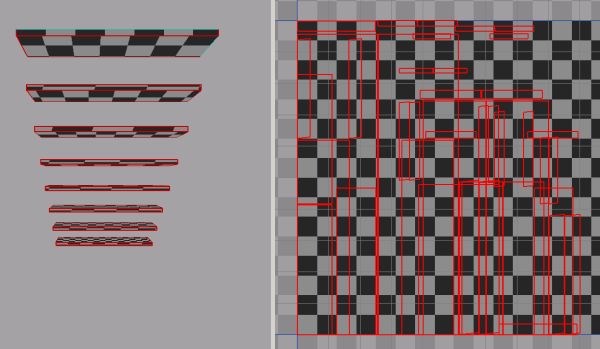
When textures are used in Sketchup they are stored and Unreal reads them as UV channel 0. Unreal can create lightmaps and stores them in UV channel 1. So when doing a lighting calculation Unreal looks for a UV channel 1. If there is no mapping info in UV channel 1 (in Sketchup you can't create it), Unreal duplicates the UV channel 0 data into channel 1 and tries to store the lightmap data in there.
And that's where you also run into problems with Sketchup. The UV coords for anything that's slightly more complex than a box, a floor or some walls aren't uniquely layed out by Sketchup but overlapping (see image: uvmaps in Roadkill for stairs). So the lighting data gets stored overlapping also and it results in errors and a visual mess.If you somehow can uniquely lay out the mapping in Sketchup for objects you should be fine.
Still investigating...
-
Kaas: have you had much success using roadkill? so what happens after you use road kill? what do you have - an .fbx to import?
-
Cmeed: Using Roadkill until now didn't work for me. If I had the uv's layed out right in Roadkill, re-imported the uv's in Sketchup (using SketchUV plugin I bought a long while ago), exporting the model as fbx from Sketchup; for some reason, that fbx export resulted in several small copies of the original texture that I was unwrapping.
Doesn't make sense to me. In Skecthup there's only one material and still several fragments of the same texture are exported.
Importing in Unreal shows the same problem: errors and multiple textures for the same element...
-
In my case I have only been using Unity because there was already free version. Now I definitely need to check Unreal 4 Engine.
My planned workflow has been mainly:
- Modeling in Sketchup
- Finalize and UV mapping in Blender
- Texturing in Substance Designer/Painter (should work pretty much the same for Unity and UE)
Anyway, I haven't got too far yet because this is just a hobby to me and I can’t works constantly with this. Lately I have been even learning Blender because it is developing so fast even though it is still far away from being modeler for architects, etc.
Do you think that UE is as easy as Unity to learn? I would still like to stick with Unity but the quality of some architectural visualizations in UE look unbelievable, which makes it tempting.











Advertisement