sketchucation logo sketchucation
    • 登入
    Oops, your profile's looking a bit empty! To help us tailor your experience, please fill in key details like your SketchUp version, skill level, operating system, and more. Update and save your info on your profile page today!
    ⚠️ Important | Libfredo 15.6b introduces important bugfixes for Fredo's Extensions Update

    [Plugin] Shortcutter Beta

    已排程 已置頂 已鎖定 已移動 Plugins
    98 貼文 14 Posters 44.6k 瀏覽 14 Watching
    正在載入更多貼文
    • 從舊到新
    • 從新到舊
    • 最多點贊
    回覆
    • 在新貼文中回覆
    登入後回覆
    此主題已被刪除。只有擁有主題管理權限的使用者可以查看。
    • Rich O BrienR 離線
      Rich O Brien Moderator
      最後由 編輯

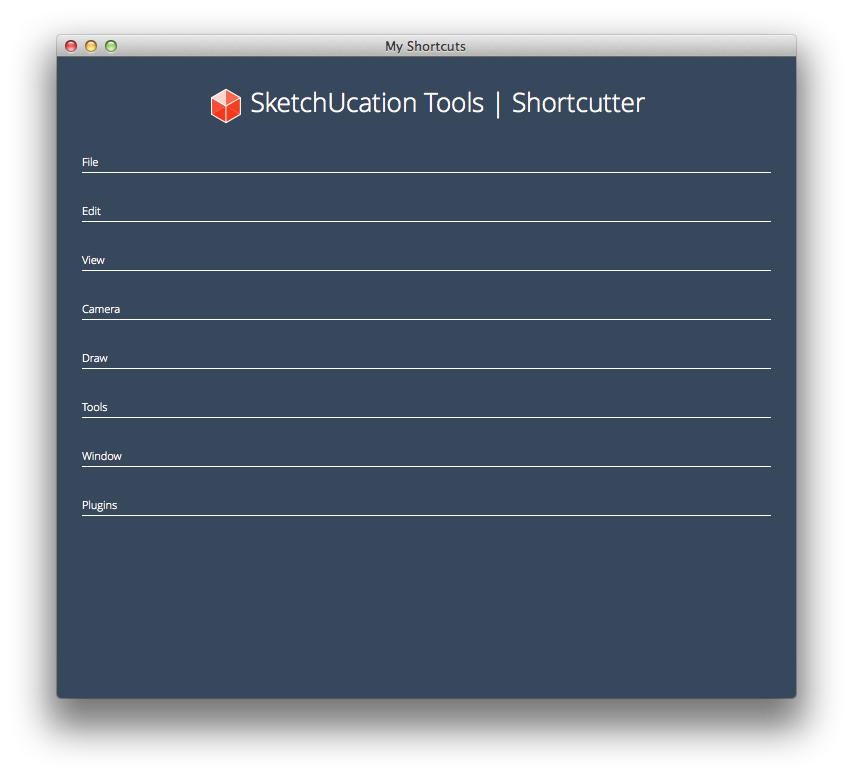
      Shortcutter for SketchUp is a simple utility that display all your assigned shortcuts in a nice web dialog.

      Modifier Keys are color coded for easy identification.

      http://i.minus.com/ibccrxOXUZcnZi.gif

      http://sketchucation.com/pluginstore?pln=shortcutter

      [mod=NOTE:1su51gv9]It needs SketchUcation Tools to run as its addon [restart SketchUp after you first install it], AND you will also need to be on-line to use it, because it uses files hosted on SketchUcation to display the UI.

      It is currently SU8, SU2013 and SU2014 compatible[/mod:1su51gv9]

      Download the free D'oh Book for SketchUp 📖

      1 條回覆 最後回覆 回覆 引用 0
      • T 離線
        TECHDAVE02
        最後由 編輯

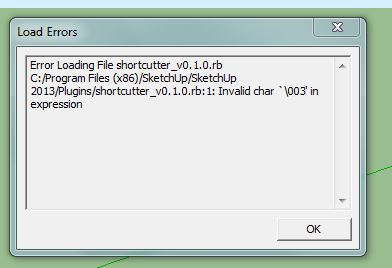
        Had an error see jpeg


        SHORTCUTTER.JPG

        1 條回覆 最後回覆 回覆 引用 0
        • Rich O BrienR 離線
          Rich O Brien Moderator
          最後由 編輯

          You need to be online to use the tool

          Download the free D'oh Book for SketchUp 📖

          1 條回覆 最後回覆 回覆 引用 0
          • Rich O BrienR 離線
            Rich O Brien Moderator
            最後由 編輯

            OK, so this tool is failing in SU2013. Sorry, we will look at a fix. In the meantime try it in SU2014 or v8

            Download the free D'oh Book for SketchUp 📖

            1 條回覆 最後回覆 回覆 引用 0
            • BoxB 離線
              Box
              最後由 編輯

              Works in 2013 and 2014 for me.

              1 條回覆 最後回覆 回覆 引用 0
              • cottyC 離線
                cotty
                最後由 編輯

                Great!
                Does the GIF shows a different version?
                I've found it here (as described in the plugin store)...
                shortcutter.png

                my SketchUp gallery

                1 條回覆 最後回覆 回覆 引用 0
                • Rich O BrienR 離線
                  Rich O Brien Moderator
                  最後由 編輯

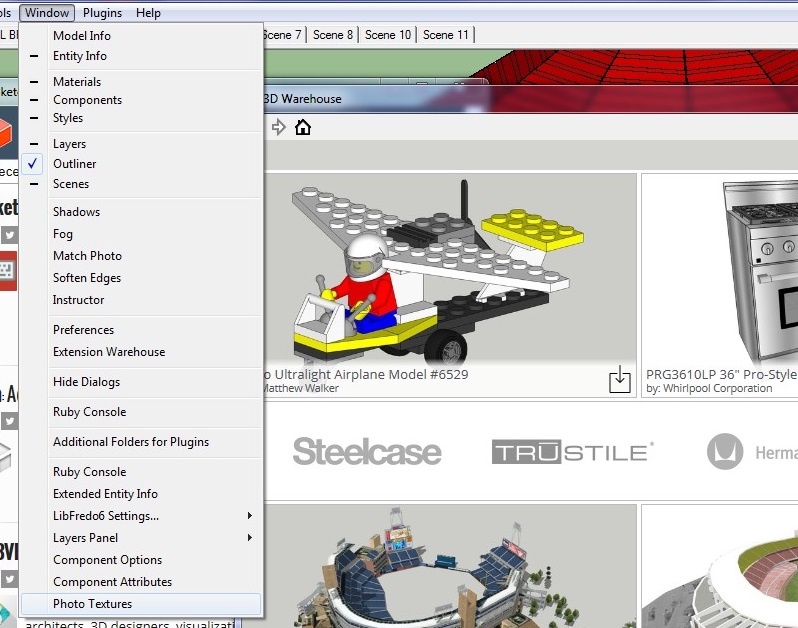
                  It does, because the .gif was an alpha when the initial idea was the place it in the Window menu.

                  Download the free D'oh Book for SketchUp 📖

                  1 條回覆 最後回覆 回覆 引用 0
                  • T 離線
                    TECHDAVE02
                    最後由 編輯

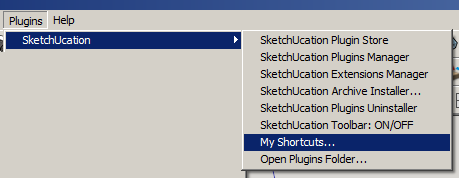
                    I don't get an option in the window menu

                    ScreenHunter_03 Apr. 11 11.05.jpg

                    1 條回覆 最後回覆 回覆 引用 0
                    • Rich O BrienR 離線
                      Rich O Brien Moderator
                      最後由 編輯

                      See SketchUcation Tools menu

                      Download the free D'oh Book for SketchUp 📖

                      1 條回覆 最後回覆 回覆 引用 0
                      • T 離線
                        TECHDAVE02
                        最後由 編輯

                        Thanks got it

                        1 條回覆 最後回覆 回覆 引用 0
                        • Dave RD 離線
                          Dave R
                          最後由 編輯

                          Very nice. And it looks great cosmetically. Is it possible to save the page as an HTML file? I tried right clicking on it but don't get a Save or Save as... option.

                          Etaoin Shrdlu

                          %

                          (THERE'S NO PLACE LIKE)

                          G28 X0.0 Y0.0 Z0.0

                          M30

                          %

                          1 條回覆 最後回覆 回覆 引用 0
                          • G 離線
                            Gábor
                            最後由 編輯

                            @dave r said:

                            I tried right clicking on it but don't get a Save or Save as... option.

                            No, not in the current version. For what purpose would you use that? If for printing out maybe a .pdf would be better which might be in some of the next versions if needed. (Well, Ctrl+P does the printing job until it is implemented...)

                            1 條回覆 最後回覆 回覆 引用 0
                            • Rich O BrienR 離線
                              Rich O Brien Moderator
                              最後由 編輯

                              It prints nice too but over a couple of pages

                              Download the free D'oh Book for SketchUp 📖

                              1 條回覆 最後回覆 回覆 引用 0
                              • Dave RD 離線
                                Dave R
                                最後由 編輯

                                @gábor said:

                                @dave r said:

                                I tried right clicking on it but don't get a Save or Save as... option.

                                No, not in the current version. For what purpose would you use that? If for printing out maybe a .pdf would be better which might be in some of the next versions if needed. (Well, Ctrl+P does the printing job until it is implemented...)

                                Not specifically for printing but possibly for including in a tutorial or other web page about using SketchUp. It's too large to get into a single screen shot so I was thinking maybe I could work from the HTML page.

                                Etaoin Shrdlu

                                %

                                (THERE'S NO PLACE LIKE)

                                G28 X0.0 Y0.0 Z0.0

                                M30

                                %

                                1 條回覆 最後回覆 回覆 引用 0
                                • G 離線
                                  Gábor
                                  最後由 編輯

                                  @dave r said:

                                  @gábor said:

                                  @dave r said:

                                  I tried right clicking on it but don't get a Save or Save as... option.

                                  No, not in the current version. For what purpose would you use that? If for printing out maybe a .pdf would be better which might be in some of the next versions if needed. (Well, Ctrl+P does the printing job until it is implemented...)

                                  Not specifically for printing but possibly for including in a tutorial or other web page about using SketchUp. It's too large to get into a single screen shot so I was thinking maybe I could work from the HTML page.

                                  The problem with the HTML is: As this webdialog uses loads of .css stuff (created by Rich) you couldn't do anything with the .html even if you could download it without the corresponding .css files.

                                  1 條回覆 最後回覆 回覆 引用 0
                                  • Rich O BrienR 離線
                                    Rich O Brien Moderator
                                    最後由 編輯

                                    We'll do something bespoke for you Dave.

                                    Download the free D'oh Book for SketchUp 📖

                                    1 條回覆 最後回覆 回覆 引用 0
                                    • N 離線
                                      numerobis
                                      最後由 編輯

                                      Nice one! Thanks! 😄

                                      1 條回覆 最後回覆 回覆 引用 0
                                      • TIGT 離線
                                        TIG Moderator
                                        最後由 編輯

                                        @techdave02 said:

                                        Had an error see jpeg
                                        Your screenshot shows an error when SketchUp tries to load a file that does not [or at least should not!] exist 😲

                                        Here is my theory on what happen... 🤓

                                        You downloaded the shortcutter_v0.1.0.rbz archive for the Plugin from the PluginStore's web-page.
                                        You did NOT install it using the v2013 Preferences > Extensions > Install... button.
                                        But [for some reason which only you can explain] you renamed it as shortcutter_v0.1.0.rb and then you just put it into your v2013 Plugins folder 😒
                                        So when SketchUp.exe v2013 tried to load that file it could not because it is NOT a Ruby file - the \003 is a binary character found early in the .rbz archive [actually a .zip renamed] 😮

                                        So the first thing to do is remove that fake .rb file from the v2013 Plugins folder.
                                        Say onto your Desktop.
                                        You can rename it with its final 'z' again.
                                        Now use v2013 Preferences > Extensions > Install... button, find the correctly named .rbz and it'll get installed properly for you where it should be.
                                        You need to restart SketchUp to effect the full integration of the addon into the SketchUcation Toolset/submenu...

                                        Alternatively, since this addon only works if the SketchUcation Toolset is installed. then you could use the SketchUcation PluginStore dialog to AutoInstall the addon directly, without even worrying about the RBZ at all...
                                        Remember that you will still need to restart SketchUp to effect the full integration of the addon into the SketchUcation Toolset/submenu...

                                        TIG

                                        1 條回覆 最後回覆 回覆 引用 0
                                        • TIGT 離線
                                          TIG Moderator
                                          最後由 編輯

                                          Just in case some of you think that this tool doesn't work in v2013... I can assure you that it works just fine in version 8/2013/2014.
                                          I have successfully tested it in all versions. 🤓
                                          The comment added to the original post was following some spurious results - user-error rather than anything inherent in the code...

                                          TIG

                                          1 條回覆 最後回覆 回覆 引用 0
                                          • D 離線
                                            driven
                                            最後由 編輯

                                            @tig said:

                                            I have successfully tested it in all versions. :geek:

                                            and mac?it's nice and clean, almost minimalist...

                                            EDIT: I do have shortcuts, but maybe it's a encoding issue...
                                            Note. "§\t/Plugins/Key Scene/Key Scene 1",

                                            Sketchup.get_shortcuts.sort
                                            ["A\tselectArcTool;", "B\tselectPaintTool;", "C\tselectCircleTool;", "D\tselectDimensionTool;", "E\tselectEraseTool;", "F\tselectExtrudeTool;", "G\tmakeComponent;", "H\tviewShowHidden;", "K\t/Plugins/Keyboard Shortcuts", "L\tselectLineTool;", "M\tselectMoveTool;", "O\tselectOffsetTool;", "P\tselectPushPullTool;", "Q\tselectRotateTool;", "R\tselectRectangleTool;", "S\tselectScaleTool;", "Space\tselectSelectionTool;", "T\tselectMeasureTool;", "U\teditUnlockSelected;", "V\ttoggleHideRestOfModel;", "W\t/Plugins/Weld", "Z\tselectZoomTool;", "§\t/Plugins/Key Scene/Key Scene 1", "⇧A\t/File/Export/Animation...", "⇧E\t/File/Export/2D Graphic...", "⇧P\tviewParallelProjection;", "⇧R\t/Draw/Rotated Rectangle", "⇧S\t/File/Export/Section Slice...", "⇧T\ttogglePageTabsDsiplay;", "⇧V\tpasteInPlace;", "⇧Z\tviewZoomExtents;", "⌃S\tsaveCopy;", "⌃⌥⇧T\tviewTop;", "⌥B\torderFrontColorPanel;", "⌥M\t/Plugins/Mirror Selection", "⌥T\tdoThreeDText;"]

                                            

                                            learn from the mistakes of others, you may not live long enough to make them all yourself...

                                            1 條回覆 最後回覆 回覆 引用 0
                                            • 1
                                            • 2
                                            • 3
                                            • 4
                                            • 5
                                            • 1 / 5
                                            • 第一個貼文
                                              最後的貼文
                                            Buy SketchPlus
                                            Buy SUbD
                                            Buy WrapR
                                            Buy eBook
                                            Buy Modelur
                                            Buy Vertex Tools
                                            Buy SketchCuisine
                                            Buy FormFonts

                                            Advertisement