[Plugin] Add Layer [1.1.0]
-
OK, maybe Jim needs to test/comment...
-
Are you hitting the Apply button?
-
I am. It is creating the layer after I do, but the layer visibility is as if I set it to always visible for existing and new scenes, regardless of what I input. I went back to using your old create hidden layer plugin which has been indispensable to me for years and it works fine in SU2015
-
Well, no I wasn't actually. I just went back and realized that I created the new layer name, made my visibility chooses, and then hit done. doh.
It is amazing how well it works when one hits apply first.
Thanks guys, I'm sorry to waste everyone's time
-
Not wasted at all - the fact that my guess was correct validates a suspicion I had that the plugin is not as intuitive as it needs to be. Thanks for reporting.
I find the core of many plugins can be written in few lines of code. It is far more difficult to create a good user experience.
-
I think it pretty slick how you have set up so one can make multiple changes without closing the dialogue. I guess I just assumed that the apply button was for changing the attributes of an existing layer and that, if I was making a new layer, that the done button would create the layer with the choices made as a default. Love the plugin, btw! Thanks for updating it.
-
This is NOT working for the primary task. Add a new layer for This Scene Only.
When I do this, the layer shows up in every scene. Nothing different than making a new layer narmally.
What is going on?SU 2015/Win 7 64 bit
-
@sketchydog said:
This is NOT working for the primary task. Add a new layer for This Scene Only.
When I do this, the layer shows up in every scene. Nothing different than making a new layer narmally.
What is going on?SU 2015/Win 7 64 bit
Make sure to press the Apply button?
-
Would it be possible to have a button (or mouse-over) in the UI which would display a temporary dialog with a summary of which layers have the "Add Layer's HIDDEN attribute" assigned to them and their type of HIDDEN attribute (eg. for a specific scene only, new scenes, etc.)?
-
Hi Jim,
I am experiencing an odd behavior with your Plugin.
If I open the Plugin window everything works as expected.
If I close the window, however, I can never get it to come back on without completely quitting SU and starting over.
Also, I flip between SU and LO with command/tab shortcut on my Mac. If the Plugin window is open while I am doing this, then, when I flip from LO to SU, the curser is unable to click or change tools unless I click up in the menu bar first. If the Plugin window is not open, then everything works as expected.
I am using SU 15.0.9349 and LO 15.0.9349 and OS X 10.10.1
-
I get the following error when I have multiple sketchup documents open (Document1, Document2).
The error occurs when I try to use this tool in Document 2, and have previously created a new layer '-section-PLAN-L0' using this tool in Document 1.Error; #<ArgumentError; '-section-PLAN-L0' not valid values in list.> /Users/me/Library/Application Support/SketchUp 2015/SketchUp/Plugins/jf_add_layer/SKUI/listbox.rb;207;in `value=' /Users/me/Library/Application Support/SketchUp 2015/SketchUp/Plugins/jf_add_layer/main.rb;37;in `main' /Users/me/Library/Application Support/SketchUp 2015/SketchUp/Plugins/jf_add_layer/main.rb;205;in `block in <module;AddLayer>' SketchUp;1;in `call'Using SU-2015-15.3.329 on OSX Yosemite 10.10.2
-
I really whish for an option in the dialogue box to choose layer visibility states in future creations of scenes to behave as they would normaly do, meaning copying exact layer visibility states from the scene used as the creation source. As it is now the dialogue offers you to choose eiter visible or invisible layer states in future scene creations. If this is implemented I will save a lot of time an be extremely greatfull!! Thanks!!!
-
When i rename a layer - 00_Equip --> 00_Equip.01 - and Add Layer[1.1.0] is open, if i closed and open it again, the ruby console show me the following error:
Error; #<ArgumentError; '00_Equip' not valid values in list.> D;/Plugins/jf_add_layer/SKUI/listbox.rb;207;in `value=' D;/plugins/jf_add_layer/main.rb;37;in `main' D;/Plugins/jf_add_layer/main.rb;205;in `block in <module;AddLayer>' SketchUp;1;in `call' -
@greenskp said:
When i rename a layer - 00_Equip --> 00_Equip.01 - and Add Layer[1.1.0] is open, if i closed and open it again, the ruby console show me the following error:
> Error; #<ArgumentError; '00_Equip' not valid values in list.>
> D;/Plugins/jf_add_layer/SKUI/listbox.rb;207;in `value='
> D;/plugins/jf_add_layer/main.rb;37;in `main'
> D;/Plugins/jf_add_layer/main.rb;205;in `block in <module;AddLayer>'
> SketchUp;1;in `call'
have you tried 00_Equip --> 00_Equip_01 ?
-
I updated the plugin to fix this error. The version is 1.1.1.
Note however the dialog needs closed and reopened to recognize a renamed layer.
-
Thank you Jim. Working fine now.
-
Thanks so much!! Running perfectly
-
I realize that this is an oldish plugin, but it's really useful, and seems to work great in v2017.
However, the layers in the pull-down list are shown in apparently random order... Is there any way of changing that, so they are in alphabetical order, just like in the actual SK "Layers" window?
I often have many dozens (or even hundreds) of layers in my models, so it's a real pain to scroll through a long list, looking for the ones I want. It would be great to have the option to sort that list in alphabetical order, and even better if it could be set to either ascending or descending order.
-
@sk_man_2020 said:
I realize that this is an oldish plugin, but it's really useful, and seems to work great in v2017.
However, the layers in the pull-down list are shown in apparently random order... Is there any way of changing that, so they are in alphabetical order, just like in the actual SK "Layers" window?
I often have many dozens (or even hundreds) of layers in my models, so it's a real pain to scroll through a long list, looking for the ones I want. It would be great to have the option to sort that list in alphabetical order, and even better if it could be set to either ascending or descending order.
when i click on 'name' (title of the column) in the window that shows layers, they are put in alphabetical order...
-
@glro said:
when i click on 'name' (title of the column) in the window that shows layers, they are put in alphabetical order...
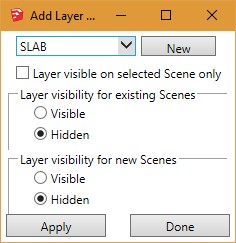
Then I guess I must have an older version of the plugin, because I don't see any "name" column in the plugin. All I see is a pull-down box with an arrow pointing down, and a button next to it labeled "New". Below that is a check box labeled "Layer visible on selected Scene only". If I click in that pull-down, I get the list of layers, but they are in random order. I don't see any column labeled "Name" on the plugin window. That's only in the layers window, not the plugin window. And when I click on "name" in the layers window, it does not change the order of the layers in the plugin window, only in the layers window.
What version of the plugin are you using? Is there a new version that has a "name" column on it?
This is what I get: Are you seeing something different?






Advertisement