sketchucation logo sketchucation
    • 登入
    Oops, your profile's looking a bit empty! To help us tailor your experience, please fill in key details like your SketchUp version, skill level, operating system, and more. Update and save your info on your profile page today!
    ⚠️ Important | Libfredo 15.6b introduces important bugfixes for Fredo's Extensions Update

    [Plugin] Add Layer [1.1.0]

    已排程 已置頂 已鎖定 已移動 Plugins
    58 貼文 23 Posters 13.7k 瀏覽 23 Watching
    正在載入更多貼文
    • 從舊到新
    • 從新到舊
    • 最多點贊
    回覆
    • 在新貼文中回覆
    登入後回覆
    此主題已被刪除。只有擁有主題管理權限的使用者可以查看。
    • J 離線
      Jim
      最後由 編輯

      @nortti said:

      Thank you for the 'Add Layer' plugin! This is a huge time saver. Although, when I select "Layer visible on selected scene only" it does not create a layer. Am I missing something? Still even without this feature it's a success.

      Thanks for any help in getting this fully working.

      Mac OSX 10.9.2 / SketchUp Pro 2013

      You should get a dialog if you select this option an there are no Scenes in the model. If there are Scenes in the model, then please try to select this option while the Ruby Console window is open. Are there any errors shown?

      Hi

      1 條回覆 最後回覆 回覆 引用 0
      • jiminy-billy-bobJ 離線
        jiminy-billy-bob
        最後由 編輯

        @tt_su said:

        Note that in SU older than 2014 creating layers with the special flag might cause SU to trigger the Fix Model dialog. That warning is a bug - nothing was messed up, it was the validation code that was wrong. And the Fix Model dialog will reset the flag unfortunately.

        The only flag causing an issue is "LAYER_HIDDEN_BY_DEFAULT", isn't it?

        25% off Skatter for SketchUcation Premium Members

        1 條回覆 最後回覆 回覆 引用 0
        • JQLJ 離線
          JQL
          最後由 編輯

          @tt_su said:

          Note that in SU older than 2014 creating layers with the special flag might cause SU to trigger the Fix Model dialog. That warning is a bug - nothing was messed up, it was the validation code that was wrong. And the Fix Model dialog will reset the flag unfortunately.

          Ahhh! So that's why my models needed fixing everytime!...

          www.casca.pt
          Visit us on facebook!

          1 條回覆 最後回覆 回覆 引用 0
          • J 離線
            Jim
            最後由 編輯

            @otb designworks said:

            Awesome! Any way to change the layer behavior after it has been created?

            For instance, if I make a layer and choose for it to be hidden for new scenes, but then I change my mind and want it visible for new scenes, is that possible to change?

            thanks!

            I could implement editing by using a Listbox instead of a Textbox...
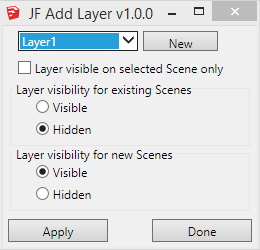
            2014-03-12_201733.png

            But then I'd need a dialog for the new layer name...
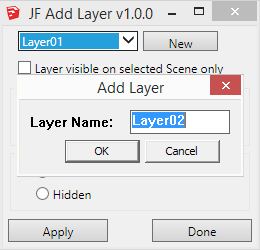
            2014-03-12_202033.png

            Or perhaps not even have the add new layer option - just have the plugin be a layer behavior editor.

            ❓

            Hi

            1 條回覆 最後回覆 回覆 引用 0
            • J 離線
              Jim
              最後由 編輯

              @techdave02 said:

              There add scenes layer that works / on only that scene or you can update it to work in other scenes works well for dimensions http://sketchucation.com/forums/viewtopic.php?f=10%26amp;t=36583

              http://sketchuptips.blogspot.ca/2007/08/add-hidden-layer.html

              The option to make the layer "visible on the selected scene only" should work, no?

              That's my blog you linked to - and this plugin is an update to the one you linked to.

              Hi

              1 條回覆 最後回覆 回覆 引用 0
              • K 離線
                ktkoh
                最後由 編輯

                I downloaded this plugin from the SU Store for the purpose of learning the SKUI interface.
                However while testing I was not able to get the check box "Layer visible on selected Scene only" to create a new layer.

                Error; #<NameError; undefined local variable or method `txt_LayerName' for JF;;AddLayer;Module>
                C;/Users/Keith/AppData/Roaming/SketchUp/SketchUp 2014/SketchUp/Plugins/jf_add_layer/main.rb;155;in `add_layer'
                C;/Users/Keith/AppData/Roaming/SketchUp/SketchUp 2014/SketchUp/Plugins/jf_add_layer/main.rb;110;in `block in main'
                C;/Users/Keith/AppData/Roaming/SketchUp/SketchUp 2014/SketchUp/Plugins/jf_add_layer/SKUI/events.rb;82;in `call'
                C;/Users/Keith/AppData/Roaming/SketchUp/SketchUp 2014/SketchUp/Plugins/jf_add_layer/SKUI/events.rb;82;in `block in trigger_event'
                C;/Users/Keith/AppData/Roaming/SketchUp/SketchUp 2014/SketchUp/Plugins/jf_add_layer/SKUI/events.rb;78;in `each'
                C;/Users/Keith/AppData/Roaming/SketchUp/SketchUp 2014/SketchUp/Plugins/jf_add_layer/SKUI/events.rb;78;in `trigger_event'
                C;/Users/Keith/AppData/Roaming/SketchUp/SketchUp 2014/SketchUp/Plugins/jf_add_layer/SKUI/window.rb;357;in `event_control_callback'
                C;/Users/Keith/AppData/Roaming/SketchUp/SketchUp 2014/SketchUp/Plugins/jf_add_layer/SKUI/window.rb;311;in `callback_handler'
                C;/Users/Keith/AppData/Roaming/SketchUp/SketchUp 2014/SketchUp/Plugins/jf_add_layer/SKUI/window.rb;269;in `block in add_callback'
                C;/Users/Keith/AppData/Roaming/SketchUp/SketchUp 2014/SketchUp/Plugins/jf_add_layer/SKUI/window.rb;203;in `call'
                C;/Users/Keith/AppData/Roaming/SketchUp/SketchUp 2014/SketchUp/Plugins/jf_add_layer/SKUI/window.rb;203;in `show_modal'
                C;/Users/Keith/AppData/Roaming/SketchUp/SketchUp 2014/SketchUp/Plugins/jf_add_layer/SKUI/window.rb;203;in `show'
                C;/Users/Keith/AppData/Roaming/SketchUp/SketchUp 2014/SketchUp/Plugins/jf_add_layer/main.rb;145;in `main'
                C;/Users/Keith/AppData/Roaming/SketchUp/SketchUp 2014/SketchUp/Plugins/jf_add_layer/main.rb;185;in `block in <module;AddLayer>'
                -e;1;in `call'
                

                The other options worked as expected. Note: this also failed in 2013 with a slightly different error message.

                Keith

                1 條回覆 最後回覆 回覆 引用 0
                • J 離線
                  Jim
                  最後由 編輯

                  Keith - I am looking into this, but can not reproduce it in any version from 2008 thru 2014.

                  Hi

                  1 條回覆 最後回覆 回覆 引用 0
                  • J 離線
                    Jim
                    最後由 編輯

                    Keith - I believe this is fixed in version 1.0.1. Let me know.

                    Thanks for taking the time to report the error.

                    Hi

                    1 條回覆 最後回覆 回覆 引用 0
                    • K 離線
                      ktkoh
                      最後由 編輯

                      Yes it is fixed now.

                      Keith

                      1 條回覆 最後回覆 回覆 引用 0
                      • jiminy-billy-bobJ 離線
                        jiminy-billy-bob
                        最後由 編輯

                        @jim said:

                        I don't mind, but I really think you should implement this in Layers Panel natively

                        Done!

                        http://sketchucation.com/forums/viewtopic.php?f=323%26amp;t=53906%26amp;p=519458#p519458

                        Thanks a lot 😉

                        25% off Skatter for SketchUcation Premium Members

                        1 條回覆 最後回覆 回覆 引用 0
                        • J 離線
                          Jim
                          最後由 編輯

                          Updated to version 1.1.0 using a Dropdown for selecting and changing the visibility properties.

                          Hi

                          1 條回覆 最後回覆 回覆 引用 0
                          • D 離線
                            dedmin
                            最後由 編輯

                            Win7 - Personalization - Set Custom text size (DPI)- 125%
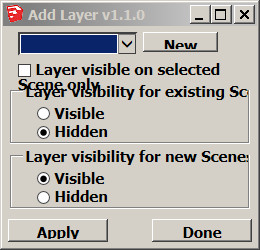
                            2014-04-12_091257.jpg

                            1 條回覆 最後回覆 回覆 引用 0
                            • J 離線
                              Jim
                              最後由 編輯

                              Thanks for the report - I am researching a fix.

                              Hi

                              1 條回覆 最後回覆 回覆 引用 0
                              • tt_suT 離線
                                tt_su
                                最後由 編輯

                                Jim, what version of SKUI are you using? I thought I had it fixed, because I use 125% scaling on my Win7 MacBook pro due to the retina screen.

                                1 條回覆 最後回覆 回覆 引用 0
                                • J 離線
                                  Jim
                                  最後由 編輯

                                  SKUI/version.rb says "0.1.0"

                                  Hi

                                  1 條回覆 最後回覆 回覆 引用 0
                                  • tt_suT 離線
                                    tt_su
                                    最後由 編輯

                                    I haven't been updating SKUI version - as I haven't made a release of it. I mean, are you using the latest committed version from GitHub?

                                    1 條回覆 最後回覆 回覆 引用 0
                                    • J 離線
                                      Jim
                                      最後由 編輯

                                      I thought so, but 3 files have been updated in SKUI and not in Add Layer:

                                      core.rb
                                      embed_skui.rb
                                      js/ui.js

                                      But those changes are related to FILE encoding, and browser detection.

                                      Hi

                                      1 條回覆 最後回覆 回覆 引用 0
                                      • TIGT 離線
                                        TIG Moderator
                                        最後由 編輯

                                        @otb designworks said:

                                        I am running mac 10.9.5 and SU2015. This plugin is not working at all on my system. It will create a new scene, regardless of visibility settings, but this scene is visible on all existing and new layers. It is as if I had used the + button in the Scene Palette.

                                        It was installed through the Sketchucation Plugin

                                        Thoughts?
                                        I am confused 😕
                                        This Plugin opens a dialog so you can make a new Layer or modify the behaviors of a selected existing Layer.
                                        The Layer's 'behavior' relates to Scene tabs, and it is in three parts.

                                        • Visible in selected [current] Scene tab only
                                        • Visible/Hidden in existing Scene tab
                                        • Visible/Hidden in new Scene tabs
                                          It does not create Scenes ?

                                        You seems to be jumbling Layer and Scene 😕
                                        Please clarify...

                                        TIG

                                        1 條回覆 最後回覆 回覆 引用 0
                                        • O 離線
                                          otb designworks
                                          最後由 編輯

                                          I am running mac 10.9.5 and SU2015. This plugin is not working at all on my system. It will create a new layer, regardless of visibility settings, but this layer is visible on all existing and new scenes. It is as if I had used the + button in the Layer Palette.

                                          It was installed through the Sketchucation Plugin

                                          Thoughts?

                                          Cheers, Chuck

                                          OTB Designworks is on Youtube

                                          6 core nMP, 32 gig RAM, (2) D700 GPU's, dual monitors

                                          1 條回覆 最後回覆 回覆 引用 0
                                          • O 離線
                                            otb designworks
                                            最後由 編輯

                                            Yeah, TIG, you had every right to be confused as my original post was, in fact jumbling layers and scenes. I have edited it to reflect what I am seeing correctly.

                                            In short, no matter the settings I choose in the plugin, I get a new layer that is visible on all existing and new scenes.

                                            Sorry for the confusion.

                                            Cheers, Chuck

                                            OTB Designworks is on Youtube

                                            6 core nMP, 32 gig RAM, (2) D700 GPU's, dual monitors

                                            1 條回覆 最後回覆 回覆 引用 0
                                            • 1
                                            • 2
                                            • 3
                                            • 3 / 3
                                            • 第一個貼文
                                              最後的貼文
                                            Buy SketchPlus
                                            Buy SUbD
                                            Buy WrapR
                                            Buy eBook
                                            Buy Modelur
                                            Buy Vertex Tools
                                            Buy SketchCuisine
                                            Buy FormFonts

                                            Advertisement


