[Plugin][$] JointPushPull Interactive - v4.9a - 02 Apr 25




-
@euflypig said:
Does anyone have any solution?
Is LibFredo6 and the Sketchucation Extension Store up to date? You need to make sure you have the current versions of both installed. Then restart SketchUp.
-
I can't see the icon image when using the joint push pull
-
@whddnjs8474 said:
I can't see the icon image when using the joint push pull
Could you check that you have uptodate versions of
-
NEW RELEASE: JointPushPull Interactive v4.7a - 10 Jul 23
JointPushPull Interactive 4.7a is a major release includingone fix and one evolution:
- Fix for Groups in multiple instances. Now, only the selected group(s) will be processed. They will be made unique on the fly.
- Preservation of special curves (circles, arcs, polygons). Whenver possible, JPP reassigns the special status the type of curves.
IMPORTANT: JointPushPull 4.7a requires LibFredo6 14.1 or above
See plugin home page of JointPushPull for Download of JointPushPull.
Main Post of the JointPushPull thread on this forum
Fredo
-
I found the cause of the license error.
If set the computer's name to a non-English name, the license will not be recognized.
I solved my problem, but the license was applied in duplicate.Fredo, can you retrieve the license for the above two?
An error occurred in the process of obtaining the license, and the pre-registered license was applied in duplicate. The computer didn't change and only Seat was used up.
I'd like to retrieve the above two licenses.
express one's thanks in advance.
Thank you. fredoSeat ID: 27003; HW ID: WF1648954173.0G; Date of activation: 03/04/2022
Seat ID: 28476; HW ID: KI1649406241.0Z; Date of activation: 08/04/2022

-
thanks for sharing
-
Olá, o plugin não está sendo instalado no meu sketchup 23, o que eu faço?
Já inseri e habilitei ele pelas extensões, mas não está aparecendo o plugin dentro do programa ou na bandeja.
SOSSSS preciso dele. -
It appears under the Tools menu.
But you also need LibFredo and the SketchUcation toolset downloaded and installed, and then SketchUp restarted to start it.
It is also licensed [can be bought through its Tools submenu limk...], so ensure you have everything in place.Ele aparece no menu Ferramentas.
Mas você também precisa baixar e instalar o LibFredo e o conjunto de ferramentas SketchUcation e, em seguida, reiniciar o SketchUp para iniciá-lo.
Ele também é licenciado [pode ser adquirido através do submenu Ferramentas limk...], portanto, certifique-se de ter tudo no lugar. -
Please someone help me with retrieve my license for this!!!
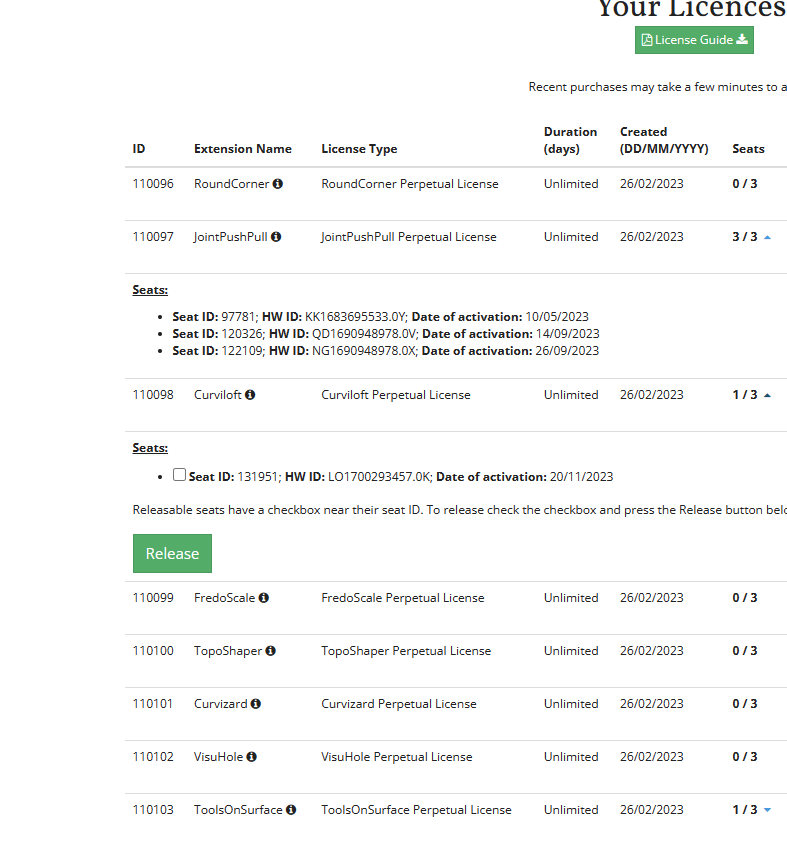
I did active fully on 3 seats although I only have 1 desktop and 1 laptop.
The reason was that I did reinstall my desktop and laptop several times due to softwares clashing.
At that time, I did not release or deactivate my seats.
Therefore, all the 3 seats now stayed in my previous installed windows.
I go to license page (attached image) and see that other plugins have "release" button whilst "Joint Push Pull" doesn't have.Is there anything to reset my license for "Joint Push Pull"?
I am being desperated now. I contacted to SketchUcation support many times but it seeems they don't take it seriously.
Now my license seems to be useless.PLEASE HELP!!!
-
@thinhphamkts said:
Is there anything to reset my license for "Joint Push Pull"?
I am being desperated now. I contacted to SketchUcation support many times but it seeems they don't take it seriously.
Now my license seems to be useless.I did reset all seats of your JPP licenses.
You need to revalidate now. -
@fredo6 said:
@thinhphamkts said:
Is there anything to reset my license for "Joint Push Pull"?
I am being desperated now. I contacted to SketchUcation support many times but it seeems they don't take it seriously.
Now my license seems to be useless.I did reset all seats of your JPP licenses.
You need to revalidate now.WOW,
Thanks a lot! I am really appreciate. -
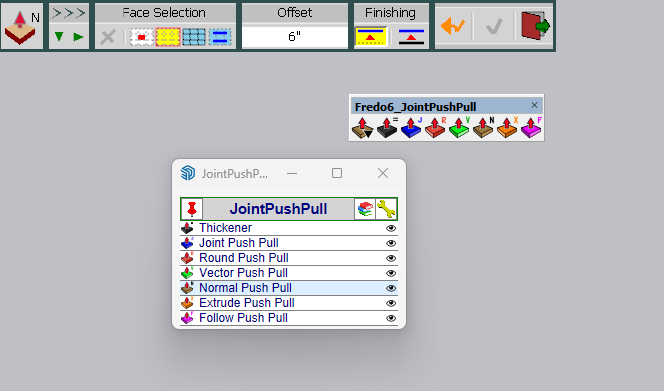
Just purchased your bundle. I have had your free tools installed in the past under SU2023. After installing the purchased versions only the older versions of your plugin/toolbars show up. I had gone in ext mgr and uninstalled all Fredo tools and then reinstalled them but they still show as the old tools. Appreciate your help. Thanks.
-
@atljimk said:
Just purchased your bundle. I have had your free tools installed in the past under SU2023. After installing the purchased versions only the older versions of your plugin/toolbars show up. I had gone in ext mgr and uninstalled all Fredo tools and then reinstalled them but they still show as the old tools. Appreciate your help. Thanks.
What you show in the screenshot is the new JPP.
So, what is the issue?
-
Hi I have followed the different instructions(first Sketchucation 4.3.1 and LibFredo6 4.7a) to installed jointpushpull, I also restarted Sketchup, the tools appear but they do not work. How can I fixe the problem? in my ruby console I got the following message:
Error:
#<LoadError: 5: Access is denied. - C:/Users/Fred/AppData/Local/Temp/SCFLicense - SU2023/SUEX_SCFLibrary.so>
C:/Program Files/SketchUp/SketchUp 2023/Tools/RubyStdLib/rubygems/core_ext/kernel_require.rb:83:inrequire' C:/Program Files/SketchUp/SketchUp 2023/Tools/RubyStdLib/rubygems/core_ext/kernel_require.rb:83:inrequire'
c:/users/fred/appdata/roaming/sketchup/sketchup 2023/sketchup/plugins/sketchucation/scflicense/scflicenseruby.rbe:156:inload_binary' c:/users/fred/appdata/roaming/sketchup/sketchup 2023/sketchup/plugins/sketchucation/scflicense/scflicenseruby.rbe:80:indynamic_token'
c:/users/fred/appdata/roaming/sketchup/sketchup 2023/sketchup/plugins/fredo6_!libfredo6/lib6plugin.rbe:1748:intem_context' c:/users/fred/appdata/roaming/sketchup/sketchup 2023/sketchup/plugins/fredo6_!libfredo6/lib6plugin.rbe:1717:intem_launcher'
c:/users/fred/appdata/roaming/sketchup/sketchup 2023/sketchup/plugins/fredo6_!libfredo6/lib6plugin.rbe:120:inlaunch_action' c:/users/fred/appdata/roaming/sketchup/sketchup 2023/sketchup/plugins/fredo6_!libfredo6/lib6plugin.rbe:240:inlaunch_action'
c:/users/fred/appdata/roaming/sketchup/sketchup 2023/sketchup/plugins/fredo6_jointpushpull/bootstrap_jointpushpull.rbe:87:inlaunch_action' c:/users/fred/appdata/roaming/sketchup/sketchup 2023/sketchup/plugins/fredo6_jointpushpull/bootstrap_jointpushpull.rbe:135:inblock in declare_command'
c:/users/fred/appdata/roaming/sketchup/sketchup 2023/sketchup/plugins/fredo6_!libfredo6/lib6plugin.rbe:1469:incommand_invoke' c:/users/fred/appdata/roaming/sketchup/sketchup 2023/sketchup/plugins/fredo6_!libfredo6/lib6plugin.rbe:1449:inblock (2 levels) in build_config_commands'
c:/users/fred/appdata/roaming/sketchup/sketchup 2023/sketchup/plugins/fredo6_!libfredo6/lib6traductor.rbe:1387:in `block in add_command' -
That error looks like a permissions issue preventing you accessing Fredo's files in the Temp folder...
Try fixing you permissions by closing SketchUp and finding its installer's exe file [usually in Downloads]. Select its icon and right-click > context menu > Run as administrator... When prompted choose 'Repair'.
After it completes retry and see if it's fixed any permissions, and lets you run the tool without problems...However, this permissions error might be more widely spread...
You could also look at the C:/Users/Fred/AppData/Local/Temp/ folder's properties and reset its security permissions to allow all others [including SketchUp to read/write in that folder and its subfolders...]Repairing the installation will not adversely affect any installed extensions etc...
-
Hi, thank you very much, it works finally after 2 days of trying....
-
What was the final fix that worked ?
-
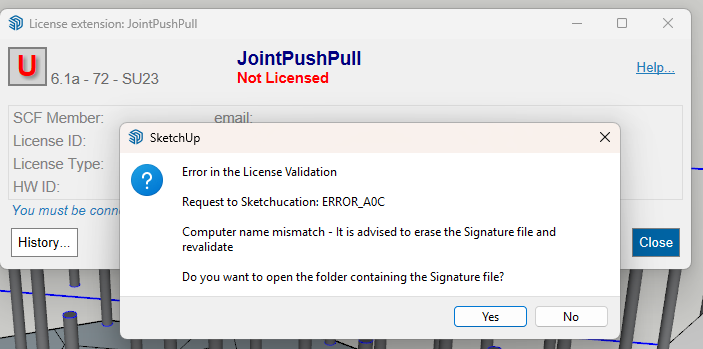
why is this happening ? can i get some help pls -
@shamsabbas Please follow the steps in the alert.
Delete signature file at C:\Users\SomeName\AppData\Local\SCF Licenses restart SketchUp and activate license.
-
Carefully read the error message.
There is a mismatch in your computer-name and the name in the license record.
[Perhaps you have renamed the computer or moved the license from another computer ?
If you have given your user or computer a name that doesn't follow Microsoft's rules that can also created unexpected issues...]The error message advises you to erase the Signature file and the re-validate the license.
To do this click the Yes button and the folder containing the Signature file will open.
Delete that file [even though it's name says not to !].
This resets your licenses on that computer.Now restart SketchUp, reopen the licensing dialog and this time the license validation should work.







Advertisement