[Plugin][$] JointPushPull Interactive - v4.9a - 02 Apr 25




-
@johngilles said:
Can't get incremental push pull to work on my Mac...
No alt keyWhat about trying Command?
What version of SketchUp are you using? Which Mac OS version? Please complete your profile.
-
@dave r said:
@johngilles said:
Can't get incremental push pull to work on my Mac...
No alt keyWhat about trying Command?
What version of SketchUp are you using? Which Mac OS version? Please complete your profile.
I did update my profile, thanks for reminding me
I am working on a 15" 2016 MacBook Pro
SketchUp Pro 2020And. no. the Command key doesn't toggle the Increment function either.
-
This is normal that it does not work, because I had to rollback to the old version, pending the resolution of a problem with Mac M1 platforms.
It is now solved, so I will soon republish JPP v4.6a, with Incremental PushPull.
Fredo
-
JointPushPull v4.6a just republished on the ExtensionStore, with
- Texture contnuity
- Incremental PushPull
- PushPull to Target Plane
It requires LibFredo6 v13.2a.
TutorialsUp has published a nice video summarizing the new features.
-
Hi Fredo, thank you for the contribution to the community.
My JPP doesn't start properly. It has no response when I click all of the icon from the toolbar.
- I am using SKP 2022 on window 10. All fredo plugins are up to date.
- I have already purchased the plugin bundle and activated the license for those plugins that I am using.
- Fredo scale/ tools on surface/ round corner are all working properly.
- Lib Fredo settings in tab - Window also not working except for set peferred languages.
Hope you can solve my problem, thank you.
Any chance I can use a previous version for now? -
@tonytony321 said:
Hope you can solve my problem, thank you.
When you upgrade to LibFredo6 v13.2a, it is important you restart all instances of Sketchup.
In the worse case, could you you restart your computer and it should make it.
-
@tonytony321 said:
Hi Fredo, thank you for the contribution to the community.
My JPP doesn't start properly. It has no response when I click all of the icon from the toolbar.
- I am using SKP 2022 on window 10. All fredo plugins are up to date.
- I have already purchased the plugin bundle and activated the license for those plugins that I am using.
- Fredo scale/ tools on surface/ round corner are all working properly.
- Lib Fredo settings in tab - Window also not working except for set peferred languages.
Hope you can solve my problem, thank you.
Any chance I can use a previous version for now?im having the same problem, i tried restarting, reinstalling and this is still happening,
Error; #<NameError; undefined method `notify_by_otpicker' for class `Traductor;;FaceSelector'> c;/users/igora/appdata/roaming/sketchup/sketchup 2022/sketchup/plugins/fredo6_!libfredo6/body_lib6faceselector.rbe;66;in `method' c;/users/igora/appdata/roaming/sketchup/sketchup 2022/sketchup/plugins/fredo6_!libfredo6/body_lib6faceselector.rbe;66;in `initialize__' c;/users/igora/appdata/roaming/sketchup/sketchup 2022/sketchup/plugins/fredo6_!libfredo6/lib6faceselector.rbe;35;in `initialize' c;/users/igora/appdata/roaming/sketchup/sketchup 2022/sketchup/plugins/fredo6_jointpushpull/jointpushpulltool.rbe;409;in `new' c;/users/igora/appdata/roaming/sketchup/sketchup 2022/sketchup/plugins/fredo6_jointpushpull/jointpushpulltool.rbe;409;in `init_face_selector' c;/users/igora/appdata/roaming/sketchup/sketchup 2022/sketchup/plugins/fredo6_jointpushpull/jointpushpulltool.rbe;151;in `initialize' c;/users/igora/appdata/roaming/sketchup/sketchup 2022/sketchup/plugins/fredo6_jointpushpull/jointpushpulltool.rbe;85;in `new' c;/users/igora/appdata/roaming/sketchup/sketchup 2022/sketchup/plugins/fredo6_jointpushpull/jointpushpulltool.rbe;85;in `action__mapping' c;/users/igora/appdata/roaming/sketchup/sketchup 2022/sketchup/plugins/fredo6_!libfredo6/lib6plugin.rbe;143;in `call' c;/users/igora/appdata/roaming/sketchup/sketchup 2022/sketchup/plugins/fredo6_!libfredo6/lib6plugin.rbe;143;in `launch_action' c;/users/igora/appdata/roaming/sketchup/sketchup 2022/sketchup/plugins/fredo6_!libfredo6/lib6plugin.rbe;240;in `launch_action' c;/users/igora/appdata/roaming/sketchup/sketchup 2022/sketchup/plugins/fredo6_jointpushpull/bootstrap_jointpushpull.rbe;87;in `launch_action' c;/users/igora/appdata/roaming/sketchup/sketchup 2022/sketchup/plugins/fredo6_jointpushpull/bootstrap_jointpushpull.rbe;135;in `block in declare_command' c;/users/igora/appdata/roaming/sketchup/sketchup 2022/sketchup/plugins/fredo6_!libfredo6/lib6plugin.rbe;1464;in `command_invoke' c;/users/igora/appdata/roaming/sketchup/sketchup 2022/sketchup/plugins/fredo6_!libfredo6/lib6plugin.rbe;1444;in `block (2 levels) in build_config_commands' c;/users/igora/appdata/roaming/sketchup/sketchup 2022/sketchup/plugins/fredo6_!libfredo6/lib6traductor.rbe;1385;in `block in add_command' -
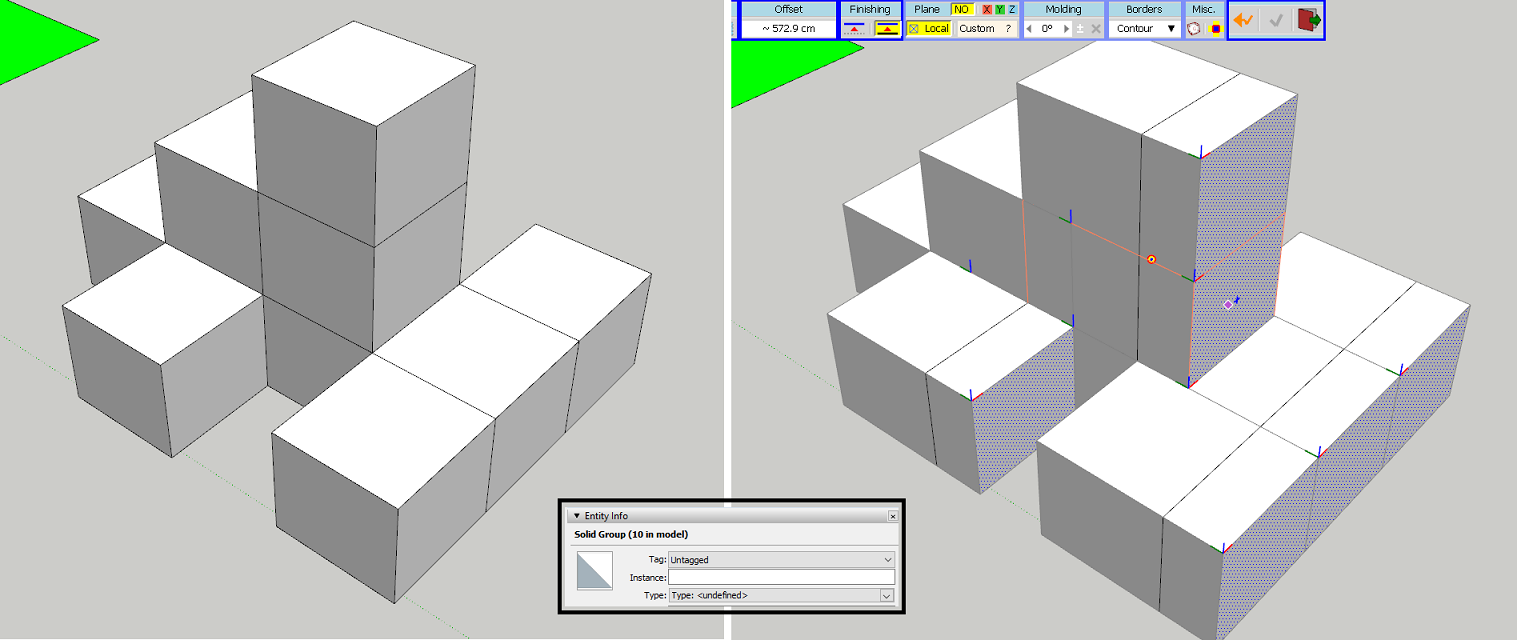
Hey Fredo, I've ran into a problem.
I duplicated a group a several times and tried to PudhPull them from the outside, as the extension allows. The problem is that the extension sees them as components and treats them accordingly.
Do you have the solution for that?
Thanks!
-
Do you have the latest version of LibFredo installed ?
Do you have the latest version of the SketchUcation toolset installed [v4.2.9] which has the up to date SCF licensing system ?
Both are available from the PluginStore - restart SketchUp after installation to sync everything -
@antonblam said:
I duplicated a group a several times and tried to PudhPull them from the outside, as the extension allows. The problem is that the extension sees them as components and treats them accordingly.
Do you have the solution for that?That's a known issue: Freshly copied groups behave like components. I may fix it for JPP.
In the meantime, just enter (double-click) each group to make them unique. -
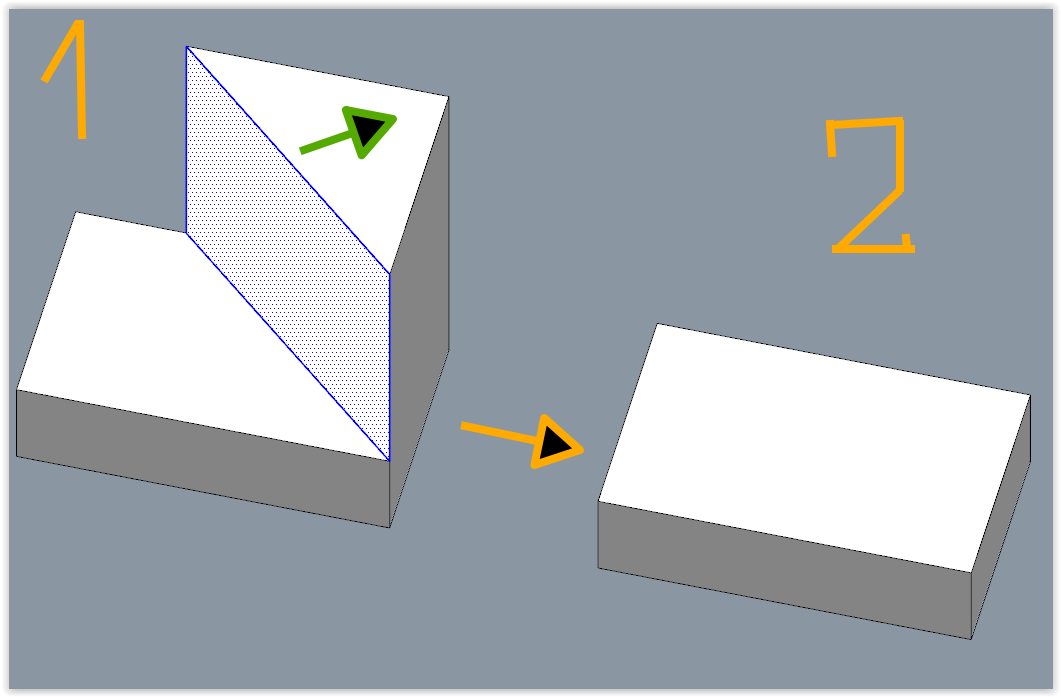
I wish Follow Push Pull will be able to remove geometry nicely a-la 3ds max (like shown on attached picture)
-
@rv1974 said:
I wish Follow Push Pull will be able to remove geometry nicely a-la 3ds max (like shown on attached picture)
JPP currently does not delete faces. So, no holes and no clear. This would be complex to do, essentially because JPP is multi-face.
-
Despite how awesome this plugin is. I'm wondering?? is there a way to further the functionality by allowing the push-pull options to push-pull only lines into planes and maybe even guide points into lines? Perhaps there is already, but I have studied the tools fairly extensively and don't see a way to do this. Adding these features would make these already game-changing tools even better!
Let me know if this is possible, in the works, or if not could it be possible to add it as a feature(s) in the near future updates of the tool?
Thanks
-
@cdurkin said:
... to push-pull only lines into planes ...
There's a plugin that can extrude edges to faces already.
What version of SketchUp are you using? Please complete your profile.
-
Hı, I can't add it as a plugin to sketchup 2023

-
@natia556 said:
Hı, I can't add it as a plugin to sketchup 2023
Why? What are you doing to install it? Did you also installed the required LibFredo6? Did you also install the required Sketchucation ExtensionStore tool?
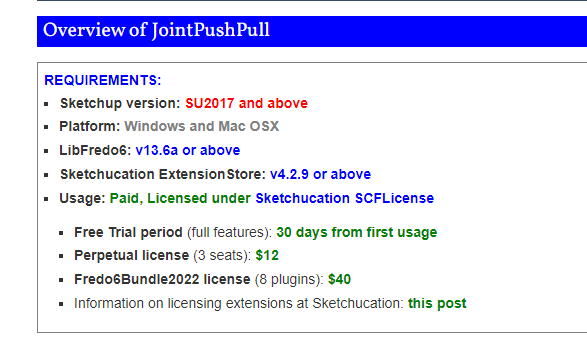
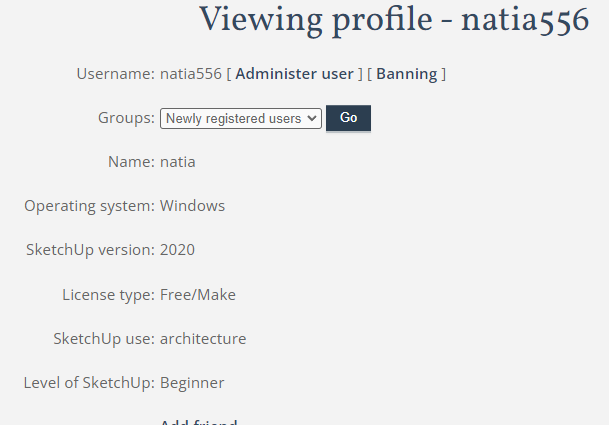
What version of SketchUp are you really using? Your profile indicates a nonexistant version.
-
I noticed that JPP treats group copies as components. Is there a way to overcome this without having to enter each copy. I am running the latest version of JPP. and SU V21
-
@seasdes said:
I noticed that JPP treats group copies as components. Is there a way to overcome this without having to enter each copy. I am running the latest version of JPP. and SU V21
It's a change I need to make. No workaround for the time being, exect than to make the groups unique manually.
-
Ok thanks
-
Hey everyone
Could you help me solve the issue? I can’t run push&pull plugin in any way
It was installed from sketchucation store plugin. I restarted the program, restarted the computer, reinstalled the last version of fredolib - the same problem.
There is a toolbar, but the buttons do not react and when I click on them these errors appear
Nevertheless for example the fredo scale plugin works correctlyFredo6 Plugins Information on 2023-05-03 12:12:13 +0300
- Platform: x64-mswin64_140 - Ruby: 2.7.2
- Sketchup: 22.0.316
- LibFredo6: v13.9a
- LibFredo6 Binary loaded
- Sketchucation ExtensionStore: 4.3.1
- SCFLicense: v6.1a - 72
- Fredo6 Plugins
LordOfTheToolbars v2.4a
FredoGuides v2.4a
FredoScale v3.5a
FredoTools v4.3a
JointPushPull v4.6a - licensed FULL
RoundCorner v3.3a - SCFLicense directory present
Signature File: 2023-05-02 13:53:09 +0300
JointPushPull: 2023-05-03 12:11:11 +0300
Error: #<NoMethodError: undefined methodwdlg_from_key' for Traductor::Wdlg:Class> c:/users/a_sve/appdata/roaming/sketchup/sketchup 2022/sketchup/plugins/fredo6_!libfredo6/lib6webwdlg.rbe:37:incheck_instance_displayed'
c:/users/a_sve/appdata/roaming/sketchup/sketchup 2022/sketchup/plugins/fredo6_!libfredo6/lib6quicklauncher.rbe:42:ininvoke' c:/users/a_sve/appdata/roaming/sketchup/sketchup 2022/sketchup/plugins/fredo6_jointpushpull/bootstrap_jointpushpull.rbe:147:ininvoke_quick_launcher'
c:/users/a_sve/appdata/roaming/sketchup/sketchup 2022/sketchup/plugins/fredo6_jointpushpull/bootstrap_jointpushpull.rbe:121:inblock in startup' c:/users/a_sve/appdata/roaming/sketchup/sketchup 2022/sketchup/plugins/fredo6_!libfredo6/lib6plugin.rbe:1469:incommand_invoke'
c:/users/a_sve/appdata/roaming/sketchup/sketchup 2022/sketchup/plugins/fredo6_!libfredo6/lib6plugin.rbe:1449:inblock (2 levels) in build_config_commands' c:/users/a_sve/appdata/roaming/sketchup/sketchup 2022/sketchup/plugins/fredo6_!libfredo6/lib6traductor.rbe:1385:inblock in add_command'
c:/users/a_sve/appdata/roaming/sketchup/sketchup 2022/sketchup/plugins/!!fredo6_lordofthetoolbars/controller_lordofthetoolbars.rbe:133:in `block in new'





Advertisement