sketchucation logo sketchucation
    • Login
    Oops, your profile's looking a bit empty! To help us tailor your experience, please fill in key details like your SketchUp version, skill level, operating system, and more. Update and save your info on your profile page today!
    โš ๏ธ Update | Sketchucation Tools 5.0.8 released with licensing improvements and bugfixes Download

    [Plugin][$] JointPushPull Interactive - v4.9a - 02 Apr 25


    Scheduled Pinned Locked Moved Plugins
    619 Posts 156 Posters 938.2k Views 155 Watching
    Loading More Posts
    • Oldest to Newest
    • Newest to Oldest
    • Most Votes
    Reply
    • Reply as topic
    Log in to reply
    This topic has been deleted. Only users with topic management privileges can see it.
    • fredo6F
      fredo6
      last edited by

      NEW RELEASE: JointPushPull Interactive v4.4e - 02 Jun 19

      JointPushPull Interactive 4.4e is a minor release including an increase of the maximum angle for Molding (now 85 degrees).

      JointPushPull 4.4e requires LibFredo6 8.7m or above


      See plugin home page of JointPushPull for Download of JointPushPull.

      Main Post of the JointPushPull thread on this forum

      Fredo

      1 Reply Last reply
      Reply Quote 0
      • E
        Einstein
        last edited by

        Thank you, for me it's a major release ๐Ÿ˜„

        1 Reply Last reply
        Reply Quote 0
        • J
          jonnys777
          last edited by

          Morning all,

          I'm getting the follow error trying to thicken some terrain on the z-axis;

          Date: 20-Jun-19 08:06:15
          An error occurred in Vector Push Pull
          Error in generation of the geometry

          Could not compute valid matrix from points

          body_lib6g6.rbe: 4568 -- position_material
          body_lib6g6.rbe: 4568 -- reverse_face_with_uv
          jointpushpullgeometry.rbe: 556 -- block in geometry_handle_finishing
          jointpushpullgeometry.rbe: 556 -- each
          jointpushpullgeometry.rbe: 556 -- geometry_handle_finishing
          jointpushpullgeometry.rbe: 376 -- geometry_robot_handle_finishing
          jointpushpullgeometry.rbe: 222 -- robot_call_action
          jointpushpullgeometry.rbe: 183 -- geometry_robot_exec
          jointpushpullgeometry.rbe: 166 -- geometry_robot
          jointpushpullgeometry.rbe: 81 -- block in geometry_execute
          lib6operation.rbe: 370 -- call
          lib6operation.rbe: 370 -- step_geometry
          lib6operation.rbe: 305 -- block in yield?
          SketchUp: 1 -- call

          1 Reply Last reply
          Reply Quote 0
          • J
            jonnys777
            last edited by

            @jonnys777 said:

            Morning all,

            I'm getting the follow error trying to thicken some terrain on the z-axis;

            Date: 20-Jun-19 08:06:15
            An error occurred in Vector Push Pull
            Error in generation of the geometry

            Could not compute valid matrix from points

            body_lib6g6.rbe: 4568 -- position_material
            body_lib6g6.rbe: 4568 -- reverse_face_with_uv
            jointpushpullgeometry.rbe: 556 -- block in geometry_handle_finishing
            jointpushpullgeometry.rbe: 556 -- each
            jointpushpullgeometry.rbe: 556 -- geometry_handle_finishing
            jointpushpullgeometry.rbe: 376 -- geometry_robot_handle_finishing
            jointpushpullgeometry.rbe: 222 -- robot_call_action
            jointpushpullgeometry.rbe: 183 -- geometry_robot_exec
            jointpushpullgeometry.rbe: 166 -- geometry_robot
            jointpushpullgeometry.rbe: 81 -- block in geometry_execute
            lib6operation.rbe: 370 -- call
            lib6operation.rbe: 370 -- step_geometry
            lib6operation.rbe: 305 -- block in yield?
            SketchUp: 1 -- call

            I'm not having much luck resolving this. I've tried scaling up and inspecting the surface to see if there's anything obviously wrong. It allows Normal Push Pull, but Vector, Joint etc. all fail.

            Any ideas as to what might be wrong?

            It's a fairly complex surface - a piece of terrain that is a hill with sections cut out of it (I draped a road onto the surface so that counts as a separate surface, for example). The surface I want to extrude is vegetation and I need it locked to the z-axis otherwise the software I intend to import it into won't work properly.

            Many thanks

            1 Reply Last reply
            Reply Quote 0
            • fredo6F
              fredo6
              last edited by

              @jonnys777 said:

              I'm not having much luck resolving this. I've tried scaling up and inspecting the surface to see if there's anything obviously wrong. It allows Normal Push Pull, but Vector, Joint etc. all fail. Any ideas as to what might be wrong?

              I included a fix in LibFredo6 9.0a

              @jonnys777 said:

              It's a fairly complex surface - a piece of terrain that is a hill with sections cut out of it (I draped a road onto the surface so that counts as a separate surface, for example). The surface I want to extrude is vegetation and I need it locked to the z-axis otherwise the software I intend to import it into won't work properly.

              If you post or PM me the model, I can have a look and advise.

              1 Reply Last reply
              Reply Quote 0
              • J
                jonnys777
                last edited by

                @fredo6 said:

                @jonnys777 said:

                I'm not having much luck resolving this. I've tried scaling up and inspecting the surface to see if there's anything obviously wrong. It allows Normal Push Pull, but Vector, Joint etc. all fail. Any ideas as to what might be wrong?

                I included a fix in LibFredo6 9.0a

                Hi Fredo, I can confirm the updated version of LibFredo has solved my issues. Many thanks, and keep up the good work.

                1 Reply Last reply
                Reply Quote 0
                • D
                  DigitalArena
                  last edited by

                  Have a problem with one installation of this set of tools on Pro 2019. We have the latest Fredo6Lib. We have installed the latest JointPushPull plugin. The tools appear in the toolbar. But when you select the surface and then the tool, the tool doesn't become active. You remain with the mouse pointer and it doesn't change to the selected JointPushPull tool.

                  Any idea why this would be happening?

                  We installed the same setup on another computer and everything is fine. Thoughts?

                  1 Reply Last reply
                  Reply Quote 0
                  • Dave RD
                    Dave R
                    last edited by

                    When SketchUp 2019 was installed, did you right click on the installer and choose Run as administrator?

                    Etaoin Shrdlu

                    %

                    (THERE'S NO PLACE LIKE)

                    G28 X0.0 Y0.0 Z0.0

                    M30

                    %

                    1 Reply Last reply
                    Reply Quote 0
                    • deaneauD
                      deaneau
                      last edited by

                      Feature Request in this Plugin

                      Hi Fredo is this possible to have an offset of faces with the same material?

                      I need this for a game.

                      The windows in the night will be the only face that has an offset. this face will save as a separate file (night mesh).

                      big thank you


                      https://i.ibb.co/Jvbyv1d/2019-08-22-01h34-49.png


                      https://i.ibb.co/9rTf66k/2019-08-22-01h46-05day.png


                      https://i.ibb.co/ThbggvQ/2019-08-22-01h46-25-night.png

                      MADE, BORN AND LIVING IN BERLIN
                      Big Thank You to all Programmers
                      Some German words are so long that they have a perspective. M.Twain

                      1 Reply Last reply
                      Reply Quote 0
                      • A
                        Ahmed0007
                        last edited by

                        Getting a bugsplat when trying to change the random push pull values. in sketchup 2019 and 18
                        any solution?

                        1 Reply Last reply
                        Reply Quote 0
                        • Dave RD
                          Dave R
                          last edited by

                          @ahmed0007 said:

                          Getting a bugsplat... any solution?

                          You'd need to provide some useful information to be able to diagnose the problem and find a solution. Share the SKP file and the values you are trying to use.

                          Etaoin Shrdlu

                          %

                          (THERE'S NO PLACE LIKE)

                          G28 X0.0 Y0.0 Z0.0

                          M30

                          %

                          1 Reply Last reply
                          Reply Quote 0
                          • A
                            Ahmed0007
                            last edited by

                            @dave r said:

                            @ahmed0007 said:

                            Getting a bugsplat... any solution?

                            You'd need to provide some useful information to be able to diagnose the problem and find a solution. Share the SKP file and the values you are trying to use.

                            here are:
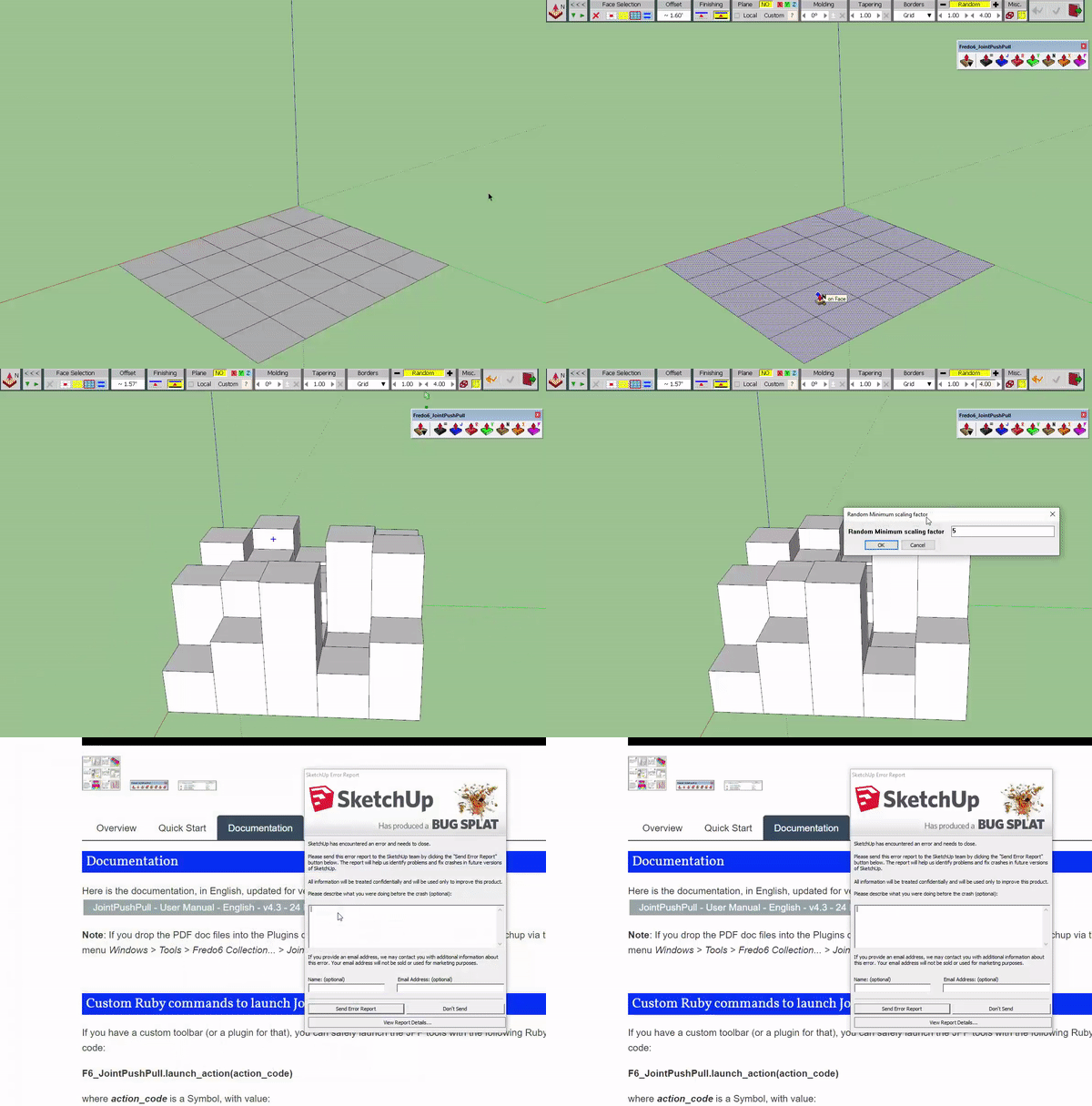

                            ezgif-2-12c249956a58.gif


                            J.skp

                            1 Reply Last reply
                            Reply Quote 0
                            • Dave RD
                              Dave R
                              last edited by

                              I don't have any problems with your file in SU2019.
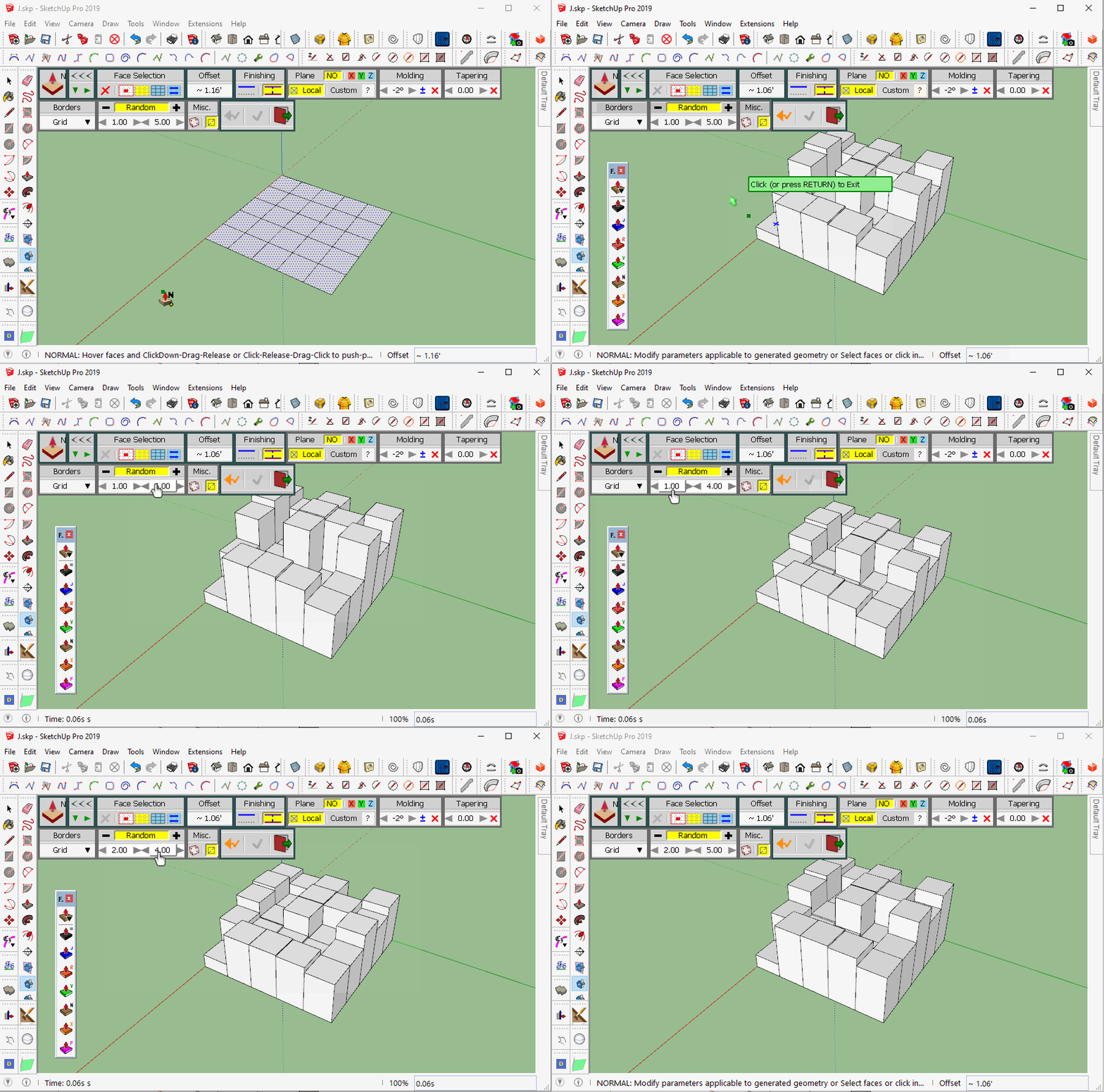
                              Random PushPull.gif
                              Click on the picture to see it move.

                              Make sure have the current version installed along with the current version of LibFredo6 and make sure you installed SketchUp correctly. That is, you right clicked on the installer and selected Run as administrator from the context menu.

                              Etaoin Shrdlu

                              %

                              (THERE'S NO PLACE LIKE)

                              G28 X0.0 Y0.0 Z0.0

                              M30

                              %

                              1 Reply Last reply
                              Reply Quote 0
                              • A
                                Ahmed0007
                                last edited by

                                @dave r said:

                                I don't have any problems with your file in SU2019.
                                [attachment=0:22w16jj0]<!-- ia0 -->Random PushPull.gif<!-- ia0 -->[/attachment:22w16jj0]
                                Click on the picture to see it move.

                                Make sure have the current version installed along with the current version of LibFredo6 and make sure you installed SketchUp correctly. That is, you right clicked on the installer and selected Run as administrator from the context menu.

                                yesterday i installed both JPP and Fredo6lib
                                everything is up to date
                                watch this https://streamable.com/oqz8g

                                1 Reply Last reply
                                Reply Quote 0
                                • fredo6F
                                  fredo6
                                  last edited by

                                  I am unable to reproduce the problem either....

                                  Do you get it always?

                                  Fredo

                                  1 Reply Last reply
                                  Reply Quote 0
                                  • A
                                    Ahmed0007
                                    last edited by

                                    and latest version of JPP is working fine with SU2017

                                    1 Reply Last reply
                                    Reply Quote 0
                                    • A
                                      Ahmed0007
                                      last edited by

                                      @fredo6 said:

                                      I am unable to reproduce the problem either....

                                      Do you get it always?

                                      Fredo

                                      Thanks for reply

                                      i haven't used random push pull a lot.
                                      i found an old version of JPP (v3.6a) this also give me bugsplat screen. in su19
                                      watch here : http://bit.ly/31SyEk5

                                      Edit ; and latest version of JPP is working fine with SU2017

                                      1 Reply Last reply
                                      Reply Quote 0
                                      • Dave RD
                                        Dave R
                                        last edited by

                                        You never answered my question about proper installation of SketchUp. Did you install SketchUp 2018 and 2019 correctly?

                                        Etaoin Shrdlu

                                        %

                                        (THERE'S NO PLACE LIKE)

                                        G28 X0.0 Y0.0 Z0.0

                                        M30

                                        %

                                        1 Reply Last reply
                                        Reply Quote 0
                                        • A
                                          Ahmed0007
                                          last edited by

                                          @dave r said:

                                          You never answered my question about proper installation of SketchUp. Did you install SketchUp 2018 and 2019 correctly?

                                          sorry i don't remember that how i had installed.
                                          but give main an hour to reinstall as you said.

                                          1 Reply Last reply
                                          Reply Quote 0
                                          • TIGT
                                            TIG Moderator
                                            last edited by

                                            You do not need to 'reinstall'.
                                            Login as your normal Windows user-account.
                                            Ensure SketchUp is closed.
                                            Find the SketchUp installer file's exe icon - it's probably in your Downloads folder.
                                            Then select it, right-click > context-menu > "Run as administrator"
                                            When prompted choose "Repair"
                                            Done.

                                            It will not harm your existing set up - just 'repair' it, if that is necessary

                                            TIG

                                            1 Reply Last reply
                                            Reply Quote 0

                                            Hello! It looks like you're interested in this conversation, but you don't have an account yet.

                                            Getting fed up of having to scroll through the same posts each visit? When you register for an account, you'll always come back to exactly where you were before, and choose to be notified of new replies (either via email, or push notification). You'll also be able to save bookmarks and upvote posts to show your appreciation to other community members.

                                            With your input, this post could be even better ๐Ÿ’—

                                            Register Login
                                            • 1
                                            • 2
                                            • 7
                                            • 8
                                            • 9
                                            • 10
                                            • 11
                                            • 30
                                            • 31
                                            • 9 / 31
                                            • First post
                                              Last post
                                            Buy SketchPlus
                                            Buy SUbD
                                            Buy WrapR
                                            Buy eBook
                                            Buy Modelur
                                            Buy Vertex Tools
                                            Buy SketchCuisine
                                            Buy FormFonts

                                            Advertisement