[Plugin][$] JointPushPull Interactive - v4.9a - 02 Apr 25




-
FYI
I have successfully installed this version's using the PluginStore's downloaded RBZ, using the native Extension Manager's red-button, in both v2017 & v2018, on both PC & MAC.
I have also successfully installed it using the SketchUcation ExtensionStore³ dialog's 'AutoInstall' red-button, again in both of those SketchUp versions and OSs.I also pre-installed the latest LibFredo6 in those 4 permutations...
-
Hm, odd.
I have not had this issue before. I installed each update you have put up the past week as well.I get the same error trying to install in 2017 through the Extension Manager also. Must be something on my end although I don't know what. Restarting my computer did not solve it.
I have never tried the installing through the Sketchucation PluginStore.
-
-Solved-
Well this is even more strange. It was definitely an issue on my end.
I went to try it again just now, after about a half hour of trying it last time, and the extension was not in the folder I saved it in. It was just gone. I am assuming it is an issue with our server profile here at work as we have seen files disappear before. I also assume on my previous attempts to install this plugin that the server was showing the file but it was not actually there. Not sure.
Anyway, I downloaded a fresh .rbz and it installed just fine.
Sorry for the uproar.
-
@boofredlay said:
I went to try it again just now, after about a half hour of trying it last time, and the extension was not in the folder I saved it in. It was just gone. I am assuming it is an issue with our server profile here at work as we have seen files disappear before.
Good for you.
It's anyway good to know this case, as it may happen to someone else, including when try to open a skp file.Fredo
-
Thanks for creating these awesome tools! i just tried the JPP "project on a plane" trick on some topo i created and I'm getting a Ruby Error. it says "Error in generation of the geometry" and "Not enough points - at least 3 required". Any Idea what is going on?
-thanks -
@snakedog said:
Thanks for creating these awesome tools! i just tried the JPP "project on a plane" trick on some topo i created and I'm getting a Ruby Error. it says "Error in generation of the geometry" and "Not enough points - at least 3 required". Any Idea what is going on?
-thanksI would need to get the model, and also have the full text of the error message.
Fredo
-
I used to use this tool extensively to create curbs from complicated terrain, and it worked almost perfectly. The new version, however, with all it's options, no longer has a tool for extruding in z axis, which baffles me. Does anyone know if there's a variable that can be changed in settings to fix this, or know of another tool to achieve the same effect?
Thanks
-
@thelorax4 said:
The new version, however, with all it's options, no longer has a tool for extruding in z axis, which baffles me. Does anyone know if there's a variable that can be changed in settings to fix this, or know of another tool to achieve the same effect?
Could you show a sample of model to illustrate your problem.
Fredo
-
Hi FREDO,
This plugin is sooo good. Thankyou. Donation on its way.
There is one quirk that i dont understand and makes the plugin unuseful when dealing with 'group copies'If editing a group of which copies have been made, all group copies are also affected. I'd expect this behaviour only for components not groups.
The behaviour id expect is that if i joint push pull a face of a group, that only that group is modified, not every other instance.Have I overlooked some setting to turn this behaviour off ?
Cheers
John -
@jwhida said:
There is one quirk that i dont understand and makes the plugin unuseful when dealing with 'group copies'
If editing a group of which copies have been made, all group copies are also affected. I'd expect this behaviour only for components not groups.
I'll probably have to fix this general issue, not just for JPP, which comes from a side effect of Sketchup (freshly copied groups behave as components until they are edited, for optimization).
In the meantime, I would suggest that you go inside the group to do the Joint Push Pull, as you would do for the native Push Pull. The capability to operate across boundaries of group and components is just a convenience.
Fredo
-
Ok that makes sense, i was aware of that optimisation of the group definition.
I'll happily edit from within the group for now, but definitely look forward to an option to treat group copies as individual groups when using joint push pull when you get time to implement it.
Thanks
-
Hi!
I caught a bug. Here it is:
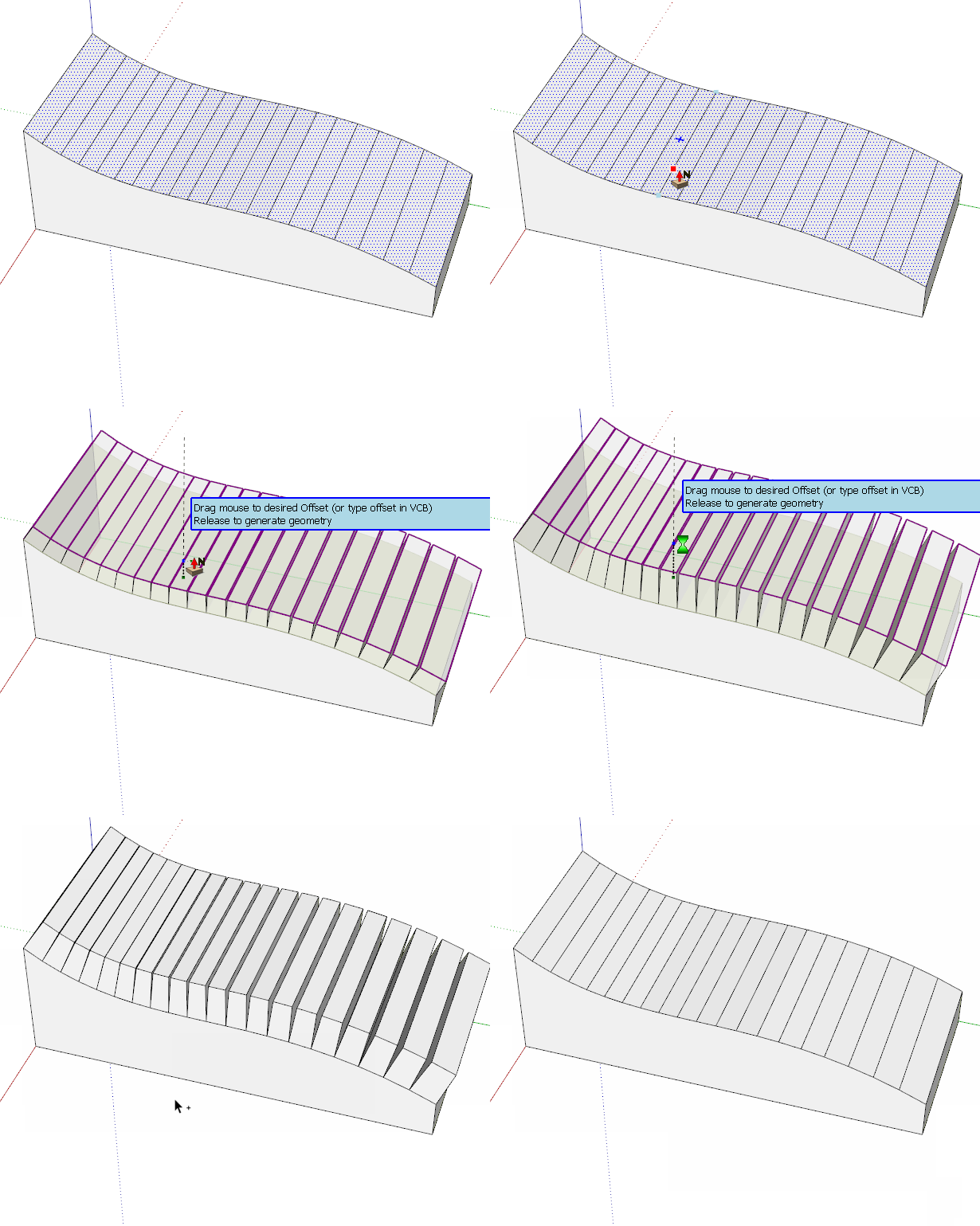
I extruded several connected faces with JPP and choose the option which removes source faces, leaving only extrusion. I confirmed the extrusion and then did UNDO. Unfortunately undoing can't be done in one go. Instead, it's "broken" into small steps and it brings back my source geometry edge by edge so I have to press UNDO many times.
It happens with every sub-tool of JPP.
I'm using SU17 with newest JPP and newest LibFredo.
-
You would make it easier to sort out if you share the SKP file that exhibits this behavior. I just tried it and found Undo still works in a single step.
-
It's OK when I use THICKEN option. But UNDO breaks when using PUSH-PULL option (source faces get erased).
Here's my file:
-
@einstein said:
Hi!
I caught a bug. Here it is:
I extruded several connected faces with JPP and choose the option which removes source faces, leaving only extrusion. I confirmed the extrusion and then did UNDO. Unfortunately undoing can't be done in one go. Instead, it's "broken" into small steps and it brings back my source geometry edge by edge so I have to press UNDO many times.
It happens with every sub-tool of JPP.
I'm using SU17 with newest JPP and newest LibFredo.
There could be an error. Could you open the Ruby console while doing the JPP operation.
Also, does it happen with any shape or model, or specifically for one?
Fredo
-
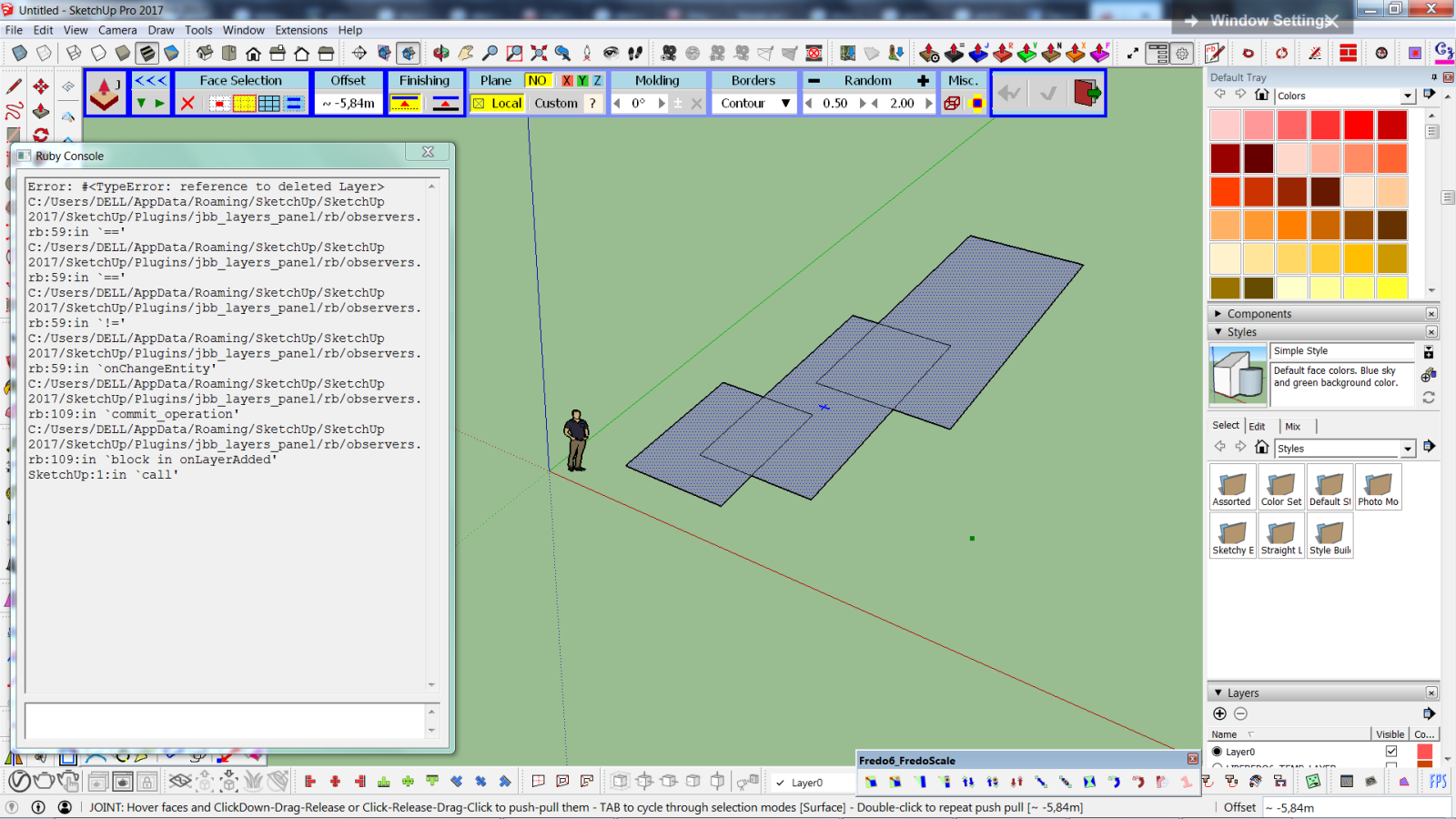
There's an error related to layers. Any time your plugins are used, there's a new layer created "LIBFREDO6_TEMP_LAYER", the geometry-to-remove is moved to that layer and it immediately gets turned off, probably due to another plugin that I use - LAYERS PANEL. As long as I remember to turn on this layer, everything goes fine and UNDO doesn't break anymore.
The bug/error is not related to any particular model or shape.
-
@einstein said:
There's an error related to layers. Any time your plugins are used, there's a new layer created "LIBFREDO6_TEMP_LAYER", the geometry-to-remove is moved to that layer and it immediately gets turned off, probably due to another plugin that I use - LAYERS PANEL. As long as I remember to turn on this layer, everything goes fine and UNDO doesn't break anymore.
The bug/error is not related to any particular model or shape.
This seems definitely to be related the another plugin, jbb_layer_panels, which has an observer and does not cover cases when layers are deleted. Who is the author?
I use the TEMP layer to simply hide faces temporarily, but JPP (as FredoCorner) deletes the layer afterwards.
Fredo
-
@fredo6 said:
@einstein said:
There's an error related to layers. Any time your plugins are used, there's a new layer created "LIBFREDO6_TEMP_LAYER", the geometry-to-remove is moved to that layer and it immediately gets turned off, probably due to another plugin that I use - LAYERS PANEL. As long as I remember to turn on this layer, everything goes fine and UNDO doesn't break anymore.
The bug/error is not related to any particular model or shape.
This seems definitely to be related the another plugin, jbb_layer_panels, which has an observer and does not cover cases when layers are deleted. Who is the author?
I use the TEMP layer to simply hide faces temporarily, but JPP (as FredoCorner) deletes the layer afterwards.
Fredo
I'm used to have this layer turned on by default for a long long time. Layer's panel is a fundamental tool.
-
@jql said:
I'm used to have this layer turned on by default for a long long time. Layer's panel is a fundamental tool.
But the small bug can be fixed by in Layer Panels...
-
@fredo6 said:
@jql said:
I'm used to have this layer turned on by default for a long long time. Layer's panel is a fundamental tool.
But the small bug can be fixed by in Layer Panels...
Layers Panel is jiminy-billy-bob's work, it is no longer supported and was open sourced, this was then picked up (some development and bugfixes done) and turned into Layers Organizer by George T.
It works pretty well, excellent work by jiminy-billy-bob for the original and George T for taking it further.








Advertisement