sketchucation logo sketchucation
    • Login
    Oops, your profile's looking a bit empty! To help us tailor your experience, please fill in key details like your SketchUp version, skill level, operating system, and more. Update and save your info on your profile page today!
    ⚠️ Update | Sketchucation Tools 5.0.8 released with licensing improvements and bugfixes Download

    SketchUp 2014 Wishlist

    Scheduled Pinned Locked Moved SketchUp Feature Requests
    sketchup
    125 Posts 54 Posters 59.8k Views 54 Watching
    Loading More Posts
    • Oldest to Newest
    • Newest to Oldest
    • Most Votes
    Reply
    • Reply as topic
    Log in to reply
    This topic has been deleted. Only users with topic management privileges can see it.
    • thomthomT
      thomthom
      last edited by

      @anton_s said:

      I wish it to upgrade to Ruby 2.0.0+

      +1

      Thomas Thomassen β€” SketchUp Monkey & Coding addict
      List of my plugins and link to the CookieWare fund

      1 Reply Last reply
      Reply Quote 0
      • C
        cuttingedge
        last edited by

        Still Im wishing there will be a native tool for unwrapping texture. This is where SKP is left behind by other 3d packages.

        1 Reply Last reply
        Reply Quote 0
        • thomthomT
          thomthom
          last edited by

          @cuttingedge said:

          Still Im wishing there will be a native tool for unwrapping texture. This is where SKP is left behind by other 3d packages.

          Does it really have to be native? What about DAle's plugin that let you use propeller UV mapping/unwrapping tools? Tools one use in other applications as well.

          Thomas Thomassen β€” SketchUp Monkey & Coding addict
          List of my plugins and link to the CookieWare fund

          1 Reply Last reply
          Reply Quote 0
          • C
            cuttingedge
            last edited by

            @thomthom said:

            Does it really have to be native? What about DAle's plugin that let you use propeller UV mapping/unwrapping tools? Tools one use in other applications as well.

            Thom, are you talking about SketchUV which you can import to Roadkill? Tried it but cant make roadkill to work.

            I still believe, basic UV mapping tools should be native and If I am going to pay $500 +, I could probably demand for something like unwrapping tool. If Roadkill can be distributed free, why cant Trimble give away similar tool even just for Pro users?

            1 Reply Last reply
            Reply Quote 0
            • K
              kaas
              last edited by

              my wishlist:

              1. customizable dimension styles in Sketchup: hide extension lines, maybe components for the leader lines/endpoints -> By dimensioning in Sketchup I can be absolutely sure the dimension points are spot on and not snapped to something 'hidden' like if I would add them in Layout. Nobody can afford mistakes like that in the building industry.

              2. enhanced uv tools would be nice: planar mapping / box mapping / cylindrical / fit selected faces / uv unwrap etc. -> I haven't found any workflow with plugins / external programs that fit me (like in the old days in 3dsMax)

              3. performance enhancements. For instance: you always have to close the Outliner before you run some scripts. If you forgot, the execution of those scripts is really slow.

              edit:typo

              1 Reply Last reply
              Reply Quote 0
              • A
                ArCAD-UK
                last edited by

                My top two:

                SU - Real arcs/circles.

                Layout - Entity creation tools that retain their layer setting.

                1 Reply Last reply
                Reply Quote 0
                • pbacotP
                  pbacot
                  last edited by

                  Ditto on real arcs and circles.

                  But always on the TOP is more speed and handling more poly. I don't want to model the world, just get through a small building or house presentation including some plants without crawling (and crying for mercy).

                  MacOSX MojaveSketchUp Pro v19 Twilight v2 Thea v3 PowerCADD

                  1 Reply Last reply
                  Reply Quote 0
                  • K
                    kasias
                    last edited by

                    Xrefs
                    And PLEASE bring back they way how the layers used to work!
                    I used to be able to change the layer of an element by typing the first letter of the layer name.
                    Now it's so clunky - the layers list only displays about 7 names and you need to use the scroll to find the layer you're after. That's so annoying! Step backwards...

                    1 Reply Last reply
                    Reply Quote 0
                    • Chris FullmerC
                      Chris Fullmer
                      last edited by

                      @kasias said:

                      Xrefs
                      And PLEASE bring back they way how the layers used to work!
                      I used to be able to change the layer of an element by typing the first letter of the layer name.
                      Now it's so clunky - the layers list only displays about 7 names and you need to use the scroll to find the layer you're after. That's so annoying! Step backwards...

                      Hi Kasias, Is that working very reliably on SU 8? I just tried it out and it looks it conflicts with shortcut keys. And then it also looks like quite a few other keys w/o shortcuts assigned to them also don't work. Is it working better than that for you?

                      Either way, it could be a nice feature. I'll make a comment about it. Thanks!

                      Chris

                      Lately you've been tan, suspicious for the winter.
                      All my Plugins I've written

                      1 Reply Last reply
                      Reply Quote 0
                      • KrisidiousK
                        Krisidious
                        last edited by

                        @chris fullmer said:

                        @kasias said:

                        Xrefs
                        And PLEASE bring back they way how the layers used to work!
                        I used to be able to change the layer of an element by typing the first letter of the layer name.
                        Now it's so clunky - the layers list only displays about 7 names and you need to use the scroll to find the layer you're after. That's so annoying! Step backwards...

                        Hi Kasias, Is that working very reliably on SU 8? I just tried it out and it looks it conflicts with shortcut keys. And then it also looks like quite a few other keys w/o shortcuts assigned to them also don't work. Is it working better than that for you?

                        Either way, it could be a nice feature. I'll make a comment about it. Thanks!

                        Chris

                        Also Chris... when you do use the down arrow on the layers drop down menu, it pushes all toolbars down those 7 spaces... at least in Win 7
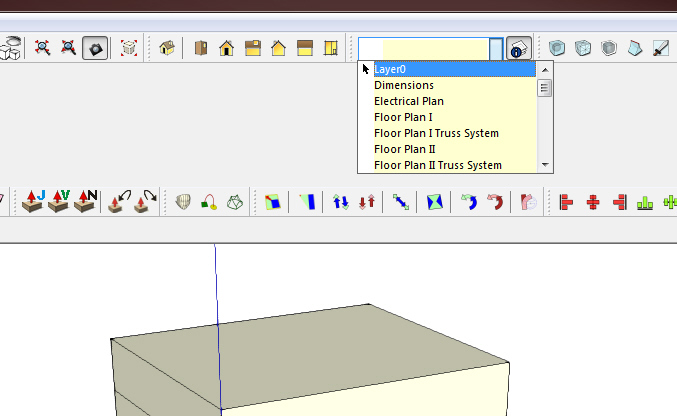
                        layer error.jpg

                        By: Kristoff Rand
                        Home DesignerUnique House Plans

                        1 Reply Last reply
                        Reply Quote 0
                        • Rich O BrienR
                          Rich O Brien Moderator
                          last edited by

                          not happening here Kris

                          Download the free D'oh Book for SketchUp πŸ“–

                          1 Reply Last reply
                          Reply Quote 0
                          • Chris FullmerC
                            Chris Fullmer
                            last edited by

                            Ahh, the screenshot helps explain kasais question better. I do see the keybaord keys working consistently in SU8 in the Layers Toolbar. I only check the entitity info and the layer dialog window, I did not test the Layer toolbar.

                            I can see that it used to work in SU8, but no longer does in SU 2013.

                            @Kris, I can't get it to do that on my system. Does anyone else see it act like that?

                            Lately you've been tan, suspicious for the winter.
                            All my Plugins I've written

                            1 Reply Last reply
                            Reply Quote 0
                            • Chris FullmerC
                              Chris Fullmer
                              last edited by

                              huh, still not working for me.

                              Lately you've been tan, suspicious for the winter.
                              All my Plugins I've written

                              1 Reply Last reply
                              Reply Quote 0
                              • Rich O BrienR
                                Rich O Brien Moderator
                                last edited by

                                nada....

                                Download the free D'oh Book for SketchUp πŸ“–

                                1 Reply Last reply
                                Reply Quote 0
                                • KrisidiousK
                                  Krisidious
                                  last edited by

                                  to recreate.

                                  select unnamed group.
                                  rename in entity info
                                  hit return don't hit return. this seems to be the issue.
                                  go to layer drop down, hit down arrow.

                                  By: Kristoff Rand
                                  Home DesignerUnique House Plans

                                  1 Reply Last reply
                                  Reply Quote 0
                                  • KrisidiousK
                                    Krisidious
                                    last edited by

                                    seems it only happens if I write in entity info and then fail to hit return afterwards and then try to select a layer.

                                    I'm not sure now... sometimes it happens every time and sometimes not. If it persists I'll make a thread or a report.

                                    By: Kristoff Rand
                                    Home DesignerUnique House Plans

                                    1 Reply Last reply
                                    Reply Quote 0
                                    • Chris FullmerC
                                      Chris Fullmer
                                      last edited by

                                      Yeah, any more info you can find on it would be great. Thanks Kris,

                                      Chris

                                      Lately you've been tan, suspicious for the winter.
                                      All my Plugins I've written

                                      1 Reply Last reply
                                      Reply Quote 0
                                      • jo-keJ
                                        jo-ke
                                        last edited by

                                        handling of more complex models please....

                                        http://www.zz7.de

                                        1 Reply Last reply
                                        Reply Quote 0
                                        • JClementsJ
                                          JClements
                                          last edited by

                                          Better/smoother camera animation.

                                          Object animation.

                                          Better camera tools. Ie., Panning, rotating, and zooming via keyboard.

                                          "Repair" of polylines back into circles and arcs which had been altered when executing, for example, follow-me and intersections and ruby scripts. Implement via context menu of a selection or as an option when saving model.

                                          A means to size the drawing window to a specific aspect ratio or display temporary vertical and horizontal pixel rulers to use a guide when re-sizing the drawing window.

                                          John | Illustrator | Beaverton, Oregon

                                          1 Reply Last reply
                                          Reply Quote 0
                                          • olisheaO
                                            olishea
                                            last edited by

                                            @jo-ke said:

                                            handling of more complex models please....

                                            +1

                                            Getting sick of sticky "complex" models. You can only switch to wireframe mode so many times before your brain explodes. Will SU ever deal with complex models? I don't see how/why other apps can crunch complex scenes but SU fails, I'm no programmer but I just don't see things progressing in this regard.

                                            oli

                                            1 Reply Last reply
                                            Reply Quote 0

                                            Hello! It looks like you're interested in this conversation, but you don't have an account yet.

                                            Getting fed up of having to scroll through the same posts each visit? When you register for an account, you'll always come back to exactly where you were before, and choose to be notified of new replies (either via email, or push notification). You'll also be able to save bookmarks and upvote posts to show your appreciation to other community members.

                                            With your input, this post could be even better πŸ’—

                                            Register Login
                                            • 1
                                            • 2
                                            • 3
                                            • 4
                                            • 5
                                            • 6
                                            • 7
                                            • 2 / 7
                                            • First post
                                              Last post
                                            Buy SketchPlus
                                            Buy SUbD
                                            Buy WrapR
                                            Buy eBook
                                            Buy Modelur
                                            Buy Vertex Tools
                                            Buy SketchCuisine
                                            Buy FormFonts

                                            Advertisement