sketchucation logo sketchucation
    • 登入
    Oops, your profile's looking a bit empty! To help us tailor your experience, please fill in key details like your SketchUp version, skill level, operating system, and more. Update and save your info on your profile page today!
    🔌 Smart Spline | Fluid way to handle splines for furniture design and complex structures. Download

    [Plugin][$] TopoShaper - v2.7b - 30 Jan 26


    已排程 已置頂 已鎖定 已移動 Plugins
    456 貼文 144 Posters 715.8k 瀏覽 143 Watching
    正在載入更多貼文
    • 從舊到新
    • 從新到舊
    • 最多點贊
    回覆
    • 在新貼文中回覆
    登入後回覆
    此主題已被刪除。只有擁有主題管理權限的使用者可以查看。
    • Dave RD 離線
      Dave R
      最後由 編輯

      @duventdesvagues said:

      where can i repor tan issue with the plugin toposhaper

      Post it here. Please also correct your profile. It says you are using SketchUp 2022 Free/Make but there is no such version. That information is important as it helps us help you.

      Etaoin Shrdlu

      %

      (THERE'S NO PLACE LIKE)

      G28 X0.0 Y0.0 Z0.0

      M30

      %

      1 條回覆 最後回覆 回覆 引用 0
      • R 離線
        RhayaderNL
        最後由 編輯

        Hey, i'm new to creating terrain in Sketchup, but following instructions using Fredotools and Toposhaper went relatively well, until the second step in Toposhaper: creating the mesh from isocontours. Toposhaper generates an error and the operation is fully aborted.
        I am using Toposhaper v2.6a in Sketchup Pro 2021 in Windows 10 Pro 64bit

        Date: 06-Jul-22 09:36:34
        An error occurred in CLEANSING
        The operation is fully aborted

        cannot hide layer that is a part of the active path

        body_lib6tool.rbe: 2538 -- visible=
        body_lib6tool.rbe: 2538 -- block in switch_to_temp_layer
        body_lib6tool.rbe: 2537 -- each
        body_lib6tool.rbe: 2537 -- switch_to_temp_layer
        toposhapertool.rbe: 1391 -- change_view
        toposhapertool.rbe: 1358 -- set_preview_working
        toposhapertool.rbe: 544 -- cleansing_processing
        toposhapertool.rbe: 523 -- after_selection
        toposhapertool.rbe: 493 -- notify_edge_picked
        body_lib6edgepicker.rbe: 539 -- call
        body_lib6edgepicker.rbe: 539 -- notify_action
        body_lib6edgepicker.rbe: 595 -- terminate_current_selection
        toposhapertool.rbe: 658 -- execute_validate
        toposhapertool.rbe: 387 -- handle_initial_selection
        toposhapertool.rbe: 319 -- activate
        toposhapertool.rbe: 133 -- select_tool
        toposhapertool.rbe: 133 -- action__mapping
        lib6plugin.rbe: 142 -- call
        lib6plugin.rbe: 142 -- launch_action
        lib6plugin.rbe: 244 -- launch_action
        bootstrap_toposhaper.rbe: 83 -- launch_action
        bootstrap_toposhaper.rbe: 149 -- block in startup
        lib6plugin.rbe: 1461 -- command_invoke
        lib6plugin.rbe: 1441 -- block (2 levels) in build_config_commands
        lib6traductor.rbe: 1378 -- block in add_command

        I would be happy to see a solution to this!

        1 條回覆 最後回覆 回覆 引用 0
        • fredo6F 離線
          fredo6
          最後由 編輯

          I think the problem is that you are inside the group of contours, and the group has itself a layer assigned.

          In TopoShaper, you can select the group of isocontours and process it, rather than entering the group.

          1 條回覆 最後回覆 回覆 引用 0
          • T 離線
            tofix1991
            最後由 編輯

            Hi, I can't use toposhaper anymore because of trial period has expired, where i can find the free license.., 😄

            1 條回覆 最後回覆 回覆 引用 0
            • Rich O BrienR 離線
              Rich O Brien Moderator
              最後由 編輯

              @tofix1991 said:

              where i can find the free license.., 😄

              It's next to the free beer 👍

              Download the free D'oh Book for SketchUp 📖

              1 條回覆 最後回覆 回覆 引用 0
              • M 離線
                makover
                最後由 編輯

                Trying to use Toposhaper but none of the dialog boxes open when attempting to generate from contours. Goes through "cleansing contours" progress bar and then a large yellow square appears. Is this due to using the trial version?

                1 條回覆 最後回覆 回覆 引用 0
                • Dave RD 離線
                  Dave R
                  最後由 編輯

                  @makover said:

                  Is this due to using the trial version?

                  Probably not. Might be an outdated LibFredo6 install, might be incorrect model setup. Share the .skp file so we can see what you are working with.

                  Etaoin Shrdlu

                  %

                  (THERE'S NO PLACE LIKE)

                  G28 X0.0 Y0.0 Z0.0

                  M30

                  %

                  1 條回覆 最後回覆 回覆 引用 0
                  • A 離線
                    Andres8659 Newcomers
                    最後由 編輯

                    Hello Fredo Master! I have the same issue as somebody before:

                    An error occurred in CLEANSING
                    The operation is fully aborted
                    cannot hide layer that is a part of the active path

                    I'm running SU2021 on my Windows OS 11

                    Helpp!! 😃

                    1 條回覆 最後回覆 回覆 引用 0
                    • fredo6F 離線
                      fredo6
                      最後由 編輯

                      @andres8659 said:

                      An error occurred in CLEANSING
                      The operation is fully aborted
                      cannot hide layer that is a part of the active path

                      It looks like you selected the curves directly and they have some assigned layer.
                      Can you try by selecting the group enclosing the curves (or create this group).

                      1 條回覆 最後回覆 回覆 引用 0
                      • M 離線
                        makover
                        最後由 編輯

                        @dave r said:

                        @makover said:

                        Is this due to using the trial version?

                        Probably not. Might be an outdated LibFredo6 install, might be incorrect model setup. Share the .skp file so we can see what you are working with.

                        Thanks! Attaching the modelled contours


                        00.10_NW_DWG Contours.skp

                        1 條回覆 最後回覆 回覆 引用 0
                        • Dave RD 離線
                          Dave R
                          最後由 編輯

                          You've got several groups nested with the loose geometry of the countours in the model. Explode the group representing the perimeter of the contours and cut the other stuff down at the bottom of the group out so the group only contains the geometry for your terrain. There's a lot of edges to deal with in the contours so be patient when you run TopoShaper. Might not hurt to simplify the contours first.

                          Etaoin Shrdlu

                          %

                          (THERE'S NO PLACE LIKE)

                          G28 X0.0 Y0.0 Z0.0

                          M30

                          %

                          1 條回覆 最後回覆 回覆 引用 0
                          • T 離線
                            titusbiao Newcomers
                            最後由 編輯

                            Hello,

                            I am now using Sketchup Pro 2021, with TopoShaper v2.6a. Following the instructions to TopoShaper::IsoContours, when I try to generate terrain as Step 4, SketchUp crashed! No matter the grid set as default 50x48, or 200x198, crashed all the same!

                            I don't know why, and could anyone tell me if there is anything wrong?

                            My file Topo.skp is here (uploaded to Microsoft OneDrive for download):
                            https://1drv.ms/u/s!AvaTfkcj2ZSTijSdm9cz1fsnQNFr?e=gUdSXs

                            Please help and many thanks!

                            1 條回覆 最後回覆 回覆 引用 0
                            • Rich O BrienR 離線
                              Rich O Brien Moderator
                              最後由 編輯

                              Try tidying up the border to help Toposhaper create a mesh...

                              https://i.imgur.com/8s0IPHU.png

                              Topo-sk8.skp

                              I removed your outline and some pointless small edges and the BugSplat stops.

                              I also moved your raw geometry onto the default layer rather than your major/minor layers

                              Download the free D'oh Book for SketchUp 📖

                              1 條回覆 最後回覆 回覆 引用 0
                              • T 離線
                                titusbiao Newcomers
                                最後由 編輯

                                Hello Rich O Brien,

                                Many thanks for your help.
                                The Topo-sk8.skp works well with toposhaper v2.6a in SketchUp 2021 (Win10).

                                I have tried some other skp files and find that if the geometry is rectangle, no errors will occur.

                                So I guess that there might be 2 situations for toposhaper smoothly running without errors:

                                1. the geometry is better in rectangle --- at least not too much acute or obtuse angles;
                                2. Not too much tiny contour lines near the edge of the geometry.
                                  Is that true?

                                Many thanks again!

                                @rich o brien said:

                                Try tidying up the border to help Toposhaper create a mesh...

                                https://i.imgur.com/8s0IPHU.png

                                [attachment=0:3akutcq8]<!-- ia0 -->Topo-sk8.skp<!-- ia0 -->[/attachment:3akutcq8]

                                I removed your outline and some pointless small edges and the BugSplat stops.

                                I also moved your raw geometry onto the default layer rather than your major/minor layers

                                1 條回覆 最後回覆 回覆 引用 0
                                • fredo6F 離線
                                  fredo6
                                  最後由 編輯

                                  @titusbiao said:

                                  So I guess that there might be 2 situations for toposhaper smoothly running without errors:

                                  1. the geometry is better in rectangle --- at least not too much acute or obtuse angles;
                                  2. Not too much tiny contour lines near the edge of the geometry.
                                    Is that true?

                                  Correct. You do not need too many contours, or too detailed contours, because TopoShaper is interpolating.

                                  When the terrain has an irregular contour, you may also get artefacts, because TopoShaper is based on quads.

                                  1 條回覆 最後回覆 回覆 引用 0
                                  • volpino170790V 離線
                                    volpino170790
                                    最後由 編輯

                                    Hi !

                                    I have a problem with TopoShaper

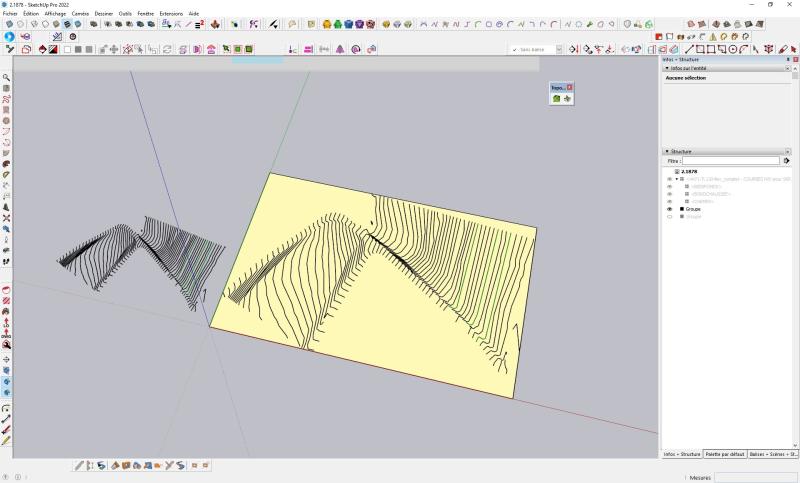
                                    Buttons don't appear and if the terrain geometry is not at the top level, it crashes.

                                    I've had this problem before with other files.

                                    Lib Fredo6 13.4a
                                    Toposhaper 2.6a

                                    I send a picture and a file

                                    https://i.goopics.net/800/ck230g.jpg

                                    Thank's !


                                    2.1878.skp

                                    1 條回覆 最後回覆 回覆 引用 0
                                    • Rich O BrienR 離線
                                      Rich O Brien Moderator
                                      最後由 編輯

                                      Works fine for me...

                                      https://i.imgur.com/iw9dhgV.png

                                      Download the free D'oh Book for SketchUp 📖

                                      1 條回覆 最後回覆 回覆 引用 0
                                      • fredo6F 離線
                                        fredo6
                                        最後由 編輯

                                        @volpino170790 said:

                                        I have a problem with TopoShaper

                                        Buttons don't appear and if the terrain geometry is not at the top level, it crashes.

                                        I've had this problem before with other files.

                                        It works for me too.

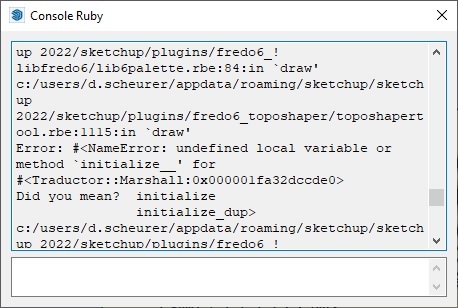
                                        Could you open the Ruby Console before launching TopoShaper to see if there are error messages displayed.

                                        1 條回覆 最後回覆 回覆 引用 0
                                        • volpino170790V 離線
                                          volpino170790
                                          最後由 編輯

                                          Hi !

                                          Here a link for a video
                                          https://e1.pcloud.link/publink/show?code=XZ44gQZpMbvTD07lPfKUOGY0zFTHRPYK5Ey

                                          Error in console

                                          https://i.goopics.net/800/pj3gjq.jpg

                                          1 條回覆 最後回覆 回覆 引用 0
                                          • volpino170790V 離線
                                            volpino170790
                                            最後由 編輯

                                            Hi!

                                            I all uninstall my extensions (just not uninstall 3dxSketchUp and the Sketchup extensions from sketchup) and reinstall this:

                                            • LibFredo6, then close and reopen the file
                                            • Toposhaper, then close and reopen the file
                                            • Scf licence manager, then close and reopen the file
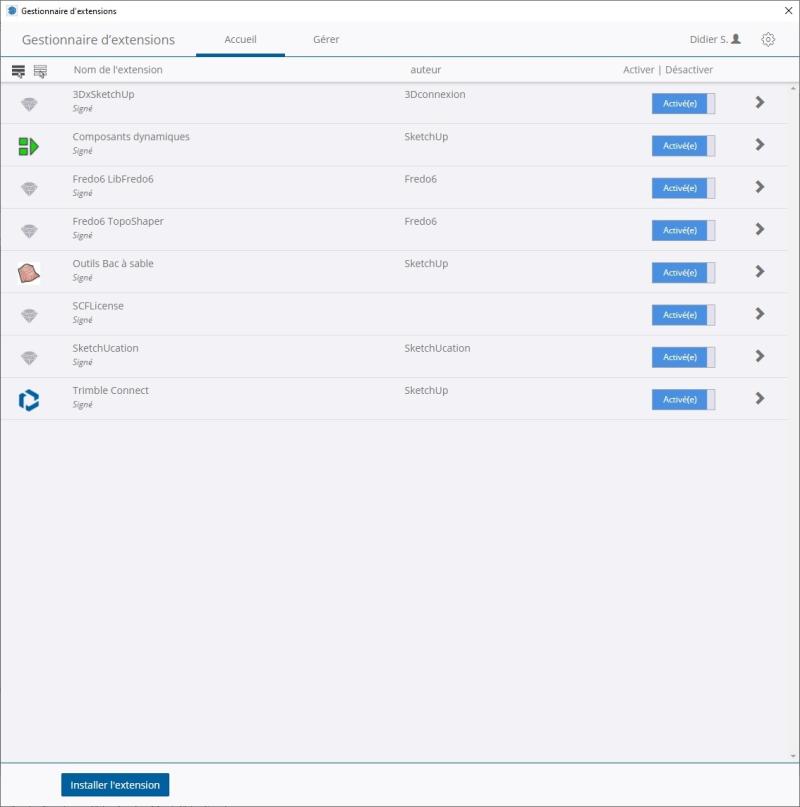

                                            https://i.goopics.net/800/uhkap9.jpg

                                            It is solved, but no idea why 😕

                                            I think there is a conflict between Fredo 6 and an other extension but which one... THAT the question 😆

                                            A video belove:

                                            Share Anything with pCloud

                                            With pCloud's unique Download Link feature you can share files with everyone. Click to download. Join pCloud.com and get up to 20GB FREE cloud storage.

                                            favicon

                                            pCloud (e1.pcloud.link)

                                            1 條回覆 最後回覆 回覆 引用 0
                                            • 1
                                            • 2
                                            • 9
                                            • 10
                                            • 11
                                            • 12
                                            • 13
                                            • 22
                                            • 23
                                            • 11 / 23
                                            • 第一個貼文
                                              最後的貼文
                                            Buy SketchPlus
                                            Buy SUbD
                                            Buy WrapR
                                            Buy eBook
                                            Buy Modelur
                                            Buy Vertex Tools
                                            Buy SketchCuisine
                                            Buy FormFonts

                                            Advertisement