sketchucation logo sketchucation
    • 登入
    Oops, your profile's looking a bit empty! To help us tailor your experience, please fill in key details like your SketchUp version, skill level, operating system, and more. Update and save your info on your profile page today!
    🔌 Smart Spline | Fluid way to handle splines for furniture design and complex structures. Download

    [Plugin][$] TopoShaper - v2.7b - 30 Jan 26


    已排程 已置頂 已鎖定 已移動 Plugins
    456 貼文 144 Posters 715.2k 瀏覽 143 Watching
    正在載入更多貼文
    • 從舊到新
    • 從新到舊
    • 最多點贊
    回覆
    • 在新貼文中回覆
    登入後回覆
    此主題已被刪除。只有擁有主題管理權限的使用者可以查看。
    • PixeroP 離線
      Pixero
      最後由 編輯

      But Instant road isn't interactive like in the link.

      1 條回覆 最後回覆 回覆 引用 0
      • A 離線
        alpro
        最後由 編輯

        @fredo6 said:

        In general, it is better to conceive the terrain before adding decoration, houses, fences, etc...

        But I'll think about what can be done, especially for roads.

        Fredo

        So what I'm doing is recreating our existing conditions surveys so that design can be brought in in 3D for some presentations and renders. When creating surfaces in Civil 3D our spot shots are used for the surface but so is our line work as breaklines for things such as roads, sidewalks, retaining walls. When I bring the contours into SU and create a surface using topo shaper sometimes the differences are pretty significant and just like KrisM I have to manually make adjustments to the surface which is tedious. Toposhaper already is a great plugin but I think having this feature will make it even better.

        1 條回覆 最後回覆 回覆 引用 0
        • fredo6F 離線
          fredo6
          最後由 編輯

          NEW RELEASE: TopoShaper v2.4a - 19 Dec 18

          Requirement: LibFredo6 8.7a

          TopoShaper 2.4a is a maintenance release with small adjustments.


          Home Page of TopoShaper for information and Download.

          Main post of this TopoShaper thread.

          1 條回覆 最後回覆 回覆 引用 0
          • M 離線
            MelResDes
            最後由 編輯

            Hello,
            I have never used Toposhaper before. I am trying to create a surface from the contour lines and I keep getting an error and the script aborts the operation. Attached is the Error:
            Date: 16-Feb-19 12:25:07
            An error occurred in CLEANSING
            The operation is fully aborted

            undefined local variable or method `colors_init' for #<F6_TopoShaper::TopoShaperCleanser:0x0000017fe1ef9f68>

            toposhapercleanser.rbe: 84 -- initialize
            toposhapertool.rbe: 541 -- new
            toposhapertool.rbe: 541 -- cleansing_processing
            toposhapertool.rbe: 523 -- after_selection
            toposhapertool.rbe: 493 -- notify_edge_picked
            body_lib6edgepicker.rbe: 445 -- call
            body_lib6edgepicker.rbe: 445 -- notify_action
            body_lib6edgepicker.rbe: 496 -- terminate_current_selection
            toposhapertool.rbe: 658 -- execute_validate
            toposhapertool.rbe: 387 -- handle_initial_selection
            toposhapertool.rbe: 319 -- activate
            toposhapertool.rbe: 133 -- select_tool
            toposhapertool.rbe: 133 -- action__mapping
            lib6plugin.rbe: 126 -- call
            lib6plugin.rbe: 126 -- launch_action
            lib6plugin.rbe: 224 -- launch_action
            bootstrap_toposhaper.rbe: 83 -- launch_action
            bootstrap_toposhaper.rbe: 136 -- block in startup
            lib6plugin.rbe: 1271 -- command_invoke
            lib6plugin.rbe: 1253 -- block (2 levels) in build_config_commands
            lib6traductor.rbe: 1361 -- block in add_command

            Please let me know if you need more info from me or if you need the file I am working on.
            Thanks!

            1 條回覆 最後回覆 回覆 引用 0
            • fredo6F 離線
              fredo6
              最後由 編輯

              Can you advise if you use Linux under the cover?

              1 條回覆 最後回覆 回覆 引用 0
              • M 離線
                MelResDes
                最後由 編輯

                I am not really familiar with Linux other than it is an OS that I don't think I use. I'm using a standard Windows 10 OS and Sketchup Pro 2019.

                1 條回覆 最後回覆 回覆 引用 0
                • fredo6F 離線
                  fredo6
                  最後由 編輯

                  I found the problem, which seems specific to SU2019.

                  I will publish a fix.

                  Fredo

                  1 條回覆 最後回覆 回覆 引用 0
                  • fredo6F 離線
                    fredo6
                    最後由 編輯

                    NEW RELEASE: TopoShaper v2.5a - 16 Feb 19

                    Requirement: LibFredo6 8.7a

                    TopoShaper 2.5a includes a major fix for SU2019, preventing it to launch correctly .


                    Home Page of TopoShaper for information and Download.

                    Main post of this TopoShaper thread.

                    1 條回覆 最後回覆 回覆 引用 0
                    • M 離線
                      MelResDes
                      最後由 編輯

                      The update worked! Thank you so much!

                      1 條回覆 最後回覆 回覆 引用 0
                      • fredo6F 離線
                        fredo6
                        最後由 編輯

                        @melresdes said:

                        The update worked! Thank you so much!

                        Thanks for signaling the problem.

                        Fredo

                        1 條回覆 最後回覆 回覆 引用 0
                        • M 離線
                          MelResDes
                          最後由 編輯

                          Hello Fredo,
                          Is there a tool I can use to manipulate a mesh created by Toposhaper? I am looking for a way to push or pull the grade around the house model I have placed on the mesh. I tried to use the native smoove tool in Sketchup but it did not want to cooperate with the Toposhaper mesh and it locked up.
                          Thanks!

                          1 條回覆 最後回覆 回覆 引用 0
                          • fredo6F 離線
                            fredo6
                            最後由 編輯

                            @melresdes said:

                            Hello Fredo,
                            Is there a tool I can use to manipulate a mesh created by Toposhaper? I am looking for a way to push or pull the grade around the house model I have placed on the mesh. I tried to use the native smoove tool in Sketchup but it did not want to cooperate with the Toposhaper mesh and it locked up.
                            Thanks!

                            You can use the native Sketchup Sandbox, or Artisanby Whaat (pay plugin).

                            1 條回覆 最後回覆 回覆 引用 0
                            • M 離線
                              MelResDes
                              最後由 編輯

                              Thank you. I tried to use the native sandbox tools but it locked up SketchUp. I will look into the Artisan plugin.

                              1 條回覆 最後回覆 回覆 引用 0
                              • fredo6F 離線
                                fredo6
                                最後由 編輯

                                @melresdes said:

                                Thank you. I tried to use the native sandbox tools but it locked up SketchUp. I will look into the Artisan plugin.

                                Did you build the terrain from iso-contours (so you get a quadmesh) or from a cloud of points (so you get a triangulated mesh)?

                                1 條回覆 最後回覆 回覆 引用 0
                                • pbacotP 離線
                                  pbacot
                                  最後由 編輯

                                  A problem with the native sandbox tool--don't pre-select the mesh. Vertex Tools ($) also helps for some work.

                                  MacOSX MojaveSketchUp Pro v19 Twilight v2 Thea v3 PowerCADD

                                  1 條回覆 最後回覆 回覆 引用 0
                                  • M 離線
                                    MelResDes
                                    最後由 編輯

                                    @pbacot said:

                                    A problem with the native sandbox tool--don't pre-select the mesh. Vertex Tools ($) also helps for some work.

                                    Thanks! That is what I was doing wrong. I appreciate the help.

                                    1 條回覆 最後回覆 回覆 引用 0
                                    • R 離線
                                      Rom1br
                                      最後由 編輯

                                      Hi , I try to figure out how I can create a terrain from a 3D dwg file I'm given.
                                      When you import this in SU and you keep the points and explode the components you see that Entity info confirms that they are Guide Points.
                                      I select them all and try to use the Points cloud fonction of the plugin but it fails or crash my SU ( pro 2018 on Mac btw ).
                                      I upload the dwg file if someone is kind enough to tell me what I'm doing wrong .
                                      Thanks for the good job though , big fan of your work .
                                      Thanks everybody


                                      115145 topo CL 04 03 2019.dwg

                                      1 條回覆 最後回覆 回覆 引用 0
                                      • fredo6F 離線
                                        fredo6
                                        最後由 編輯

                                        @rom1br said:

                                        I select them all and try to use the Points cloud fonction of the plugin but it fails or crash my SU ( pro 2018 on Mac btw ).

                                        Did you enclose all guide points within a group and then launch TopoShaper on this group?

                                        1 條回覆 最後回覆 回覆 引用 0
                                        • fredo6F 離線
                                          fredo6
                                          最後由 編輯

                                          NEW RELEASE: TopoShaper v2.5b - 11 Apr 19

                                          Requirement: LibFredo6 8.7a

                                          TopoShaper 2.5b includes another major fix for SU2019, preventing it to launch correctly .


                                          Home Page of TopoShaper for information and Download.

                                          Main post of this TopoShaper thread.

                                          1 條回覆 最後回覆 回覆 引用 0
                                          • pbacotP 離線
                                            pbacot
                                            最後由 編輯

                                            Working on a issue here. The main hill in my terrain is coming out deflated. In the screen shot, have selected "Show contours used by each node of the mesh". It looks like a lower contour is coming into play. (is this query relevant?) I have the hilltops set to "rounded". There is no straight line like is highlighted here connecting that contour below. No hidden lines. Maybe the contour file is too rough there are some gaps and big hole as you can see. At least I am reading the manual now.

                                            I can see there is a point where I can see these erroneous closing of contours (the straight lines). At this point in cleansing I can ignore the contour or simplify it. I wonder what steps I should take a that point to correct the straight line connections.
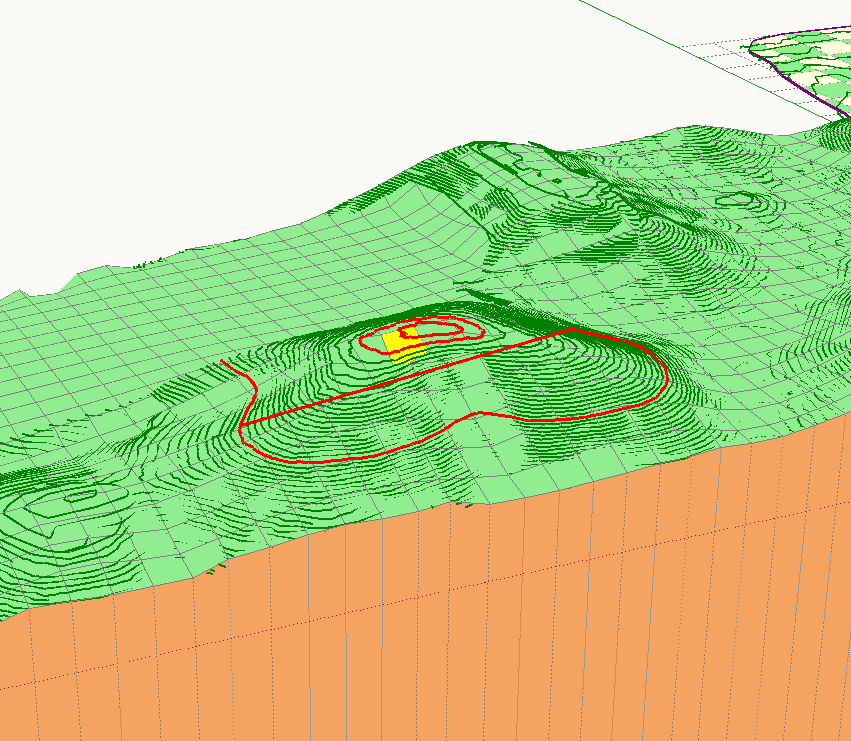


                                            Screen Shot 2019-04-26 at 7.11.44 PM.png

                                            MacOSX MojaveSketchUp Pro v19 Twilight v2 Thea v3 PowerCADD

                                            1 條回覆 最後回覆 回覆 引用 0
                                            • 1
                                            • 2
                                            • 3
                                            • 4
                                            • 5
                                            • 22
                                            • 23
                                            • 1 / 23
                                            • 第一個貼文
                                              最後的貼文
                                            Buy SketchPlus
                                            Buy SUbD
                                            Buy WrapR
                                            Buy eBook
                                            Buy Modelur
                                            Buy Vertex Tools
                                            Buy SketchCuisine
                                            Buy FormFonts

                                            Advertisement