Materials lose the characteristics
-
Hello everyone, I use vray recently and I have a problem.
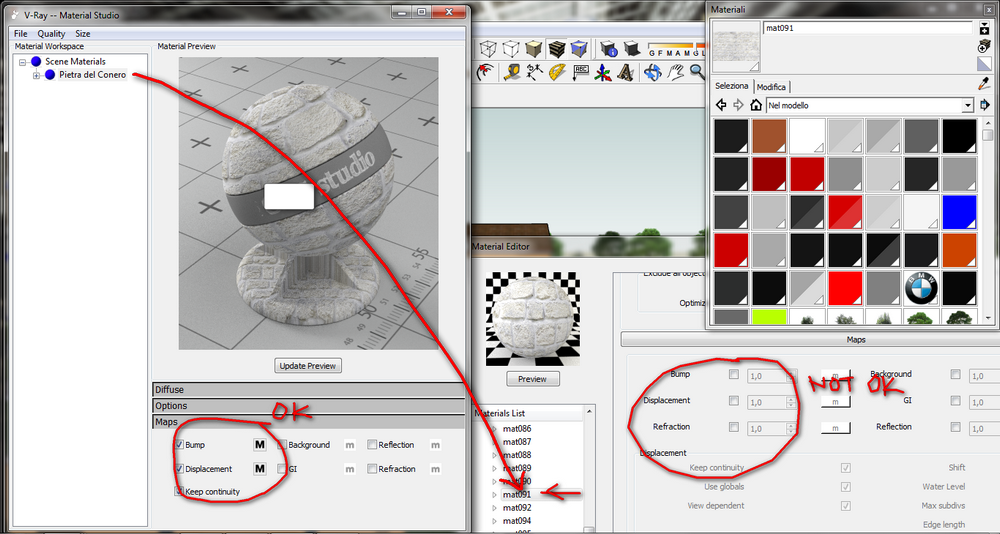
I vismat materials. them call the editor and apply them to the model. if you render now, no problem but if you save, close and reopen the model in sketchup, the materials lose their names, leaving only mat001, mat002 .... but the worst thing is losing the characteristics of ... reflection, refraction, bump, displacement ...
-
I have never heard of this bug specifically but I know there is a bug where you can lose all of your material layers. Yep, very annoying but I think its isolated and doesnt happen often. Ive never heard of saving and then when you open the materials are gone. Do you have other render engines installed?
-
i have this problem quite often.
i noticed it most frequently appens if you have your material applyed on a geometry touching other geometry with different material. i find that grouping geometry by material reduce the occurance of this bug.i also find the same problem sometimes using the "duplicate material" option.
so recently i try to avoid it, because when i save and reopen the file, sometimes the materials which were duplicated disappear and are replaced with the "parent" material (the one from wich you started the duplicate one).
i noticed this bug more often occours on material which have no texture maps applied.another similar funny pain in the ass is the case in which displacement/bump map are corrupted (i mean, you notice the displacment bump fails and when you go to check the bumpmap folder the jpeg texture lose the prewiew in windows and can't be opened by windows picture manager) this is veeeery fun indeed.
i find the more safe way is to pack/save wathever .vismat you create and always save the .psd which you use for bumpmaps because you may need it again when vray "eats" bumpmaps.
i really hope this will be solved with next relase.. and really hope it will be relased very soon. i do love vray itself, and the new features are so promising, but i hope they deal with bugs at first.
-
People with problem where layers are lost: what version are you using? I experienced this in older versions of V-Ray, but I've not had this lately.
As for renaming - never seen that. Sounds like it might be some plugin conflict. What other plugins do you have installed?
-
@thomthom said:
People with problem where layers are lost: what version are you using? I experienced this in older versions of V-Ray, but I've not had this lately.
i use 1.49etc.. the last one.
this strange behaviour appens sometimes. -
A lot of buggy things happen if you have more than one window of SU open and have vray loaded twice... so just don't do it. Know that if you open a second window of SU with vray, you'll crash vray more likely than not.
-
@andybot said:
A lot of buggy things happen if you have more than one window of SU open and have vray loaded twice... so just don't do it. Know that if you open a second window of SU with vray, you'll crash vray more likely than not.
I've not seen that behaviour - but if you copy and paste (or import) between windows while V-Ray is loaded I've seen strange things happen. That's one of the reasons why I model with V-Ray unloaded - and load it only when I need to render.
-
@thomthom said:
@andybot said:
A lot of buggy things happen if you have more than one window of SU open and have vray loaded twice... so just don't do it. Know that if you open a second window of SU with vray, you'll crash vray more likely than not.
I've not seen that behaviour - but if you copy and paste (or import) between windows while V-Ray is loaded I've seen strange things happen. That's one of the reasons why I model with V-Ray unloaded - and load it only when I need to render.
This is apart from the copy and paste bug. Try opening a second instance sometime if you have a model you already have backed up: open the material editor and run a render or two in different windows, and I can guarantee you'll end up with some vray materials lost or render not able to start...
-
Oh, you mean you render simultaneously multiple times??
-
@thomthom said:
Oh, you mean you render simultaneously multiple times??
actually, no, I don't think I've ever done that. I mean open the material editor in separate windows, or run a render in one and the editor in another.
-
i know about it, and i NEVER run 2 instances of vray, also i use thomthom's vray tool to load vray only in the final phases, when really is needed.
but under some circumstances (the ones i listed before, or most likely some odd combination of them) strange things MAY appens (luckly not always, but sometimes).. -
@panixia: I was responding to the OP. But I agree, the material editor by itself can be unreliable. I've found material property layers missing, and I have on occasion run into textures that get messed up, but that's usually been fixed when I change the color space of the texture to RGB.
-
It does happen in 1.49.01 and not consistently. I have heard that it can happen when you move a layer in material up or down, I have had it happen if a render crashes and I get that VRay could not start render dialog. It doesnt happen often but I have certainly had all of my material layers disappear on me. I think this was discussed in the Chaod forums and I thought I heard someone say they had a workaround. Something about opening the options dialog and closing before saving your SU file and restarting???
Whatever it is, I am confident that the latest release has fixed it.
-
Here is the discussion on the Chaos forums
http://www.chaosgroup.com/forums/vbulletin/showthread.php?63554-Losing-material-layers -
@andybot said:
that's usually been fixed when I change the color space of the texture to RGB.
what do you mean by this? i can't understand

-
I'm guessing he's talking about this:
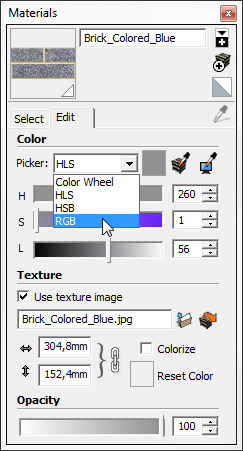
-
@valerostudio said:
I have heard that it can happen when you move a layer in material up or down
yes sir, this is right, it appened to me in a recent project.
i had some emissive glasses with four different level of intensity. they had to be reflective in sunny scenes and emissive in night scenes.
so i created the firt "emissive glass" moved the reflection layer on top of emissive and than using "duplicate material" i created emissive glass 1/2/3 and only modified the emissive layer intensity for each one.
once saved and reopened project, they were corrupted forever. all the newely created variations were replaced in model from the original "emissive glass" and "emissive glass 1/2/3" disappeared at all from the list.
so i created them back again and this time, at saving reopening file, the reflection/emissive layers were all gone..the only way to get rid of this behaviour was to create the materials out of the project, save them, use flat-diffuse red,blue and pink color for the 3 galss variation (to be sure from sketchup view they were not merged again
 ) and "load material" one by one every time before hit renderng.
this was SUPER annoyng.
-
@panixia said:
h four different level of intensity. they had to be reflective in sunny scenes and emissive in night scenes.
so i created the firt "emissive glass" moved the reflection layer on top of emissivewhile (re)thinking on this fact, i'm having sort of "doo-moment" because actually you don't need to move layers at all to do this. just playng with emissive layer transparency is right enough.

-
my version is a 1.49 and with regard to the plug-ins ... I installed only two knowing possible problems. I just know that vray is a great program, but the management of materials (materialstudio create them, recall etc ... without the possibility of an archive visible) is absurd! I'd rather create a material. vismat and have a chance to copy it into the program folder and find a menu with thumbnails visible (and of adequate size).
other strange thing ... I noticed that the bump mapping only works if you apply a material to a group. ok reorganization ideas and try to post some pictures explanatory;) thanks to all. -
in the picture you can see what was said....I wanted it to work as vray for 3dsmax, where you can import models from Evermotion with the materials already set. in this way we can create for ourselves object libraries with materials already, without having to apply, map each time. this thing confuses me instead.
 Maybe I just need to find a more comprehensive manual?






Advertisement