[Plugin] Snapshot – (1.0.1) — updated 09.10.2012
-
Aerilius
Would it be possible to make the selection to save, such that I can save in a "custom folder" and the "same Folder as skp" at the same time. This way I would have the master png's in my custom folder and work related png's at the skp's folder.
If I know the work related folder, I would just browse at that location, if I wasn't sure or was looking for something that I haven't worked on for some time, I could go to the custom folder.
Also, I could print out a contact sheet for the custom folder for a hard copy.
So this morning, I have been opening and saving skp files to get my master folder up to date.
Thank you for this very helpful plugin.
Ken
-
@aerilius said:
If GraphicsConverter has a command line interface, that would make it much easier!
It does, and it's free[if your scint], you can also use it to extract the SU thumbnails from the .skp, but it's a bit random when Sketchup saves that, unless you want the silly 'styled' frame you get with 'save thumbnail'
I'll dig out the command line flags. an applescript wrapper might swap the icons...
john
-
There should be an option to enter the date and time automatically in the file name.
Thanks for this great tool. -
@aerilius said:
@driven said:
Works on mac
Great! I think there was once a discussion about integrate better thumbnails on OS X, as far as I remember that would require XCode and Objective C (?). I couldn't do it and can't test it.
If GraphicsConverter has a command line interface, that would make it much easier!@glro said:
C, or java programming would be needed, yes; to create a special file browser hat would add a meta data (the link to the skp file)
That would be almost reinventing the wheel
 . I would prefer using the system's thumbnailing (Windows Vista+ uses a thumbnail folder and a database). We would need to register a thumbnail to the database. As far as I know, there are only APIs for C(++, # ...) and I have not enough experience. I will see if someone else can help me, or if we can get equivalent improvements into SketchUp.
@glro said:
is it possible to create a shortcut to a file using ruby?
That might be a the easiest solution! I'll try it!
There is a simple way: creating a batch file, for example:
"@ECHO OFF
call F:\000_experience.sauvb\programmation\ruby\essai_plateforme.skp
end"this opens the console
to avoid opening the console, write a second file"var WindowStyle_Hidden = 0
var objShell = WScript.CreateObject("WScript.Shell")
var result = objShell.Run("cmd.exe /c shortcut.bat", WindowStyle_Hidden)"both are text files, easy to write in ruby...
-
@aerilius said:
It now works also in SketchUp 7
That's great

@aerilius said:
@simon le bon said:
The "save the name-1" is less evident. Previously I thought it was adding at the end of the file name a decrementation -1 -2 -3 etc..
Sorry, I had understood it would decrease the number (to redo older images). So instead of a minus button, you would prefer something like "increase primary version number" and "secondary version number"?
It seems to me that "save the name+1" already "increase secondary version number"

nameFile_000.skp
when it is saved gives: (autosave checked)
nameFile_000.png
"save the name+1" become:
nameFile_0001.png
nameFile_0002.png
nameFile_0003.png
...nameFile_001.skp
when it is saved gives:
nameFile_001.png
& "save the name+1" become:
nameFile_0011.png
nameFile_0012.png
nameFile_0013.pngThat's not bad to consider snapshots incrementation.
@unknownuser said:
it would decrease the number (to redo older images)
Redo older image is not (IMO) a very necessary option. And in facts don't work pretty good.
If you have a png set made with "save the name+1"
nameFile_0001.png
nameFile_0002.png
nameFile_0003.png
Then you want to redo basically the last one: nameFile_0003.png , if you use "save the name-1" It is nameFile_0002.png that is overwrited !!May be only one button would be necessary which would make a clear proper incrementation:
nameFile_001.skp
when saved gives:
nameFile_001.png
& "save the name + increment"
nameFile_001_001.png
nameFile_001_002.png
nameFile_001_003.pngJust idea (as Jean Lemire always says
)Simon
PS:
_ Sorry that "save a copy as" can't autosave a snapshot. We can take few seconds to save the snapshot name manually after all.
_ "The foxy method" is lost for me. I have tried with the search engine in vain. May be Gaieus knows something about it! -
@aerilius said:
@driven said:
@glro said:
is it possible to create a shortcut to a file using ruby?
That might be a the easiest solution! I'll try it!
i added some code to yours at the end of "self.save_as(filepath)" method
filepath2 = (filepath.split("/")[0..-2]).join("/")
nom_model = m.title
# name of the text file to put the shortcut in
nom_bat = filepath2 + "/" + nom_model + ".bat"

#open this file
aFile = File.new(nom_bat,"w")

pathmodel = m.path

#write the file shortcut
aFile.puts("call "+pathmodel)
aFile.puts("end")
aFile.close
a black cmd window is opened... must be closed manually, unless you embed the .bat file in a .js file...
it is basic but it works... -
Sorry to disturb the coding discussion

Ae_Snapshot tested with Su7 : love this plug
(Png transparent background option still don't work - - )simonlebon
-
I forgot to mention: the transparent png option has only been added to SketchUp 8.
I'm working on a new version! -
@glro said:
@aerilius said:
@driven said:
@glro said:
is it possible to create a shortcut to a file using ruby?
That might be a the easiest solution! I'll try it!
i added some code to yours at the end of "self.save_as(filepath)" method
> filepath2 = (filepath.split("/")[0..-2]).join("/")
> nom_model = m.title
> # name of the text file to put the shortcut in
> nom_bat = filepath2 + "/" + nom_model + ".bat"
>
> #open this file
> aFile = File.new(nom_bat,"w")
>
> pathmodel = m.path
>
> #write the file shortcut
> aFile.puts("call "+pathmodel)
> aFile.puts("end")
> aFile.close
>
a black cmd window is opened... must be closed manually, unless you embed the .bat file in a .js file...
it is basic but it works...Doesn't work if there is a white space in the file address
additional code is needed
nom_bat2 = nom_bat.to_s if nom_bat2.count(nom_bat2, " ") != 0 UI.messagebox("no white space in the file address") fail end -
I updated the plugin. I think it will now fit all your needs because you can now make your own buttons
@glro, can you test if the shortcuts work as expected? -
@aerilius said:
I updated the plugin. I think it will now fit all your needs because you can now make your own buttons
@glro, can you test if the shortcuts work as expected?i tested, but there might be a problem
no box is opened on my scree when i check "ae snapshot" in the menu
it might come from the html file
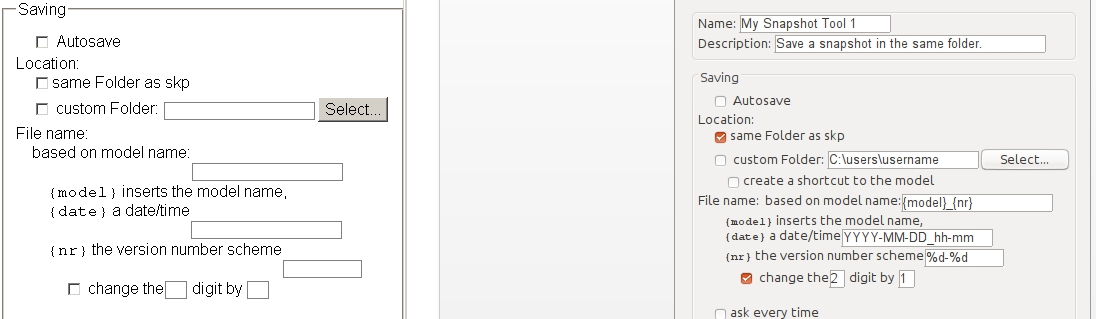
in the pop up windows you show in the first message of this thread, i read "create a shortcut"
but when i click on the html file in "ae_snapshot" folder, i don't see the same things
-
I first thought it might have to do with upgrading the settings (because the previous version is much different). But I just tested it from 0.1.1 to 0.3.0 and it works for me.
You mean the settings dialog does not appear when you click the gear icon on the toolbar (there is no ae snapshot menu). Can you open the Ruby Console, click the gear button and give me the error messages if there are any.
Then copy&paste "AE::Snapshot.options={}" into the console and press the gear button again. Does it then work? -
@aerilius said:
I first thought it might have to do with upgrading the settings (because the previous version is much different). But I just tested it from 0.1.1 to 0.3.0 and it works for me.
You mean the settings dialog does not appear when you click the gear icon on the toolbar (there is no ae snapshot menu). Can you open the Ruby Console, click the gear button and give me the error messages if there are any.
Then copy&paste "AE::Snapshot.options={}" into the console and press the gear button again. Does it then work?yes, the setting dialog does not appear;
the gear icon does'nt appear either...
just a small reactangle where i cannot click ...how do you explain the differences between the setting dialog window i get when i double click directly on the file "settings_dialog.htm" and the one you pasted in you message?
my guess is that it is linked to the problem

-
Very useful! Thank you very much.
-
@glro: Does "
Sketchup.write_default("Plugins_ae", "Snapshot", "{}")" on the Ruby Console and restarting help?
(There are no relevant differences in the htm file.)
(By the way, you don't need quote the message, I know it's on the same page one above ) -
OK
yes it helps
when i close and open sketchup again, the icon and snapshot settings windows appear on the screen
but i cannot save the parameters (clicking on "OK" doesnt change anything)
i notice the lines you added to create a file shortcut; since this is the only option i am interested in, i'll try to add them to the previous version, that worked perfectly on my computer
thank you
-
-
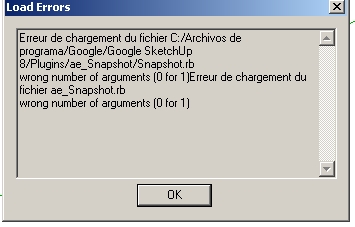
when i launch sketchup again, i get "wrong number of arguments (0 for 1)"
The plugin does take a shot when i click on the button
but i cannot get the snapshot settings windows on the screen anymore
it may be because of my computer, if i am the only one to have this problem...
-
I am very sure it's not your computer. I couldn't find anything on my own.
@unknownuser said:
"wrong number of arguments (0 for 1)"
This error was on the Ruby Console? Can you tell me what was before or after that? There should be a line number and a line number is very much helpful!
-
no, nothing in the ruby console
it is an error message when sketchup loads all the plugins
no numbers






Advertisement