sketchucation logo sketchucation
    • 登入
    Oops, your profile's looking a bit empty! To help us tailor your experience, please fill in key details like your SketchUp version, skill level, operating system, and more. Update and save your info on your profile page today!
    🔌 Smart Spline | Fluid way to handle splines for furniture design and complex structures. Download

    How to import a model dazstudio (obj) in Sketchup?

    已排程 已置頂 已鎖定 已移動 Newbie Forum
    sketchup
    28 貼文 6 Posters 6.1k 瀏覽 6 Watching
    正在載入更多貼文
    • 從舊到新
    • 從新到舊
    • 最多點贊
    回覆
    • 在新貼文中回覆
    登入後回覆
    此主題已被刪除。只有擁有主題管理權限的使用者可以查看。
    • Dave RD 離線
      Dave R
      最後由 編輯

      Is it possible that the faces are reversed in SketchUp? What does the model look like when viewed in Monochrome face style? Do you have some white faces and some blue?

      Etaoin Shrdlu

      %

      (THERE'S NO PLACE LIKE)

      G28 X0.0 Y0.0 Z0.0

      M30

      %

      1 條回覆 最後回覆 回覆 引用 0
      • TIGT 離線
        TIG Moderator
        最後由 編輯

        Could it be that the model's faces are reversed.
        So you are really looking at the backs, most renderers show back-faces as while or black.
        The materials are therefore on the inside of the objects.
        If your current Style has distinct colors for front/back faces - say off-white and bright-blue - and you change the View mode > Monochrome, all visible faces that are 'backs' will show in that blue - I suspect this will be most of them ? They ought to be 'white' !
        If you edit an object and select one face then what does the Entity Info window say?
        Probably 'default' front and textured back to that face ?
        Swap back to View > Textured mode.
        You can try the right-click context-menu to 'Reverse' the selected face [or even selected faces].
        It might work, or it might rearrange the textures unexpectedly - try it you can always use 'undo' it it fails.
        If it reverses OK and the object is a 'solid' then using the context-menu 'Orient' will make all other joined faces flip to match that face, and fix the texturing.

        If you can post a simple <4Mb SKP [can be zipped] we can look at it for you... 😕

        Alternatively try my Fix Back Face Materials tools or thomthom also has some tools to do this face flipping and texture swapping...

        EDIT: Dave beat to the draw!

        TIG

        1 條回覆 最後回覆 回覆 引用 0
        • S 離線
          Senior Commodore
          最後由 編輯

          I checked and the sides are not reversed.

          Here are the files that are created after an OBJ export from a Dazstudio

          I sent three post because he exceeded the limit of 4 mg.

          01 = obj file


          obj file

          1 條回覆 最後回覆 回覆 引用 0
          • S 離線
            Senior Commodore
            最後由 編輯

            02 = Maps file


            Maps file

            1 條回覆 最後回覆 回覆 引用 0
            • TIGT 離線
              TIG Moderator
              最後由 編輯

              The MTL was missing !
              Please edit the post and reattach it...

              TIG

              1 條回覆 最後回覆 回覆 引用 0
              • S 離線
                Senior Commodore
                最後由 編輯

                03 = MTL file


                mtl file

                1 條回覆 最後回覆 回覆 引用 0
                • TIGT 離線
                  TIG Moderator
                  最後由 編輯

                  I just used the FluidImporter and all of the faces WERE reversed - so you see the faces' backs.
                  Also the various materials that are made seem to have the specified texture-files missing - they are plain-colors... So even reversing them has no great result !

                  The image paths in the MTL file need to point at the "Maps" folder which in turn needs to in the same folder as the OBJ and MTL files... This all seems OK, so I'm unclear as to why the images aren't used.

                  I also note that 7_Tear and 1_Eyebrow have no texture-file associated with them ?

                  I'll repeated the import with my "OBJimporter [with Textures]" tool... but it takes a lot longer to process... I'll report back later...

                  TIG

                  1 條回覆 最後回覆 回覆 引用 0
                  • S 離線
                    Senior Commodore
                    最後由 編輯

                    Thank you Tig, you are very generous to take the time to help me.

                    I send you the file Daz.

                    Maybe it will be useful ...


                    daz file

                    1 條回覆 最後回覆 回覆 引用 0
                    • TIGT 離線
                      TIG Moderator
                      最後由 編輯

                      I can't use the DAZ file...
                      My OBJimporter is still running, and reports several [666] errors in the Ruby Console, so it not looking good !
                      Still running...
                      I'll let it finish... but I'm not hopeful of a good outcome... 😞
                      If seems the files have some issues...

                      TIG

                      1 條回覆 最後回覆 回覆 引用 0
                      • S 離線
                        Senior Commodore
                        最後由 編輯

                        Hello TIG,
                        I did some test and I got a weird result.
                        Here is the path I have traveled:
                        In the software Dazstudio - I clicked 'send to Hexagon'
                        In the software Hexagone - I exported my model file 'Carrera' (.car)
                        In the software Carrera - I export the model in OBJ file.
                        In the software Setchup - I imported the OBJ file with Fluidimporter

                        WOW! the road is long!

                        The problem is that the skin material is not placed correctly and that the eyes are absent.

                        Here is a picture that shows the result one time in sketchup.
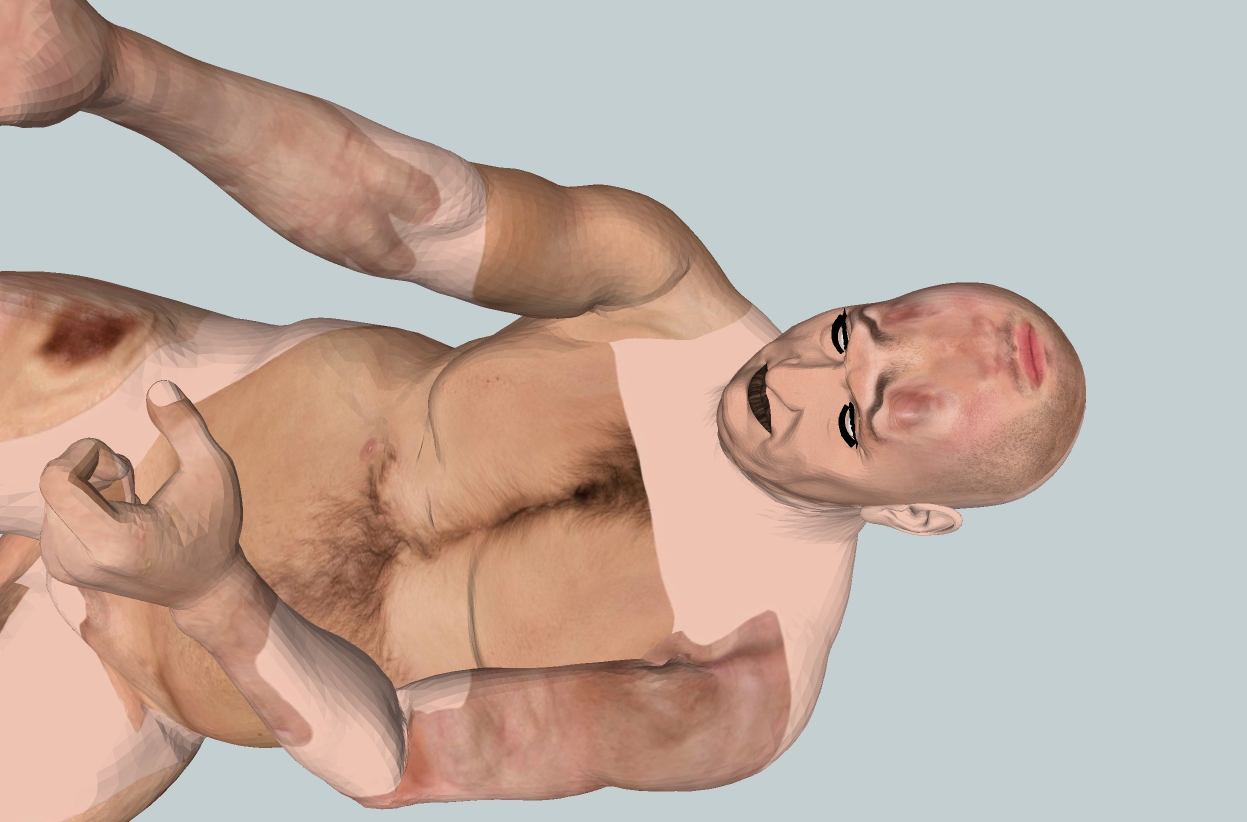

                        weird.jpg

                        1 條回覆 最後回覆 回覆 引用 0
                        • S 離線
                          Senior Commodore
                          最後由 編輯

                          Voici le fichier OBJ


                          fichier OBJ

                          1 條回覆 最後回覆 回覆 引用 0
                          • S 離線
                            Senior Commodore
                            最後由 編輯

                            Here the first MAPS folder


                            MAPS folder 01

                            1 條回覆 最後回覆 回覆 引用 0
                            • S 離線
                              Senior Commodore
                              最後由 編輯

                              Here the second MAPS folder


                              MAPS folder 02

                              1 條回覆 最後回覆 回覆 引用 0
                              • S 離線
                                Senior Commodore
                                最後由 編輯

                                Here the MTL folder


                                MTL folder

                                1 條回覆 最後回覆 回覆 引用 0
                                • TIGT 離線
                                  TIG Moderator
                                  最後由 編輯

                                  My own OBJimporter took hours to complete, it gave many errors and most faces were reversed - just like the FluidImporter.
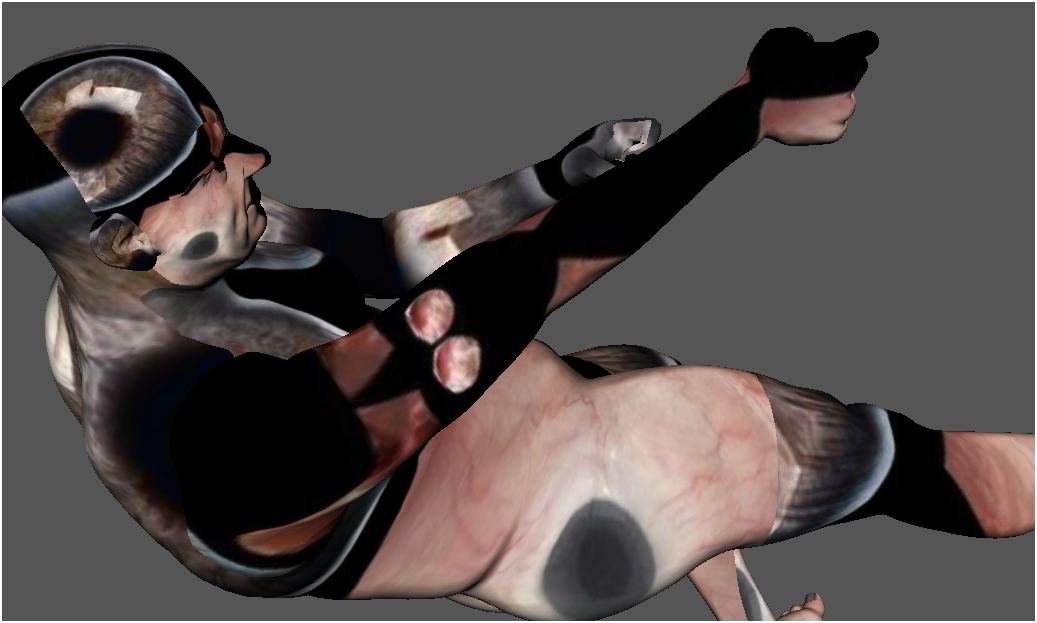
                                  Reversing faces showed all of the textures' UVmapping messed up too.
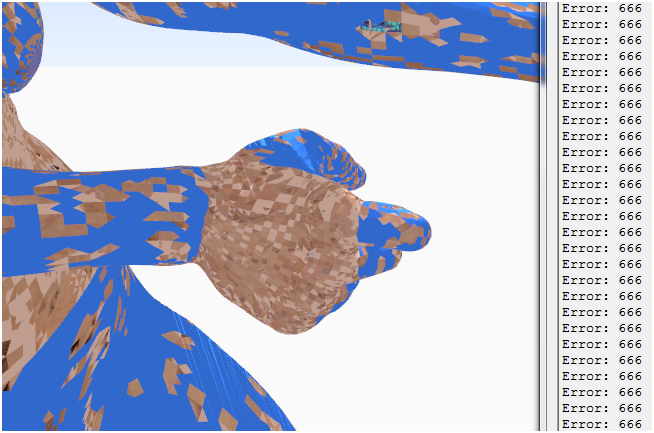
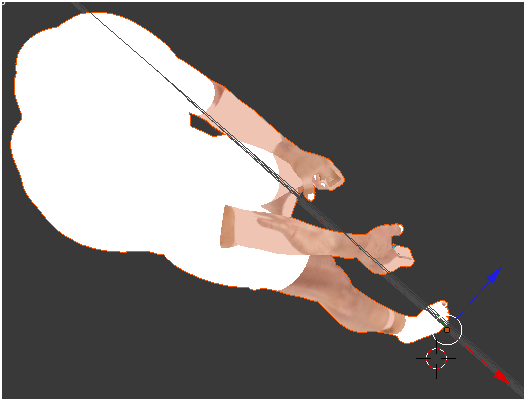
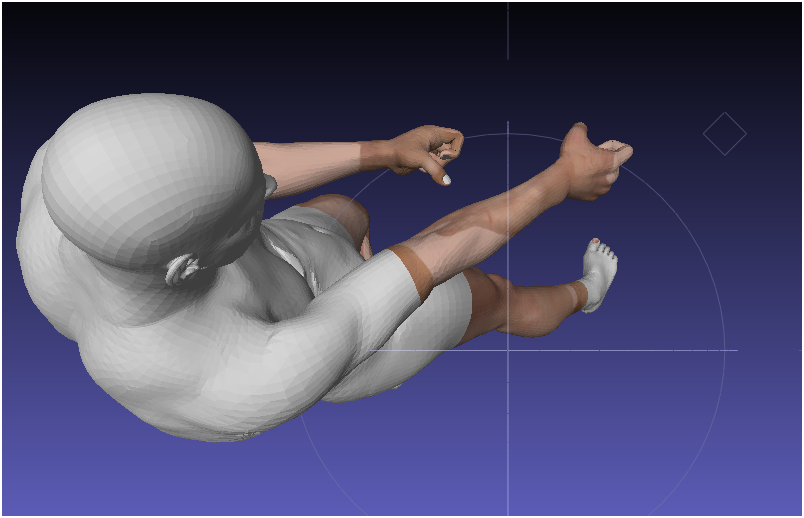
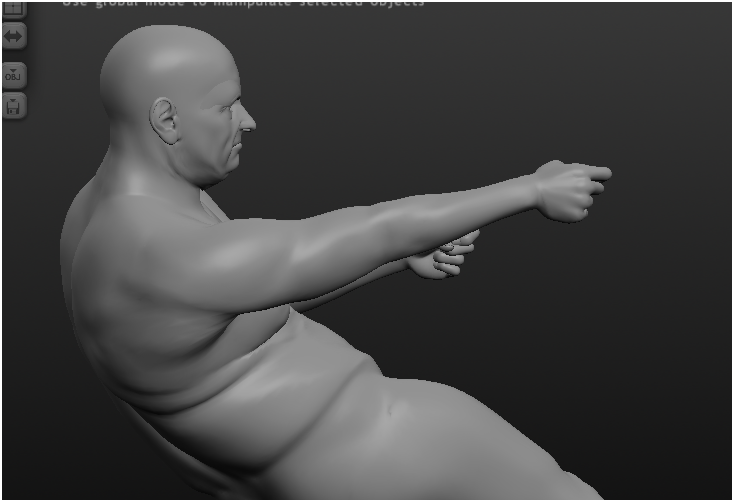
                                  man_pulling.PNG
                                  I tested your new OBJ etc [this time the MTL expects the image files to be in its folder NOT a subfolder 😒 ]
                                  The FluidImporter worked better - the faces were mostly correctly oriented, but the UV-mapping was again screwy !man_pulling2.PNG
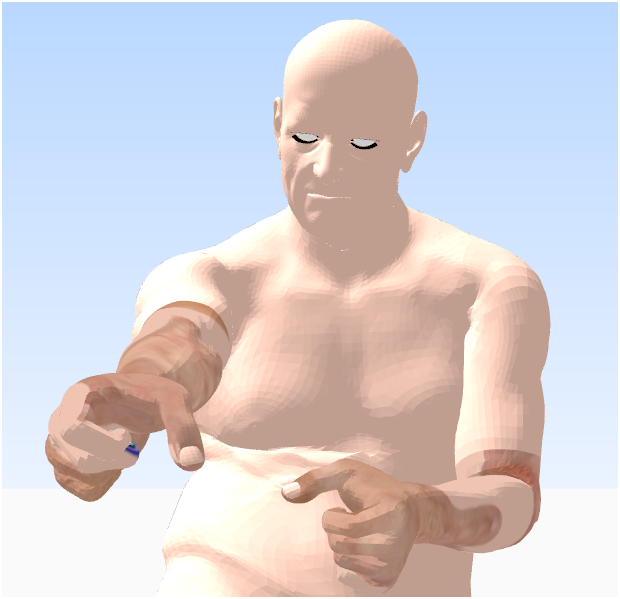
                                  I also tested the file in various other apps - which also produced poor results...
                                  The object's UVmapping seems a 'step too far' for them all...
                                  Sketchup us not really designed to cope with hundreds of thousands of pieces of geometry and very complex UVmapping - but some of the other apps ought to have coped better 😕 ?man_pulling2Blender.PNGman_pulling2MeshLab.PNGman_pulling2Sculptris.PNGman_pulling2AC3D.PNG For comparison this is the original OBJ in AC3D - it is also messed up but in a completely different manner !man_pulling1AC3D.PNG
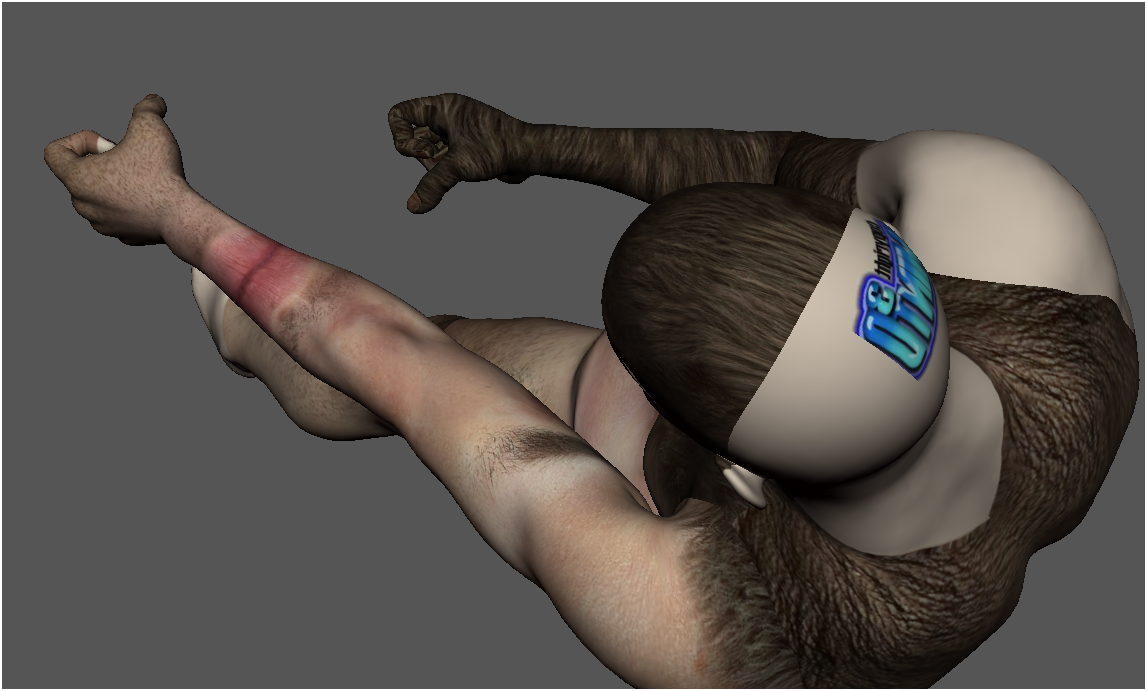
                                  TIG

                                  1 條回覆 最後回覆 回覆 引用 0
                                  • TIGT 離線
                                    TIG Moderator
                                    最後由 編輯

                                    I don't know DAZ etc so what alternative options do you have when exporting these files ?
                                    Clearly the face orientation and associated UV-mapping do not seem to be immediately compatible with other apps using the settings used thus far 😕
                                    I assume you can re-import the exported files back into DAZ etc without issues ??

                                    TIG

                                    1 條回覆 最後回覆 回覆 引用 0
                                    • GaieusG 離線
                                      Gaieus
                                      最後由 編輯

                                      Wow, this looks like a horror movie. After teleportation, your body parts end up messed up! 😮

                                      Gai...

                                      1 條回覆 最後回覆 回覆 引用 0
                                      • Rich O BrienR 離線
                                        Rich O Brien Moderator
                                        最後由 編輯

                                        I hope that chap intends to go into battle with a bit more armour.

                                        Download the free D'oh Book for SketchUp 📖

                                        1 條回覆 最後回覆 回覆 引用 0
                                        • TIGT 離線
                                          TIG Moderator
                                          最後由 編輯

                                          @gaieus said:

                                          Wow, this looks like a horror movie. After teleportation, your body parts end up messed up! 😮
                                          It is rather like that ! The geometry arrives reasonably OK - although in the initial versions the poor guy's skin was on 'inside-out' [yeuk!], but no matter what tweaking is done he ends up with either giant eyeballs on top of his head, lips on his forearm, hair where it shouldn't be etc...
                                          The "Hiesenberg Uncertainty Principle" at it's most extreme [the very reason Star Trek Transporters, the Fly teleporter etc won't work safely...]

                                          http://upload.wikimedia.org/math/e/6/8/e68d148926aa65efc4aac092c4c9d88f.png
                                          😒

                                          TIG

                                          1 條回覆 最後回覆 回覆 引用 0
                                          • K 離線
                                            Khai
                                            最後由 編輯

                                            I can tell you the problem I think

                                            Poser/Daz studio OBJ's tend to use stacked UV maps to maximize space on the map. also it's not uncommon for a texture map to be 4096x4096 in size for the skin etc, tho many will goto 8192 these days 😒

                                            If I'm right, the body has a huge Head UV stacked on top of it....

                                            I've seen figures have a lot of issues due to the UVs thanks to this method...

                                            1 條回覆 最後回覆 回覆 引用 0
                                            • 1
                                            • 2
                                            • 1 / 2
                                            • 第一個貼文
                                              最後的貼文
                                            Buy SketchPlus
                                            Buy SUbD
                                            Buy WrapR
                                            Buy eBook
                                            Buy Modelur
                                            Buy Vertex Tools
                                            Buy SketchCuisine
                                            Buy FormFonts

                                            Advertisement