I've got a problem with Sketchup [ clipping plane issues]
-
This issue doesn't occur on every drawing, but it is a real problem for me. When I try to zoom in on a point it often shows a plane through the item, jumps straight past the item or zooms me out to a huge distance away. I've tried to show it on the short clip below (I used Jing and Screencast that I've just found out about - they seem like useful tools). Hopefully you can see that as I try to zoom in on a corner of an item it disappears!
I'm sure I must just accidentally have activated some setting somewhere that I don't know about, but if you could please point me in the right direction then it might stop me tearing my rapidly greying hair out

-
Some hints may be here: http://support.google.com/sketchup/bin/answer.py?hl=en&answer=36261
-
@cotty said:
Some hints may be here: http://support.google.com/sketchup/bin/answer.py?hl=en&answer=36261
Thanks for that. I think I've sussed it, but it's a bit backwards. The guide states "Another situation that can cause clipping is when the Perspective camera mode is turned off." But I found that by turning "Perspective" off it eliminated the problem

At the level I'm presently using SU too I'm not presently aware of what the pros and cons are of having Perspective on/off, but at this moment all that seems to have changed is that my problem has stopped
-
Common causes for clipping plane issues are:
-
SKP with some geometry 'miles' from the origin [even if hidden or on off layers].
Imported CAD files that maintain the CAD file's origin can cause these issues. Either set that option 'off' or Move everything afterwards - ensuring that all geometry/objects are visible and not locked so they'll move. -
Components with their insertion post [axes] 'miles' from their geometry or a tiny piece of geometry far away from the rest [CAD imports are often a culprit here too].
To resolve this set the Model Info > Component settings to show axes.
Now if you see axes miles away you can select the component and right-click context-menu > 'reset axes' pick somewhere on the object's geometry to make the thing 'compact' - changing an object's axes doesn't affect the placed instances, however, future instances will use the new location-point at the cursor.
If you suspect that a component has little bits of unnecessary geometry miles away from the rest, then editing the component [double-click it] will display a dotted box much bigger than might be expected around its main geometry. Ensure View > Hidden Geometry is ON so you can see things even if they're hidden [as dotted]. To delete anything that's far-off you can do the component-edit [double-click], Select All [Ctrl+A] and then hold Shift+Ctrl to go into 'remove-from-selection' mode, and use a fence around the bits you want to keep and they should become deselected. 'Entity Info' will show if something remains selected. Press <delete> to erase these far-off rogues !
-
-
Thanks TIG. Your suggestion re' extraneous bits of geometry that are "miles away" was the first (and only
 ) thing that entered my mind. Just about my only redeeming feature when it comes to using SU is my fastidiousness - I hate having untidy drawings so I'm usually OK when it comes to random fragments causing problems, oh and I'm forever clicking on "Zoom extents" to make sure .
I often import .dxf files, and though they can make things a bit messy, the drawing I had the issues with did not have anything imported into it at all.
-
As a matter of interest....
When you go from Perspective to Parallel are you activating the Parallel view while the error is on screen? Likewise are you toggling back to Perspective while zoom in close?
-
@rich o brien said:
As a matter of interest....
When you go from Perspective to Parallel are you activating the Parallel view while the error is on screen? Likewise are you toggling back to Perspective while zoom in close?
I'm afraid I had jumped the gun in thinking the problem was solved. It isn't

Perspective is back on as standard, but I can't quite seem to fix this "clipping plane" thingy. It is literally only on the one drawing which is what baffles me, but it's one I use for reference and as a bit of a catalogue for components.
So far the possible solutions that have been eliminated are:
1- Field of View (which is the 35 degree standard)
2- Perspective (turned on)
3- Scale of model too large/small (several items on the drawing, each measuring approximately 1metre in length)
4- Distance from Origin Point (I always draw as close to them as possible and they are always on show)
5- .dwg import (not applicable as nothing imported)
6- Hidden geometry far from main drawing (I checked and this is not the case)Back to you lot
-
Can you Zoom to Extents(using the menu not the mouse) while in Perspective view
Then without orbiting go to Parallel mode(using the menu not the mouse) and Zoom to Extents(using the menu not the mouse)
Then back to Perspective view(using the menu not the mouse) then zoom in?
-
@rich o brien said:
Can you Zoom to Extents(using the menu not the mouse) while in Perspective view
Then without orbiting go to Parallel mode(using the menu not the mouse) and Zoom to Extents(using the menu not the mouse)
Then back to Perspective view(using the menu not the mouse) then zoom in?
I did what you said but nothing has altered. The problem is definitely something to do with "Perspective" as "Parallel Projection" does seem to correct things (I previously thought that "Parallel Projection" setting would default back to "Perspective" as I didn't save my changes on closing the drawing. I now realise that this only affects the items that have been drawn and not the settings of SU
) -
Did you try to rearrange the items around the origin (not as a long line along one axis)?
Are you allowed to share the model? -
If you delete that large plane I see in the video does it help? You mention things are in meters, how large is that plane?
I've a feeling it is related to axis placement but we'd need a model to examine. Either PM or here depending on whether it can be shared or not.
-
@rich o brien said:
If you delete that large plane I see in the video does it help? You mention things are in meters, how large is that plane?
I've a feeling it is related to axis placement but we'd need a model to examine. Either PM or here depending on whether it can be shared or not.
I just recently added the plane there as I needed to rotate on one of the faces. I've done another tiny clip showing me scrolling in at a constant but SLOW rate, and it still plays up http://screencast.com/t/YJnEMrRy
I can get rid of this problem by using Parallel Projection, but I don't want to work like that, especially as I don't in my other drawings.
Would you mind tell me how I go about sharing a drawing? Do you just mean sharing via the 3D warehouse? If so then I'm afraid I can't do that presently due to the limiations of where I am at the moment. I might be able to do it tonight when I get home.
Thanks
-
You can add the skp directly as an attachement to your post (under the text-field).
-
Hi folks.
Try this:
1 - Make everything visible (Unhide All and make sure all layers are visible).
2 - Select All.
3 - Create a group with the selection. All the model including any stray geometry is now one group.
4 - Open the Outlinerwindow.
5 - Right click on the newly created group to bring up a contextual menu.
6 - Choose Zoom Extend in this menu. This will zoom so that only the group fills the screen.
If the group do not fill the screen, you have something tiny and/or far that is enlarging the bounding box of the group. If this is the case, try the procedure below.
If it nicely fills the screen there still migth be a problematic geometry but is is in line with the line of sight. Orbit the model at least 90° and try again.
To delete stray geometry that is difficult or even impossible to spot, try this:
1 - Try to orbit, pan and zoom so that you can see your model sufficiently to select all of it.
2 - Repeat steps 1 and 2 from above procedure.
3 - Press and hold down the SHIFT key to Add/Subtract from the selection.
4 - While still pressing the SHIFT key, do a window select of all of your model. This deselects it. Any stray geometry remains selected.
5 - Delete the selection.
If the problem persits, it migth happens that the stray geometry is in line with the line of sight. Again, orbit the view by about 90° and repeat the procedure.
Just ideas.
-
@cotty said:
You can add the skp directly as an attachement to your post (under the text-field).
I've cleaned up all the drawing and left on filter bank item that exhibits the problem. I'm preparing myself for a barrage of comments beginning with "you idiot, you had >insert setting here< active!"
-
You've got hidden entities scattered all over. Turn on Hidden Geometry and hit Zoom Extents. Take a look around and clean up the junk.
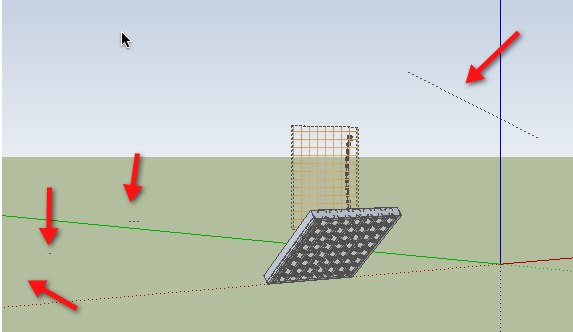
-
You have one longer 'hidden line' that is almost 2 miles away from the origin !
Erase that [and have a general tidy up - e.g. why all the unattached dims?] and everything will be fine ! -
@tig said:
You have one longer 'hidden line' that is almost 2 miles away from the origin !
Erase that [and have a general tidy up - e.g. why all the unattached dims?] and everything will be fine !Wow. And there's me thinking I kept it tidy!
For some reason when I read the last two posts, the voice narrating them in my head was that of my Mum - just like when I was a child being told to tidy my room
Consider me told off.
-
Hi Grizzler, hi folks.
I applied all the ideas in my previous post.
See attached SU files for ideas:
-
this problem occurs only with parallel projection mode. It will be removed if you switch to perspective or 2 point perspective.








Advertisement