sketchucation logo sketchucation
    • 登入
    Oops, your profile's looking a bit empty! To help us tailor your experience, please fill in key details like your SketchUp version, skill level, operating system, and more. Update and save your info on your profile page today!
    🔌 Smart Spline | Fluid way to handle splines for furniture design and complex structures. Download

    [Plugin][$] Curvizard - v2.5a - 01 Apr 24


    已排程 已置頂 已鎖定 已移動 Plugins
    198 貼文 58 Posters 330.5k 瀏覽 57 Watching
    正在載入更多貼文
    • 從舊到新
    • 從新到舊
    • 最多點贊
    回覆
    • 在新貼文中回覆
    登入後回覆
    此主題已被刪除。只有擁有主題管理權限的使用者可以查看。
    • uwesketchU 離線
      uwesketch
      最後由 編輯

      New feature "Convert to Arc/Circle":

      Great, thanks a lot Fredo.

      • Is it correct, that when using "Make curves", that now the curve is converted automatically to an arc as well?

      • Now I can finally convert the corner edges generated by FredoCorner (using circle rounding) back to arcs, if desired. This then allows adding radius measurements in Sketchup and Layout! 😄

      • Any chance that this feature is added as an option to FredoCorner for the generation of the corner edges when rounding using circles?

      1 條回覆 最後回覆 回覆 引用 0
      • fredo6F 離線
        fredo6
        最後由 編輯

        @uwesketch said:

        Is it correct, that when using "Make curves", that now the curve is converted automatically to an arc as well?

        Correct. I may introduce an option to disable this behavior however.

        @uwesketch said:

        Any chance that this feature is added as an option to FredoCorner for the generation of the corner edges when rounding using circles?

        I understand that you ask for creating curves, possibly arcs when applicable.
        I assume that only the rounding edges on rounded borders are to be converted to curves.

        Fredo

        1 條回覆 最後回覆 回覆 引用 0
        • B 離線
          bharralure
          最後由 編輯

          Merci beaucoup Fredo

          Un outil qui va remplacer avantageusement (parce que beaucoup plus complet) "niline2arc" de Nobnob qui, malgré tout et sans mise à jour depuis 6 ans, fonctionne toujours.
          Les améliorations que j'apprécie:

          • sélection multiple, y compris avec les faces
          • ne pas être obligé d'entrer à l'intérieur des groupes et composants
          • l'outil reconnait les cercle ou arc même si l'option "convertir en courbe" à été choisie

          peut être est t'il possible de découvrir d'autres astuces ...

          1 條回覆 最後回覆 回覆 引用 0
          • uwesketchU 離線
            uwesketch
            最後由 編輯

            @unknownuser said:

            uwesketch wrote:
            Is it correct, that when using "Make curves", that now the curve is converted automatically to an arc as well?

            Fredo6 wrote:
            Correct. I may introduce an option to disable this behavior however.

            Since an arc or n-gon (polygon) is as well a curve, it is not wrong to always convert to an arc or polygon, if it is an arc or polygon. I do not see any disadvantage for this.

            @unknownuser said:

            Any chance that this feature is added as an option to FredoCorner for the generation of the corner edges when rounding using circles?

            I understand that you ask for creating curves, possibly arcs when applicable.
            I assume that only the rounding edges on rounded borders are to be converted to curves.

            Yes, only the corner edges, not as well the inner edges or borders.
            To clarify I marked in below picture the edges.
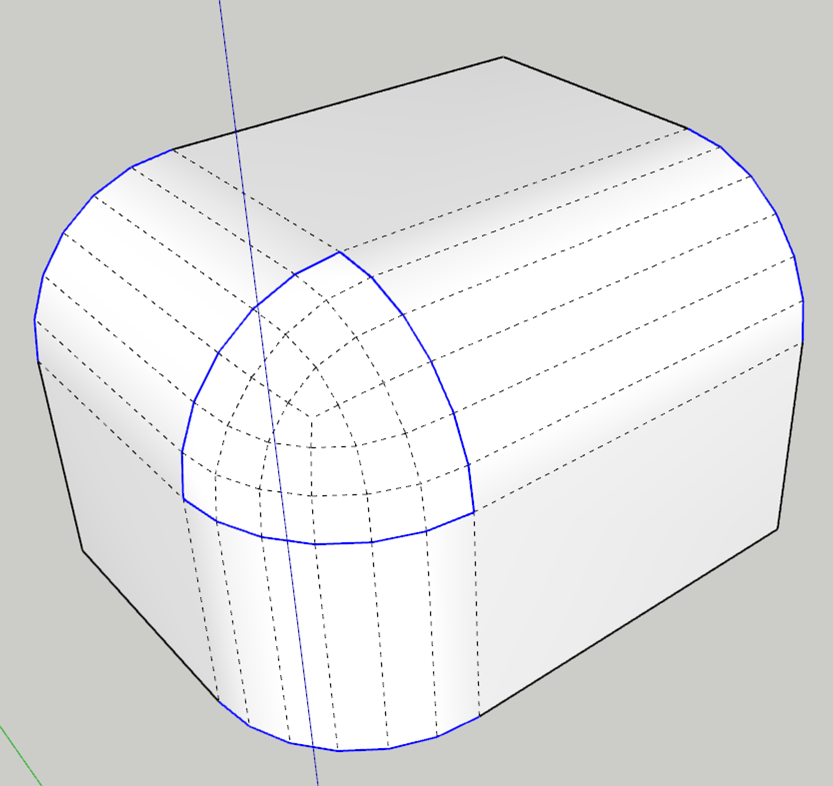
            blue marked corner edges to convert to arc

            1 條回覆 最後回覆 回覆 引用 0
            • fredo6F 離線
              fredo6
              最後由 編輯

              @uwesketch said:

              Yes, only the corner edges, not as well the inner edges or borders.
              To clarify I marked in below picture the edges.
              [attachment=0:1u9dg31q]<!-- ia0 -->CornerEdges_to_Curves.png<!-- ia0 -->[/attachment:1u9dg31q]

              Conversion to curve is probably possible.
              But be aware that in most cases, this won't be an arc of circle, even if you chose a Circular profile, except in the special cases where the corner is purely made of orthogonal faces.

              1 條回覆 最後回覆 回覆 引用 0
              • uwesketchU 離線
                uwesketch
                最後由 編輯

                @unknownuser said:

                Fredo6 wrote:
                Conversion to curve is probably possible.
                But be aware that in most cases, this won't be an arc of circle, even if you chose a Circular profile, except in the special cases where the corner is purely made of orthogonal faces.

                Looking already forward to it.
                Agree, it will not be in all cases an arc. But it is enough, if the edge to be rounded is perpendicular to the face at the end of the edge.

                1 條回覆 最後回覆 回覆 引用 0
                • pilouP 離線
                  pilou
                  最後由 編輯

                  Trivial question but...when something is Converted to guides lines with Curvizard
                  How to make the inverse ? 😮

                  TIG xLine2line makes that but you must edit the Group generated above and the little black crosses are always living ! 😲

                  So Curvizard don't make this trivial thing ? (i miss maybe something too 😄

                  Frenchy Pilou
                  Is beautiful that please without concept!
                  My Little site :)

                  1 條回覆 最後回覆 回覆 引用 0
                  • fredo6F 離線
                    fredo6
                    最後由 編輯

                    @pilou said:

                    Trivial question but...when something is Converted to guides lines with Curvizard
                    How to make the inverse ? 😮

                    TIG xLine2line makes that but you must edit the Group generated above and the little black crosses are always living ! 😲

                    So Curvizard don't make this trivial thing ? (i miss maybe something too 😄

                    Curvizard could do it, but it is supposed to work on true edges.
                    So that's why the function 'convert Construction Lines to Edges' should live in another plugin. I did not do it because there was some existing, but it is not too complex.

                    Fredo

                    1 條回覆 最後回覆 回覆 引用 0
                    • pilouP 離線
                      pilou
                      最後由 編輯

                      Will be fine and more speedy than research the good plugin, enter the Group, click the lines, kill the cross points, explode the group etc... 😄

                      Frenchy Pilou
                      Is beautiful that please without concept!
                      My Little site :)

                      1 條回覆 最後回覆 回覆 引用 0
                      • BoxB 離線
                        Box
                        最後由 編輯

                        Hi Fredo,
                        I think this has happened since the latest update to libfredo.
                        If I remember correctly Smooth, Simplify etc previously left the edges welded but now explode the curve. Unless I'm missing an autoweld setting.
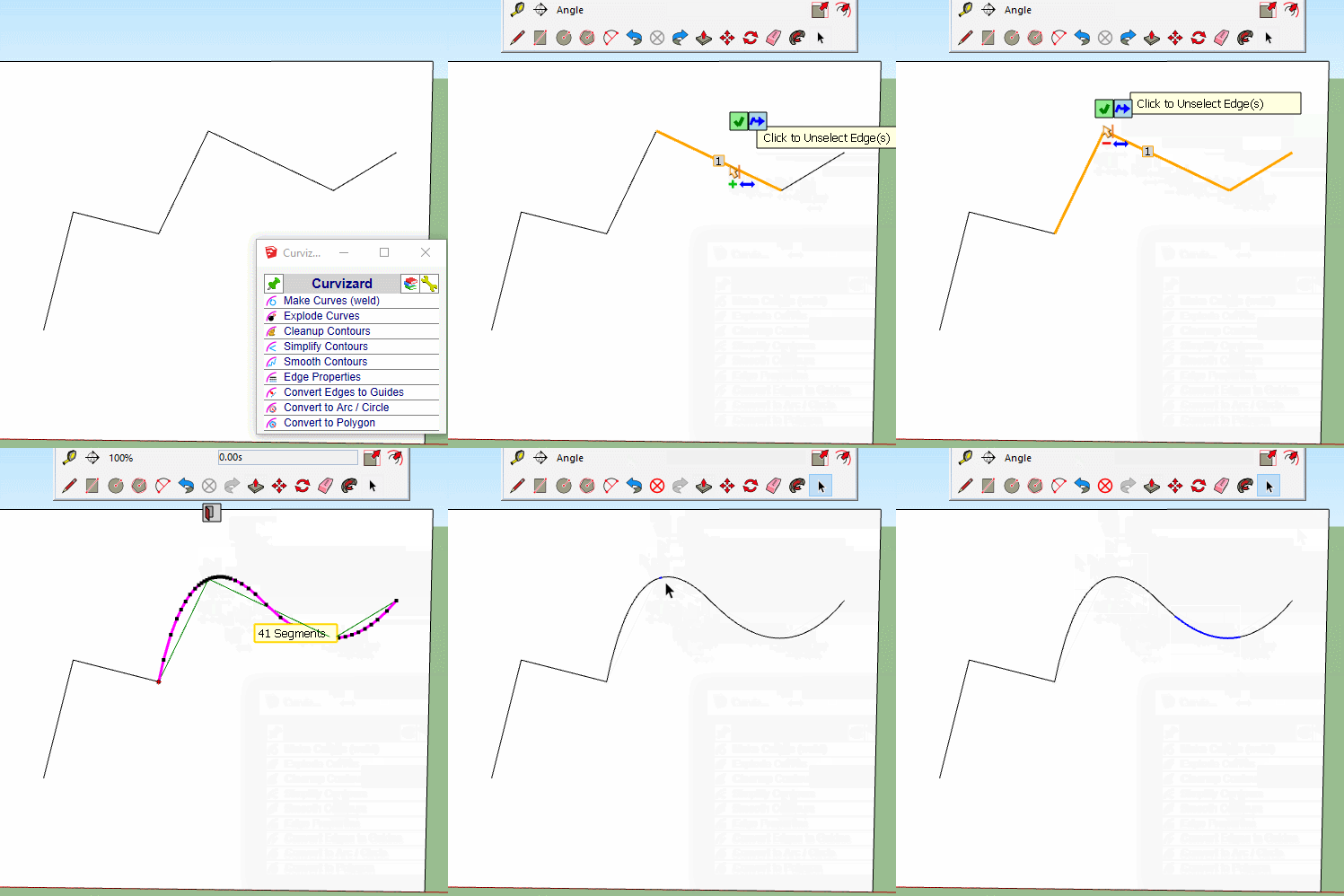

                        Smooth1.gif

                        1 條回覆 最後回覆 回覆 引用 0
                        • fredo6F 離線
                          fredo6
                          最後由 編輯

                          I can reproduce it. Strange. I am looking into the issue and will come back.

                          1 條回覆 最後回覆 回覆 引用 0
                          • fredo6F 離線
                            fredo6
                            最後由 編輯

                            Problem of Sketchup curves not constructed fixed with LibFredo6 v9.5d.

                            Fredo

                            1 條回覆 最後回覆 回覆 引用 0
                            • BoxB 離線
                              Box
                              最後由 編輯

                              Thanks Fredo, a very timely fix as always.

                              1 條回覆 最後回覆 回覆 引用 0
                              • fredo6F 離線
                                fredo6
                                最後由 編輯

                                @box said:

                                Thanks Fredo, a very timely fix as always.

                                Thanks for signaling the problem. Strange that nobody complained before, as this comes from a bug in LibFredo6 v9.5c, released on 10 January.

                                1 條回覆 最後回覆 回覆 引用 0
                                • A 離線
                                  AISmebel
                                  最後由 編輯

                                  Good afternoon. I had a problem while working with smooth_curve. What can I do to treat him?

                                  1 條回覆 最後回覆 回覆 引用 0
                                  • fredo6F 離線
                                    fredo6
                                    最後由 編輯

                                    @aismebel said:

                                    Good afternoon. I had a problem while working with smooth_curve. What can I do to treat him?

                                    There seems to be a bug there, but I cannot reproduce it.

                                    Could you open the Ruby console to check if there are errors.

                                    1 條回覆 最後回覆 回覆 引用 0
                                    • A 離線
                                      AISmebel
                                      最後由 編輯

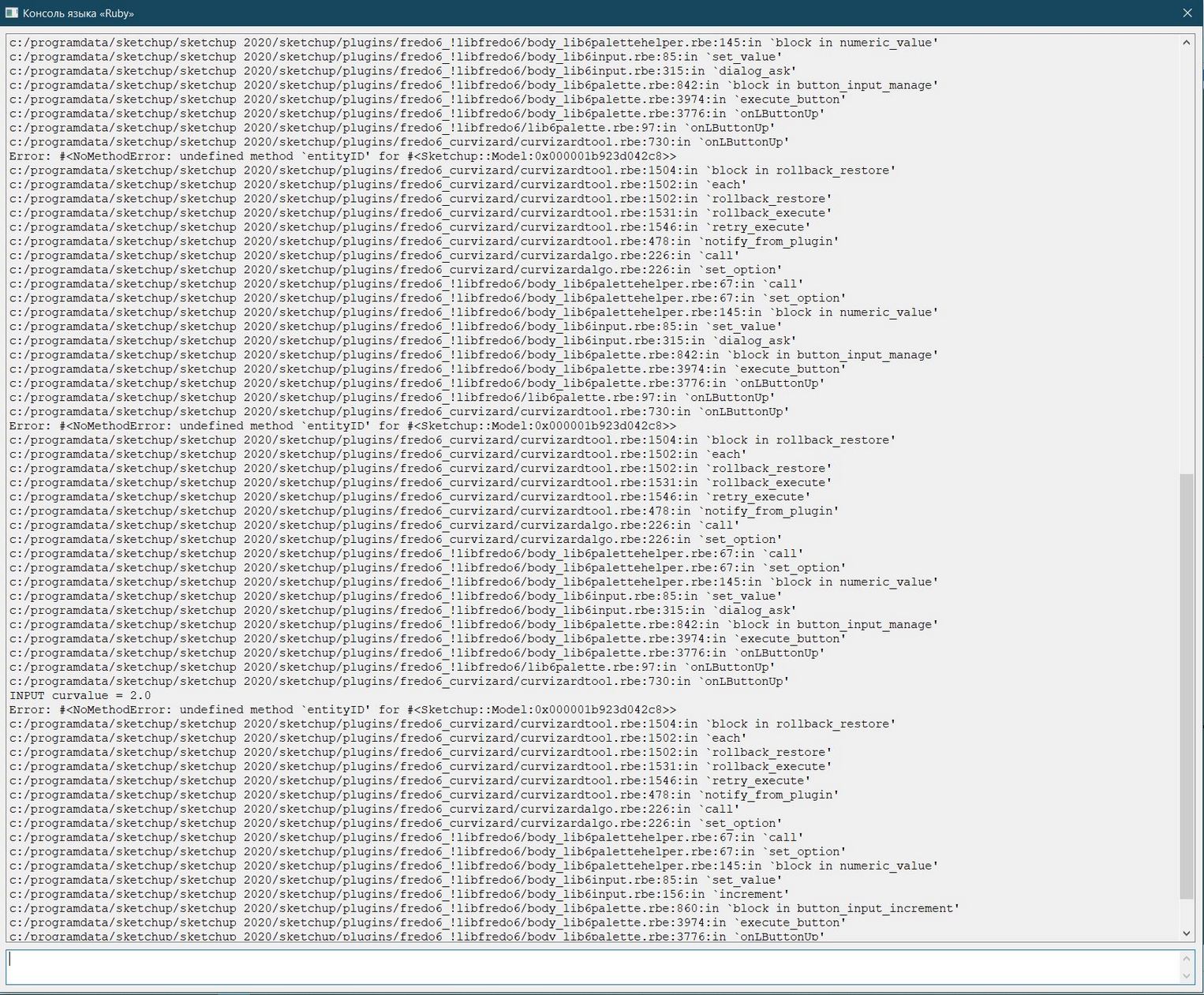
                                      Good afternoon. I hope that I did everything right.
                                      In SketchUp 2018, I had no such problem.
                                      I think that the problem arose due to the transfer of plugins to SketchUp 2020.
                                      Removing Curvizard, LibFredo and installing it again did not solve the problem.
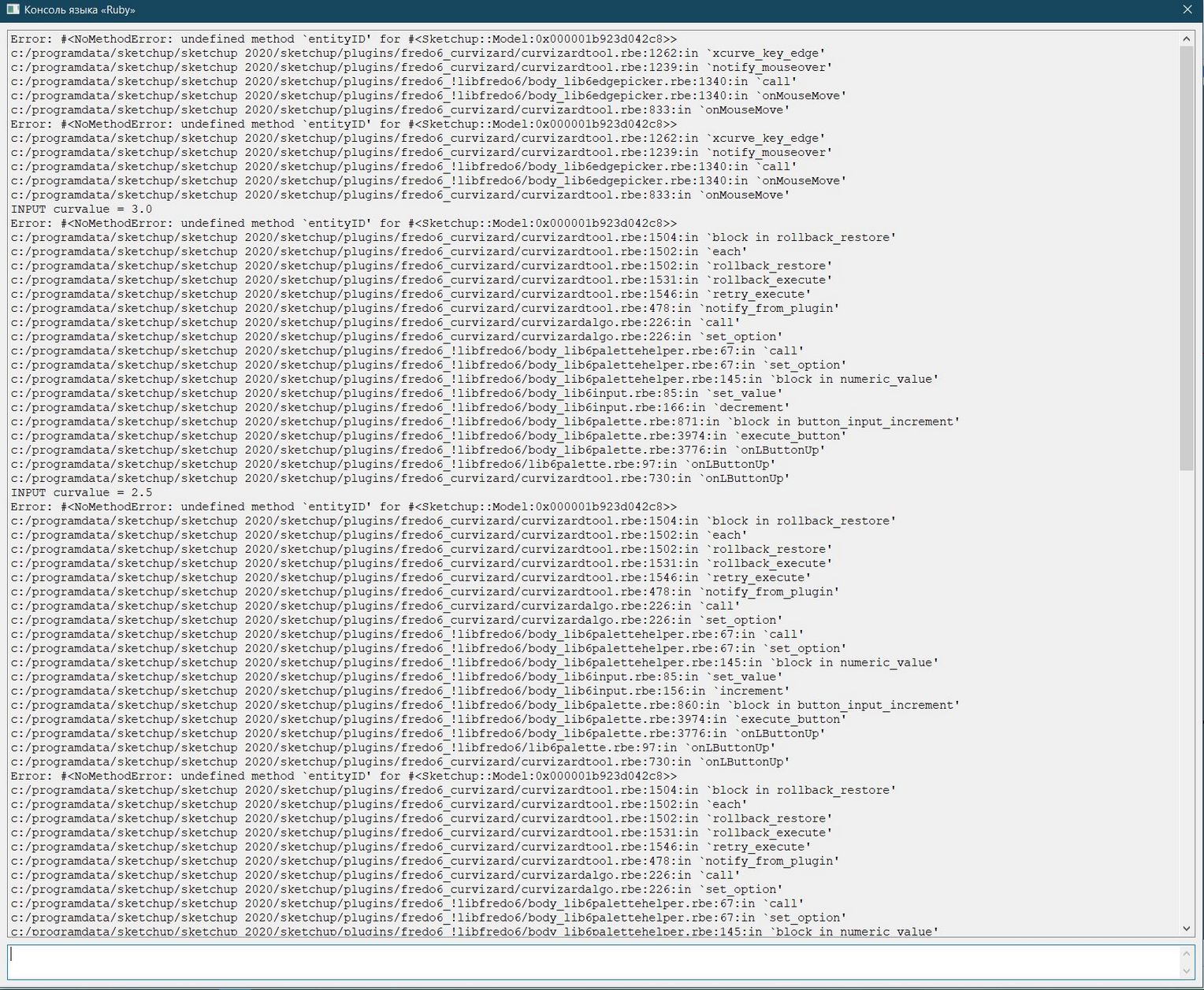

                                      1.JPG


                                      2.JPG


                                      3.JPG

                                      1 條回覆 最後回覆 回覆 引用 0
                                      • TIGT 離線
                                        TIG Moderator
                                        最後由 編輯

                                        @AISmebel

                                        How is your Plugins folder within the ProgramData folder-path ?
                                        The user's Plugins folder in within that user's AppData/Roaming path...
                                        I hope you haven't made it manually ??

                                        Can you try this in the Ruby Console [copy+paste+enter]:
                                        Sketchup.find_support_file('Plugins')
                                        It should return something like:
                                        C:/Users/YOURUSERNAME/AppData/Roaming/SketchUp/SketchUp 2020/SketchUp/Plugins

                                        If you have not installed SketchUp properly sometimes folder permissions gets messed up...
                                        Close SketchUp/Layout, find the SketchUp installer exe file's icon [probably in Downloads]
                                        Select it, right-click > context-menu > "Run as administrator"
                                        When prompted choose 'Repair'

                                        This should sort out permissions and paths etc...

                                        Any other way of installing - e.g. double-clicking the exe file to simply 'Run' it is NOT the same thing and can result in weird errors...

                                        TIG

                                        1 條回覆 最後回覆 回覆 引用 0
                                        • A 離線
                                          AISmebel
                                          最後由 編輯

                                          Fredo, thank you very much for your help, everything worked for me. I was very pleased that you were able to help me so quickly.
                                          Thank you for your plugins, they are very strong and very useful for many people.
                                           Take this opportunity to answer me another question =>

                                          http://sketchucation.com/forums/viewtopic.php?f=323&t=17948&p=657086#p657086

                                          Thanks.

                                          1 條回覆 最後回覆 回覆 引用 0
                                          • fredo6F 離線
                                            fredo6
                                            最後由 編輯

                                            NEW RELEASE: Curvizard v2.4b - 10 Feb 20

                                            Curvizard 2.4b is for some bug fixing.

                                            Requirement: LibFredo6 9.5 or above


                                            See Home Page of Curvizard for information and Download.

                                            See Main post of this Curvizard thread for discussion, bug reports and suggestions.

                                            1 條回覆 最後回覆 回覆 引用 0
                                            • 1
                                            • 2
                                            • 6
                                            • 7
                                            • 8
                                            • 9
                                            • 10
                                            • 8 / 10
                                            • 第一個貼文
                                              最後的貼文
                                            Buy SketchPlus
                                            Buy SUbD
                                            Buy WrapR
                                            Buy eBook
                                            Buy Modelur
                                            Buy Vertex Tools
                                            Buy SketchCuisine
                                            Buy FormFonts

                                            Advertisement