sketchucation logo sketchucation
    • 登入
    Oops, your profile's looking a bit empty! To help us tailor your experience, please fill in key details like your SketchUp version, skill level, operating system, and more. Update and save your info on your profile page today!
    🔌 Smart Spline | Fluid way to handle splines for furniture design and complex structures. Download

    [Plugin][$] Curvizard - v2.5a - 01 Apr 24


    已排程 已置頂 已鎖定 已移動 Plugins
    198 貼文 58 Posters 330.6k 瀏覽 57 Watching
    正在載入更多貼文
    • 從舊到新
    • 從新到舊
    • 最多點贊
    回覆
    • 在新貼文中回覆
    登入後回覆
    此主題已被刪除。只有擁有主題管理權限的使用者可以查看。
    • guanjinG 離線
      guanjin
      最後由 編輯

      Thank you updates, always so timely! 👍

      I come from China, is to learn

      1 條回覆 最後回覆 回覆 引用 0
      • D 離線
        dedmin
        最後由 編輯

        Excellent and invaluable tools!!!
        No problems so far!
        Thanks!!

        1 條回覆 最後回覆 回覆 引用 0
        • utilerU 離線
          utiler
          最後由 編輯

          Thank you Fredo from all that use your tools!!!

          Just Curious...

          1 條回覆 最後回覆 回覆 引用 0
          • D 離線
            dedmin
            最後由 編輯

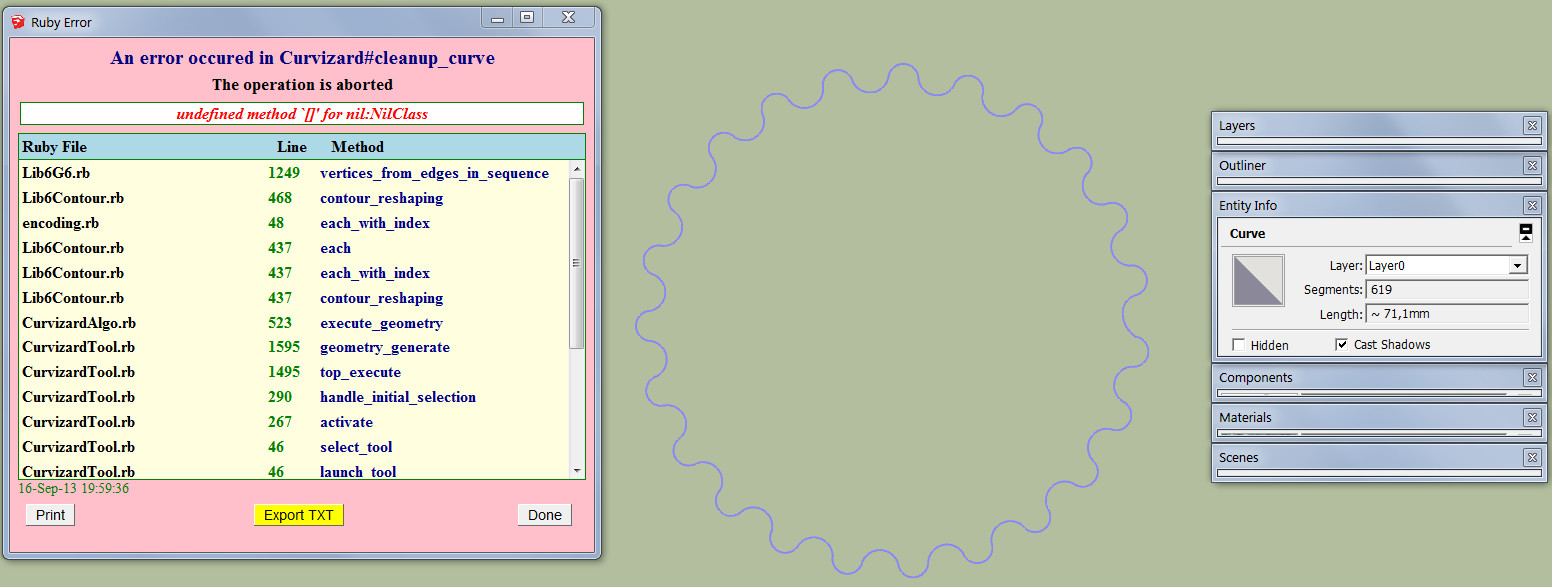
            2013-09-16_200052.jpg

            Date; 16-Sep-13 19;59;36
            An error occured in Curvizard#cleanup_curve
            The operation is aborted
            
            undefined method `[]' for nil;NilClass
             
            Lib6G6.rb; 1249 -- vertices_from_edges_in_sequence
            Lib6Contour.rb; 468 -- contour_reshaping
            encoding.rb; 48 -- each_with_index
            Lib6Contour.rb; 437 -- each
            Lib6Contour.rb; 437 -- each_with_index
            Lib6Contour.rb; 437 -- contour_reshaping
            CurvizardAlgo.rb; 523 -- execute_geometry
            CurvizardTool.rb; 1595 -- geometry_generate
            CurvizardTool.rb; 1495 -- top_execute
            CurvizardTool.rb; 290 -- handle_initial_selection
            CurvizardTool.rb; 267 -- activate
            CurvizardTool.rb; 46 -- select_tool
            CurvizardTool.rb; 46 -- launch_tool
            CurvizardTool.rb; 41 -- action__mapping
            Lib6Plugin.rb; 134 -- call
            Lib6Plugin.rb; 134 -- launch_action
            bootstrap_Curvizard.rb; 51 -- launch_action
            bootstrap_Curvizard.rb; 83 -- declare_command
            Lib6Plugin.rb; 1111 -- call
            Lib6Plugin.rb; 1111 -- build_config_handlers
            FredoTools__ThruPaint.rb; 2315 -- call
            
            1 條回覆 最後回覆 回覆 引用 0
            • fredo6F 離線
              fredo6
              最後由 編輯

              dedmin,

              Would you mind to post or PM me the model.

              This looks like a bug linked to the geometry.

              Thanks

              Fredo

              1 條回覆 最後回覆 回覆 引用 0
              • fredo6F 離線
                fredo6
                最後由 編輯

                NEW RELEASE: Curvizard v1.5a - 27 Nov 13

                Curvizard 1.5a is a release for future Sketchup compatibility. It is advised to upgrade even if there are no functional changes.

                See main post of this thread for Download.

                Fredo

                1 條回覆 最後回覆 回覆 引用 0
                • sicksickisckS 離線
                  sicksickisck
                  最後由 編輯

                  some bug in ver 1.5a ..crash skp9 when I use Curvizard inside the component.

                  1 條回覆 最後回覆 回覆 引用 0
                  • Dave RD 離線
                    Dave R
                    最後由 編輯

                    What is skp9?

                    You have to give some useful details if you want help. Post the SketchUp model and describe exactly what you were trying to accomplish.

                    I just tried it and it works for me without crashing.

                    Etaoin Shrdlu

                    %

                    (THERE'S NO PLACE LIKE)

                    G28 X0.0 Y0.0 Z0.0

                    M30

                    %

                    1 條回覆 最後回覆 回覆 引用 0
                    • sicksickisckS 離線
                      sicksickisck
                      最後由 編輯

                      again crash! :kurwaa: when I want connect lines by Curvizard - v1.5a

                      1 條回覆 最後回覆 回覆 引用 0
                      • Dave RD 離線
                        Dave R
                        最後由 編輯

                        @sicksickisck said:

                        again crash! :kurwaa: when I want connect lines by Curvizard - v1.5a

                        That's as useless as your previous post as far as getting any help. 😒

                        Etaoin Shrdlu

                        %

                        (THERE'S NO PLACE LIKE)

                        G28 X0.0 Y0.0 Z0.0

                        M30

                        %

                        1 條回覆 最後回覆 回覆 引用 0
                        • A 離線
                          amis
                          最後由 編輯

                          Nice interface improvement, Fredo! Thank you so much.

                          1 條回覆 最後回覆 回覆 引用 0
                          • jeff hammondJ 離線
                            jeff hammond
                            最後由 編輯

                            hey Fredo,

                            I'm experiencing the problem of curves exploding upon welding another curve on the same object.. the attached .skp should allow you to see this in a repeatable manner (at least, the model shows the problem on both of my computers)

                            MakeCurvesProblem.skp


                            with nothing pre-selected, use the function 'Make Curves (weld)' with the following settings:

                            Screen Shot 2014-02-01 at 10.46.15 AM.png

                            ..click on one of the 3 border curves of the object.
                            -exit tool.. the curve has been welded.
                            -run the function again but use it on another edge.
                            -exit tool.. this new edge is now a curve but the other one has now exploded.


                            the .skp is saved as a v8 file but i'm using the plugin in a newer version of sketchup.. the Curvizard version i'm using is 1.5a with LibFredo 5.5g

                            thanks

                            dotdotdot

                            1 條回覆 最後回覆 回覆 引用 0
                            • fredo6F 離線
                              fredo6
                              最後由 編輯

                              Jeff,

                              There seems to be several problems in this model

                              • Curvizard (nor Curviloft) cannot select some of the edges in the bottom right corner
                              • yes, curves are unwelded when you make a new one.

                              I'll have a closer look and advise.

                              Do you notice that on other models?

                              Fredo

                              1 條回覆 最後回覆 回覆 引用 0
                              • jeff hammondJ 離線
                                jeff hammond
                                最後由 編輯

                                @fredo6 said:

                                Jeff,

                                There seems to be several problems in this model

                                • Curvizard (nor Curviloft) cannot select some of the edges in the bottom right corner
                                • yes, curves are unwelded when you make a new one.

                                I'll have a closer look and advise.

                                Do you notice that on other models?

                                Fredo

                                thanks for looking into it.

                                yes, i notice it on other models sometimes but it was this particular part of a drawing in which the behavior was very noticeable/repeatable..

                                fwiw, the side profile edge came from a .3ds import via rhino and the surface was then made/revolved via TIG's lathe tool.. i'm not sure if that has anything to do with it.. i also mapped the surface with thruPaint but deleted the texture prior to uploading.. so the surface may still have some custom UV applied?


                                [EDIT] i just tried drawing a similar model in sketchup only.. i still used TIGs lathe to revolve the surface but no texturing or imported curves were used.. same problem.

                                dotdotdot

                                1 條回覆 最後回覆 回覆 引用 0
                                • fredo6F 離線
                                  fredo6
                                  最後由 編輯

                                  Jeff,

                                  I identified and fixed all problems. This will go in a next release. Thanks for signaling (you were the first one).

                                  Fredo

                                  1 條回覆 最後回覆 回覆 引用 0
                                  • jeff hammondJ 離線
                                    jeff hammond
                                    最後由 編輯

                                    @fredo6 said:

                                    Jeff,

                                    I identified and fixed all problems. This will go in a next release. Thanks for signaling (you were the first one).

                                    Fredo

                                    well, i just recently started trying curvizard as my all-situation weld tool.. previously i was using recurve in the situation presented here.. hence the late find 😉

                                    dotdotdot

                                    1 條回覆 最後回覆 回覆 引用 0
                                    • fredo6F 離線
                                      fredo6
                                      最後由 編輯

                                      NEW RELEASE: Curvizard v1.6a - 03 Feb 14

                                      Curvizard 1.6a is a release for bug fixing in the Make Curve tool, as signaled by Jeff Hammond. It is advised to upgrade.

                                      Curvizard 1.6 requires to upgrade to LibFredo6 5.6a or higher.

                                      See main post of this thread for Download of Curvizard.

                                      Fredo

                                      1 條回覆 最後回覆 回覆 引用 0
                                      • jeff hammondJ 離線
                                        jeff hammond
                                        最後由 編輯

                                        sweet. that's working now.

                                        i did notice another peculiar behavior which occurs once lines have been welded but it's going to take me a bit of time to get the appropriate screenshots/description together.. and i don't have that much time right now.. if i don't get to it tonight, i'll post tomorrow
                                        thanks

                                        dotdotdot

                                        1 條回覆 最後回覆 回覆 引用 0
                                        • fredo6F 離線
                                          fredo6
                                          最後由 編輯

                                          In Sketchup, Curves have the strong constraint that they cannot cross each other, except at their extremities. So, if you apply a Make Curve to a model globally, you will likely get atomic curves (for instance, a cube will results in just its individual edges to become curves).

                                          Curvizard can do bulk Make Curve on the selection, including in Groups and Components. But it will work better, and as expected, on a set of contours, where there is no ambiguity on which edges to assemble as curves.

                                          Fredo

                                          1 條回覆 最後回覆 回覆 引用 0
                                          • fredo6F 離線
                                            fredo6
                                            最後由 編輯

                                            NEW RELEASE: Curvizard v1.7a - 15 Feb 14

                                            Curvizard 1.7a fixes a major bugwhich was present in v1.6a, whereby the vertex marks and tooltip for number of segments were no longer displayed. It is advised to upgrade to v1.7a.

                                            See main post of this thread for Download of Curvizard.

                                            Fredo

                                            1 條回覆 最後回覆 回覆 引用 0
                                            • 1
                                            • 2
                                            • 3
                                            • 4
                                            • 5
                                            • 9
                                            • 10
                                            • 1 / 10
                                            • 第一個貼文
                                              最後的貼文
                                            Buy SketchPlus
                                            Buy SUbD
                                            Buy WrapR
                                            Buy eBook
                                            Buy Modelur
                                            Buy Vertex Tools
                                            Buy SketchCuisine
                                            Buy FormFonts

                                            Advertisement