sketchucation logo sketchucation
    • 登入
    Oops, your profile's looking a bit empty! To help us tailor your experience, please fill in key details like your SketchUp version, skill level, operating system, and more. Update and save your info on your profile page today!
    ⚠️ Important | Libfredo 15.6b introduces important bugfixes for Fredo's Extensions Update

    V-ray rendering problem

    已排程 已置頂 已鎖定 已移動 V-Ray
    renderpluginsextensions
    42 貼文 10 Posters 9.0k 瀏覽 10 Watching
    正在載入更多貼文
    • 從舊到新
    • 從新到舊
    • 最多點贊
    回覆
    • 在新貼文中回覆
    登入後回覆
    此主題已被刪除。只有擁有主題管理權限的使用者可以查看。
    • eidam655E 離線
      eidam655
      最後由 編輯

      BlackMastah, so far i'm experiencing the same things as you, but the Task Manager is showing 100% CPU activity, so although the window doesn't redraw, the light cache is being built at this stage (and it always takes the more time the more lights you have in the scene), so i wouldn't say something is wrong. it just takes time.

      I'm using SketchUp 2017, V-Ray 3.4

      1 條回覆 最後回覆 回覆 引用 0
      • thomthomT 離線
        thomthom
        最後由 編輯

        @eidam655 said:

        BlackMastah, so far i'm experiencing the same things as you, but the Task Manager is showing 100% CPU activity, so although the window doesn't redraw, the light cache is being built at this stage (and it always takes the more time the more lights you have in the scene), so i wouldn't say something is wrong. it just takes time.

        The problem appear, from the video, that V-Ray doesn't start rendering after the processing.

        Thomas Thomassen — SketchUp Monkey & Coding addict
        List of my plugins and link to the CookieWare fund

        1 條回覆 最後回覆 回覆 引用 0
        • eidam655E 離線
          eidam655
          最後由 編輯

          @thomthom said:

          The problem appear, from the video, that V-Ray doesn't start rendering after the processing.

          that's yet to be confirmed by looking at the task manager / cpu usage. my framebuffer isn't redrawn either.

          I'm using SketchUp 2017, V-Ray 3.4

          1 條回覆 最後回覆 回覆 引用 0
          • B 離線
            BlackMastah
            最後由 編輯

            Okay. I can see there's some bug. That's nice that you confirmed that. Maybe i'm dumm, but... What now?!

            1 條回覆 最後回覆 回覆 引用 0
            • B 離線
              BlackMastah
              最後由 編輯

              Are we stuck? 😕

              1 條回覆 最後回覆 回覆 引用 0
              • eidam655E 離線
                eidam655
                最後由 編輯

                did you check the ruby console output? did you check your cpu usage with task manager?

                I'm using SketchUp 2017, V-Ray 3.4

                1 條回覆 最後回覆 回覆 引用 0
                • thomthomT 離線
                  thomthom
                  最後由 編輯

                  @eidam655 said:

                  did you check the ruby console output? did you check your cpu usage with task manager?

                  Yes, please check both there. Particularly the Ruby Console.

                  Thomas Thomassen — SketchUp Monkey & Coding addict
                  List of my plugins and link to the CookieWare fund

                  1 條回覆 最後回覆 回覆 引用 0
                  • B 離線
                    BlackMastah
                    最後由 編輯

                    Guys, i don't understand HOW to menage with the problem and are you talking to me? WHERE is the problem? In the file or.. In the program? I can't figure that out. And with the CPU, it's obvious that there is some bug, but that's not enough and that wasn't my question. The quesion is HOW to deal with that so i can finish with the file? To put the IES lights, to finish everything else and to RENDER...

                    1 條回覆 最後回覆 回覆 引用 0
                    • eidam655E 離線
                      eidam655
                      最後由 編輯

                      to know where the problem is, it would be useful to check the ruby console output, so we could be more helpful and accurate 😄

                      try creating a new file, with a big box and copy the lights from the original file to the new one and see if this problem persists. or try to purge your original file and do a test render with the room and lights only.

                      i was curious about the cpu usage because sometimes it happens that the rendering continues, but the window is not redrawn, so i thought maybe this was the case.

                      other than that we (or at least i) have no idea how to solve this, that's why those pieces of extra info from you could be useful.

                      I'm using SketchUp 2017, V-Ray 3.4

                      1 條回覆 最後回覆 回覆 引用 0
                      • thomthomT 離線
                        thomthom
                        最後由 編輯

                        @blackmastah said:

                        Guys, i don't understand HOW to menage with the problem

                        Open the Ruby Console before you start to render and watch for error messages that might appear. They will probably give us a clue to why your render fails.

                        Thomas Thomassen — SketchUp Monkey & Coding addict
                        List of my plugins and link to the CookieWare fund

                        1 條回覆 最後回覆 回覆 引用 0
                        • C 離線
                          ccs1987
                          最後由 編輯

                          I ma having the same problem. i found out mine it's with the retengular lighting that i have with is small square and arrayed 12 x 15 lights for the whole building. after i delete the light it starts to render.but if i am with the light it dont render..what's the problem..is it grouping layering for retengular lights are making bugs for vray?

                          Sketchup 8 pro
                          Vray

                          Intel Xeon W3520 2.67Ghz
                          12Gb Ram
                          Nvdia Quadro FX 1800

                          1 條回覆 最後回覆 回覆 引用 0
                          • dkendigD 離線
                            dkendig
                            最後由 編輯

                            If you convert the light group to a component, it will prevent the scene from rendering. We see that happen a lot, people want to have instances of the same light so they just convert the group, thinking everything will be fine. In order to have that functionality though, you need to place the light group inside of a component, rather than converting the group to a component.

                            Devin Kendig
                            Developer

                            1 條回覆 最後回覆 回覆 引用 0
                            • thomthomT 離線
                              thomthom
                              最後由 編輯

                              @dkendig said:

                              If you convert the light group to a component, it will prevent the scene from rendering. We see that happen a lot, people want to have instances of the same light so they just convert the group, thinking everything will be fine. In order to have that functionality though, you need to place the light group inside of a component, rather than converting the group to a component.

                              Feature request for the nexy Version? It is an intuitive thing to convert to Component.

                              Thomas Thomassen — SketchUp Monkey & Coding addict
                              List of my plugins and link to the CookieWare fund

                              1 條回覆 最後回覆 回覆 引用 0
                              • C 離線
                                ccs1987
                                最後由 編輯

                                @dkendig said:

                                If you convert the light group to a component, it will prevent the scene from rendering. We see that happen a lot, people want to have instances of the same light so they just convert the group, thinking everything will be fine. In order to have that functionality though, you need to place the light group inside of a component, rather than converting the group to a component.

                                wow. i did that mistake no wonder it wont render. making component perhaps alter the data of the light..thx man for waking me up

                                Sketchup 8 pro
                                Vray

                                Intel Xeon W3520 2.67Ghz
                                12Gb Ram
                                Nvdia Quadro FX 1800

                                1 條回覆 最後回覆 回覆 引用 0
                                • andybotA 離線
                                  andybot
                                  最後由 編輯

                                  That's odd, I find I've never run into that problem. I usually have some kind of light fixture model and I make my vray light part of that component. I could see this option being useful for an area light (but I usually draw a line with my area light to tell me which direction it's shining...) Hmm, I wonder why changing to a component messes it up.

                                  http://charlottesvillearchitecturalrendering.com/

                                  1 條回覆 最後回覆 回覆 引用 0
                                  • dkendigD 離線
                                    dkendig
                                    最後由 編輯

                                    we didn't want our lights to clutter up the component definitions, so we use groups. When we go to look for lights in the scene, we don't check any components, we only check groups. You can put the light group in the component, that's fine. You can not convert it to a component directly though, or we will not know what to do with it.

                                    Devin Kendig
                                    Developer

                                    1 條回覆 最後回覆 回覆 引用 0
                                    • C 離線
                                      cuttingedge
                                      最後由 編輯

                                      Yes, directly converting vray light to component will cause problem, I often just create a tiny line or a point (often the center point) with the vray light before i make them component. Once an instance then it can be grouped and converted to other components. Often, I experience a crash or not being able to start a render if I use maps larger than 1 MB, be it diffuse, reflection, opacity or most especially displacement maps. Other days, there are just problematic geometry that will cause the problem.Detecting which one is a pain especially for a large model. Most likely its from imported blocks.

                                      1 條回覆 最後回覆 回覆 引用 0
                                      • K 離線
                                        Kris7
                                        最後由 編輯

                                        Hello everyone,,,I'm having a strange problem while rendering in sketchup. I m using Vray 1.48.49 and sketchup pro 8. I used .vismat materials for the scenes and vray used to render well(m not a professional but good enough for me) but it doesnt do so anymore. I searched the forum for help and did some techniques like purging unused materails in the editor and turning off .vri in the options. but it ddnt work....if anyone can help
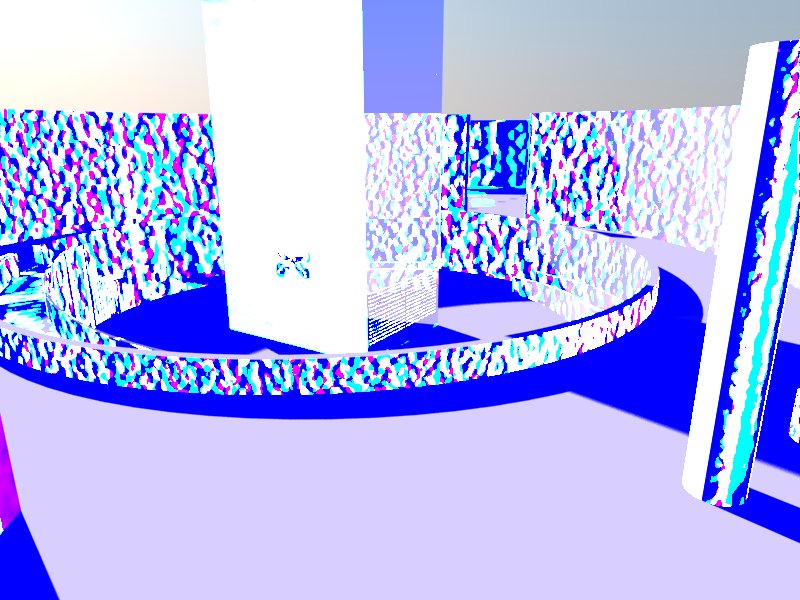

                                        after

                                        1 條回覆 最後回覆 回覆 引用 0
                                        • R 離線
                                          rspierenburg
                                          最後由 編輯

                                          I looks like something odd has been checked in your Frame Buffer that is changing the colors. I can't quite think of exactly which setting it would be. In any case, 1.48.49 is VERY dated and had numerous problems, you should definitely be looking at Vray 2.0

                                          Rob

                                          1 條回覆 最後回覆 回覆 引用 0
                                          • K 離線
                                            Kris7
                                            最後由 編輯

                                            Tnx for the response Rob...but is it really about Vray version or something else i mean materials or any settings in the vray options????


                                            1 條回覆 最後回覆 回覆 引用 0
                                            • 1
                                            • 2
                                            • 3
                                            • 2 / 3
                                            • 第一個貼文
                                              最後的貼文
                                            Buy SketchPlus
                                            Buy SUbD
                                            Buy WrapR
                                            Buy eBook
                                            Buy Modelur
                                            Buy Vertex Tools
                                            Buy SketchCuisine
                                            Buy FormFonts

                                            Advertisement
