sketchucation logo sketchucation
    • 登入
    Oops, your profile's looking a bit empty! To help us tailor your experience, please fill in key details like your SketchUp version, skill level, operating system, and more. Update and save your info on your profile page today!
    🔌 Smart Spline | Fluid way to handle splines for furniture design and complex structures. Download

    Mini-challenge

    已排程 已置頂 已鎖定 已移動 SketchUp Discussions
    sketchup
    328 貼文 26 Posters 38.3k 瀏覽 26 Watching
    正在載入更多貼文
    • 從舊到新
    • 從新到舊
    • 最多點贊
    回覆
    • 在新貼文中回覆
    登入後回覆
    此主題已被刪除。只有擁有主題管理權限的使用者可以查看。
    • fredo6F 離線
      fredo6
      最後由 編輯

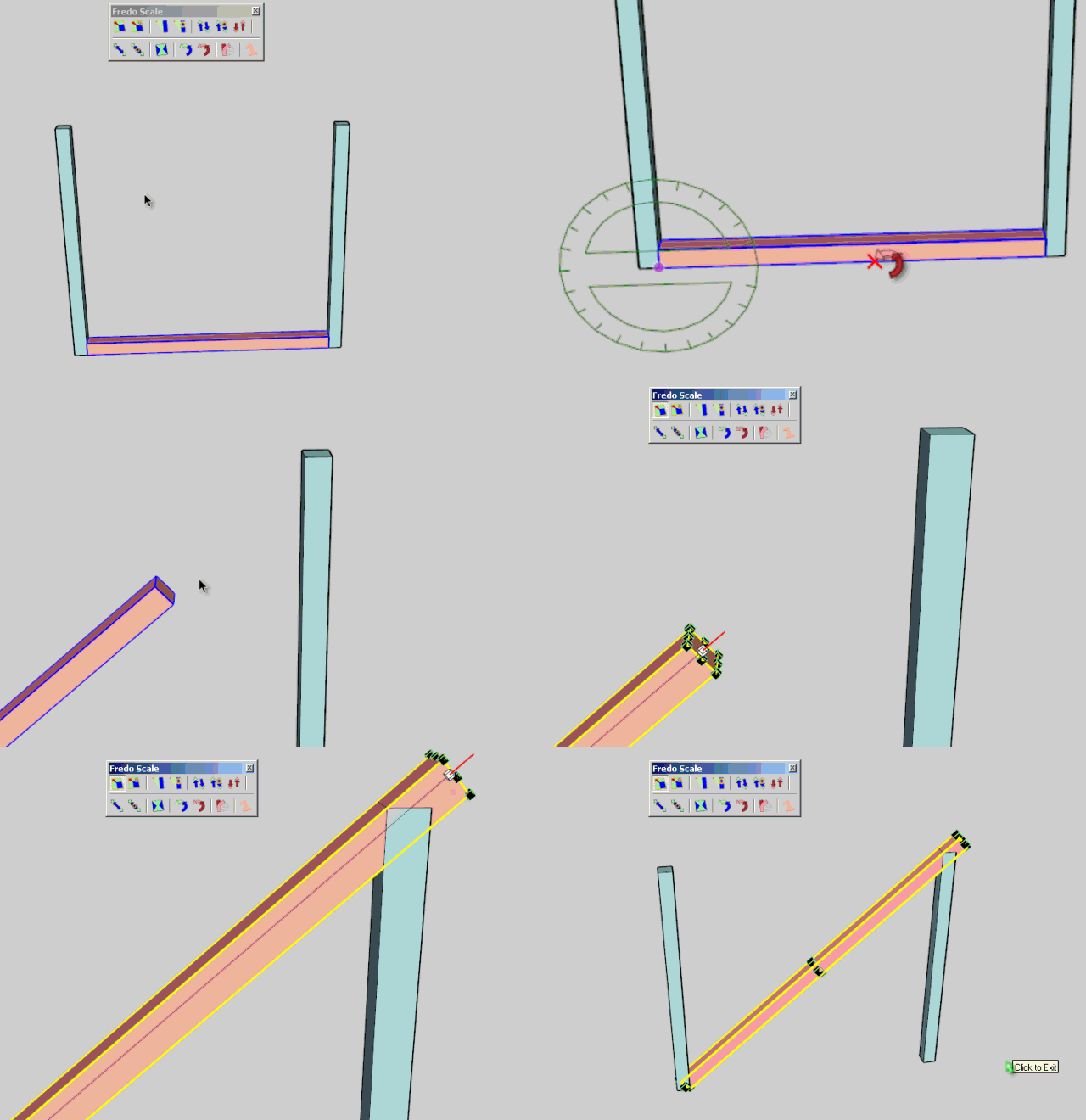
      This mini challenge gave me an interesting idea. Thanks Jeff.

      I will introduce an option in FredoScale for the tools using rotation, in particular the Free Rotate tool (but also Twist and Rotate in Box).
      Basically, after you define the plan of rotation and base direction, you will click an extra target point anywhere in the model. This target point, and actually the parallel to the base direction passing through this point will be used as inference guide instead of the base direction.

      As I did not want to make a separate tool, the convention is that when you click the point for the base direction, you release after 1 second (kind of long click). Then you'll have the opportunity to click the target point as a red cross (in the Fee Rotate tool, you can also toggle this function via Ctrl Alone).

      Indeed this is a plugin solution to the challenge, but I am not sure there is a pure geometrical solution with just the native standard SU Tools.
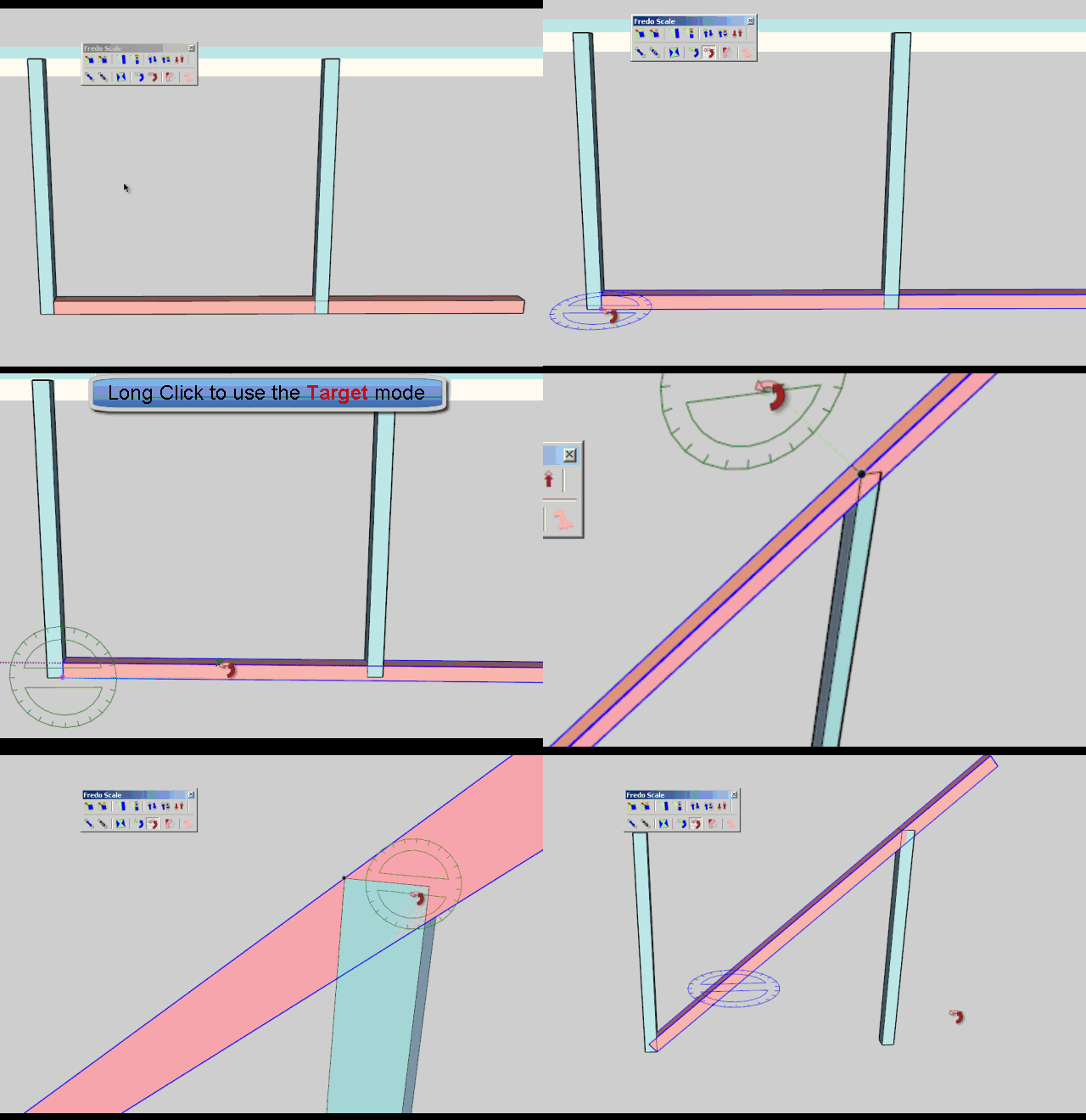
      Jeff Challenge.gif

      Jeff Challenge2.gif

      If you wish to try in advance of releasing, just drop the file Lib6Protractor.rb attached to this post into the LIBFREDO6_Dir_44 folder.

      Fredo

      1 條回覆 最後回覆 回覆 引用 0
      • fredo6F 離線
        fredo6
        最後由 編輯

        For info, I just published the script updates for supporting the two problems featured in this mini challenge. See this post for detail and video.

        This comes in FredoScale, but you just need to download LibFredo6 4.5a.

        Fredo

        1 條回覆 最後回覆 回覆 引用 0
        • utilerU 離線
          utiler
          最後由 編輯

          You are a crazy man, Fredo!!!!!

          Just Curious...

          1 條回覆 最後回覆 回覆 引用 0
          • pilouP 離線
            pilou
            最後由 編輯

            Yep! 😎
            Classieux! 👍
            And no problem in the Big Zoom! ☀

            1.3239127 Nurbs (height of brace cut vertically) Pilars are 1 * 1 * 10 , brace 1 * 1 * x : unity meter
            1.323913m SU

            http://forums.sketchucation.com/download/file.php?id=87799

            Frenchy Pilou
            Is beautiful that please without concept!
            My Little site :)

            1 條回覆 最後回覆 回覆 引用 0
            • C 離線
              Charlie__V
              最後由 編輯

              Bravo Fredo..............Bravo!

              Thanks lots,

              Charlie

              Precision M1710/Win 7 Pro 64 bit/i-7 6920 Quad core 2.9 Ghz -3.8/16Gb ram/NVIDIA M5000M 8Gb

              1 條回覆 最後回覆 回覆 引用 0
              • jeff hammondJ 離線
                jeff hammond
                最後由 編輯

                .

                2014 bump

                .

                dotdotdot

                1 條回覆 最後回覆 回覆 引用 0
                • Dave RD 離線
                  Dave R
                  最後由 編輯

                  @jeff hammond said:

                  .

                  2014 bump

                  .

                  why are you bumping this, Jeff?

                  Etaoin Shrdlu

                  %

                  (THERE'S NO PLACE LIKE)

                  G28 X0.0 Y0.0 Z0.0

                  M30

                  %

                  1 條回覆 最後回覆 回覆 引用 0
                  • jeff hammondJ 離線
                    jeff hammond
                    最後由 編輯

                    @dave r said:

                    why are you bumping this, Jeff?

                    because you can solve the challenge with su2014

                    dotdotdot

                    1 條回覆 最後回覆 回覆 引用 0
                    • Dave RD 離線
                      Dave R
                      最後由 編輯

                      Oh. By using the new Arc tool.

                      Etaoin Shrdlu

                      %

                      (THERE'S NO PLACE LIKE)

                      G28 X0.0 Y0.0 Z0.0

                      M30

                      %

                      1 條回覆 最後回覆 回覆 引用 0
                      • jeff hammondJ 離線
                        jeff hammond
                        最後由 編輯

                        @dave r said:

                        Oh. By using the new Arc tool.

                        right. we finally have a way to natively get a rotated snap point.

                        next step, incorporate the same inferencing into the rotate tool 😉
                        (but just having it in the arc tool is fine by me.. I've been wishing for it since maybe 2004 😄 )

                        dotdotdot

                        1 條回覆 最後回覆 回覆 引用 0
                        • C 離線
                          Charlie__V
                          最後由 編輯

                          @jeff hammond said:

                          @dave r said:

                          why are you bumping this, Jeff?

                          @jeff hammond said:

                          because you can solve the challenge with su2014

                          Buzzinga! 😎

                          C

                          Precision M1710/Win 7 Pro 64 bit/i-7 6920 Quad core 2.9 Ghz -3.8/16Gb ram/NVIDIA M5000M 8Gb

                          1 條回覆 最後回覆 回覆 引用 0
                          • Wo3DanW 離線
                            Wo3Dan
                            最後由 編輯

                            @jeff hammond said:

                            @dave r said:

                            Oh. By using the new Arc tool.

                            right. we finally have a way to natively get a rotated snap point. ...

                            Is it really that accurate? I can't get it to work. If I zoom in I can still see a new endpoint (second end of arc) not being on the edge inside a group I "rotated" to(=pulled the arc to.

                            1 條回覆 最後回覆 回覆 引用 0
                            • Wo3DanW 離線
                              Wo3Dan
                              最後由 編輯

                              @wo3dan said:

                              @jeff hammond said:

                              @dave r said:

                              Oh. By using the new Arc tool.

                              right. we finally have a way to natively get a rotated snap point. ...

                              Is it really that accurate? I can't get it to work. If I zoom in I can still see a new endpoint (second end of arc) not being on the edge inside a group I "rotated" to(=pulled the arc to).

                              1 條回覆 最後回覆 回覆 引用 0
                              • jeff hammondJ 離線
                                jeff hammond
                                最後由 編輯

                                @wo3dan said:

                                @jeff hammond said:

                                @dave r said:

                                Oh. By using the new Arc tool.

                                right. we finally have a way to natively get a rotated snap point. ...

                                Is it really that accurate? I can't get it to work. If I zoom in I can still see a new endpoint (second end of arc) not being on the edge inside a group I "rotated" to(=pulled the arc to.

                                as far as i can tell, it's completely accurate.. in this case, i tested it like this:
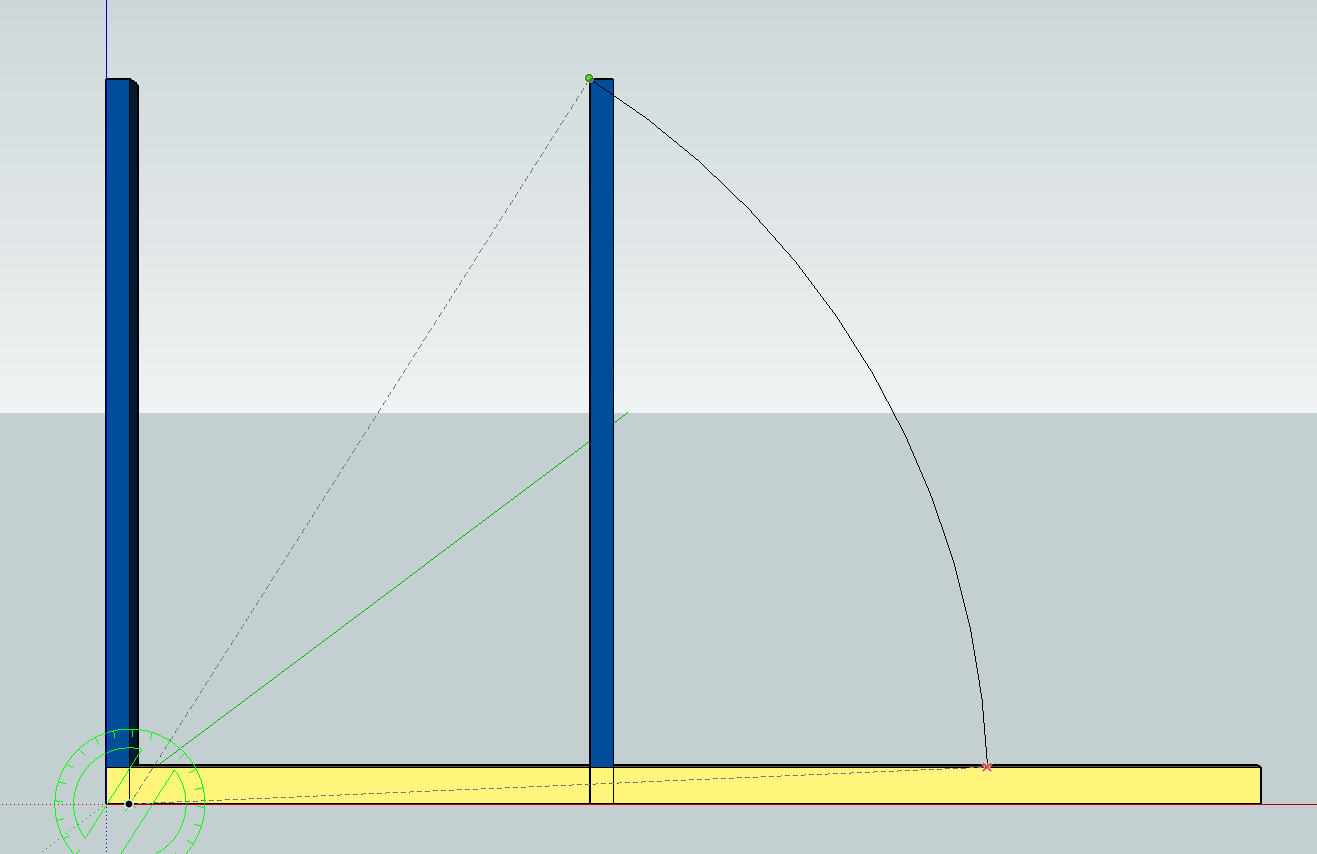
                                click pic for larger

                                ... then rotated the bottom board from the arc end point to the arc start point using the same center point..
                                everything appears to line up perfectly for me..

                                dotdotdot

                                1 條回覆 最後回覆 回覆 引用 0
                                • pbacotP 離線
                                  pbacot
                                  最後由 編輯

                                  I am surprised because SU can't draw real arcs.

                                  MacOSX MojaveSketchUp Pro v19 Twilight v2 Thea v3 PowerCADD

                                  1 條回覆 最後回覆 回覆 引用 0
                                  • jeff hammondJ 離線
                                    jeff hammond
                                    最後由 編輯

                                    @pbacot said:

                                    I am surprised because SU can't draw real arcs.

                                    the arcs are the same as before. it's just that you can now get a snap at an intersection while creating the arc.

                                    dotdotdot

                                    1 條回覆 最後回覆 回覆 引用 0
                                    • Wo3DanW 離線
                                      Wo3Dan
                                      最後由 編輯

                                      @jeff hammond said:

                                      ...
                                      the arcs are the same as before. it's just that you can now get a snap at an intersection while creating the arc.

                                      The arc tool hasn't changed at all, it still doen't snap to edges, only to endpoints (say A), intersections (say A)etc. To indicate that the arc ends on a (virtual) line from certer to A.
                                      The tool may indicate that you slide the cursor on an edge. But when zooming in, the resulting endpoint that the arc creates isn't on the edge that it is supposed to snap to. Unfortunately!

                                      1 條回覆 最後回覆 回覆 引用 0
                                      • jeff hammondJ 離線
                                        jeff hammond
                                        最後由 編輯

                                        @wo3dan said:

                                        @jeff hammond said:

                                        ...
                                        the arcs are the same as before. it's just that you can now get a snap at an intersection while creating the arc.

                                        The arc tool hasn't changed at all, it still doen't snap to edges, only to endpoints (say A), intersections (say A)etc. To indicate that the arc ends on a (virtual) line from certer to A.
                                        The tool may indicate that you slide the cursor on an edge. But when zooming in, the resulting endpoint that the arc creates isn't on the edge that it is supposed to snap to. Unfortunately!

                                        the old arc tool hasn't changed. there's a new arc tool in 2014.. pick the center point first then the two end points.
                                        try using that one.

                                        there's a red X indicator when an intersection is made

                                        dotdotdot

                                        1 條回覆 最後回覆 回覆 引用 0
                                        • Wo3DanW 離線
                                          Wo3Dan
                                          最後由 編輯

                                          @jeff hammond said:

                                          .....the old arc tool hasn't changed. there's a new arc tool in 2014.. pick the center point first then the two end points.
                                          try using that one.

                                          there's a red X indicator when an intersection is made

                                          I did use the new arc tool (center > start endpoint > end endpoint of the arc).
                                          Thing is I was trying to get an intersection on a grouped edge. That didn't give me any intersection ( red X ), only a sliding rectangular red dot. But on a basic edge I did. Thank you Jeff for pointing it out.

                                          Have you managed to get the intersection on an edge inside a group or component?

                                          1 條回覆 最後回覆 回覆 引用 0
                                          • jeff hammondJ 離線
                                            jeff hammond
                                            最後由 編輯

                                            @wo3dan said:

                                            I did use the new arc tool (center > start endpoint > end endpoint of the arc).
                                            Thing is I was trying to get an intersection on a grouped edge. That didn't give me any intersection ( red X ), only a sliding rectangular red dot. But on a basic edge I did. Thank you Jeff for pointing it out.

                                            Have you managed to get the intersection on an edge inside a group or component?

                                            hmm.. yeah, i see what you're saying. it gets iffy when trying to achieve an intersection snap to an outside object while drawing inside a group.

                                            i am (sometimes) able to get the red X depending on my zoom level.. if i zoom out of the scene, i'm more likely to get the intersection snap to an outside object.. if i'm in close to the arc's endpoint, i only seem to get the 'on edge outside active' inference.


                                            dotdotdot

                                            1 條回覆 最後回覆 回覆 引用 0
                                            • 1
                                            • 2
                                            • 9
                                            • 10
                                            • 11
                                            • 12
                                            • 13
                                            • 16
                                            • 17
                                            • 11 / 17
                                            • 第一個貼文
                                              最後的貼文
                                            Buy SketchPlus
                                            Buy SUbD
                                            Buy WrapR
                                            Buy eBook
                                            Buy Modelur
                                            Buy Vertex Tools
                                            Buy SketchCuisine
                                            Buy FormFonts

                                            Advertisement


