sketchucation logo sketchucation
    • 登入
    Oops, your profile's looking a bit empty! To help us tailor your experience, please fill in key details like your SketchUp version, skill level, operating system, and more. Update and save your info on your profile page today!
    🔌 Smart Spline | Fluid way to handle splines for furniture design and complex structures. Download

    [Plugin] SketchUV - now free

    已排程 已置頂 已鎖定 已移動 Plugins
    176 貼文 62 Posters 152.0k 瀏覽 62 Watching
    正在載入更多貼文
    • 從舊到新
    • 從新到舊
    • 最多點贊
    回覆
    • 在新貼文中回覆
    登入後回覆
    此主題已被刪除。只有擁有主題管理權限的使用者可以查看。
    • S 離線
      smicha
      最後由 編輯

      Tube cannot be triangulated before uv-mapping. Otherwise remove triangulation.
      I suggest trying thrupaint for such triangulated tubes - it works great.

      1 條回覆 最後回覆 回覆 引用 0
      • K 離線
        kaas
        最後由 編輯

        @cotty said:

        It should work. Can you share that model so that we can search for the problem?

        Here you go...


        3darcStudioTree_SketchUv.skp

        1 條回覆 最後回覆 回覆 引用 0
        • S 離線
          smicha
          最後由 編輯

          1. clean your model (bottom especially)
          2. use thrupaint

          the file is attached


          3darcStudioTree_SketchUv2.skp

          1 條回覆 最後回覆 回覆 引用 0
          • W 離線
            Whaat
            最後由 編輯

            Price drop - now just $5. Get it here:
            http://www.smustard.com/script/SketchUV

            SketchUp Plugins for Professionals

            1 條回覆 最後回覆 回覆 引用 0
            • S 離線
              smicha
              最後由 編輯

              @whaat said:

              Price drop - now just $5. Get it here:
              http://www.smustard.com/script/SketchUV

              Do you plan to add the function to normalize different sizes of textures - I asked about it in previous posts?

              1 條回覆 最後回覆 回覆 引用 0
              • W 離線
                Whaat
                最後由 編輯

                @smicha said:

                @whaat said:

                Price drop - now just $5. Get it here:
                http://www.smustard.com/script/SketchUV

                Do you plan to add the function to normalize different sizes of textures - I asked about it in previous posts?

                Yes, but I can't give you any accurate estimate of when that would be. It could be anywhere from two months to several years away.

                SketchUp Plugins for Professionals

                1 條回覆 最後回覆 回覆 引用 0
                • S 離線
                  stpauljason
                  最後由 編輯

                  I just bought the plugin, and am very happy with it. I read the user manual as well, and have a question using the path select tool. Is it possible to weld a piece back after it has been cut, like in most UV mapping software. I sometimes accidentally double click on the wrong line, and I hate to have to start the whole line cut again on a large model.

                  I tried holding the Alt, Shift, and Ctrl Keys separately hoping they would activate the opposite of cut, but they did not.

                  Thanks
                  Jason

                  1 條回覆 最後回覆 回覆 引用 0
                  • W 離線
                    Whaat
                    最後由 編輯

                    @stpauljason said:

                    I just bought the plugin, and am very happy with it. I read the user manual as well, and have a question using the path select tool. Is it possible to weld a piece back after it has been cut, like in most UV mapping software. I sometimes accidentally double click on the wrong line, and I hate to have to start the whole line cut again on a large model.

                    I tried holding the Alt, Shift, and Ctrl Keys separately hoping they would activate the opposite of cut, but they did not.

                    Thanks
                    Jason

                    Hi Jason,
                    If I understand you correctly, all you have to do is select the edges you want to 'weld' and then right-click on them and select 'soften'. You can also use the soften edges dialog in SketchUp by going to Window->Soften Edges

                    When you 'cut' all you are doing is unsoftening the edge.

                    Hope this helps.

                    SketchUp Plugins for Professionals

                    1 條回覆 最後回覆 回覆 引用 0
                    • P 離線
                      Pherim
                      最後由 編輯

                      This completes my Sketchup. Have not tried every function but it seems the cylindrical mapping is exactly what I was looking for! Thank you so much this is worth paying for!

                      1 條回覆 最後回覆 回覆 引用 0
                      • ely862meE 離線
                        ely862me
                        最後由 編輯

                        Hi, Dale
                        I am using SketchUV mostly for it's selecting features, and I was wondering if you could add a new function to the Path Select Tool. What I need and I think it would be welcome is to be able to select more than one path by pressing the CTRL key as in the native Select tool.
                        For example I have two exploded circles(or two random contours) and I want to connect those, I use the Path select on one contour, then I press CTRL key and select the next one, then I use Curviloft and "Voila!".
                        In the actual case we are not able to select more than one path.Or there is a way that I am not aware of ?

                        Thanks !

                        Elisei (sketchupper)


                        Before no life was done on Earth it was THE LIFE ITSELF...GOD
                        Come and See EliseiDesign

                        1 條回覆 最後回覆 回覆 引用 0
                        • W 離線
                          Whaat
                          最後由 編輯

                          @ely862me said:

                          Hi, Dale
                          I am using SketchUV mostly for it's selecting features, and I was wondering if you could add a new function to the Path Select Tool. What I need and I think it would be welcome is to be able to select more than one path by pressing the CTRL key as in the native Select tool.
                          For example I have two exploded circles(or two random contours) and I want to connect those, I use the Path select on one contour, then I press CTRL key and select the next one, then I use Curviloft and "Voila!".
                          In the actual case we are not able to select more than one path.Or there is a way that I am not aware of ?

                          Thanks !

                          Maybe if you weld the paths with the Weld plugin, you might be able to do this. I have not used Curviloft so I am not sure...

                          Someday, I would like to release the Path Select Tool as a standalone plugin. Maybe then, I could add that feature, too.

                          Thanks.

                          SketchUp Plugins for Professionals

                          1 條回覆 最後回覆 回覆 引用 0
                          • ely862meE 離線
                            ely862me
                            最後由 編輯

                            I am sorry I have not explained myself better .
                            By connecting the paths I meant to create a surface between them.
                            The impediment is that after you select one path you can't select another one. In this case I select one path with the Path Select tool then I hold CTRL and take the Select tool from Sketchup and select the segments one by one(which is very hard and time consuming).
                            Long story short : Take Path Select Tool and select a path then hold CTRL and select as many paths as you want !(This is what I think it will be very useful!)

                            Thank you!

                            Elisei (sketchupper)


                            Before no life was done on Earth it was THE LIFE ITSELF...GOD
                            Come and See EliseiDesign

                            1 條回覆 最後回覆 回覆 引用 0
                            • charly2008C 離線
                              charly2008
                              最後由 編輯

                              Hello,

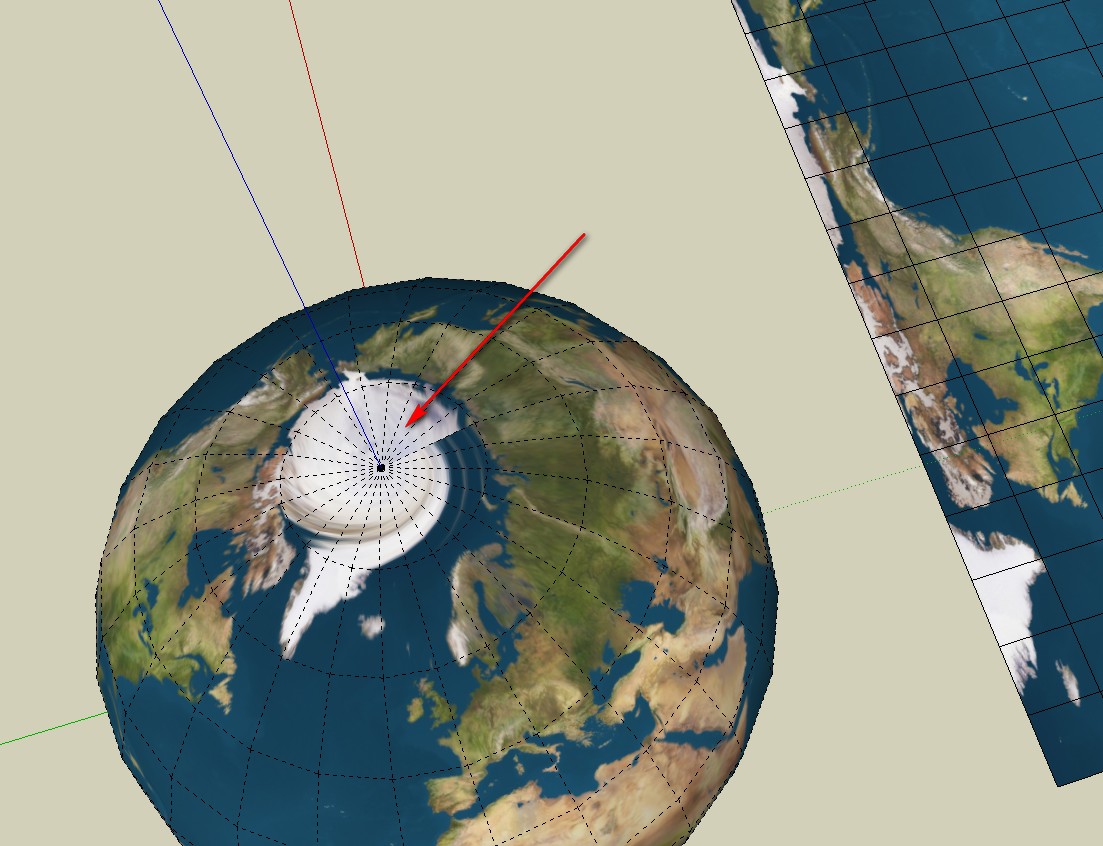
                              Is there a way to correct the distortion shown below tool with a UV tool or is the error in the map projection?

                              Thanks for any help.

                              Untitled.skp


                              2013-12-17_130017.jpg

                              He who makes no mistakes, makes nothing

                              1 條回覆 最後回覆 回覆 引用 0
                              • FrederikF 離線
                                Frederik
                                最後由 編輯

                                It looks like it's the map, which isn't good enough... 😐

                                Here's my attempt with a map from JHT's Planetary Pixel Emporium...


                                Earth-model.skp

                                Cheers
                                Kim Frederik

                                1 條回覆 最後回覆 回覆 引用 0
                                • charly2008C 離線
                                  charly2008
                                  最後由 編輯

                                  Hi Kim,

                                  thank you for your help and your effort. Also thanks for this link.

                                  Charly

                                  He who makes no mistakes, makes nothing

                                  1 條回覆 最後回覆 回覆 引用 0
                                  • SwissmountainS 離線
                                    Swissmountain
                                    最後由 編輯

                                    Hello and thank you for this much needed plugin.

                                    I am rendering in Modo and need to export my models.

                                    I notice that each polygon gets assigned its own material, creating hundreds of materials and making the export near impossible.

                                    Is this how the plugin is intended to work?

                                    Cogito ergo dum-di-dum

                                    1 條回覆 最後回覆 回覆 引用 0
                                    • W 離線
                                      Whaat
                                      最後由 編輯

                                      @swissmountain said:

                                      Hello and thank you for this much needed plugin.

                                      I am rendering in Modo and need to export my models.

                                      I notice that each polygon gets assigned its own material, creating hundreds of materials and making the export near impossible.

                                      Is this how the plugin is intended to work?

                                      Sorry for the late reply.
                                      You need to use the Triangulate feature in SketchUV prior to exporting in order to reduce the number of exported materials. This is explained in the SketchUV tutorials.

                                      Dale

                                      SketchUp Plugins for Professionals

                                      1 條回覆 最後回覆 回覆 引用 0
                                      • cottyC 離線
                                        cotty
                                        最後由 編輯

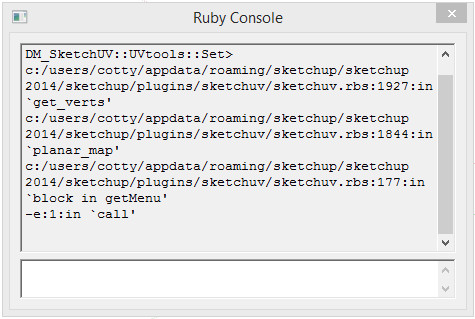
                                        Does anyone have problems with this plugin and SU14?

                                        sketchuvrubyconsole.jpg

                                        my SketchUp gallery

                                        1 條回覆 最後回覆 回覆 引用 0
                                        • E 離線
                                          Extractor
                                          最後由 編輯

                                          Yes, for example errors in the Ruby Console when using a spherical map. I wrote an e-mail to D. Martens and he replied that there will be an update in a few weeks.

                                          1 條回覆 最後回覆 回覆 引用 0
                                          • soloS 離線
                                            solo
                                            最後由 編輯

                                            @cotty said:

                                            Does anyone have problems with this plugin and SU14?

                                            Me, I was looking for an updated version.

                                            I need this tool to work with SU 2014

                                            http://www.solos-art.com

                                            If you see a toilet in your dreams do not use it.

                                            1 條回覆 最後回覆 回覆 引用 0
                                            • 1
                                            • 2
                                            • 3
                                            • 4
                                            • 5
                                            • 6
                                            • 7
                                            • 8
                                            • 9
                                            • 6 / 9
                                            • 第一個貼文
                                              最後的貼文
                                            Buy SketchPlus
                                            Buy SUbD
                                            Buy WrapR
                                            Buy eBook
                                            Buy Modelur
                                            Buy Vertex Tools
                                            Buy SketchCuisine
                                            Buy FormFonts

                                            Advertisement