sketchucation logo sketchucation
    • 登入
    Oops, your profile's looking a bit empty! To help us tailor your experience, please fill in key details like your SketchUp version, skill level, operating system, and more. Update and save your info on your profile page today!
    🔌 Easy Offset | Offset selected faces in SketchUp in positive and negative offsets. Download

    [Plugin] Multiple Offsets (Updated 09-Feb-2014)

    已排程 已置頂 已鎖定 已移動 Plugins
    37 貼文 16 Posters 75.1k 瀏覽 16 Watching
    正在載入更多貼文
    • 從舊到新
    • 從新到舊
    • 最多點贊
    回覆
    • 在新貼文中回覆
    登入後回覆
    此主題已被刪除。只有擁有主題管理權限的使用者可以查看。
    • sdmitchS 離線
      sdmitch
      最後由 編輯

      New version has been posted

      Nothing is worthless, it can always be used as a bad example.

      http://sdmitch.blogspot.com/

      1 條回覆 最後回覆 回覆 引用 0
      • pilouP 離線
        pilou
        最後由 編輯

        You definitly rocks!!! 👍 😎 ☀

        sdmitch01.jpg

        Frenchy Pilou
        Is beautiful that please without concept!
        My Little site :)

        1 條回覆 最後回覆 回覆 引用 0
        • D 離線
          dtrarch
          最後由 編輯

          Sam

          Good stuff and thank you. 👍

          dtr

          1 條回覆 最後回覆 回覆 引用 0
          • B 離線
            Ben Ritter
            最後由 編輯

            sdmitch, Thank you!

            1 條回覆 最後回覆 回覆 引用 0
            • sdmitchS 離線
              sdmitch
              最後由 編輯

              Major update posted today. Offsets can be created by three methods

              Constant: Input number of offsets, distance between offsets, direction to
              offset, either inside, outside, or both, and whether the selected face(s) and all
              created faces are to be deleted, select No to keep faces.

              Formula: Enter number of offsets, distance to first offset, direction to offset,
              delete faces Yes or No, select operator + or *, and value to add or multiply by.

              List: Select direction of offsets, delete faces Yes or No, a list of offsets
              seperated by commas, choose type of offset either absolute or a delta value
              to be added to the last offset value. If the offsets are a repeated sequence,
              end the list with *X, where X = the number of repititions for the offset
              sequence entered.

              Nothing is worthless, it can always be used as a bad example.

              http://sdmitch.blogspot.com/

              1 條回覆 最後回覆 回覆 引用 0
              • simon le bonS 離線
                simon le bon
                最後由 編輯

                Thank you Sam,

                It's a gem. 👍
                http://i274.photobucket.com/albums/jj245/Spendauballet/SketchUp/Boutons/Ruby.png
                older version overwritten by the new one 😉

                ++simon

                1 條回覆 最後回覆 回覆 引用 0
                • simon le bonS 離線
                  simon le bon
                  最後由 編輯

                  Hi Pilou and Sam,

                  Multiple Offsets works for me with Su7
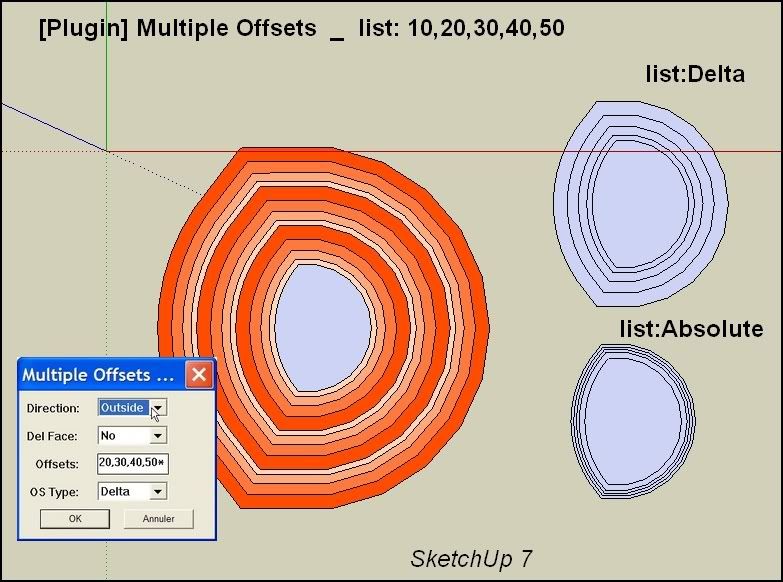
                  http://i274.photobucket.com/albums/jj245/Spendauballet/SketchUp/MultipleOffsets001.jpg

                  However problems with the List Options:

                  • List:Offset by * 3
                    Absolute and Delta choice gives the same result:

                  x3 Delta offset (see pict)
                  (colored after for a better watch)

                  • List: Offsets: + operator don't work and deletes the offseted faces

                  simon

                  1 條回覆 最後回覆 回覆 引用 0
                  • pilouP 離線
                    pilou
                    最後由 編輯

                    curious nothing append on V7 and V6! 😮
                    All menu appear but nothing is done! Does this normal ?

                    Work like a charm in V8 ! 😎 (aespecially the * x with a list ! 👍 😉

                    As the "exotic Push Pull" seems have a problem maybe will be a good thing to input it inside this plug during the calculate ?

                    Or See my new request 😉

                    Frenchy Pilou
                    Is beautiful that please without concept!
                    My Little site :)

                    1 條回覆 最後回覆 回覆 引用 0
                    • pilouP 離線
                      pilou
                      最後由 編輯

                      @Simon
                      Curious you write 20,30,40,50*3, that must be 20,30,40,50,*3 😉
                      Edit : in fact that gives the same result! 💚

                      Frenchy Pilou
                      Is beautiful that please without concept!
                      My Little site :)

                      1 條回覆 最後回覆 回覆 引用 0
                      • guanjinG 離線
                        guanjin
                        最後由 編輯

                        @sdmitch said:

                        Major update posted today. Offsets can be created by three methods

                        Constant: Input number of offsets, distance between offsets, direction to
                        offset, either inside, outside, or both, and whether the selected face(s) and all
                        created faces are to be deleted, select No to keep faces.

                        Formula: Enter number of offsets, distance to first offset, direction to offset,
                        delete faces Yes or No, select operator + or *, and value to add or multiply by.

                        List: Select direction of offsets, delete faces Yes or No, a list of offsets
                        seperated by commas, choose type of offset either absolute or a delta value
                        to be added to the last offset value. If the offsets are a repeated sequence,
                        end the list with *X, where X = the number of repititions for the offset
                        sequence entered.

                        Great tool invention
                        Can realize line migration, generating surface?
                        Perhaps we should not be too many requests
                        thank you sdmitch

                        I come from China, is to learn

                        1 條回覆 最後回覆 回覆 引用 0
                        • guanjinG 離線
                          guanjin
                          最後由 編輯

                          @guanjin said:

                          @sdmitch said:

                          Major update posted today. Offsets can be created by three methods

                          Constant: Input number of offsets, distance between offsets, direction to
                          offset, either inside, outside, or both, and whether the selected face(s) and all
                          created faces are to be deleted, select No to keep faces.

                          Formula: Enter number of offsets, distance to first offset, direction to offset,
                          delete faces Yes or No, select operator + or *, and value to add or multiply by.

                          List: Select direction of offsets, delete faces Yes or No, a list of offsets
                          seperated by commas, choose type of offset either absolute or a delta value
                          to be added to the last offset value. If the offsets are a repeated sequence,
                          end the list with *X, where X = the number of repititions for the offset
                          sequence entered.

                          Great tool invention
                          Can realize line migration, generating surface?
                          DWG files import, Is no surface of
                          Perhaps we should not be too many requests
                          thank you sdmitch

                          I come from China, is to learn

                          1 條回覆 最後回覆 回覆 引用 0
                          • guanjinG 離線
                            guanjin
                            最後由 編輯

                            @guanjin said:

                            @guanjin said:

                            @sdmitch said:

                            Major update posted today. Offsets can be created by three methods

                            Constant: Input number of offsets, distance between offsets, direction to
                            offset, either inside, outside, or both, and whether the selected face(s) and all
                            created faces are to be deleted, select No to keep faces.

                            Formula: Enter number of offsets, distance to first offset, direction to offset,
                            delete faces Yes or No, select operator + or *, and value to add or multiply by.

                            List: Select direction of offsets, delete faces Yes or No, a list of offsets
                            seperated by commas, choose type of offset either absolute or a delta value
                            to be added to the last offset value. If the offsets are a repeated sequence,
                            end the list with *X, where X = the number of repititions for the offset
                            sequence entered.

                            Great tool invention
                            Can realize line migration, generating surface?
                            DWG files import, Is no surface of ,
                            Perhaps we should not be too many requests
                            thank you sdmitch

                            I come from China, is to learn

                            1 條回覆 最後回覆 回覆 引用 0
                            • pilouP 離線
                              pilou
                              最後由 編輯

                              I have added some plugins for another things in V8

                              All menus Offset Multiples are fine but nothing append! 😲
                              Seems there is a conflict with another plugs! 😮
                              Must find the the culprit(s)! (resolved see the next page for see the culprit) 😉

                              Frenchy Pilou
                              Is beautiful that please without concept!
                              My Little site :)

                              1 條回覆 最後回覆 回覆 引用 0
                              • B 離線
                                blajnov
                                最後由 編輯

                                Respected sdmitch, the new version of a plug-in, doesn't work in SketchUp 8 Pro M2...😢
                                The previous works perfectly well.

                                1 條回覆 最後回覆 回覆 引用 0
                                • guanjinG 離線
                                  guanjin
                                  最後由 編輯

                                  @blajnov said:

                                  Respected sdmitch, the new version of a plug-in, doesn't work in SketchUp 8 Pro M2...😢
                                  The previous works perfectly well.

                                  I also SU8M2, no problem

                                  I come from China, is to learn

                                  1 條回覆 最後回覆 回覆 引用 0
                                  • sdmitchS 離線
                                    sdmitch
                                    最後由 編輯

                                    blajov, sorry about that but I only have SU8 Free at my disposal so there is no way for me to determine why that is the case.

                                    Nothing is worthless, it can always be used as a bad example.

                                    http://sdmitch.blogspot.com/

                                    1 條回覆 最後回覆 回覆 引用 0
                                    • pilouP 離線
                                      pilou
                                      最後由 編輯

                                      Ok for the Conflict in V8 free the culprit is "Windowizer3" ! ☀

                                      Frenchy Pilou
                                      Is beautiful that please without concept!
                                      My Little site :)

                                      1 條回覆 最後回覆 回覆 引用 0
                                      • kenK 離線
                                        ken
                                        最後由 編輯

                                        Sam

                                        The multiple offset does not work on my computer,none of the options, constant, formula or list. I have Sketchup, V8, M1. Here is the error message. Hope this helps.

                                        Error: #<ArgumentError: wrong number of arguments (3 for 1)>
                                        C:/Program Files (x86)/Google/Google SketchUp 8/Plugins/Multiple Offsets-A.rb:76:in offset' C:/Program Files (x86)/Google/Google SketchUp 8/Plugins/Multiple Offsets-A.rb:76:in do_offsets_constant'
                                        C:/Program Files (x86)/Google/Google SketchUp 8/Plugins/Multiple Offsets-A.rb:74:in each' C:/Program Files (x86)/Google/Google SketchUp 8/Plugins/Multiple Offsets-A.rb:74:in do_offsets_constant'
                                        C:/Program Files (x86)/Google/Google SketchUp 8/Plugins/Multiple Offsets-A.rb:72:in each' C:/Program Files (x86)/Google/Google SketchUp 8/Plugins/Multiple Offsets-A.rb:72:in do_offsets_constant'
                                        C:/Program Files (x86)/Google/Google SketchUp 8/Plugins/Multiple Offsets-A.rb:49:in do_offsets' C:/Program Files (x86)/Google/Google SketchUp 8/Plugins/Multiple Offsets-A.rb:30 C:/Program Files (x86)/Google/Google SketchUp 8/Plugins/Multiple Offsets-A.rb:76:in call'
                                        C:/Program Files (x86)/Google/Google SketchUp 8/Plugins/Multiple Offsets-A.rb:76

                                        Thanks in advance for looking at this problem and the plugin.

                                        Ken

                                        Fight like your the third monkey on Noah's Ark gangway.

                                        1 條回覆 最後回覆 回覆 引用 0
                                        • sdmitchS 離線
                                          sdmitch
                                          最後由 編輯

                                          One last update!!!

                                          Nothing is worthless, it can always be used as a bad example.

                                          http://sdmitch.blogspot.com/

                                          1 條回覆 最後回覆 回覆 引用 0
                                          • M 離線
                                            mirale999
                                            最後由 編輯

                                            Great plugin~

                                            paranoia is a higher form of awareness...

                                            1 條回覆 最後回覆 回覆 引用 0
                                            • 1
                                            • 2
                                            • 2 / 2
                                            • 第一個貼文
                                              最後的貼文
                                            Buy SketchPlus
                                            Buy SUbD
                                            Buy WrapR
                                            Buy eBook
                                            Buy Modelur
                                            Buy Vertex Tools
                                            Buy SketchCuisine
                                            Buy FormFonts

                                            Advertisement