sketchucation logo sketchucation
    • Login
    Oops, your profile's looking a bit empty! To help us tailor your experience, please fill in key details like your SketchUp version, skill level, operating system, and more. Update and save your info on your profile page today!
    Mac User? | Join the Rayscaper Beta for Mac Learn More

    [Plugin] Multiple Offsets (Updated 09-Feb-2014)

    Scheduled Pinned Locked Moved Plugins
    37 Posts 16 Posters 78.8k Views 16 Watching
    Loading More Posts
    • Oldest to Newest
    • Newest to Oldest
    • Most Votes
    Reply
    • Reply as topic
    Log in to reply
    This topic has been deleted. Only users with topic management privileges can see it.
    • sdmitchS
      sdmitch
      last edited by

      Retracing any segment of the closed curve with the Line Tool should create a face.

      Nothing is worthless, it can always be used as a bad example.

      http://sdmitch.blogspot.com/

      1 Reply Last reply
      Reply Quote 0
      • pilouP
        pilou
        last edited by

        Redraw a "big" above the result and intersect all make the trick and very more speedy than all redraw with the ๐Ÿ˜‰

        Frenchy Pilou
        Is beautiful that please without concept!
        My Little site :)

        1 Reply Last reply
        Reply Quote 0
        • sdmitchS
          sdmitch
          last edited by

          New version has been posted

          Nothing is worthless, it can always be used as a bad example.

          http://sdmitch.blogspot.com/

          1 Reply Last reply
          Reply Quote 0
          • pilouP
            pilou
            last edited by

            You definitly rocks!!! ๐Ÿ‘ ๐Ÿ˜Ž โ˜€

            sdmitch01.jpg

            Frenchy Pilou
            Is beautiful that please without concept!
            My Little site :)

            1 Reply Last reply
            Reply Quote 0
            • D
              dtrarch
              last edited by

              Sam

              Good stuff and thank you. ๐Ÿ‘

              dtr

              1 Reply Last reply
              Reply Quote 0
              • B
                Ben Ritter
                last edited by

                sdmitch, Thank you!

                1 Reply Last reply
                Reply Quote 0
                • sdmitchS
                  sdmitch
                  last edited by

                  Major update posted today. Offsets can be created by three methods

                  Constant: Input number of offsets, distance between offsets, direction to
                  offset, either inside, outside, or both, and whether the selected face(s) and all
                  created faces are to be deleted, select No to keep faces.

                  Formula: Enter number of offsets, distance to first offset, direction to offset,
                  delete faces Yes or No, select operator + or *, and value to add or multiply by.

                  List: Select direction of offsets, delete faces Yes or No, a list of offsets
                  seperated by commas, choose type of offset either absolute or a delta value
                  to be added to the last offset value. If the offsets are a repeated sequence,
                  end the list with *X, where X = the number of repititions for the offset
                  sequence entered.

                  Nothing is worthless, it can always be used as a bad example.

                  http://sdmitch.blogspot.com/

                  1 Reply Last reply
                  Reply Quote 0
                  • simon le bonS
                    simon le bon
                    last edited by

                    Thank you Sam,

                    It's a gem. ๐Ÿ‘
                    http://i274.photobucket.com/albums/jj245/Spendauballet/SketchUp/Boutons/Ruby.png
                    older version overwritten by the new one ๐Ÿ˜‰

                    ++simon

                    1 Reply Last reply
                    Reply Quote 0
                    • simon le bonS
                      simon le bon
                      last edited by

                      Hi Pilou and Sam,

                      Multiple Offsets works for me with Su7
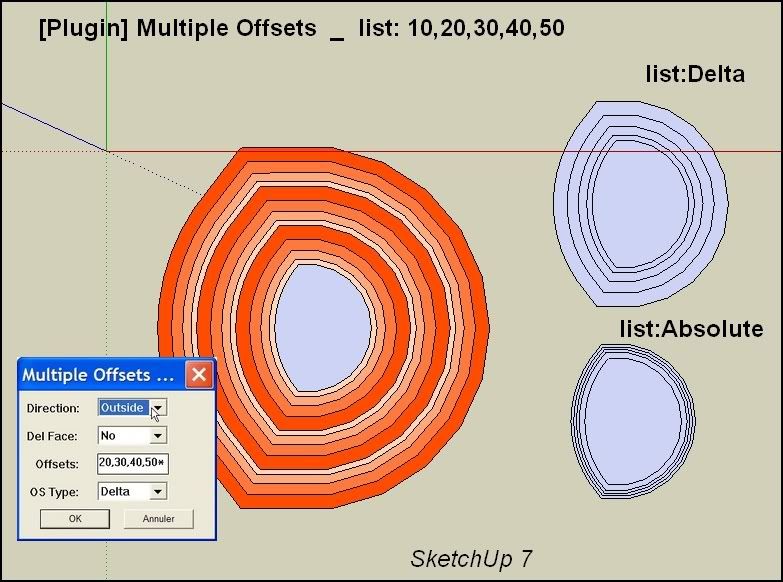
                      http://i274.photobucket.com/albums/jj245/Spendauballet/SketchUp/MultipleOffsets001.jpg

                      However problems with the List Options:

                      • List:Offset by * 3
                        Absolute and Delta choice gives the same result:

                      x3 Delta offset (see pict)
                      (colored after for a better watch)

                      • List: Offsets: + operator don't work and deletes the offseted faces

                      simon

                      1 Reply Last reply
                      Reply Quote 0
                      • pilouP
                        pilou
                        last edited by

                        curious nothing append on V7 and V6! ๐Ÿ˜ฎ
                        All menu appear but nothing is done! Does this normal ?

                        Work like a charm in V8 ! ๐Ÿ˜Ž (aespecially the * x with a list ! ๐Ÿ‘ ๐Ÿ˜‰

                        As the "exotic Push Pull" seems have a problem maybe will be a good thing to input it inside this plug during the calculate ?

                        Or See my new request ๐Ÿ˜‰

                        Frenchy Pilou
                        Is beautiful that please without concept!
                        My Little site :)

                        1 Reply Last reply
                        Reply Quote 0
                        • pilouP
                          pilou
                          last edited by

                          @Simon
                          Curious you write 20,30,40,50*3, that must be 20,30,40,50,*3 ๐Ÿ˜‰
                          Edit : in fact that gives the same result! ๐Ÿ’š

                          Frenchy Pilou
                          Is beautiful that please without concept!
                          My Little site :)

                          1 Reply Last reply
                          Reply Quote 0
                          • guanjinG
                            guanjin
                            last edited by

                            @sdmitch said:

                            Major update posted today. Offsets can be created by three methods

                            Constant: Input number of offsets, distance between offsets, direction to
                            offset, either inside, outside, or both, and whether the selected face(s) and all
                            created faces are to be deleted, select No to keep faces.

                            Formula: Enter number of offsets, distance to first offset, direction to offset,
                            delete faces Yes or No, select operator + or *, and value to add or multiply by.

                            List: Select direction of offsets, delete faces Yes or No, a list of offsets
                            seperated by commas, choose type of offset either absolute or a delta value
                            to be added to the last offset value. If the offsets are a repeated sequence,
                            end the list with *X, where X = the number of repititions for the offset
                            sequence entered.

                            Great tool invention
                            Can realize line migration, generating surface?
                            Perhaps we should not be too many requests
                            thank you sdmitch

                            I come from China, is to learn

                            1 Reply Last reply
                            Reply Quote 0
                            • guanjinG
                              guanjin
                              last edited by

                              @guanjin said:

                              @sdmitch said:

                              Major update posted today. Offsets can be created by three methods

                              Constant: Input number of offsets, distance between offsets, direction to
                              offset, either inside, outside, or both, and whether the selected face(s) and all
                              created faces are to be deleted, select No to keep faces.

                              Formula: Enter number of offsets, distance to first offset, direction to offset,
                              delete faces Yes or No, select operator + or *, and value to add or multiply by.

                              List: Select direction of offsets, delete faces Yes or No, a list of offsets
                              seperated by commas, choose type of offset either absolute or a delta value
                              to be added to the last offset value. If the offsets are a repeated sequence,
                              end the list with *X, where X = the number of repititions for the offset
                              sequence entered.

                              Great tool invention
                              Can realize line migration, generating surface?
                              DWG files import, Is no surface of
                              Perhaps we should not be too many requests
                              thank you sdmitch

                              I come from China, is to learn

                              1 Reply Last reply
                              Reply Quote 0
                              • guanjinG
                                guanjin
                                last edited by

                                @guanjin said:

                                @guanjin said:

                                @sdmitch said:

                                Major update posted today. Offsets can be created by three methods

                                Constant: Input number of offsets, distance between offsets, direction to
                                offset, either inside, outside, or both, and whether the selected face(s) and all
                                created faces are to be deleted, select No to keep faces.

                                Formula: Enter number of offsets, distance to first offset, direction to offset,
                                delete faces Yes or No, select operator + or *, and value to add or multiply by.

                                List: Select direction of offsets, delete faces Yes or No, a list of offsets
                                seperated by commas, choose type of offset either absolute or a delta value
                                to be added to the last offset value. If the offsets are a repeated sequence,
                                end the list with *X, where X = the number of repititions for the offset
                                sequence entered.

                                Great tool invention
                                Can realize line migration, generating surface?
                                DWG files import, Is no surface of ,
                                Perhaps we should not be too many requests
                                thank you sdmitch

                                I come from China, is to learn

                                1 Reply Last reply
                                Reply Quote 0
                                • pilouP
                                  pilou
                                  last edited by

                                  I have added some plugins for another things in V8

                                  All menus Offset Multiples are fine but nothing append! ๐Ÿ˜ฒ
                                  Seems there is a conflict with another plugs! ๐Ÿ˜ฎ
                                  Must find the the culprit(s)! (resolved see the next page for see the culprit) ๐Ÿ˜‰

                                  Frenchy Pilou
                                  Is beautiful that please without concept!
                                  My Little site :)

                                  1 Reply Last reply
                                  Reply Quote 0
                                  • B
                                    blajnov
                                    last edited by

                                    Respected sdmitch, the new version of a plug-in, doesn't work in SketchUp 8 Pro M2...๐Ÿ˜ข
                                    The previous works perfectly well.

                                    1 Reply Last reply
                                    Reply Quote 0
                                    • guanjinG
                                      guanjin
                                      last edited by

                                      @blajnov said:

                                      Respected sdmitch, the new version of a plug-in, doesn't work in SketchUp 8 Pro M2...๐Ÿ˜ข
                                      The previous works perfectly well.

                                      I also SU8M2, no problem

                                      I come from China, is to learn

                                      1 Reply Last reply
                                      Reply Quote 0
                                      • sdmitchS
                                        sdmitch
                                        last edited by

                                        blajov, sorry about that but I only have SU8 Free at my disposal so there is no way for me to determine why that is the case.

                                        Nothing is worthless, it can always be used as a bad example.

                                        http://sdmitch.blogspot.com/

                                        1 Reply Last reply
                                        Reply Quote 0
                                        • pilouP
                                          pilou
                                          last edited by

                                          Ok for the Conflict in V8 free the culprit is "Windowizer3" ! โ˜€

                                          Frenchy Pilou
                                          Is beautiful that please without concept!
                                          My Little site :)

                                          1 Reply Last reply
                                          Reply Quote 0
                                          • kenK
                                            ken
                                            last edited by

                                            Sam

                                            The multiple offset does not work on my computer,none of the options, constant, formula or list. I have Sketchup, V8, M1. Here is the error message. Hope this helps.

                                            Error: #<ArgumentError: wrong number of arguments (3 for 1)>
                                            C:/Program Files (x86)/Google/Google SketchUp 8/Plugins/Multiple Offsets-A.rb:76:in offset' C:/Program Files (x86)/Google/Google SketchUp 8/Plugins/Multiple Offsets-A.rb:76:in do_offsets_constant'
                                            C:/Program Files (x86)/Google/Google SketchUp 8/Plugins/Multiple Offsets-A.rb:74:in each' C:/Program Files (x86)/Google/Google SketchUp 8/Plugins/Multiple Offsets-A.rb:74:in do_offsets_constant'
                                            C:/Program Files (x86)/Google/Google SketchUp 8/Plugins/Multiple Offsets-A.rb:72:in each' C:/Program Files (x86)/Google/Google SketchUp 8/Plugins/Multiple Offsets-A.rb:72:in do_offsets_constant'
                                            C:/Program Files (x86)/Google/Google SketchUp 8/Plugins/Multiple Offsets-A.rb:49:in do_offsets' C:/Program Files (x86)/Google/Google SketchUp 8/Plugins/Multiple Offsets-A.rb:30 C:/Program Files (x86)/Google/Google SketchUp 8/Plugins/Multiple Offsets-A.rb:76:in call'
                                            C:/Program Files (x86)/Google/Google SketchUp 8/Plugins/Multiple Offsets-A.rb:76

                                            Thanks in advance for looking at this problem and the plugin.

                                            Ken

                                            Fight like your the third monkey on Noah's Ark gangway.

                                            1 Reply Last reply
                                            Reply Quote 0

                                            Hello! It looks like you're interested in this conversation, but you don't have an account yet.

                                            Getting fed up of having to scroll through the same posts each visit? When you register for an account, you'll always come back to exactly where you were before, and choose to be notified of new replies (either via email, or push notification). You'll also be able to save bookmarks and upvote posts to show your appreciation to other community members.

                                            With your input, this post could be even better ๐Ÿ’—

                                            Register Login
                                            • 1
                                            • 2
                                            • 1 / 2
                                            • First post
                                              Last post
                                            Buy SketchPlus
                                            Buy SUbD
                                            Buy WrapR
                                            Buy eBook
                                            Buy Modelur
                                            Buy Vertex Tools
                                            Buy SketchCuisine
                                            Buy FormFonts

                                            Advertisement