sketchucation logo sketchucation
    • Login
    Oops, your profile's looking a bit empty! To help us tailor your experience, please fill in key details like your SketchUp version, skill level, operating system, and more. Update and save your info on your profile page today!
    Mac User? | Join the Rayscaper Beta for Mac Learn More

    The Richard Technique

    Scheduled Pinned Locked Moved Newbie Forum
    sketchup
    17 Posts 10 Posters 4.5k Views 10 Watching
    Loading More Posts
    • Oldest to Newest
    • Newest to Oldest
    • Most Votes
    Reply
    • Reply as topic
    Log in to reply
    This topic has been deleted. Only users with topic management privileges can see it.
    • P
      pensiero stupendo
      last edited by

      the richad jeffery technique as described in deJongh's biginner's guide

      1 Reply Last reply
      Reply Quote 0
      • GaieusG
        Gaieus
        last edited by

        And what is the "deJongh's biginner's guide"??? and especially what is the "richad jeffery technique" in that guide? 😕

        Gai...

        1 Reply Last reply
        Reply Quote 0
        • P
          pensiero stupendo
          last edited by

          ufff, sorry
          SU for architectural visualization Beginner's guide written by Robin de Jongh
          pg221 Richard Jeffery sketchy pencil technique

          1 Reply Last reply
          Reply Quote 0
          • daleD
            dale
            last edited by

            Hmmm
            Googled thisScreen shot 2012-02-21 at 12.01.22 PM.png
            Quite intertesting and new to me. Would love to know more.

            Just monkeying around....like Monsanto

            1 Reply Last reply
            Reply Quote 0
            • B
              brokenkeys
              last edited by

              I think he's refereing to this one (about halfway down the page):
              http://www.sketchupartists.org/presentations/techniques/

              1 Reply Last reply
              Reply Quote 0
              • P
                pensiero stupendo
                last edited by

                @brokenkeys said:

                I think he's refereing to this one (about halfway down the page):
                http://www.sketchupartists.org/presentations/techniques/

                yep, that's the guy; can you direct me to where this might have been discussed? thx

                1 Reply Last reply
                Reply Quote 0
                • Dave RD
                  Dave R
                  last edited by

                  that's the only place it's been discussed that I know of.

                  Etaoin Shrdlu

                  %

                  (THERE'S NO PLACE LIKE)

                  G28 X0.0 Y0.0 Z0.0

                  M30

                  %

                  1 Reply Last reply
                  Reply Quote 0
                  • B
                    brokenkeys
                    last edited by

                    Sorry I can't help either. I only know where it is not how to do it.

                    Nor am I familiar with gimp. My firm forces me to use CS2 🤢

                    1 Reply Last reply
                    Reply Quote 0
                    • TIGT
                      TIG Moderator
                      last edited by

                      Here are three 'techniques' - including the Richard-Technique...


                      The Richard Technique.pdf


                      The Dennis Technique.pdf


                      The Overlay Technique.pdf

                      TIG

                      1 Reply Last reply
                      Reply Quote 0
                      • RichardR
                        Richard
                        last edited by

                        Mate just copy one layer and darken it then use rough brushes to erase unwanted areas out of the top layer.

                        RJ

                        BUILTBRAND.COM.AU

                        1 Reply Last reply
                        Reply Quote 0
                        • soloS
                          solo
                          last edited by

                          Me needs to formulate a "solo method" 💚

                          http://www.solos-art.com

                          If you see a toilet in your dreams do not use it.

                          1 Reply Last reply
                          Reply Quote 0
                          • E
                            Espadrille
                            last edited by

                            Hello everybody ! 😄
                            Sorry for up this old topic but I'm new and I'm very interesting in this special technique... But I need your help.
                            I'm french and I don't understand few words in this tutorial, and when I try to translate them, it gives me a very bad traduction.
                            In the first point, I don't understand "rubbed out heaps" what do we have to do in photoshop ? What does it mean ? And again in the third point "deleted heaps"
                            Then in the second point, what is "jitter lines" in skechup ?
                            Thank you for your answer.

                            1 Reply Last reply
                            Reply Quote 0
                            • Rich O BrienR
                              Rich O Brien Moderator
                              last edited by

                              Rubbed out heaps = erased a large quantity

                              Deleted heaps = deleted large quantity

                              Jitter is a style applied to edges under the styles dialog box

                              Download the free D'oh Book for SketchUp 📖

                              1 Reply Last reply
                              Reply Quote 0
                              • TIGT
                                TIG Moderator
                                last edited by

                                @espadrille said:

                                Hello everybody ! 😄
                                Sorry for up this old topic but I'm new and I'm very interesting in this special technique... But I need your help.
                                I'm french and I don't understand few words in this tutorial, and when I try to translate them, it gives me a very bad traduction.
                                In the first point, I don't understand "rubbed out heaps" what do we have to do in photoshop ? What does it mean ? And again in the third point "deleted heaps"
                                Then in the second point, what is "jitter lines" in skechup ?
                                Thank you for your answer.
                                Rich beat me to it, but since I had already typed this... I repeat...

                                Translation: 'Rubbed out' is a way of saying 'Erased' [effacé].
                                'Heaps' is a way of saying 'A Lot' or 'Lots' [beaucoup].
                                So 'Rubbed out heaps' - is 'Erased a lot' [effacé beaucoup].
                                'Deleted heaps' is much Capture.PNGthe same [effacé beaucoup].
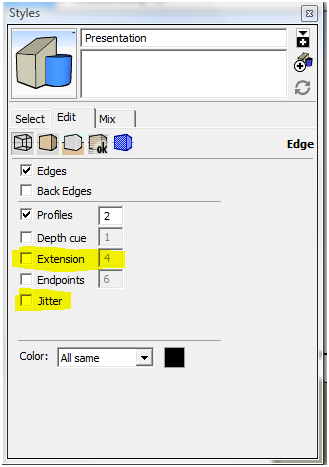
                                'Jitter Lines' is a 'Style' setting in Sketchup - not sure what the French phrase is...
                                This technique also uses 'Endpoints' set in 'Style' too...

                                TIG

                                1 Reply Last reply
                                Reply Quote 0

                                Hello! It looks like you're interested in this conversation, but you don't have an account yet.

                                Getting fed up of having to scroll through the same posts each visit? When you register for an account, you'll always come back to exactly where you were before, and choose to be notified of new replies (either via email, or push notification). You'll also be able to save bookmarks and upvote posts to show your appreciation to other community members.

                                With your input, this post could be even better 💗

                                Register Login
                                • 1 / 1
                                • First post
                                  Last post
                                Buy SketchPlus
                                Buy SUbD
                                Buy WrapR
                                Buy eBook
                                Buy Modelur
                                Buy Vertex Tools
                                Buy SketchCuisine
                                Buy FormFonts

                                Advertisement