sketchucation logo sketchucation
    • 登入
    Oops, your profile's looking a bit empty! To help us tailor your experience, please fill in key details like your SketchUp version, skill level, operating system, and more. Update and save your info on your profile page today!
    🔌 Smart Spline | Fluid way to handle splines for furniture design and complex structures. Download

    [Plugin] TIG.splitsausage

    已排程 已置頂 已鎖定 已移動 Plugins
    38 貼文 14 Posters 42.4k 瀏覽 14 Watching
    正在載入更多貼文
    • 從舊到新
    • 從新到舊
    • 最多點贊
    回覆
    • 在新貼文中回覆
    登入後回覆
    此主題已被刪除。只有擁有主題管理權限的使用者可以查看。
    • TIGT 離線
      TIG Moderator
      最後由 編輯

      Capture.PNG(c) TIG 2012
      Script:
      TIG-splitsausage.rb

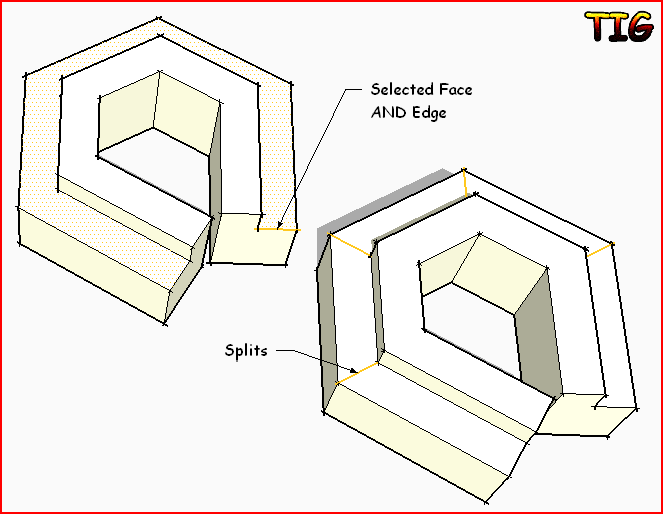
      Splits a 'sausage' shaped face, made with followme etc into 'quads'
      [four-sided faces].
      Select ONE face and ONE edge that you want to be the 'seed' for the
      'quads' vertices, typically this will be the 'end' edge.
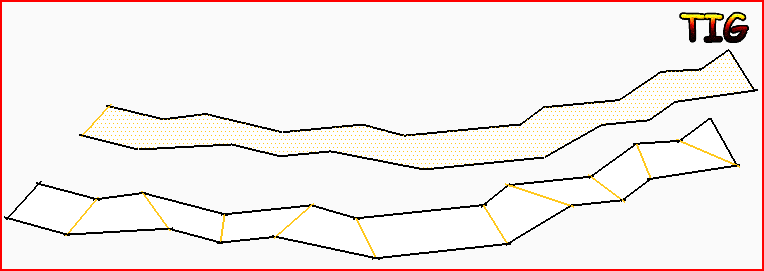
      Lines are then added between 'matching' vertices along the 'sausage' to
      divide its face into 'quads'...
      If the 'sausage' has an uneven number of vertices then the last facet will
      be a triangle
      Type into the Ruby Console: TIG.splitsausage
      OR use Tools > Split Tools... submenu item.
      It is one step undoable.

      Donations: by PayPal.com to info @ revitrev.org PayPalButton ###
      Version:
      1.0 20120218 First issue.
      1.1 20120219 At the end all new Edges added are selected to let you use
      Entity Info to set them soft/smooth or hidden etc as desired.
      Error messages added if incorrect selection.
      Now in Tools > Split Tools submenu.
      2.0 20160818 Now comes in the SplitTOOLS RBZ. No longer installed separately.

      http://forums.sketchucation.com/viewtopic.php?p=386658#p386658

      TIG

      1 條回覆 最後回覆 回覆 引用 0
      • GaieusG 離線
        Gaieus
        最後由 編輯

        👍 Now I can split my sausage... 😄

        Gai...

        1 條回覆 最後回覆 回覆 引用 0
        • TIGT 離線
          TIG Moderator
          最後由 編輯

          Thought I'd keep on the 'food theme' - that started with 'donut' and now 'sausage' - to go with our sKetchup...
          Maybe 'splitUp' should have been called something else - 'splitpeas' or 'splitbananas' to match ? 😉

          TIG

          1 條回覆 最後回覆 回覆 引用 0
          • thomthomT 離線
            thomthom
            最後由 編輯

            😆
            Love the new naming conversion!

            Nice utility, I've wanted one like this.

            Thomas Thomassen — SketchUp Monkey & Coding addict
            List of my plugins and link to the CookieWare fund

            1 條回覆 最後回覆 回覆 引用 0
            • Rich O BrienR 線上
              Rich O Brien Moderator
              最後由 編輯

              Is it possible that EebyOffset can morph into EebyScale. Where I select an edge/loop and extrude them leaving the original selection and having quads.

              Am I making sense?

              Download the free D'oh Book for SketchUp 📖

              1 條回覆 最後回覆 回覆 引用 0
              • TIGT 離線
                TIG Moderator
                最後由 編輯

                Here is v1.1 http://forums.sketchucation.com/viewtopic.php?p=386610#p386610
                At the end all new Edges added are selected to let you use Entity Info to set them soft/smooth or hidden etc as desired.
                Error messages added if incorrect selection.
                Now in Tools > Split Tools submenu. http://forums.sketchucation.com/viewtopic.php?p=386658#p386658
                Capture.PNG

                TIG

                1 條回覆 最後回覆 回覆 引用 0
                • K 離線
                  Khai
                  最後由 編輯

                  oh my. you are brilliant... no more doing this by hand 💚

                  1 條回覆 最後回覆 回覆 引用 0
                  • Dave RD 離線
                    Dave R
                    最後由 編輯

                    TIG, this is a very useful tool that I expect many people didn't even know they needed. thank you.

                    I can see this as a great start to dividing a molding created with Follow Me into its component parts. I have to do this sort of thing frequently. The steps I normally use after Follow Me are:

                    Draw in all the miter lines on the horizontal surfaces.
                    Select each section that, in real life, would be a single piece of molding and make it a component.

                    Your plugin would reduce a little of the work by eliminating the need to chase around all of the molding extrusion. It could all be achieved while zoomed in to one end of the molding.

                    So to look the proverbial gift horse in the mouth, is it possible to get all of the surfaces divided at the corners? I'm thinking that one might select the profile that was used for Follow Me and divide all faces where there's a direction change in the bounding edges. That probably needs some thought as to how that would work. Or, to take it a step further, suppose there was a version of Follow Me that would make those miter lines.
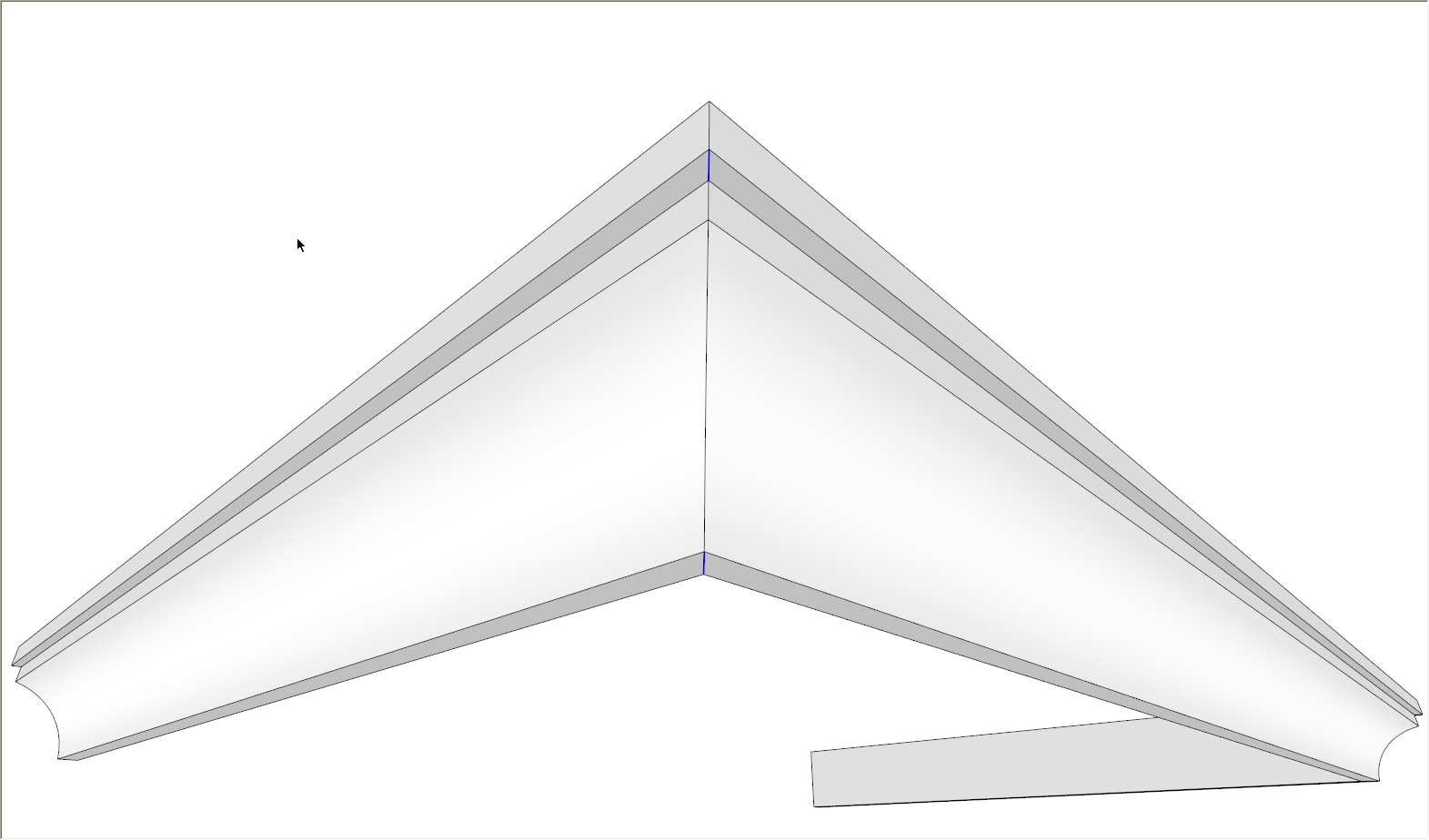

                    Sausage.png

                    Etaoin Shrdlu

                    %

                    (THERE'S NO PLACE LIKE)

                    G28 X0.0 Y0.0 Z0.0

                    M30

                    %

                    1 條回覆 最後回覆 回覆 引用 0
                    • Dave RD 離線
                      Dave R
                      最後由 編輯

                      Hmmm... I was just experimenting with splitting a molding created with Follow Me and I got the result shown below.
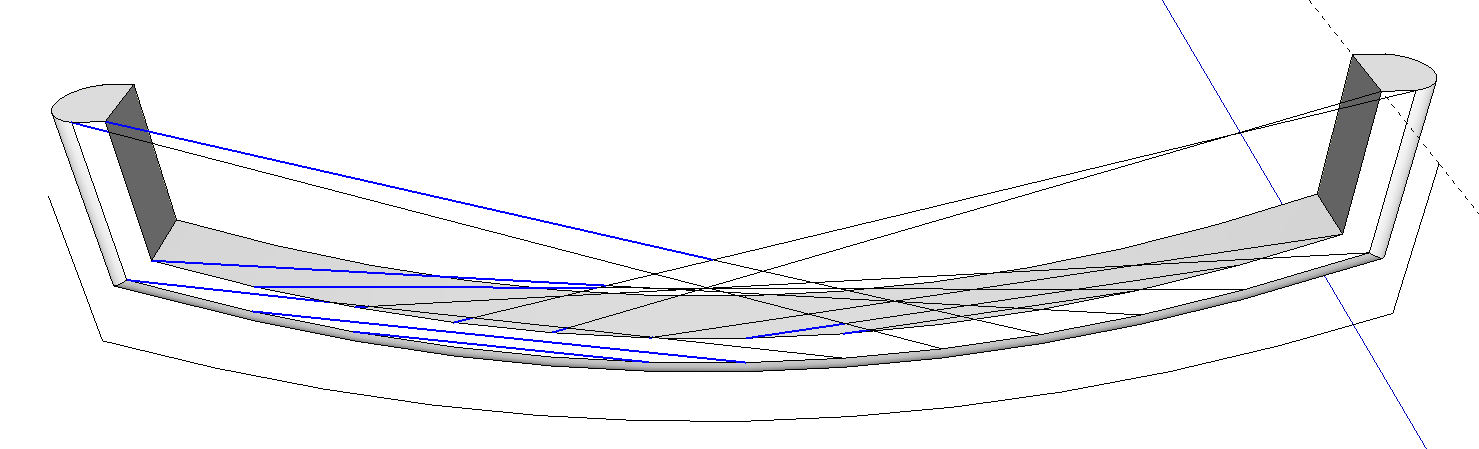
                      Split Sausage.png
                      It worked fine on the opposite face.

                      Feature or bug?

                      Etaoin Shrdlu

                      %

                      (THERE'S NO PLACE LIKE)

                      G28 X0.0 Y0.0 Z0.0

                      M30

                      %

                      1 條回覆 最後回覆 回覆 引用 0
                      • TIGT 離線
                        TIG Moderator
                        最後由 編輯

                        Isn't it already split along that surface, view with hidden geometry 'on' ?
                        It's use is meant to divide up a face using its vertices that only have two edges ?
                        Like the flat faces but not the curved surface which comprises several facets...
                        I don't think it's meant to [or able to] do what you wish...
                        What were you hoping for exactly ?

                        TIG

                        1 條回覆 最後回覆 回覆 引用 0
                        • Dave RD 離線
                          Dave R
                          最後由 編輯

                          split sausage2.png

                          No, they aren't already split. The surfaces on the top and bottom of the "molding" are single faces which is what I was hoping to have split up.
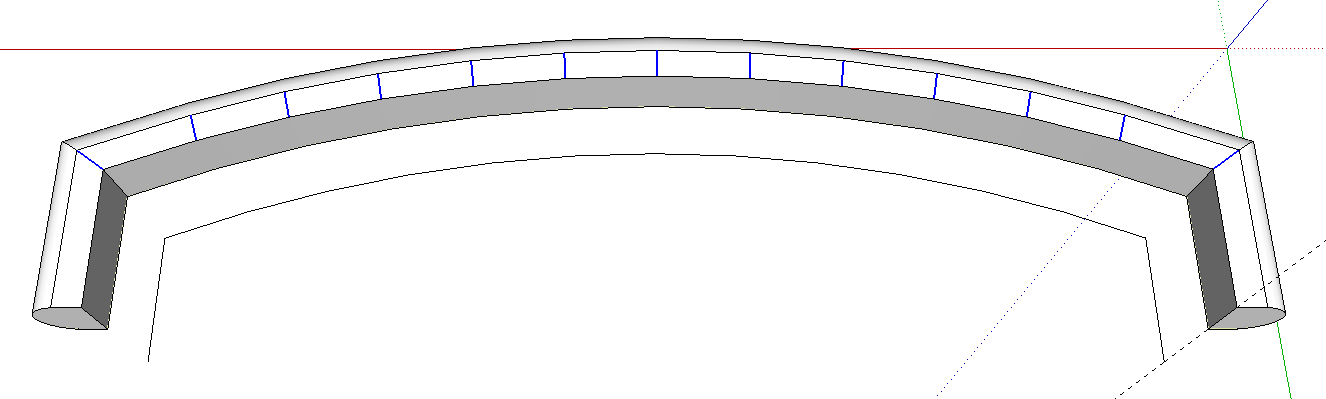
                          split sausage 3.png

                          This is what the plugin does on the top face. I was expecting a repeat performance on the bottom one.

                          Etaoin Shrdlu

                          %

                          (THERE'S NO PLACE LIKE)

                          G28 X0.0 Y0.0 Z0.0

                          M30

                          %

                          1 條回覆 最後回覆 回覆 引用 0
                          • TIGT 離線
                            TIG Moderator
                            最後由 編輯

                            Sorry, I misinterpreted the form, it looks like a 3d surface because you showed it 'upside down'... The other view explained it 😒
                            So now I see no reason it shouldn't work on this other face.
                            Do you have any reversed faces ?
                            If you erase the face and remake it by overdrawing an edge does it split OK then ?
                            Is it one of these 'coincident faces' where if you erase it there's still one below it ??
                            Can you PM me the SKP for some testing ...

                            TIG

                            1 條回覆 最後回覆 回覆 引用 0
                            • Dave RD 離線
                              Dave R
                              最後由 編輯

                              Sorry about the orientation. I was just looking at it from below.

                              No reversed faces--those would be obvious with the green back face color I use. It's just a simple Follow Me. No coincident faces. Deleting the face and healing it seems to take care of the problem.

                              Etaoin Shrdlu

                              %

                              (THERE'S NO PLACE LIKE)

                              G28 X0.0 Y0.0 Z0.0

                              M30

                              %

                              1 條回覆 最後回覆 回覆 引用 0
                              • TIGT 離線
                                TIG Moderator
                                最後由 編輯

                                Another way to avoid the issue without even reforming the face is to select just the face and one short end edge, then it splits OK.
                                I think what it is, is that if you have all of the edges selected it takes the first one in the 'collection' and starts the splitting from there, because the form is 'concave' you can then get some diagonal splitting lines that don't do what you want if that first edge isn't a short 'end one'... Maybe reforming the face takes the first edge as the 'end one' and thereby running the tool with all of the face's edges selected works OK.

                                So the lesson is select just the face and one edge that then determines where the splitting starts from - usually at the 'end' of the sausage !

                                TIG

                                1 條回覆 最後回覆 回覆 引用 0
                                • Dave RD 離線
                                  Dave R
                                  最後由 編輯

                                  Thanks, TIG.

                                  So basically it might work if the face and all its edges are selected or it might not. And if it doesn't, select the face and only one edge. Got it.

                                  Etaoin Shrdlu

                                  %

                                  (THERE'S NO PLACE LIKE)

                                  G28 X0.0 Y0.0 Z0.0

                                  M30

                                  %

                                  1 條回覆 最後回覆 回覆 引用 0
                                  • N 離線
                                    numerobis
                                    最後由 編輯

                                    oh... unbeleivable that i missed this one before... Thanks for bringing this up again, Dave. 😉
                                    Great plugin! thank you very much! i will try it 😄

                                    1 條回覆 最後回覆 回覆 引用 0
                                    • R 離線
                                      rv1974
                                      最後由 編輯

                                      This splitter would UNDOUBTEDLY become megahitif it additionally could align pre-applied textures along edges. 😒

                                      1 條回覆 最後回覆 回覆 引用 0
                                      • N 離線
                                        numerobis
                                        最後由 編輯

                                        @rv1974 said:

                                        This splitter would UNDOUBTEDLY become megahitif it additionally could align pre-applied textures along edges. 😒

                                        http://sketchucation.com/forums/viewtopic.php?f=323&t=44552&hilit=thrupaint
                                        😉

                                        1 條回覆 最後回覆 回覆 引用 0
                                        • S 離線
                                          smicha
                                          最後由 編輯

                                          TIG,

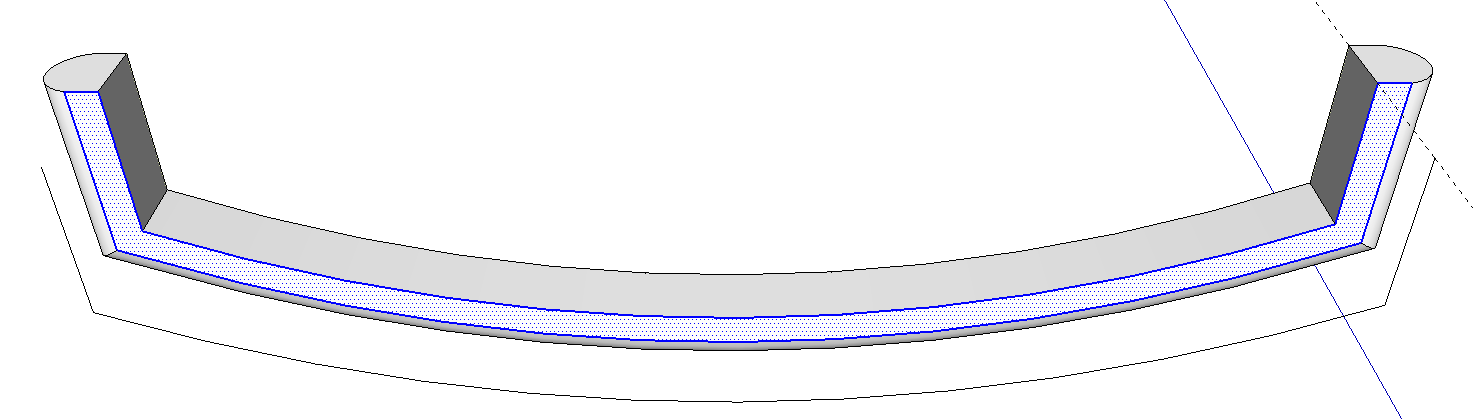
                                          When I use SplitSausage on arcs I get strange results - see the screenshot. Is it possible to fix it?

                                          Sebastian
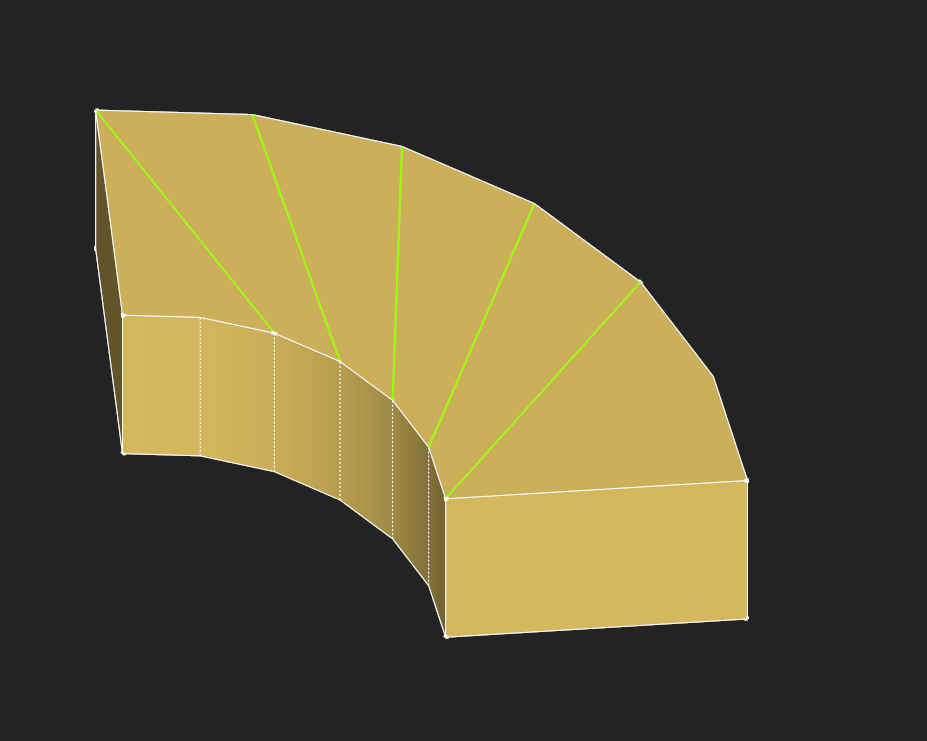
                                          https://lh4.googleusercontent.com/-6kEbBbV6D2s/UTHByEhQVjI/AAAAAAAAC7k/gqQD2RbxgyU/s927/splitsausage.jpg

                                          1 條回覆 最後回覆 回覆 引用 0
                                          • S 離線
                                            smicha
                                            最後由 編輯

                                            Sorry TIG,

                                            I just didn't select the edge - it works like a charm.

                                            1 條回覆 最後回覆 回覆 引用 0
                                            • 1
                                            • 2
                                            • 1 / 2
                                            • 第一個貼文
                                              最後的貼文
                                            Buy SketchPlus
                                            Buy SUbD
                                            Buy WrapR
                                            Buy eBook
                                            Buy Modelur
                                            Buy Vertex Tools
                                            Buy SketchCuisine
                                            Buy FormFonts

                                            Advertisement