sketchucation logo sketchucation
    • 登入
    Oops, your profile's looking a bit empty! To help us tailor your experience, please fill in key details like your SketchUp version, skill level, operating system, and more. Update and save your info on your profile page today!
    🔌 Smart Spline | Fluid way to handle splines for furniture design and complex structures. Download

    [Plugin] FredoTools - v4.5c - 24 Jun 24


    已排程 已置頂 已鎖定 已移動 Plugins
    463 貼文 123 Posters 710.9k 瀏覽 121 Watching
    正在載入更多貼文
    • 從舊到新
    • 從新到舊
    • 最多點贊
    回覆
    • 在新貼文中回覆
    登入後回覆
    此主題已被刪除。只有擁有主題管理權限的使用者可以查看。
    • Dave RD 離線
      Dave R
      最後由 編輯

      @mstumpo said:

      Surface on tools stopped working on SU 2023.

      Tools on Surface is working fine for me in SketchUp 2023. Share your .skp file so we can see what you are working with and what might be causing the problem.

      Etaoin Shrdlu

      %

      (THERE'S NO PLACE LIKE)

      G28 X0.0 Y0.0 Z0.0

      M30

      %

      1 條回覆 最後回覆 回覆 引用 0
      • M 離線
        mstumpo
        最後由 編輯

        File is attached. I re-downloaded the RBZ and license file, removed p[lug-in and re-added back. I don't see a place to use the license file and the plug-in is not complaining that a license was not found.


        Tools on surface not working.skp

        1 條回覆 最後回覆 回覆 引用 0
        • M 離線
          mstumpo
          最後由 編輯

          In addition, while checking my sketchucation license status it shows Tools On Surface as 0/3 as if it was not licensed. Maybe that's the issue?

          1 條回覆 最後回覆 回覆 引用 0
          • TIGT 線上
            TIG Moderator
            最後由 編輯

            You need to save the license file[s] somewhere sensible - I use a special licensing folder in my Documents.
            Then you validate the license for that extension by using the validate button etc in the Tools > Fredo6 Collection > ExtensionName > License... submenu for that extension, which opens a dialog...

            TIG

            1 條回覆 最後回覆 回覆 引用 0
            • TIGT 線上
              TIG Moderator
              最後由 編輯

              PS: Also make sure that you have installed the latest version of the extension, LibFredo6 and the SketchUcation toolset [for the licensing], and have restarted SketchUp...

              TIG

              1 條回覆 最後回覆 回覆 引用 0
              • M 離線
                mstumpo
                最後由 編輯

                Tools On Surface not displayingOK, I got past this and all appears good. However, the toolbar for Tools On Surface is blank on my screen. In fact, any plugin that uses on-screen options shows as blank. Nvidia driver issue? see attached.

                1 條回覆 最後回覆 回覆 引用 0
                • fredo6F 離線
                  fredo6
                  最後由 fredo6 編輯

                  NEW RELEASE: FredoTools v4.5a - 02 Apr 24

                  Requirement:

                  • LibFredo6 v14.3b or above

                  FredoTools 4.5a is a maintenance release for:

                  • Future compatibility

                  See FredoTools plugin home page for Download.

                  See also main post of this thread for User Discussion.

                  yanrothwellY 1 條回覆 最後回覆 回覆 引用 0
                  • yanrothwellY 離線
                    yanrothwell @fredo6
                    最後由 編輯

                    @fredo6 Hi I have used Fredo6's tools for manyt years and they are always super useful.
                    At present, since SU2024 I have had issues with SUClock, which I stopped using whilst it was updated.
                    I've since started using SUClock since the update and its been working fine.
                    Today I started up SU2024 with an existing project (double clicking on the skp file itself, incase that is ever relevant how I 'opened up' the file) and I got the following error.
                    This error hasn't gone away and did not start working up next restart of SU2034, so I wonder if you can help - Screenshot 2024-06-04 104337.png
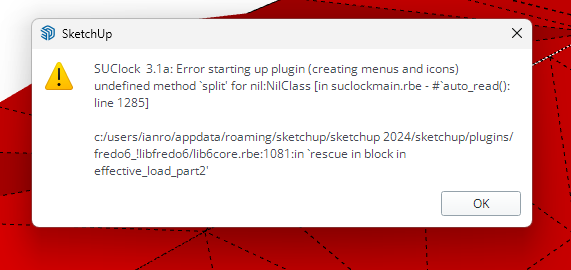
                    I see the icon of SUClock but it does nothing when clicked on.
                    Multiple restarts have not fixed anything. There are similar errors with ThruPaint and Toposhaperm unforrtunately. Can anyone help? plugin information as follows:
                    Fredo6 Plugins Information on 2024-06-04 12:00:59 +0100

                    • Platform: x64-mswin64_140 - Ruby: 3.2.2
                    • Sketchup: 24.0.484
                    • LibFredo6: v14.5b
                    • LibFredo6 Binary loaded
                    • Sketchucation ExtensionStore: 4.4.0
                    • SCFLicense: v6.4a - 74
                    • Fredo6 Plugins

                      LordOfTheToolbars v2.7b
                      Curviloft v2.0a - licensed FULL
                      Curvizard v2.5a
                      FredoCorner v2.7a - licensed FULL
                      FredoScale v3.6a - licensed FULL
                      FredoTools v4.5a
                      JointPushPull v4.8a - licensed FULL
                      SUClock v3.1a
                      ToolsOnSurface v2.6a - licensed FULL
                      TopoShaper v2.7a - licensed FULL

                    • SCFLicense directory present

                      Signature File: 2022-03-30 14:03:14 +0100
                      ClothWorks: 2022-10-27 15:42:55 +0100
                      Curviloft: 2022-09-03 15:21:17 +0100
                      FredoCorner: 2024-03-04 13:57:21 +0000
                      FredoScale: 2022-04-25 11:42:35 +0100
                      FredoSpline: 2022-11-21 16:26:56 +0000
                      JointPushPull: 2022-05-08 14:44:25 +0100
                      ToolsOnSurface: 2022-04-25 13:46:45 +0100
                      TopoShaper: 2022-09-02 16:10:20 +0100

                    MrHide_1.8a
                    AutoInstall Finished.
                    Using Main Plugins Folder.
                    C:/Users/<user>/AppData/Roaming/SketchUp/SketchUp 2024/SketchUp/Plugins

                    http://www.ianrothwell.co.uk

                    fredo6F 1 條回覆 最後回覆 回覆 引用 0
                    • fredo6F 離線
                      fredo6 @yanrothwell
                      最後由 編輯

                      @yanrothwell

                      Did you install SU2024 with 'Run as dministrator'?

                      yanrothwellY 1 條回覆 最後回覆 回覆 引用 0
                      • yanrothwellY 離線
                        yanrothwell @fredo6
                        最後由 編輯

                        @fredo6 yes

                        http://www.ianrothwell.co.uk

                        fredo6F 1 條回覆 最後回覆 回覆 引用 0
                        • fredo6F 離線
                          fredo6 @yanrothwell
                          最後由 編輯

                          @yanrothwell

                          Could you open the Ruby console and copy paste the following command, and then type Enter:

                          UI.openURL F6_SUClock::Project.get_tmpdir

                          This will open the temp directory, in which you have files with extension .txt and a form like XXX__YYY.txt.
                          Just erase them. It seems that one of them is corrupted.

                          Erasing them should not impact your SUClock data.

                          Then restart Sketchup.

                          yanrothwellY 1 條回覆 最後回覆 回覆 引用 1
                          • yanrothwellY 離線
                            yanrothwell @fredo6
                            最後由 編輯

                            @fredo6 Many thanks - after doing just that and restarting, it worked. no errors upon startup.
                            Cheers \o/

                            http://www.ianrothwell.co.uk

                            1 條回覆 最後回覆 回覆 引用 0
                            • fredo6F 離線
                              fredo6
                              最後由 編輯

                              NEW RELEASE: FredoTools v4.5c - 24 Jun 24

                              Requirement:

                              • LibFredo6 v14.3b or above

                              FredoTools 4.5c is a maintenance release for:

                              • Fix for the caluclation of volumes in SolidVolume

                              See FredoTools plugin home page for Download.

                              See also main post of this thread for User Discussion.

                              1 條回覆 最後回覆 回覆 引用 0
                              • R 離線
                                rv1974
                                最後由 編輯

                                a true Doh! moment - Angle Inspector has Slope meter in %% ! Many many thanks, Fredo.
                                P.S. Maybe one day it would become interactive - showing live the slope altering.

                                1 條回覆 最後回覆 回覆 引用 1
                                • 1
                                • 2
                                • 13
                                • 14
                                • 15
                                • 16
                                • 17
                                • 23
                                • 24
                                • 15 / 24
                                • 第一個貼文
                                  最後的貼文
                                Buy SketchPlus
                                Buy SUbD
                                Buy WrapR
                                Buy eBook
                                Buy Modelur
                                Buy Vertex Tools
                                Buy SketchCuisine
                                Buy FormFonts

                                Advertisement