[Plugin] ShadowProjector
-
Copyright 2016 TIG (c)
All rights reserved.
This software is provided "as is" and without any express or implied
warranties, including, without limitation, the implied warranties of
merchantability and fitness for a particular purpose.Extension:
By default the Extension TIG-shadowProjector is set to be active when it is first installed, but it may be switched on/off later as desired.
Menu:
Tools > ShadowProjector > submenu items
New Shadow Projection
-
Select the Face[s] to be processed.
Note that all other Objects in the Selection are ignored. -
Run the tool from the submenu item.
-
The Options dialog opens.
Choose the Shadow 'Type' from the drop-down list.
Lines
Faces
Faces[Edged]
Faces[Edged]%
Faces[Edged]%sq…'Lines' draws just lines along each shadow's perimeter [the default Type].
'Faces' draws shadows as 'gray' faces, with edges hidden/visible.
'Faces[Edged]' draws shadows as 'gray' faces, edges visible.
'Faces[Edged]%' draws each shadow as a 'gray' face, edges visible, with a text-tag at the center of the 'Shadow' group showing the % of that Face in shade.
'Faces[Edged]%sq…' is similar, but it also appends the Shaded:Total Area, in either ft² or m² depending on your Model Units settings.
In this Options dialog you can also enter a 'Text Height', in current units.
Note that this is only used if a '%' Type is chosen.
The default text-height is 2" or 50mm depending on your Model Units settings.These Options are remembered with the Model across sessions.
- OK to continue, Cancel to abort.
Notes:
Selected Faces that are oriented away from the sun are ignored.
All qualifying Faces are now processed in turn.
All Faces are analyzed for shading, so it is much quicker to Select only those Faces you know to be shaded [or just those which you are interesting in].
Remember that an unshaded Face will take time to analyze and produce no 'Shadow' !
'Shadows' are drawn over the Face showing the extent on any shadows cast on it by all other Faces in the Model [including any within Groups/Components] located between it and the sun.
Note that a Surface's 'Shadows' are processed as separate facets, so it is much quicker to have hidden geometry 'on' and then Select only those Surface Faces which you know to be shaded...
All Faces within the Model that fall within a face's reversed-umbra will be included in any shadow-casting analysis.
Hidden Objects, those on 'off' Layers, Faces with transparent-materials [<70% opacity] - or faces assigned the default-material within a group/instance that itself has a transparent-material [so it displays 'transparent' and casts no shadow] - and Objects with 'casts shadows' unchecked are ignored in the analysis.
Each 'Shadow-Group' is named after the Model's ShadowTime and the Face's ID:
e.g. Shadows@Jun_21_1200#0xc741eac
Those with % or %sq have the text-group similarly named, but with those values appended to the name:
e.g. Shadows@Jun_21_15=67.1%
The 'Shadow-Groups' are put on a Layer named 'SHAD'.
The 'Shadows' 'gray' material is named 'Shadows'; once it has been made you can change its color/transparency etc as desired.
Any text is colored 'Black'.
Later on the text-group can be moved within the shadow-group for clarity etc.
The text-group goes on a Layer named 'SHAD-TEXT'.
The tool beeps when it has finished processing.
The processing/shadow-group is one step undoable.
Note that if the 'Shadows' have Faces then it is moved 0.1mm off the original Face to avoid 'z-fighting' between surfaces.
Similarly any text-group is slightly offset upwards too to be above the Faces.
It is best to process a few faces at a time because Sketchup slows up almost 'exponentially' as it processes larger collections...
If you process a lot at once be prepared to have lunch and come back when it has done !
Remember that although it might 'white-out', it is still processing.
It is recommended that you keep the Outliner window closed when using this tool, although it can be useful for selecting shadow/text-groups later on.Shadow Report to File
Writes a report of all Shadows to a txt file.
Shadow Report in Ruby Console
Prints the report in the Ruby Console.
Shadow Options for Model
Opens the Options dialog - this lets you change the settings for that Model without having to run an analysis.
The Options are saved with the Model across sessions.Help...
Opens the Help document.
Locales:
You can make your own locale translations of the tool's .strings file as your own locale copy.
There are detailed instructions at the start of the standard file:
..Plugins/TIG-shadowProjector/Strings/TIG-shadowProjector-EN-US.stringsYou can also make a translated copy of the Help .doc file:
..Plugins/TIG-shadowProjectorStrings/TIG-shadowProjector-EN-US.doc
Get the latest version from the SCF PluginStore http://sketchucation.com/pluginstore?pln=TIG_shadowProjector
-
-
A great plugin! Thanks TIG.
Very usefull to add more depth to facades (filling the shadow-faces with hatch lines by using Jolran's 2dBoolean and assigning a thin 'pen' to the shadow-scene in LO).
greetings, Max
-
Neat TIG!! DO you ever get time to work for money???
This is a little like GOH's 1001Shadows, right?

-
really useful plugin
Would it be possible to add an option to pick the source of the shadow ? say I only want to see the projected shadow from 1 component on 1 selected face
-
Just idea : makes the "solid shadow" volume from the object to the ground shadow casted

So that will obtain a funny volume that you can colorize as you want !
So you can calculate its volume for any process
For example compare 2 objects for know what the object who makes the biggest shadow volume!
Or the one who makes the more beauty shadow volume!
Poetic isn't it ?
Or another funny problem of reverse ingeneering
What is the object who create this shadow volume -
@utiler said:
Neat TIG!! DO you ever get time to work for money???
This is a little like GOH's 1001Shadows, right?
http://www.1001shadows.com/en/index.html
Not the same thing, this shows shadows cast on selected faces by objects, I don't have that tool but I think 1001shadows projects all onto the 'ground' [of course if you have a ground-plane face selected my tool does the same]. My tool also has options of displaying the shadows - from a line, to a face, to a face with statistics...
-
@d0n said:
really useful plugin
Would it be possible to add an option to pick the source of the shadow ? say I only want to see the projected shadow from 1 component on 1 selected face
Select the objects you don't want to cast shadows and temporarily group them, then either put the group onto an 'off' layer or hide that group OR simply Edit>Cut the unwanted items. Then do the shadows and the unseen grouped/cut objects are ignored; then unhide the temporary group and explode it OR Edit>PastInPlace to restore the objects ? -
Wow, thanks TIG this seem to be exactly what I wished for a little while ago. To bad it's too late for that perticular project but there will be more I'm sure.
Thanks! -
Cool! Thanks!
-
Hi TIG
How many smart tools from you I haven't tested? a bunch of them I guess: it's a pity (but they are carefully bookmarked
).This one one more time, is full of potential
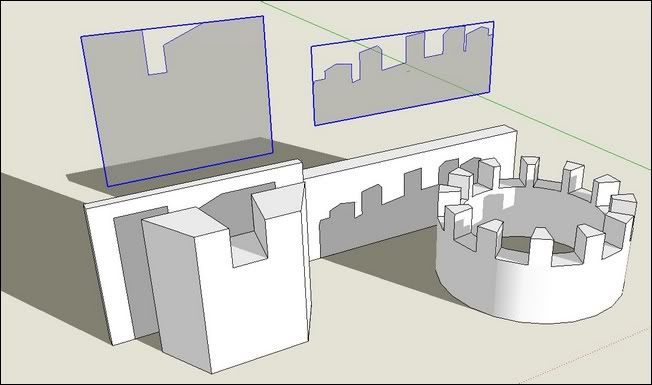
+++

simon -
Perhaps it's my Christmas Present to SCF...
I've been working on it for some time... and I finally got a moment to polish if up for its release... -
Hi, TIG:
Another great tool from you. -
-
Cool idea, TIG!
-
fantastic!!!! a great help for architectural drawings instead of cheap renderings
thank you
-
@tig said:
@utiler said:
Neat TIG!! DO you ever get time to work for money???
This is a little like GOH's 1001Shadows, right?
http://www.1001shadows.com/en/index.html
Not the same thing, this shows shadows cast on selected faces by objects, I don't have that tool but I think 1001shadows projects all onto the 'ground' [of course if you have a ground-plane face selected my tool does the same]. My tool also has options of displaying the shadows - from a line, to a face, to a face with statistics...
That's pretty cool, TIG.
-
Something cool about this but not sure how someone makes use of it. Is it only so you can export a polygon and use it in a CAD rendering (2d)?
-
@pbacot said:
Something cool about this but not sure how someone makes use of it. Is it only so you can export a polygon and use it in a CAD rendering (2d)?
It's as useful as you think up uses for it...
For example, checking the % of solar shading on some selected glazing at a certain Date/Time.
Getting the area [sq'/sqm] of perhaps some selected glazing or a solar-panel that's receiving [or not receiving] direct sunlight...
Because faces using a translucent material don't show normal shadows you can now use this tool to add a visible translucent 'gray' shadow-group face [with no edges] onto selected window-glass etc, to fake these shadows in a Sup render...
DAE files etc don't contain shadow info but you can now include a faced snapshot of the shadows if desired.
I only invented the tool - you lot need to come up with uses for it... -
Dear Tig,
@tig said:
Because faces using a translucent material don't show normal shadows you can now use this tool to add a visible translucent 'gray' shadow-group face [with no edges] onto selected window-glass etc, to fake these shadows in a Sup render...
That was exactly what I wanted to experiment: colored glasses and their colored shadows...
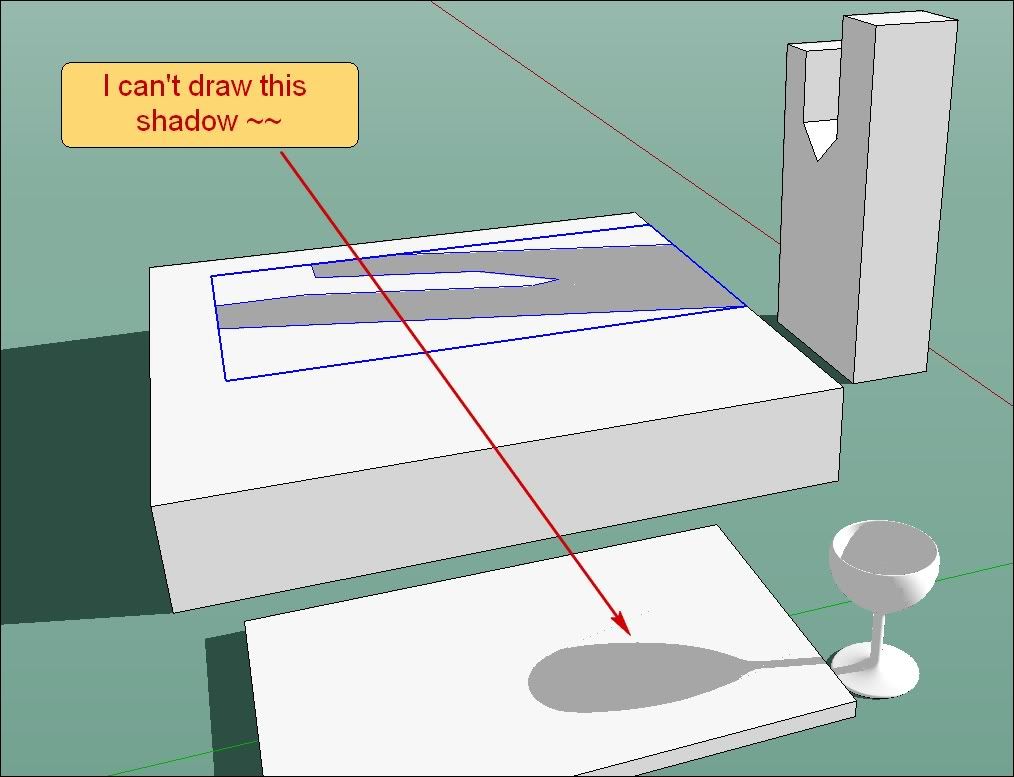
Glasses and bottle are drawn , but
I can't make to "ShadowProjector" draw their shadows.. Probably too complex shapes.
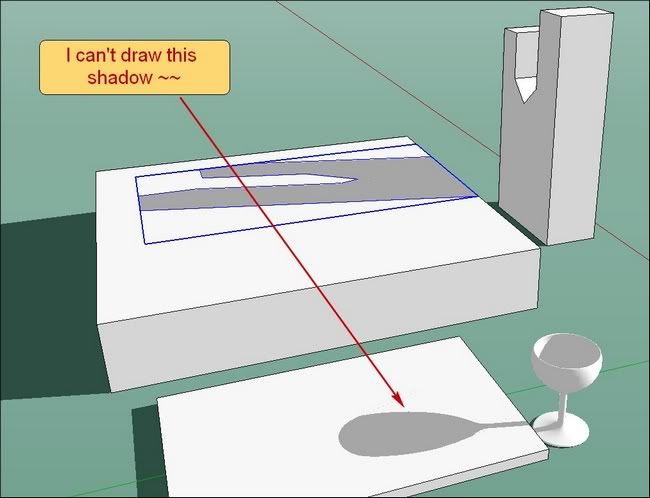
 simon
simon -
Simon,
what scale are you trying at, is it a small triangle issue... just a thought
john













Advertisement